Hello! Welcome back to your course on improving your speaking for professional communication.
In our last lesson, you learned how to propose technical solutions and describe their benefits. That's a vital skill, but it's only one half of the process. Before you can solve a problem, you must first understand it completely. The best way to do that is by asking the right questions.
Today, we will focus on the skill of diagnosing issues. This lesson is designed to help you achieve the learning outcome: Use phrases to ask targeted questions about a technical issue. As a technical consultant, this skill allows you to act like a detective: gathering clues, narrowing down possibilities, and finding the root cause of a problem efficiently.
1. The Art of Troubleshooting: A Step-by-Step Approach
Your background in computer science has already made you an expert in debugging. The process of asking questions to diagnose a technical issue in a conversation follows the same logic: it's a step-by-step process of elimination to find the source of the problem.
We will start by watching a detailed case study. The following video shows a customer service agent troubleshooting an internet connection problem. The instructor breaks down the logic behind each question, showing how a sequence of targeted questions can quickly identify the issue.
Troubleshooting for the Internet • Vocabulary • Part 1/4
In this video, 'Troubleshooting for the Internet', pay close attention to the instructor's explanation of why he asks each specific question. This demonstrates the logical process of troubleshooting through conversation.
Please watch the following two segments: Explaining the Initial Questions (20:18 - 31:08): The instructor analyzes the first, most critical questions in the troubleshooting process, such as 'Are you calling from your device?' and 'Do you have signal bars?'. Checking the Wi-Fi Connection (31:08 - 37:09): He continues by explaining how to guide the user to check their phone settings, focusing on the common issue of Wi-Fi interference. As you watch, notice how each question builds on the last to eliminate possibilities.
As you saw in the video, effective troubleshooting isn't about asking random questions; it's about asking them in a logical order to systematically isolate the problem.
2. Building Your Question Toolkit
Now that you've seen a diagnostic conversation in action, let's build a toolkit of phrases you can use in different situations. We can group these questions into three main categories.
A. Probing Questions: To Gather More Information
When someone reports a problem, your first step is often to get a broader understanding of the situation. Probing questions are open-ended questions that encourage the other person to give you more details.
The article "15 Examples of Probing Questions for Customer Service" explains this concept well. While it's written for customer service, the questions can be adapted perfectly for technical discussions with colleagues. Here are some of the most useful ones for your work:
- "You mentioned [the issue]. Could you tell me a little bit more about that?" (This is a great starting point).
- "Has this happened before?" (Helps you know if it's a recurring or a new problem).
- "What were you doing when the issue first began?" (Helps identify what might have triggered the problem).
- "When did this situation begin?" (Helps establish a timeline).
B. Guiding Questions: To Check Specific Things
After you have a general idea, you need to check specific technical details. These questions guide the person to look at certain settings or perform an action. You saw many examples of this in the first video.
It's important to ask these questions politely. The next video offers excellent phrases for making polite suggestions and requests.
How to Describe Video Call Problems in English - Business Meeting Phrases and Vocabulary - UK and US
This video, 'How to Describe Video Call Problems in English', includes a great section on suggesting solutions politely. We can use these same phrases to ask someone to check something for us.
Please watch the segment on Suggesting Solutions (24:47 - 29:48). Focus on phrases like: 'Maybe check...' 'Could you try...' 'What about...' 'Could you see if...' These are perfect for asking a colleague to perform a diagnostic check.
Here are some examples combining those polite phrases with technical checks:
- "Maybe check if the server is responding to pings."
- "Could you try restarting the application?"
- "What about your firewall settings? Are they blocking the connection?"
- "Could you see if your microphone is muted in the system settings?"
A quick note on intonation: When you ask these yes/no questions (e.g., "Is your video on?"), your voice should rise slightly at the end. This makes the question sound more natural and polite.
C. Clarifying Questions: To Confirm Your Understanding
As you gather information, it's crucial to make sure you understand it correctly. Clarifying questions help you confirm details and show that you are listening carefully.
Asking For and Giving Clarification
The webpage 'Asking For and Giving Clarification' from FutureLearn provides a very useful list of phrases for this purpose.
Please scroll down to Task 2: Asking for Clarification. Review the list of phrases. Pay special attention to the ones that help you check if your understanding is correct.
Here are two of the most effective types of clarifying questions from that list:
- "So, you mean that...": Used to summarize what you think the other person said.
- Example: "So, you mean that the error only appears when you try to export the file?"
- "Just to make sure I understand, ...?": A more formal way to do the same thing.
- Example: "Just to make sure I understand, you can access the website, but you can't log in?"
Test your understanding!
A colleague says, "I'm having trouble with the new software." Which of the following is the best first question to ask?
- "So, you mean that the software is broken?"
- "Could you tell me a little bit more about the trouble you're having?"
- "Could you try reinstalling it?"
Show answer
Option 2 is the best first question. It's a broad, probing question designed to gather more information. Option 1 is a clarifying question, but it's too early to clarify because you don't have any details yet. Option 3 jumps directly to a solution (reinstalling) without diagnosing the problem first.
3. Practice Scenario
Let's apply what you've learned. Look at the question below, which is similar to what you might encounter in your work.
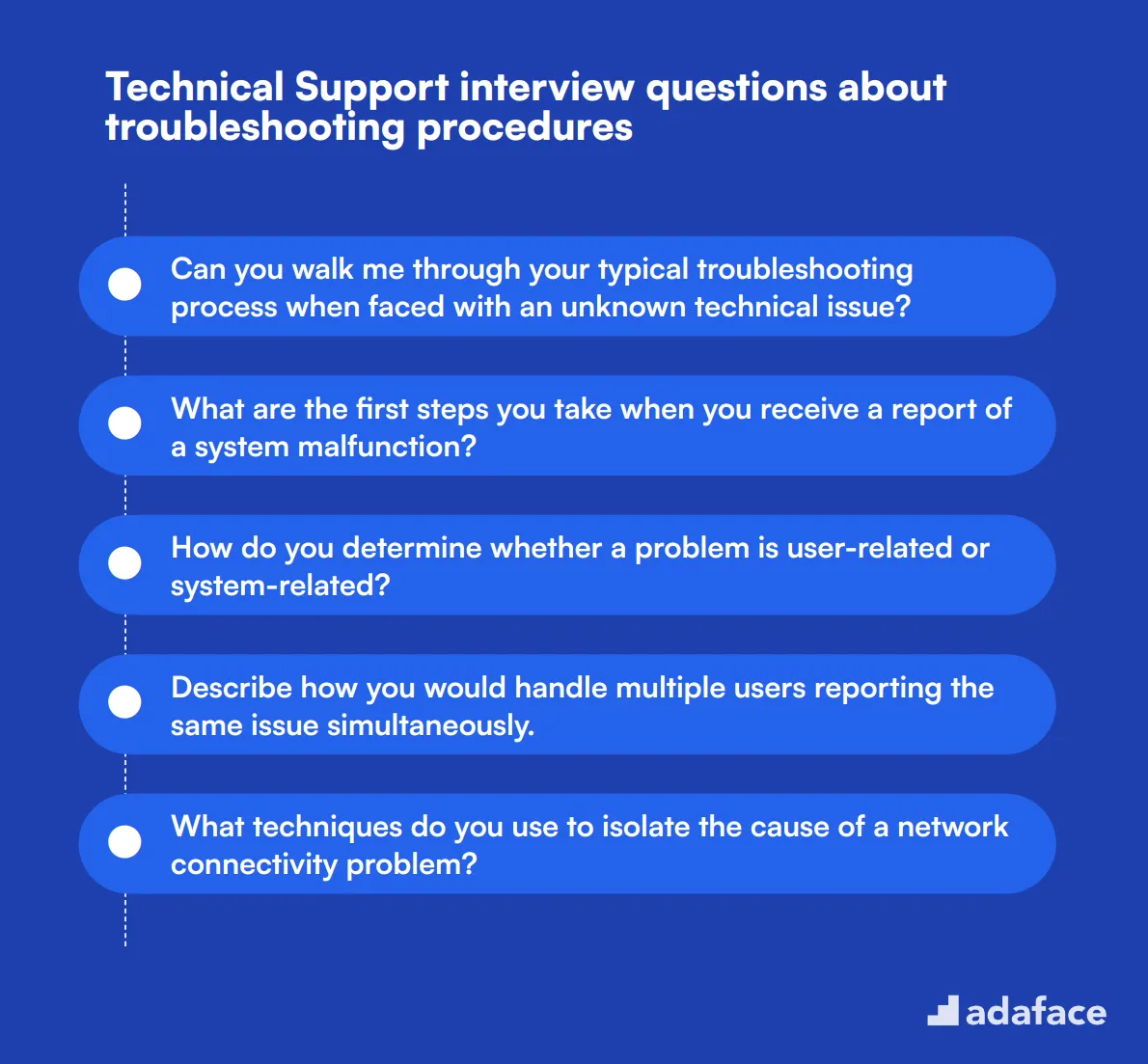
Your Task:
Imagine a colleague comes to you and says, "I'm having problems connecting to the network." (This relates to question #5 in the image).
Your goal is to start diagnosing the problem. Write down three targeted questions you would ask, in a logical order. Use the phrases and techniques you learned in this lesson.
See a sample answer
Here is one possible sequence of questions. Your answer might be different, but it should show a similar logical progression.
- "Okay, could you tell me a bit more about the problem? For example, are you getting any error messages?" (This is a good probing question to start).
- "Has this happened before, or is this the first time?" (This helps narrow down if it's a new or old issue).
- "Could you check if you are connected via Wi-Fi or a cable? Maybe try switching to the other one?" (This is a specific, guiding question to test a common variable).
Conclusion
Excellent work today! You have learned how to ask the structured, targeted questions that are essential for any technical professional. This skill will not only help you solve problems faster but also make you sound more confident and competent in technical discussions.
Key Takeaways:
- Start with broad, probing questions to understand the general situation.
- Use polite, guiding questions to check specific technical details.
- Use clarifying questions to confirm your understanding and ensure everyone is on the same page.
- Always follow a logical sequence to eliminate possibilities, just like debugging code.
Preview of the Next Lesson:
In our next lesson, you will learn to Practice explaining a simple technical problem to a colleague. Now that you know how to ask questions to understand an issue, you will be well-prepared to describe that issue clearly and concisely to someone else.