Introduction
Welcome to the final lesson of our first module, "Foundations of Agentic AI Systems." In our last session, you learned how to evaluate the critical trade-offs between LLM providers, concluding that the most effective systems often use a multi-model strategy. The key to this strategy is a "router"—a component that intelligently directs a user's query to the most suitable tool or model.
This lesson directly builds on that idea and addresses the learning outcome: Build a simple router agent that selects the appropriate tool based on user queries.
A router is essentially the traffic controller of your AI system. Given a query, it decides which specialized function, or "tool," should handle the request. For your goal of building project finance agents, this is a cornerstone capability. A user might ask, "What's the IRR for the Kenya Solar Project?" or "Summarize the latest political risk report for Nigeria." The router's job is to recognize that the first query needs a financial calculation tool, while the second requires a document analysis tool.
Let's look at a conceptual model of this process.
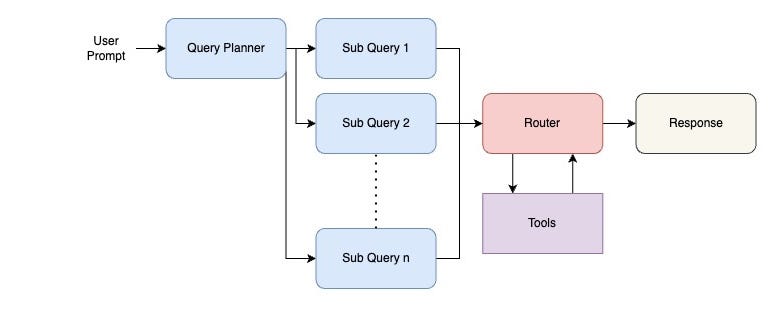
The Core of Modern Routing: Tool Calling
The most powerful and flexible way to build a router is to leverage the native tool-calling (or function-calling) capabilities of modern LLMs. Instead of you writing complex if/else logic, you describe a set of available tools to the LLM, and its own reasoning capabilities determine which one to use based on the user's query.
LangChain provides an elegant and standardized way to implement this. We'll start by defining some tools relevant to project finance and then build an agent that can intelligently select between them.
First, let's understand the mechanics of tool calling in LangChain.
This official LangChain video, 'Tool Calling with LangChain,' explains how to define tools and bind them to an LLM, standardizing the process across different model providers like OpenAI, Google, and Anthropic.
Watch the following two segments: Defining and Passing Tools (01:13 - 02:20): Focus on how Python functions can be decorated with @tool to make them discoverable by an LLM. Creating a Tool-Calling Agent (05:16 - 06:51): Pay close attention to the create_tool_calling_agent constructor. This is the key function we will use to build our router.
Now, let's apply this to our project finance domain.
Building a Project Finance Router
We will create an agent that can choose between two distinct tools:
- A tool to fetch a specific financial metric from a (mock) database.
- A tool to perform a keyword search within a project's (mock) document library.
Here is the implementation. You can run this code in your own environment.
import os
from langchain_openai import ChatOpenAI
from langchain.agents import AgentExecutor, create_tool_calling_agent
from langchain_core.prompts import ChatPromptTemplate
from langchain.tools import tool

# Set up your OpenAI API key
# os.environ["OPENAI_API_KEY"] = "your_api_key_here"

# 1. Define your tools
@tool
def get_financial_metric(project_name: str, metric: str) -> str:
    """
    Retrieves a specific financial metric (e.g., IRR, NPV, DSCR) for a named project.
    Use this for any questions about quantitative financial performance indicators.
    """
    print(f"--- Calling get_financial_metric for project '{project_name}' and metric '{metric}' ---")
    # In a real system, this would query a database or financial model.
    if "kenya solar" in project_name.lower() and metric.upper() == "IRR":
        return "The IRR for the Kenya Solar One project is 14.5%."
    elif "nigeria wind" in project_name.lower() and metric.upper() == "DSCR":
        return "The average DSCR for the Nigeria Wind Farm is 1.35x."
    else:
        return f"Sorry, I don't have the {metric} for {project_name}."

@tool
def search_project_documents(project_name: str, search_query: str) -> str:
    """
    Searches the document library (e.g., PPA, Loan Agreements, Due Diligence reports)
    for a specific project to find mentions of a search query. Use this to find qualitative
    information, legal terms, or specific clauses.
    """
    print(f"--- Calling search_project_documents for project '{project_name}' with query '{search_query}' ---")
    # In a real system, this would trigger a RAG pipeline on a vector database.
    if "kenya solar" in project_name.lower() and "force majeure" in search_query.lower():
        return "The PPA for Kenya Solar One defines force majeure events to include political unrest and natural disasters, but excludes currency fluctuations."
    else:
        return f"No results found for '{search_query}' in the documents for {project_name}."

# 2. Create the list of tools and initialize the LLM
tools = [get_financial_metric, search_project_documents]
llm = ChatOpenAI(model="gpt-4o")

# 3. Create the agent prompt
# The `agent_scratchpad` is a special variable that holds the history of tool calls and their outputs.
prompt = ChatPromptTemplate.from_messages(
    [
        ("system", "You are a helpful project finance analyst assistant. You have access to tools to answer questions."),
        ("user", "{input}"),
        ("placeholder", "{agent_scratchpad}"),
    ]
)

# 4. Create the tool-calling agent
agent = create_tool_calling_agent(llm, tools, prompt)

# 5. Create the Agent Executor, which runs the agent
agent_executor = AgentExecutor(agent=agent, tools=tools, verbose=True)

# 6. Test the router
print("\n--- Test Case 1: Financial Metric Query ---")
agent_executor.invoke({"input": "What is the IRR for the Kenya Solar One project?"})

print("\n--- Test Case 2: Document Search Query ---")
agent_executor.invoke({"input": "What does the PPA for the solar project in Kenya say about force majeure?"})

print("\n--- Test Case 3: A query that requires no tools ---")
agent_executor.invoke({"input": "Hello, how are you today?"})
When you run this code, pay close attention to the verbose=True output from the AgentExecutor. You will see the LLM's thought process as it receives the input, decides which tool to call (or not to call), executes it, and synthesizes the final answer. The docstring of each tool function is critical—it's the description the LLM uses to make its routing decision.
Alternative Routing Strategies
While tool-calling is the state-of-the-art, other routing methods exist and can be useful in certain scenarios, such as when using models with weaker function-calling capabilities or when you need more explicit control. The two main alternatives are:
-
Semantic Routing: This method converts the user query and a set of "example questions" for each tool into numerical vectors (embeddings). It then uses cosine similarity to find the tool whose examples are most semantically similar to the user's query. It's very fast and cheap but can be brittle if the user's query deviates too much from the examples.
-
LLM Classifier Routing: This involves a dedicated LLM call with a prompt that explicitly asks the model to categorize the user's query. For example: "Given the query, classify it as either 'financial_metric_question' or 'document_search_question'." This is more robust than semantic routing but adds the latency and cost of an extra LLM call.
To see these alternatives in action, the following video provides a practical demonstration in LangChain.
Routing with LangChain - Basics - Semantic Routing vs. LLM Classifier
This video, 'Routing with LangChain - Basics,' demonstrates how to implement both semantic similarity routing and LLM-based classification.
Watch the video from 00:30 to 06:25. It covers: Semantic Similarity Routing (00:30 - 04:04): Notice how example questions are embedded and used for comparison. LLM-based Classifier (04:04 - 06:01): Observe how a specific prompt forces the LLM to output a predefined category. Comparison (06:01 - 06:25): Understand the trade-offs between these two methods regarding cost, speed, and accuracy.
From Simple Router to Complex Workflow Orchestrator
The simple router we built today is the fundamental building block for much more sophisticated multi-agent systems. In a complex system, you might not just route to a single tool, but to a completely separate, specialized agent. The router, or "supervisor," might also decide to call multiple agents in parallel and then synthesize their results.

Frameworks like LangGraph are designed specifically for orchestrating these complex, stateful, multi-agent workflows. While we will dive deep into this in Module 11, it's valuable to see now how our simple router concept fits into this larger picture.
Build a multi-source knowledge base with routing
To see how our router concept scales, this LangChain documentation provides an excellent architectural blueprint for a multi-source knowledge base. We won't implement this today, but understanding the pattern is crucial for your long-term goal.
Skim through this guide, focusing on the high-level architecture: Read the Overview to understand the problem: routing queries to specialized agents (e.g., for GitHub, Notion, Slack). Examine section 4. Build the router workflow. Note the four key steps: Classify, Route, Query agents, Synthesize. Our lesson today focused on the 'Classify' and 'Route' steps. Briefly review section 7. Understanding the architecture. This explains how LangGraph uses a Send command for parallel execution and 'reducers' to collect results. This is a powerful pattern we will return to later in the course.
Test your understanding!
You are building an agent system with three available tools:
get_real_time_market_data(ticker: str): Fetches real-time data like FX rates or commodity prices.run_scenario_analysis(project_id: str, scenario_assumptions: dict): Runs a full financial model scenario.search_news_database(search_query: str): Searches a database of recent news articles.
A user makes the following complex query: "Given the recent 20% devaluation of the Nigerian Naira, re-run the scenario analysis for the 'Lagos Solar Farm' project. Also, are there any news reports about potential government currency controls?"
How would an ideal router or supervisor agent decompose this query? Which tools would it call, and in what logical sequence?
Show answer
An ideal router/supervisor would decompose the query into three distinct steps and tool calls:
-
Step 1: Get Real-Time Data. The agent first needs the latest FX rate to inform the scenario.
- Tool Call:
get_real_time_market_data(ticker="USDNGN")
- Tool Call:
-
Step 2: Run Scenario Analysis. Using the data from the first step, the agent can now construct the assumptions for the scenario and run the model.
- Tool Call:
run_scenario_analysis(project_id="Lagos Solar Farm", scenario_assumptions={"fx_rate": <result_from_step_1>, "devaluation_shock": 0.20})
- Tool Call:
-
Step 3: Search News Database. This part of the query is independent and can potentially be run in parallel with the first two steps.
- Tool Call:
search_news_database(search_query="Nigeria currency controls")
- Tool Call:
Finally, the agent would synthesize the results from steps 2 and 3 into a single, coherent answer for the user. This demonstrates how a router evolves into a planner that can orchestrate multi-step, multi-tool operations.
Conclusion
This lesson concludes the first module of our course. You have now built all the foundational components of a modern AI agent.
Key Takeaways:
- A router agent is a crucial component that directs user queries to the most appropriate tool or downstream agent.
- The most effective modern approach is to use an LLM's native tool-calling capabilities, where the LLM itself acts as the routing logic based on tool descriptions.
- Alternative methods like semantic routing and LLM classification provide trade-offs in speed, cost, and robustness for specific use cases.
- The simple router we built today is the entry point to creating complex, multi-agent workflows that can execute tasks in sequence or in parallel, a topic we will master in future modules.
You've successfully laid the groundwork for building sophisticated AI systems. However, an agent is only as good as the data it can access. Our next module, "Data Engineering for Project Finance AI," will focus entirely on this challenge. We will begin by tackling the learning outcome: Map the diverse data sources for project finance (market data APIs, filings, news, legal documents). This will set the stage for building the very tools our new router agent will be selecting from.