Hello! In our previous lesson, we explored how to use pytest-mock to isolate our code from external dependencies, a crucial skill for writing robust unit tests. We saw how creating mocks inside each test function works, but you might have noticed this could lead to significant code duplication if many tests require the same mock setup.
This lesson addresses that exact issue. We will learn how to structure and share fixtures across your entire test suite using a special pytest file: conftest.py. Mastering this will enable you to write cleaner, more maintainable, and scalable tests by applying the "Don't Repeat Yourself" (DRY) principle. This is a foundational practice for any professional software engineering project, especially in complex data pipelines where managing test setups for databases, APIs, or services is a common task.
The Problem of Repetitive Setups
Imagine you have a dozen tests that all need a mock requests.Response object, or perhaps a pre-configured database connection object. Copying and pasting the fixture code into each test file is inefficient and makes maintenance difficult. If the setup logic needs to change, you'd have to update it in every single location.
pytest provides an elegant solution to this problem. The following video introduces the conftest.py file and explains why it's the preferred way to manage shared test infrastructure.
pytest Basics: The conftest.py File
This video from the channel "Nick" clearly outlines the challenge of managing fixtures across multiple files and introduces conftest.py as the solution.
Please watch from the beginning to the introduction. The key takeaway is that conftest.py allows you to share fixtures without needing explicit imports in your test files.
conftest.py: Your Test Utility Belt
The conftest.py file is a special file that pytest automatically discovers. When you place fixtures inside a conftest.py file, they become available to all test files in that directory and any of its subdirectories. You don't need to import them; pytest's dependency injection mechanism handles it automatically based on the fixture's name.
Let's look at a concrete example of how this works.
pytest Basics: The conftest.py File
This segment demonstrates a fixture being defined in conftest.py and used in a test file in the same directory.
Now, watch from the basic example. Pay attention to how the initial_value fixture is used in test_conf_test_zero.py without any import statement. The video also introduces a very useful command, pytest --fixtures, to see all fixtures available to a given test file.
A common and recommended project structure, especially for projects with distinct application and test code, is the src layout.
Python Unit Tests. using pytest & conftest | by Usmanmushtaq
This article by Usman Mushtaq provides a simple, practical walkthrough of placing fixtures in conftest.py within a standard project layout.
Please read the sections on "Repository layout", "Production code", "Shared fixtures in conftest.py", and "Tests for each function". This will give you a clear, minimal example of how src/math_utils.py, tests/test_math_utils.py, and tests/conftest.py all work together. Notice how the example_numbers fixture is defined once and used directly in test_mean_with_example_numbers.
Fixture Scope and Sharing
The power of conftest.py is amplified when combined with fixture scopes, which you've seen before. The scope determines the lifecycle of a fixture instance.
The official pytest documentation provides the definitive explanation of fixture scopes.
Please read the subsection Fixture scopes. The five scopes (function, class, module, package, session) give you fine-grained control over how often a fixture's setup and teardown code is executed.
Placing a fixture with a broader scope (like module or session) in a root conftest.py file is an extremely common and effective pattern. For example, a fixture that establishes a database connection or initializes a Spark session can be set to scope="session". It will be created only once at the beginning of the entire test run and torn down at the very end, saving significant time and resources across hundreds of tests.
This section of the documentation puts the concepts of sharing and scope together.
Now, read the section titled Scope: sharing fixtures. The smtp_connection example perfectly illustrates how defining a module-scoped fixture in conftest.py makes it efficiently available to multiple tests in test_module.py.
Hierarchical Configuration and Overriding
For large projects, you might want different fixture configurations for different parts of your test suite. For instance, you might have a directory for fast unit tests and another for slower integration tests that hit a real database. pytest supports this through a hierarchical conftest.py structure.
pytest discovers fixtures by searching for conftest.py in the test's directory, then its parent directory, and so on, all the way to the root of your project. This means:
- Fixtures defined in a parent directory's
conftest.pyare available to tests in subdirectories. - You can define new fixtures in a subdirectory's
conftest.pythat are only available to tests within that subdirectory. - You can override a fixture from a parent directory by defining a fixture with the same name in a subdirectory's
conftest.py.pytestwill always use the "closest" fixture definition to the test file.
This image shows a project structure where this hierarchical model applies. The fixtures in the root conftest.py are available everywhere, while the conftest.py inside test_suit_01 can provide specific or overridden fixtures just for that suite.
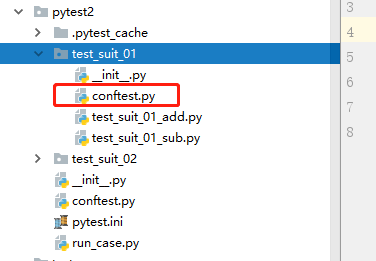
The following video provides an excellent walkthrough of both discovery in parent directories and overriding.
pytest Basics: The conftest.py File
This video continues with clear examples of how pytest finds fixtures in parent directories and how it handles naming conflicts.
First, watch the segment on hierarchical discovery. It shows how a test in a subdirectory can access fixtures from both its local conftest.py and the parent's conftest.py. Next, watch the segment on overriding fixtures. This demonstrates what happens when two conftest.py files define a fixture with the same name (initial_value). Notice that pytest picks the one closest to the test being run.
This overriding mechanism is incredibly powerful. It allows you to define a general-purpose fixture, like a mocked database connection, in your root conftest.py. Then, in a subdirectory for integration tests, you can provide a different conftest.py that defines a fixture with the same name but which returns a real database connection. Your test code doesn't change at all; it just requests the db_connection fixture, and pytest provides the correct one based on the test's location.
Conclusion
In this lesson, we've elevated our testing practice by learning how to organize and share fixtures effectively. This is a key step toward building professional, scalable, and maintainable test suites.
Key Takeaways:
- The
conftest.pyfile ispytest's mechanism for sharing fixtures without requiring explicit imports. - Fixtures in
conftest.pyare automatically discovered and available to tests in the same directory and all subdirectories. - Combining fixture scopes (especially
moduleandsession) withconftest.pyallows you to efficiently manage expensive setup and teardown operations. - You can create a hierarchical structure with multiple
conftest.pyfiles to provide specific fixtures to certain parts of your test suite. - Overriding fixtures by redefining them in a closer
conftest.pyis a powerful pattern for swapping implementations, such as switching between a mock and a real service.
Now that we know how to structure our test dependencies with conftest.py, our next step is to learn how to structure the tests themselves. In the next lesson, we will explore how to organize a test suite with unit and integration tests, and how to use markers to categorize and selectively run different groups of tests.