Bonjour! Welcome to your first lesson in the IT Audit course. Your goal is to become an IT auditor, and this journey begins with understanding the very foundation of what you will be auditing: the IT infrastructure. Think of it like this: an auditor can't assess the risks in a factory without first understanding what machinery is used, how the production lines are connected, and what raw materials are being processed. The same logic applies to the digital world.
Today's lesson will introduce you to the core components that make up a modern organization's IT infrastructure. We will define what an IT infrastructure is and then explore its four main pillars: hardware, software, networks, and data. By the end of our session, you will be able to identify these components and understand their fundamental roles, which is the essential first step for analyzing IT risks and controls.
What is an IT Infrastructure?
At its core, an IT infrastructure is the combination of all the hardware, software, network resources, and services required to operate and manage an enterprise's information technology environment. It is the backbone that supports every digital process, from sending an email to running a complex financial system.
To get a formal definition and understand why a well-planned infrastructure is critical, please read the following short sections from the article "IT Infrastructure: Definition, Components, and Best Practices".
IT Infrastructure: Definition, Components, and Best Practices
This reading will provide a clear, concise definition of IT infrastructure and explain its importance from a business perspective, touching upon concepts like reliability and security that are central to your interest in risk management.
Please read the sections "What is IT infrastructure?" and "Why is IT infrastructure important?".
As you've just read, a poorly designed infrastructure can lead to downtime, security vulnerabilities, and high costs—all significant risks that an IT auditor is trained to identify.
To visualize how these different elements come together, have a look at the following diagram. It presents a high-level view of what is often called the "IT Infrastructure Ecosystem."
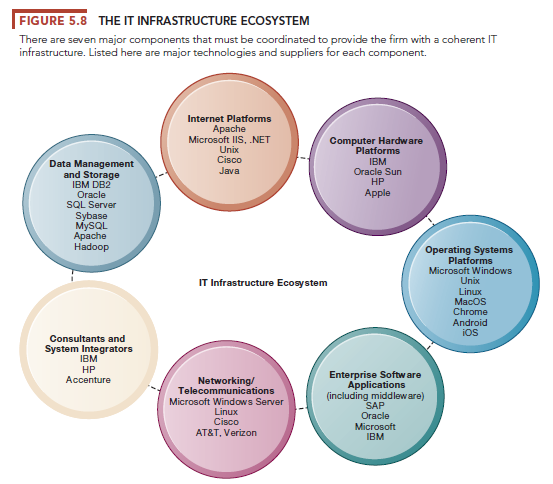
This diagram shows that an infrastructure isn't just one thing, but a collection of interconnected components that must work together. Now, let's break down the primary categories from your learning outcome: hardware, software, networks, and data.
1. Hardware: The Physical Foundation
Hardware refers to the tangible, physical components of the IT infrastructure. These are the machines you can actually touch. Hardware provides the raw computing power to run software and store data.
The main categories of hardware are:
- Servers: Powerful computers that "serve" data or applications to other computers (known as clients) on a network.
- Clients (or End-User Devices): These are the devices people use to do their work, such as laptops, desktops, smartphones, and tablets.
- Storage Devices: Equipment designed specifically to store data, from individual hard drives to large, complex systems.
- Networking Equipment: Devices like routers and switches that connect everything together. We'll discuss these more in the "Networks" section.
To get a much clearer idea of the different kinds of servers and clients you might encounter, please watch the following video segments. The speaker provides excellent, straightforward explanations with clear examples.
Introduction to IT Infrastructure
This video, "Introduction to IT Infrastructure," offers a detailed breakdown of server types and client devices, which will help you differentiate them in a real-world business context.
First, watch the segment on servers from the beginning of the section. Pay attention to how servers are named based on their function (e.g., web server, database server). Next, watch the segment on clients from this section. This will clarify the relationship between the servers you just learned about and the devices that access them.
As an auditor, you'll need to know, for example, whether a critical financial application is running on a single, aging server (a high risk) or on a modern, resilient "cluster" of servers. Understanding the physical hardware is the first step in that assessment.
2. Software: The Instructions and Applications
If hardware is the physical body, software is the intelligence that brings it to life. Software consists of the programs, applications, and operating systems that run on the hardware. It can be broadly divided into three layers:
- Operating Systems (OS): This is the core software that manages all the hardware and software resources. It's the foundation upon which everything else is built. Examples include Microsoft Windows Server, Linux, and Apple's macOS.
- Middleware: This is a type of software that acts as a bridge, helping different applications communicate with each other. It's the "plumbing" of the software world.
- Applications: These are the programs that end-users interact with to perform business tasks. Examples include Enterprise Resource Planning (ERP) systems like SAP, Customer Relationship Management (CRM) software, and Microsoft Office. From an audit perspective, application software is often a major focus area.
For a summary of these software components, let's return to the StarWind article.
IT Infrastructure: Definition, Components, and Best Practices
This section provides a clear, layered view of the software stack.
In the "Components of IT infrastructure" section, please read the subsection IT components: Software.
When auditing, you might examine if operating systems are kept up-to-date with security patches or if access to critical applications like an ERP system is properly restricted.
3. Networks: The Communication Fabric
Networks are the communication pathways that connect all the hardware and software components, allowing them to exchange data. The network enables a user's laptop to connect to a web server, a server to access data from a storage device, and a company's internal systems to connect to the internet.
Key elements of a network include:
- Networking Devices: Physical hardware that directs traffic. The most common are switches (which connect devices within a local network) and routers (which connect different networks together).
- Communication Media: The physical cables (like Ethernet and fiber optic) or wireless signals (like Wi-Fi) that carry the data.
- Network Protocols: These are the established rules and standards (like TCP/IP) that govern how data is formatted and transmitted across the network, ensuring devices can understand each other.
The video you watched earlier also has a great segment explaining the role of key network devices.
Introduction to IT Infrastructure
This segment will help you visualize and understand the distinct roles of common networking devices.
Please watch the part of the video covering network devices, from the start of the section until the discussion about going "outside of the network."
In an audit context, networks are critical. You would assess the security of the network by looking for controls like firewalls, which act as barriers to block unauthorized traffic, and you would verify that sensitive data is encrypted as it travels across the network.
4. Data: The Core Asset
Finally, we come to data. While not a physical component in the same way as a server, data is arguably the most important asset that the IT infrastructure exists to support. It is the information that the hardware, software, and networks are all designed to store, process, and transmit.
From a business perspective, and especially from a risk management perspective, data is the "what" and the infrastructure is the "how". Examples of data include:
- Customer records in a CRM application.
- Financial transactions in an ERP system.
- Employee files in an HR database.
- Emails and business documents.
As an IT auditor, your primary concern is often the protection of data. Your work will revolve around answering questions like:
- Is sensitive customer data stored securely?
- Can unauthorized users access financial records?
- Is there a reliable backup of the data in case of a disaster?
This perspective makes data a central component of the IT infrastructure framework.
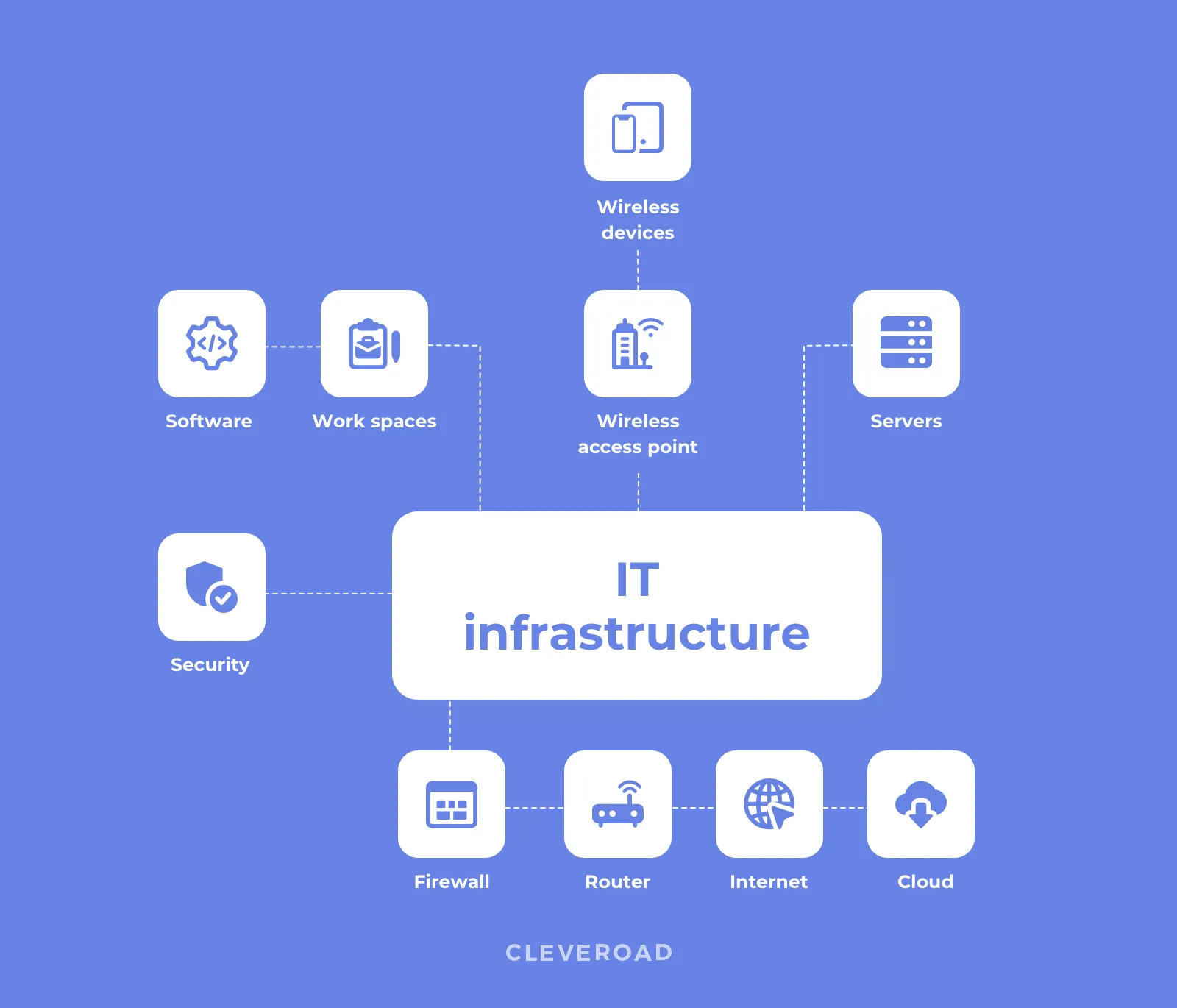
This simplified diagram provides a nice summary of how these various elements interconnect to form the complete IT infrastructure.
Conclusion
In this lesson, we have laid the essential groundwork for your journey into IT auditing. You've learned that IT infrastructure is the foundational collection of technology that supports all of an organization's digital operations.
Here are the key takeaways:
- IT Infrastructure is a combination of hardware, software, networks, and services.
- Hardware is the physical equipment, including servers that provide services, clients that access them, and devices that store data.
- Software provides the instructions, from the foundational Operating System to the business-facing Applications.
- Networks are the communication web, built from devices like switches and routers, that connects everything.
- Data is the critical asset that the entire infrastructure is built to protect, process, and make available.
In our next lesson, we will dive deeper into two of the most critical software components you were introduced to today. We will "describe the functions of an operating system and the purpose of databases in an organization," building directly on the concepts we've covered.