Welcome to your first lesson in your AI journey! This course is designed to take you from the foundational principles of programming and mathematics all the way to advanced AI models. Your background in computer science and mathematics gives you a fantastic head start, especially for understanding the theoretical underpinnings of AI. This first module, "Python and Data Science Foundations," is designed to bridge your theoretical knowledge with the practical programming skills essential for building AI systems.
Today's lesson focuses on the absolute bedrock of programming in Python: its built-in data structures. We will cover lists, tuples, sets, and dictionaries. These are the containers you will use to store and organize data for every AI model you build, from simple regression to complex neural networks. By the end of this lesson, you will be able to create, manipulate, and choose the appropriate data structure for a given task.
1. How Python Thinks About Data
Before diving into specific data structures, it's crucial to understand Python's underlying model of data and variables. As a computer science student, you're familiar with concepts like memory addresses and data types. In Python, these concepts are very explicit. Every piece of data is an object that lives at a specific memory address, and a variable is simply a name or a "label" that points to that object.
Understanding this model is key to grasping the important distinction between mutable (changeable) and immutable (unchangeable) data types, which is a central theme of today's lesson.
To build this fundamental mental model, let's watch a few key segments from the video "Python under the Hood" by Lucas Layman. This will provide a more rigorous view than a typical introductory tutorial.
Python under the Hood Data, Variables, and Types
This video provides an excellent visualization of how Python handles variables, data, and memory. We'll watch a few selected parts to understand the core concepts.
Please watch the following segments: Variables as Bookmarks (1:45 - 6:38): Focus on how variables are names pointing to values in memory and how to use the type() function. Finding Memory Addresses (6:38 - 13:46): This section introduces the id() function to see the actual memory address of an object. This makes the concept of a variable being a pointer very concrete. Visualizing Assignments (13:46 - 24:12): This part uses a tool to visually demonstrate what happens in memory when you assign variables. Pay close attention to what happens when you set one variable equal to another (y = x). Mutable vs. Immutable Types (24:12 - 26:47): This is a critical section that explains the difference between data types that can be changed in-place (mutable) and those that cannot (immutable). This will be a recurring theme today.
Key Takeaways from the Video:
- Everything is an object: Every value (a number, a string, a list) is an object stored in memory.
- Variables are labels: A variable is a name that points to the memory address of an object.
- Assignment points the label: The assignment operator (
=) makes a variable label point to an object. When you writey = x, you are making the labelypoint to the same object thatxpoints to. - Immutability: For immutable types (like integers, floats, strings), you cannot change the object itself. Any operation that seems to "modify" it actually creates a new object and reassigns the variable label to point to it.
- Mutability: For mutable types (like lists and dictionaries), you can change the object's contents in-place without creating a new object. This means if two variables point to the same list, modifying the list through one variable will be visible through the other.
2. The Four Core Data Structures
With that foundation, let's explore Python's four fundamental built-in data structures. They are the primary tools for collecting and organizing data.
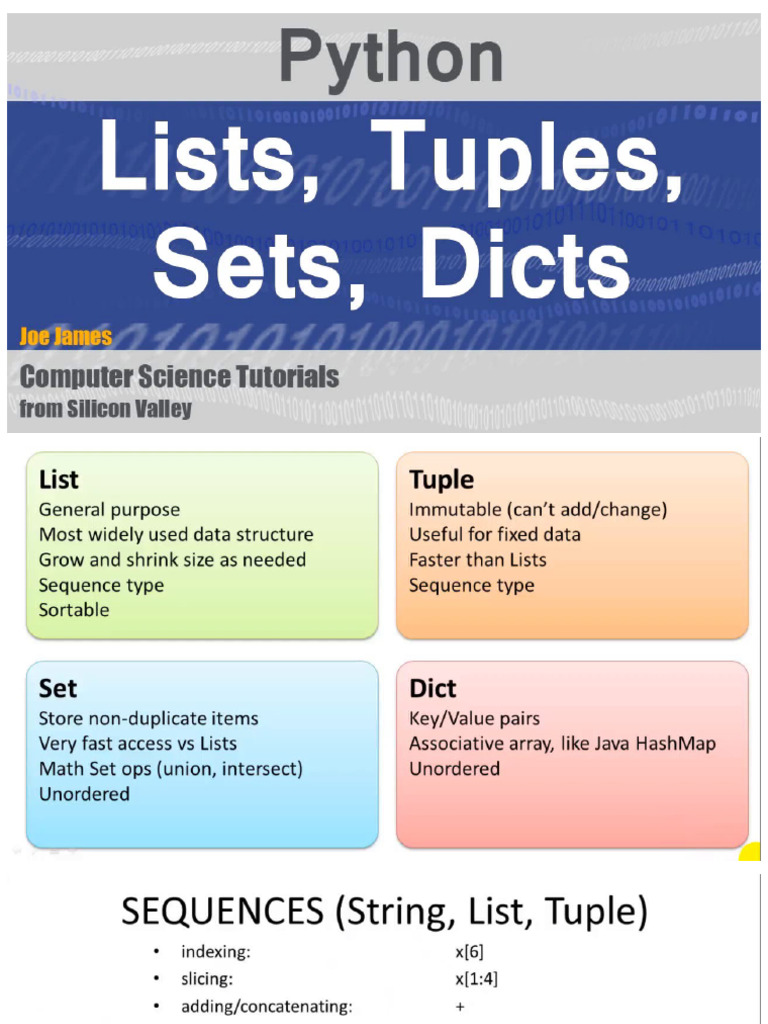
We will use the video "Python: Data Structures" as our main guide. It provides a clear, practical walkthrough of how to use each one.
Python: Data Structures - Lists, Tuples, Sets & Dictionaries tutorial
This tutorial by Programming and Math Tutorials gives a concise and practical overview of creating and working with lists, tuples, sets, and dictionaries.
First, watch the brief introduction from 0:05 to 1:26, which gives a quick summary of all four types.
Now, let's break them down one by one.
2.1. Sequences: Lists and Tuples
Lists and tuples are both sequence types, meaning their elements are stored in a specific order and can be accessed using a numerical index. Many operations, like indexing and slicing, work identically for both.
Python: Data Structures - Lists, Tuples, Sets & Dictionaries tutorial
Let's start by looking at the operations that are common to all sequence types in Python.
Watch the segment on sequence operations from 1:26 to 8:02. Pay attention to indexing, slicing, concatenation (+), and membership testing (in). Your computer science background should make the concept of indexing (O(1) access) quite familiar.
Lists: Mutable, Ordered Collections
Lists are the most common and versatile data structure in Python. They are ordered collections that are mutable, meaning you can add, remove, and change elements after the list has been created.
- Syntax: Defined with square brackets
[]. Example:my_list = [1, "hello", 3.14] - Best for: Collections of items that need to be modified, or when you don't know the number of items in advance.
Now, let's see how to work with them in practice.
Python: Data Structures - Lists, Tuples, Sets & Dictionaries tutorial
This segment covers list-specific methods and the powerful concept of list comprehensions.
Watch the segment on lists from 8:02 to 11:29. Focus on the methods like .append(), .insert(), .pop(), and .sort(). Also, pay close attention to list comprehensions; they are a hallmark of idiomatic Python code.
Key List Operations:
my_list.append(item): Adds an item to the end of the list. This is a very fast, constant-timeO(1)operation.my_list.insert(index, item): Inserts an item at a specific index. This is a slow, linear-timeO(n)operation, as subsequent elements must be shifted.my_list.pop(): Removes and returns the last item. FastO(1).my_list.remove(item): Removes the first occurrence of a specific value. SlowO(n).my_list.sort(): Sorts the list in place.
List Comprehensions provide a concise syntax to create lists. They are both readable and more performant than using a for loop with .append().
# Standard for loop
squares = []
for x in range(10):
    if x % 2 == 0:
        squares.append(x**2)
print(squares) # Output: [0, 4, 16, 36, 64]

# List comprehension (preferred)
squares_comp = [x**2 for x in range(10) if x % 2 == 0]
print(squares_comp) # Output: [0, 4, 16, 36, 64]
Test your understanding!
Given a list of strings words = ["hello", "world", "in", "a", "frame"], use a list comprehension to create a new list that contains the length of each word, but only for words with more than 3 characters.
Show answer
words = ["hello", "world", "in", "a", "frame"]
lengths = [len(word) for word in words if len(word) > 3]
print(lengths) # Output: [5, 5, 5]
Tuples: Immutable, Ordered Collections
Tuples are just like lists, but with one crucial difference: they are immutable. Once you create a tuple, you cannot change its contents.
- Syntax: Defined with parentheses
(). Example:my_tuple = (1, "hello", 3.14) - Best for: Fixed data that should not change, such as coordinates
(x, y), RGB color values, or database records. Their immutability also allows them to be used as keys in dictionaries, unlike lists.
Python: Data Structures - Lists, Tuples, Sets & Dictionaries tutorial
Now let's look at tuples and understand why their immutability is useful.
Watch the segment on tuples from 11:29 to 13:36. The video explains how to create tuples and highlights their immutability.
A common and useful feature associated with tuples is packing and unpacking:
# Packing: grouping values into a tuple
point = (10, 20, 5)

# Unpacking: assigning tuple elements to individual variables
x, y, z = point

print(f"The x-coordinate is {x}") # Output: The x-coordinate is 10
2.2. Unordered Collections: Sets and Dictionaries
Unlike lists and tuples, sets and dictionaries are collections that are optimized for fast lookups. They achieve this by using a hash table implementation, a concept you are likely familiar with from your data structures courses.
Sets: Mutable, Unordered, Unique Elements
A set is an unordered collection of unique elements. It is highly optimized for membership testing (checking if an element is present).
- Syntax: Defined with curly braces
{}or theset()constructor. Example:my_set = {1, 2, 3} - Best for:
- Removing duplicates from a collection.
- Fast membership testing (
item in my_set). This is a constant-timeO(1)operation on average. - Mathematical set operations (union, intersection, difference). This will feel natural given your math background.
Python: Data Structures - Lists, Tuples, Sets & Dictionaries tutorial
This segment introduces sets and their powerful mathematical operations.
Watch the video from 13:25 to 15:55. Focus on how to create sets, how they automatically handle duplicates, and the syntax for operations like union (|) and intersection (&).
Example of Set Operations:
set_a = {1, 2, 3, 4}
set_b = {3, 4, 5, 6}

# Union: Elements in either set
print(set_a | set_b)  # Output: {1, 2, 3, 4, 5, 6}

# Intersection: Elements in both sets
print(set_a & set_b)  # Output: {3, 4}

# Difference: Elements in set_a but not in set_b
print(set_a - set_b)  # Output: {1, 2}
Dictionaries: Mutable, Key-Value Pairs
A dictionary is a collection of key-value pairs. It maps unique, immutable keys to values. Like sets, they are implemented using hash tables, which means looking up a value by its key is extremely fast (O(1) on average).
- Syntax: Defined with curly braces
{}, with key-value pairs. Example:{'name': 'Alice', 'age': 30} - Best for: Storing structured data where you need to look up values based on a unique identifier. Examples include mapping user IDs to user objects, or storing configuration settings.
A note on ordering: Historically, dictionaries were unordered. However, since Python 3.7, standard dictionaries remember the order in which items were inserted.
Python: Data Structures - Lists, Tuples, Sets & Dictionaries tutorial
Finally, let's explore dictionaries, one of the most useful data structures in Python.
Watch from 15:42 to 18:44. Pay attention to how to create, access, add, and iterate over dictionaries. The .items() method is particularly useful for looping over both keys and values simultaneously.
Key Dictionary Operations:
- Accessing:
value = my_dict['key'](raises an error if the key doesn't exist). - Safer Accessing:
value = my_dict.get('key', 'default_value')(returnsNoneor a default value if the key is not found). - Adding/Updating:
my_dict['new_key'] = 'new_value' - Iterating:
for key, value in my_dict.items():
    print(f"Key: {key}, Value: {value}")
Test your understanding!
You are given a sentence: s = "the quick brown fox jumps over the lazy dog".
Write a short piece of code to count the frequency of each word in this sentence and store the result in a dictionary.
Show answer
s = "the quick brown fox jumps over the lazy dog"
words = s.split() # Split the string into a list of words
word_counts = {}

for word in words:
    word_counts[word] = word_counts.get(word, 0) + 1

print(word_counts)
# Output: {'the': 2, 'quick': 1, 'brown': 1, 'fox': 1, 'jumps': 1, 'over': 1, 'lazy': 1, 'dog': 1}
Conclusion
In this lesson, you've been introduced to the four fundamental data structures in Python, moving from the conceptual model of how Python handles data in memory to the practical syntax for using them.
Key Takeaways:
- Lists: Ordered, mutable sequences. Your go-to for flexible collections of items.
- Tuples: Ordered, immutable sequences. Use them for fixed data to ensure data integrity.
- Sets: Unordered, unique collections. Perfect for membership testing and removing duplicates.
- Dictionaries: Key-value pairs. The best choice for fast lookups based on a key.
Choosing the right data structure is a foundational skill that impacts not only the readability of your code but also its performance—a concept that will become increasingly important as we work with the large datasets common in AI.
In our next lesson, we will build directly on this foundation. Now that you know how to store data, we will learn how to write Python functions that use control flow (if/else), loops (for/while), and list comprehensions to process and manipulate that data.