Welcome back! In our last session, we laid the groundwork by learning how to store data in variables using Python's fundamental data types. You learned that strings are Python's way of handling text, and you've already seen how to join them with + and repeat them with *.
Today, we're going to put strings under the microscope. Manipulating text is one of the most common tasks in programming, whether you're processing user input, reading data from files, or preparing text for an AI model. This lesson will equip you with a powerful toolkit for working with strings. We'll cover three core skills: slicing to extract pieces of a string, modern formatting to build strings from variables, and a suite of common string methods to clean, search, and transform text.
Accessing Parts of a String: Indexing and Slicing
Think of a string as a sequence of characters lined up in order. Each character has a position, or index, which is simply a number that tells you where it is in the line. In Python, indexing starts at 0.
You can access a single character using its index in square brackets []. For example, my_string[0] gives you the first character. You can also count from the end of the string using negative numbers, where my_string[-1] gives you the last character.
Let's watch a short clip that demonstrates this.
How to Use Strings in Python - Python Tutorial for Beginners
Watch this segment from the video by Programming with Mosh. It clearly explains how to use positive and negative index numbers to access individual characters.
Focus on the part from the explanation of indexing. Pay attention to how [0] gets the first character and [-1] gets the last.
While indexing grabs one character, slicing lets you grab a whole substring. The syntax for this is string[start:stop:step].

This might look a bit complex, but it's very powerful. Let's break it down:
start: The index of the first character you want to include. If you leave it blank, it defaults to the beginning of the string (0).stop: The index of the first character you don't want to include. This is a crucial point: the slice goes up to but not including thestopindex. If you leave it blank, it defaults to the end of the string.step: How many characters to jump after each one is retrieved. The default is1, which means you get a continuous block of text.
The following clip continues from where the last one left off and shows how to perform basic slices.
How to Use Strings in Python - Python Tutorial for Beginners
Continue with the same video to see slicing in action.
Watch from where slicing is introduced. Notice how course[0:3] gets the first three characters, and see what happens when you leave the start or end index blank.
Let's solidify this with a focused reading that also introduces the step parameter.
How To Index and Slice Strings in Python
This article from DigitalOcean provides very clear examples of slicing, including the powerful step parameter.
In the article, start by reading the section titled "Slicing Strings" and the subsection "Understanding Slice Syntax". You can find this by scrolling down a little. Read from the introduction to slices. Next, read the subsection "Omitting Slice Parameters" to reinforce what you saw in the video. Read the two paragraphs on omitting parameters. Finally, jump down to the section "Specifying Stride while Slicing Strings". Read the introduction and the part on basic stride examples.
A common and useful trick using the step parameter is to reverse a string. You can do this with a step of -1.
original = "Hello World"
reversed_string = original[::-1]
print(reversed_string) # Output: dlroW olleH
Here, [::-1] is a slice that says: "start from the end, go to the beginning, and step backwards by one character."
Building Better Strings: Formatting
In the last lesson, you built strings by "gluing" them together with +, like this:message = "Total sales: " + str(total_sales)
This works, but it can get clumsy, and it's easy to forget the str() conversion, leading to a TypeError. Modern Python offers a much cleaner and more powerful way to do this: f-strings (formatted string literals).
With an f-string, you can embed variables and even entire expressions directly inside your string.
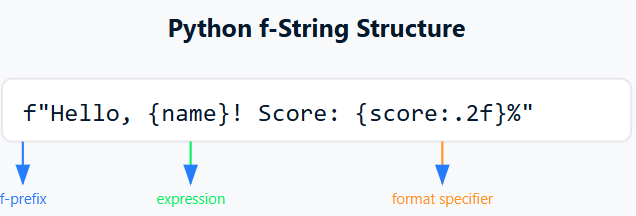
The following video segment does an excellent job of comparing the old concatenation method with the new f-string approach.
How to Use Strings in Python - Python Tutorial for Beginners
Watch this segment from Programming with Mosh to see a side-by-side comparison of string concatenation and f-strings.
Watch the portion from on building strings. Pay close attention to how much more readable the f-string version is.
As you saw, the syntax is simple: just prefix your string with an f and place your variables inside curly braces {}.
first_name = "Ada"
last_name = "Lovelace"


# Old way with concatenation
full_name_concat = first_name + " " + last_name
print(full_name_concat)


# New way with an f-string
full_name_fstring = f"{first_name} {last_name}"
print(full_name_fstring)


# You can even put expressions inside!
age = 36
message = f"{first_name} was {age * 12} months old when she died."
print(message)
From now on, you should prefer f-strings whenever you need to build a string from other variables. They are more readable, less error-prone, and more efficient.
The String's Toolkit: Common Methods
Python's strings come with a host of built-in methods. A method is like a function that belongs to a specific object. You call them using dot notation, like my_string.method_name().
A critical concept to understand is immutability. Strings in Python are immutable, which means they cannot be changed. When you call a string method like .upper(), it doesn't modify the original string. Instead, it returns a new string with the changes applied.
greeting = "hello world"


# This does NOT change the original greeting string
greeting.upper()
print(greeting) # Output: hello world


# You must assign the result to a variable (it can be the same variable)
uppercase_greeting = greeting.upper()
print(uppercase_greeting) # Output: HELLO WORLD


# Or re-assign to the original variable name
greeting = greeting.upper()
print(greeting) # Output: HELLO WORLD
Let's explore some of the most useful string methods. They can be grouped by what they do.
Strings and Character Data in Python – Real Python
The following sections are from a comprehensive guide on Python strings. We won't read all of it, but it's an excellent reference. We will go through the most important methods together.
In the "Exploring str Class Methods" section, you'll find subsections for different categories of methods. You can use the article's table of contents to navigate. We'll be looking at methods from "Manipulating Casing", "Finding and Replacing Substrings", "Formatting Strings", and "Joining and Splitting Strings".
1. Changing Case
These methods are for converting the string to upper or lower case.
.lower(): Returns a new string with all characters in lowercase..upper(): Returns a new string with all characters in uppercase..title(): Returns a new string where the first letter of each word is capitalized..capitalize(): Returns a new string where only the very first character is capitalized.
mixed_case = "pyTHon proGRAMming"
print(f"Lower: {mixed_case.lower()}")       # pyton programming
print(f"Upper: {mixed_case.upper()}")       # PYTHON PROGRAMMING
print(f"Title: {mixed_case.title()}")       # Python Programming
print(f"Capitalize: {mixed_case.capitalize()}") # Python programming
2. Cleaning Up Whitespace
These are essential for cleaning up user input or data read from files.
.strip(): Removes whitespace (spaces, tabs, newlines) from the beginning and end of a string..lstrip(): Removes whitespace from the left side only..rstrip(): Removes whitespace from the right side only.
messy_string = "   some text with spaces   \n"
print(f"Original: '{messy_string}'")
print(f"Stripped: '{messy_string.strip()}'") # 'some text with spaces'
3. Finding and Replacing
.replace(old, new): Returns a new string where all occurrences of theoldsubstring are replaced by thenewsubstring..find(substring): Returns the starting index of the first occurrence ofsubstring. If the substring is not found, it returns-1. This is useful for checking if a substring exists and where it is.
sentence = "I like to code in Python. Python is great."
new_sentence = sentence.replace("Python", "Java")
print(new_sentence) # I like to code in Java. Java is great.


# find() is case-sensitive
print(sentence.find("Python")) # 18
print(sentence.find("python")) # -1 (not found)
4. Checking for Substrings: The in Operator
While you can use .find() != -1 to see if a substring is present, a more "Pythonic" way is to use the in operator. It returns a boolean (True or False), which is often exactly what you need.
sentence = "I like to code in Python."
print("Python" in sentence) # True
print("Java" in sentence)   # False
5. Splitting and Joining
These are incredibly powerful for breaking a string into a list of smaller strings, and vice-versa. (We will cover lists in detail in a future lesson, but this is a great preview).
.split(separator): Splits the string at every occurrence of theseparatorand returns a list of the pieces. If you don't provide a separator, it splits by any whitespace.separator.join(list_of_strings): Joins the elements of a list into a single string, using theseparatorstring to connect them.
# Splitting
csv_data = "John,Doe,35,Engineer"
data_list = csv_data.split(",")
print(data_list) # ['John', 'Doe', '35', 'Engineer']


# Joining
url_parts = ["www", "example", "com"]
full_url = ".".join(url_parts)
print(full_url) # www.example.com
Let's Practice
Time to combine these new skills. Imagine you have a filename from a log system that's a bit messy. Your task is to extract the date and print a clean message.
Create a new file called string_practice.py and write code to solve the following problem.
Problem:
You are given the following filename as a string: LOG_ENTRY-2024-07-26.txt
Write a Python script that performs these steps:
- Store the filename in a variable.
- Clean the surrounding whitespace from the filename and convert it to all lowercase. Store this in a new variable.
- From the cleaned filename, extract the date part (
"2024-07-26"). You can use slicing for this. - Use the
.replace()method on your extracted date to change the hyphens-to slashes/. - Finally, use an f-string to print the message:
Log entry from: 2024/07/26
Try to solve this on your own before looking at the solution!
Click to see the solution
# 1. Store the filename in a variable.
raw_filename = "  LOG_ENTRY-2024-07-26.txt   "


# 2. Clean and convert to lowercase.
# .strip() removes whitespace, .lower() converts to lowercase.
# We can chain methods together!
cleaned_filename = raw_filename.strip().lower()


# cleaned_filename is now "log_entry-2024-07-26.txt"


# 3. Extract the date using slicing.
# The date starts at index 10 and ends before index 20.
date_part = cleaned_filename[10:20]


# date_part is now "2024-07-26"


# 4. Replace hyphens with slashes.
formatted_date = date_part.replace("-", "/")


# formatted_date is now "2024/07/26"


# 5. Print the final message using an f-string.
output_message = f"Log entry from: {formatted_date}"
print(output_message)


# Expected Output: Log entry from: 2024/07/26
Conclusion
Fantastic work. You've just added a whole range of professional-grade tools to your Python toolkit for handling text.
Let's recap the key points:
- Strings are immutable sequences, meaning you can access parts of them but you can't change them in place. Methods always return a new string.
- Slicing with
[start:stop:step]is the primary way to extract substrings. - f-strings (e.g.,
f"Hello, {name}") are the modern, readable, and efficient way to format strings by embedding variables. - String methods like
.strip(),.lower(),.replace(), and.split()provide a powerful library of functions for text manipulation.
In our next lesson, we will learn how to make our programs much more intelligent by introducing conditional logic. Using if, elif, and else statements, you'll be able to make your programs execute different code based on different conditions, such as checking if a string startswith("ERROR:") before taking action.