Hello! Welcome to the next lesson in your FastAPI journey.
In our last session, we created and ran our first minimal FastAPI application using Uvicorn. We saw how it contrasted with Django's runserver workflow and got our first glimpse of a major FastAPI feature: the automatic interactive documentation at the /docs endpoint.
Today, we'll dive into the magic that powers that documentation and a whole lot more. We'll explore how FastAPI uses standard Python type hints to provide powerful, automatic data validation.
Learning Outcome: Use Python type hints to annotate function parameters and return types as the basis for FastAPI's auto-validation.
For someone with your Django background, this lesson introduces FastAPI's modern answer to Django REST Framework's (DRF) serializers. You'll see how a standard Python feature replaces a framework-specific component, leading to more concise and intuitive code.
A Refresher on Python Type Hints
Before we connect them to FastAPI, let's briefly review what type hints are. Introduced in PEP 484, they are a standard way to annotate the expected types of variables, function parameters, and return values in Python.
By themselves, they don't change how the code runs. However, they provide immense benefits for developer tools like your IDE, enabling better autocompletion, static analysis, and error checking.
The official FastAPI documentation has a wonderful quick tutorial on Python type hints. It's a great refresher on why they are useful and how to declare them.
Please read the sections 'Motivation', 'More motivation', 'Declaring types', and 'Generic types'. Focus on how adding a simple : str or : int can dramatically improve editor support and help you catch bugs before you even run the code.
As you just read, adding types like str, int, list[str], or dict[str, float] makes your code clearer and more robust. Now, let's see how FastAPI takes this a step further.
The Power of Pydantic: From Hints to Validation
FastAPI doesn't just use type hints for documentation. It uses them for runtime data validation. This is made possible by a powerful library called Pydantic, which is installed automatically with FastAPI.
Django Analogy: Think of a Pydantic model as FastAPI's equivalent of a DRF Serializer. Both are used to define the expected structure, data types, and validation rules for incoming and outgoing data. However, Pydantic models use standard Python type hints, making them feel more native to the language.
The core idea is simple:
- You define the "shape" of your data in a class that inherits from Pydantic's
BaseModel. - You use that class as a type hint in your path operation function.
- FastAPI handles the rest: parsing, validation, error reporting, and documentation.
The following video explains this relationship and the problem Pydantic solves.
Python Pydantic Tutorial: Complete Data Validation Course (Used by FastAPI)
Corey Schafer's video on Pydantic provides a great introduction to why data validation is crucial and how Pydantic simplifies it using type hints.
Watch the first 5 minutes and 36 seconds of the video. It contrasts manual validation with Pydantic's approach, highlighting how BaseModel makes validation declarative and concise.
Implementing Request Body Validation
Let's apply this concept. We'll modify our main.py to handle a POST request that accepts a JSON body. We want to create an "item" with a name, description, price, and offer status.
First, we define our data shape using a Pydantic model. Create a new file, schemas.py, to hold your data models (similar to how you might have a serializers.py in a Django app).
schemas.py
from pydantic import BaseModel
from typing import Optional # Or `from typing import Union` for older Python

class ItemBase(BaseModel):
    name: str
    price: float
    is_offer: bool = False # A field with a default value is not required
    description: Optional[str] = None # An optional field, can be None

class ItemCreate(ItemBase):


    # For now, this is the same as ItemBase.
    # We create it to separate concerns, just as we'd have different serializers
    # for creating vs. displaying data.
    pass

class Item(ItemBase):
    id: int


    # This config allows Pydantic to read data from ORM models (like SQLAlchemy)
    # by attribute access (e.g., item.id) instead of just dict access (item['id']).
    # We'll use this extensively in the database module.
    class Config:
        from_attributes = True
Now, let's use this in main.py to create a new endpoint.
main.py
from fastapi import FastAPI, status
from typing import List
import schemas # Import our new schemas

app = FastAPI()


# Dummy database
fake_db = {
    1: {"id": 1, "name": "Laptop", "price": 1200.0, "is_offer": True, "description": "A powerful laptop"}
}

@app.post("/items/", status_code=status.HTTP_201_CREATED, response_model=schemas.Item)
async def create_item(item: schemas.ItemCreate):
    """
    Create an item with all the information:

    - **name**: each item must have a name
    - **description**: a long description
    - **price**: required
    - **is_offer**: a boolean indicating if this is an offer
    """
    new_id = max(fake_db.keys()) + 1
    item_dict = item.dict()
    item_dict.update({"id": new_id})
    fake_db[new_id] = item_dict
    return item_dict
Let's break down the key line: async def create_item(item: schemas.ItemCreate):
item: The name of the parameter.: schemas.ItemCreate: The type hint. You are telling FastAPI that the request body should conform to the structure of yourItemCreatePydantic model.
When a request comes in, FastAPI automatically performs the steps detailed in this article.
FastAPI Request Body Validation
This article from apxml.com provides a clear, step-by-step explanation of what FastAPI does behind the scenes when it sees a Pydantic type hint.
Read the sections 'Request Body Validation' and the text below the code block that lists the 5 steps FastAPI follows (Read, Parse, Validate, Inject, Handle Errors). This perfectly explains the automatic process.
Seeing It in Action: Validation and Auto-Docs
Now, run your app with uvicorn main:app --reload and navigate to http://127.0.0.1:8000/docs.
You will see your new /items/ endpoint. Expand it.
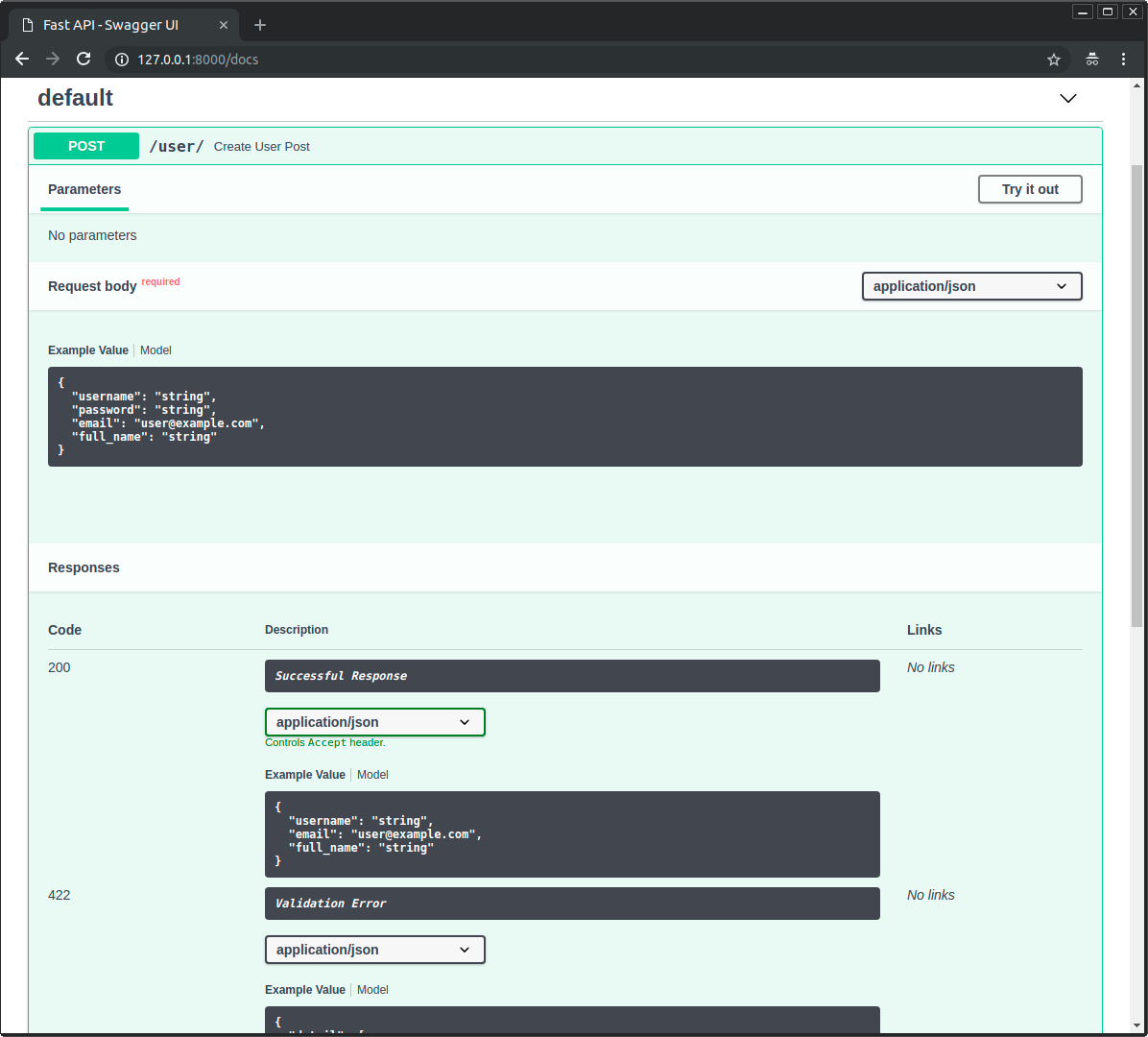
Notice a few things:
- The "Request body" section has a schema showing the exact fields, types, and whether they are required. This was generated from
schemas.ItemCreate. - The "Responses" section shows a
201successful response with a schema based onschemas.Item, which we specified in theresponse_modelparameter.
Now, let's test the validation. Click "Try it out".
Test 1: Valid Request
Use the example JSON provided, or create your own valid one:
{
  "name": "Keyboard",
  "price": 75.50
}
Click "Execute". You should get a 201 Created response with the full item object, including its new ID.
Test 2: Invalid Request
Now, try to send an invalid payload. For example, let's make the price a string instead of a float and omit the required name field.
{
  "price": "seventy-five"
}
Click "Execute". Instead of your code running, FastAPI intercepts the request and returns a 422 Unprocessable Entity error. The response body will contain a detailed JSON object explaining exactly what went wrong.
{
  "detail": [
    {
      "loc": ["body", "name"],
      "msg": "field required",
      "type": "value_error.missing"
    },
    {
      "loc": ["body", "price"],
      "msg": "value is not a valid float",
      "type": "type_error.float"
    }
  ]
}
This is the "magic." You wrote zero lines of validation logic. Compare this to the typical DRF pattern:
# The DRF way
serializer = ItemSerializer(data=request.data)
if serializer.is_valid():
    serializer.save()
    return Response(serializer.data, status=status.HTTP_201_CREATED)
return Response(serializer.errors, status=status.HTTP_400_BAD_REQUEST)
In FastAPI, all of that boilerplate is gone, handled automatically by the type hint.
Corey Schafer's video provides a great walkthrough of this entire process.
Python FastAPI Tutorial (Part 4): Pydantic Schemas - Request and Response Validation
Let's watch a practical demonstration of creating schemas and using them for request validation, which will solidify what we've just discussed.
Watch from 03:20 to 19:28. This segment covers: Creating schema files and BaseModel classes. Using the schemas in path operations for request bodies (POST) and responses (GET). Demonstrating the automatic validation and error reporting using the Swagger UI.
Conclusion
In this lesson, we uncovered one of FastAPI's most powerful features: declarative data validation powered by Python type hints and Pydantic. This approach not only reduces boilerplate but also makes your API self-documenting.
Key Takeaways:
- Type Hints are the Foundation: FastAPI leverages standard Python type hints for more than just code clarity; they are the basis for runtime data validation, serialization, and documentation.
- Pydantic is the Engine: The Pydantic library provides the
BaseModelclass, which you use to define data schemas. Think of these as a more Pythonic version of DRF Serializers. - Automatic Validation: By type-hinting a path operation parameter with a Pydantic model, FastAPI automatically:
- Parses the JSON request body.
- Validates its structure and types against your model.
- Returns a detailed
422error if validation fails. - Provides a validated, type-hinted Pydantic object to your function if it succeeds.
- Auto-Generated Docs: These same Pydantic models are used to generate the rich, interactive schemas in your Swagger UI documentation.
In our next lesson, we will explore lifespan events, a mechanism for running logic when your application starts up or shuts down. This is essential for tasks like setting up database connections or loading machine learning models into memory.