Hello! Welcome to your next lesson on FastAPI.
In our previous lesson, we saw how to use the response_model parameter to control the shape and content of successful API responses. This is a crucial tool for security and for defining a clear API contract, much like how you would use a DRF ModelSerializer to control output.
Today, we turn our attention to the other side of the coin: what happens when things go wrong? This lesson addresses the learning outcome: Raise and customize HTTPException for standard error responses, analogous to DRF's exception classes.
You'll learn how to stop execution and return clear, standard HTTP error responses from your endpoints. As a Django developer, you'll find that FastAPI's approach is very similar to raising exceptions like NotFound or PermissionDenied in DRF.
1. The Problem: Handling Errors Gracefully
Imagine you have an endpoint to fetch a resource by its ID, like /items/{item_id}. What should your API do if a client requests an ID that doesn't exist?
Simply returning None or a dictionary like {"error": "not found"} is not ideal. This would typically result in a 200 OK HTTP status code, which is misleading for the client. The client's request was successfully processed, but the result it was looking for isn't there—this is a client error, which should be indicated by a 4xx status code.
In Django REST Framework, you would handle this by raising a specific exception:
# Django REST Framework example
from rest_framework import exceptions

def get_object(self):
    try:
        obj = Item.objects.get(pk=self.kwargs['pk'])
    except Item.DoesNotExist:
        raise exceptions.NotFound('Item not found') # This sends a 404 response
    return obj
FastAPI provides a similarly elegant solution for this exact scenario.
2. The Solution: fastapi.HTTPException
FastAPI's primary tool for sending standard HTTP error responses is HTTPException. When you raise an HTTPException in your path operation function, FastAPI intercepts it, stops any further processing, and sends a properly formatted JSON error response to the client with the HTTP status code you specify.
The following video provides a concise demonstration of this process.
Python FastAPI Tutorial (Part 3): Path Parameters - Validation and Error Handling
In this clip from his Python FastAPI Tutorial series, Corey Schafer explains why simply returning an error dictionary is insufficient and demonstrates how to import and use HTTPException to raise a proper 404 Not Found error.
Please watch from 06:52 to 09:41. Focus on how he imports HTTPException and status, and how he replaces the return statement with a raise HTTPException(...) statement to handle the 'not found' case.
As you saw in the video, using raise HTTPException is a clean and explicit way to signal that something has gone wrong in a way the client needs to be aware of.
3. Dissecting HTTPException
The HTTPException class is simple but powerful. You initialize it with a few key arguments:
status_code(required): An integer representing the HTTP status code. For readability and to avoid "magic numbers," it's highly recommended to use thefastapi.statusmodule, which provides constants for all standard HTTP codes (e.g.,status.HTTP_404_NOT_FOUND).detail(optional): The error details you want to send in the response body. This can be a simple string or any other JSON-serializable data (like a dictionary or list).headers(optional): A dictionary of any custom HTTP headers you want to include in the error response.
Here is a complete example:
from fastapi import FastAPI, HTTPException, status

app = FastAPI()


# A mock database of items
items_db = {"item1": {"name": "T-shirt"}, "item2": {"name": "Jeans"}}

@app.get("/items/{item_id}")
async def read_item(item_id: str):
    if item_id not in items_db:


        # If the item is not found, raise an HTTPException
        raise HTTPException(
            status_code=status.HTTP_404_NOT_FOUND,
            detail=f"Item with ID '{item_id}' not found",
            headers={"X-Error-Source": "Items-API-v1"},
        )
    return items_db[item_id]
If you call this endpoint with /items/item3, the client will receive:
- An HTTP status code of
404 Not Found. - A custom
X-Error-Sourceheader. - A JSON response body like this:
{"detail": "Item with ID 'item3' not found"}.
4. A Direct Comparison with DRF
Your experience with DRF gives you a great head start here. The conceptual mapping is very direct:
| Django REST Framework | FastAPI |
|---|---|
from rest_framework import exceptions |
from fastapi import HTTPException |
raise exceptions.NotFound() |
raise HTTPException(status_code=404) |
raise exceptions.PermissionDenied() |
raise HTTPException(status_code=403) |
raise exceptions.NotAuthenticated() |
raise HTTPException(status_code=401) |
raise exceptions.ValidationError() |
raise HTTPException(status_code=422)* |
* Note: For validation errors from Pydantic models, FastAPI automatically raises a special RequestValidationError which results in a 422 response. You typically raise a 422 HTTPException for your own custom validation logic inside a path operation.
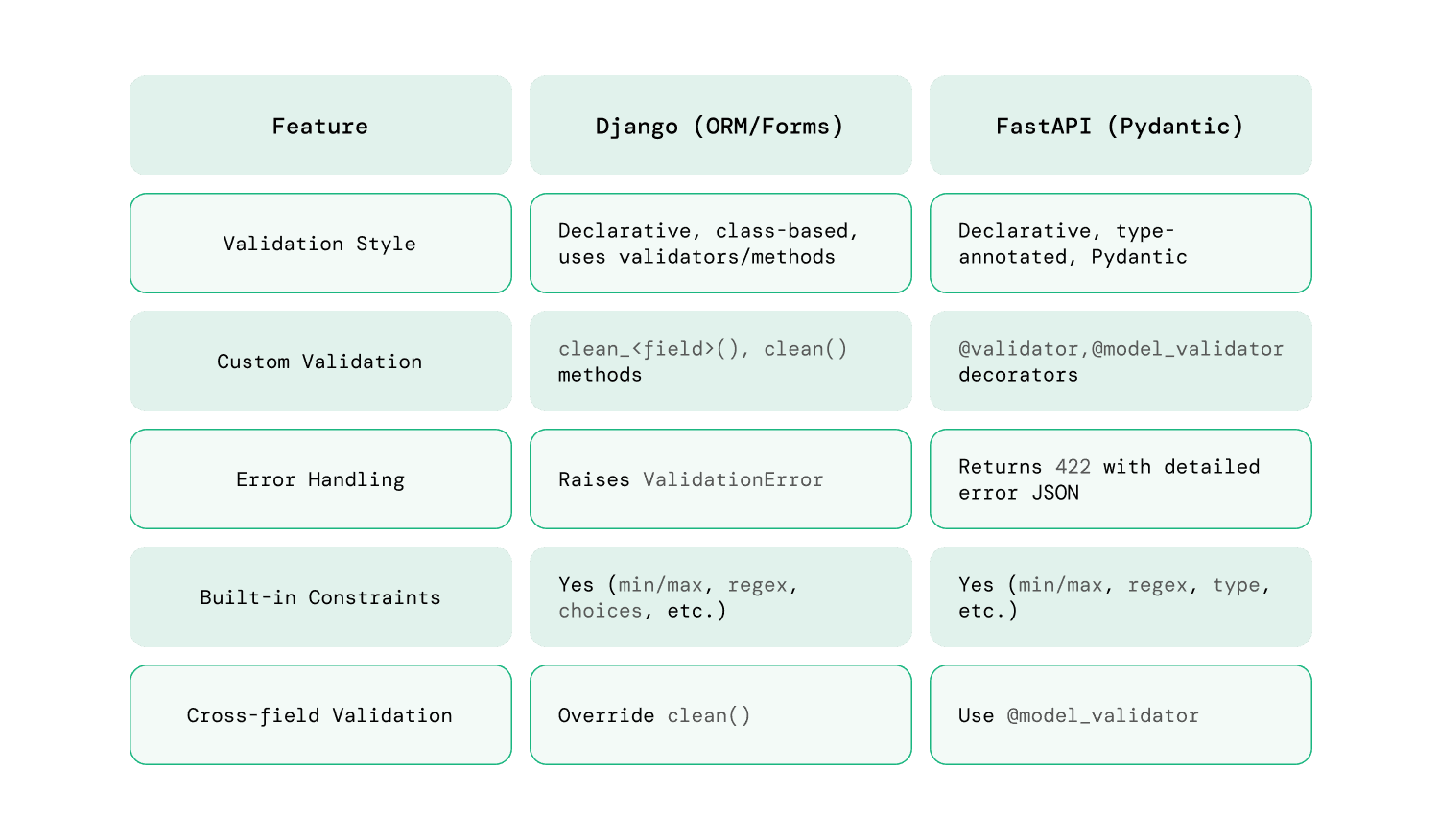
This comparison table provides a visual summary of the parallels between Django and FastAPI for validation and error handling.
5. Visualizing Errors in the Docs
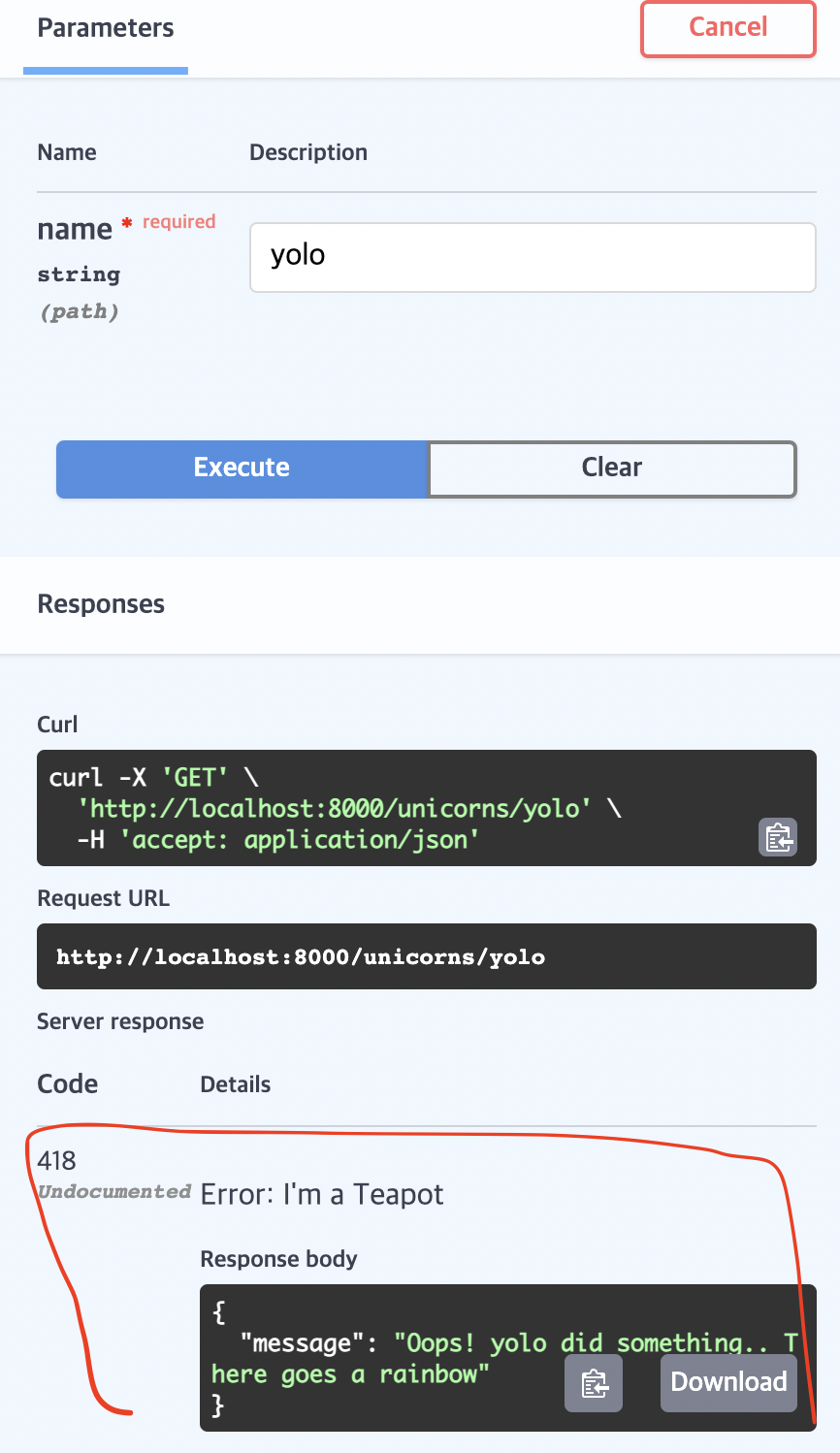
One of the great benefits of this approach is that FastAPI's automatic documentation can understand these exceptions. When you use HTTPException, your API consumers can see what kind of errors they should expect from your endpoints.
The image below shows an example from the interactive Swagger UI where a custom error has been returned. Raising HTTPException provides the same structured error response.
Conclusion
You've now learned the standard, built-in method for handling predictable errors in FastAPI. This is a fundamental building block for creating robust and user-friendly APIs.
Key Takeaways:
HTTPExceptionis the primary mechanism for returning standard HTTP error responses in FastAPI.- It's the direct counterpart to DRF's built-in
APIExceptionclasses likeexceptions.NotFoundorexceptions.PermissionDenied. - Raising an
HTTPExceptionallows you to precisely control thestatus_code,detailmessage, and responseheaders. - Using the
fastapi.statusmodule (e.g.,status.HTTP_404_NOT_FOUND) is a best practice that makes your code more readable and maintainable.
Preview of the Next Lesson:
HTTPException is perfect for handling errors on a case-by-case basis within your endpoints. But what if you want to create a standardized error format for your entire application? Or what if you need to log every error in a specific way, or handle unexpected 500 errors gracefully?
In our next lesson, we will explore FastAPI's powerful custom exception handlers. This is where you'll see the direct parallel to DRF's EXCEPTION_HANDLER setting, giving you complete control over your API's error responses.