In our previous lesson, you learned how to communicate with R by writing and executing commands in the console and a script file. This is like learning to speak the language of your new digital lab. Now, it's time to learn how to use that lab to store and work with information. To perform any kind of data analysis, from a simple calculation to a complex meta-analysis, you need a way for R to remember the data you give it.
This lesson introduces one of the most fundamental concepts in programming: variables. You will learn how to create variables to store values, and then how to perform basic arithmetic operations using those variables. This skill is the foundation for handling the data you will eventually extract from research studies.
Storing Information: The Concept of a Variable
In R, a variable is simply a name that you assign to a value. Think of it as putting a label on a container. Instead of working with a raw number like 42.5, you can put it in a container named mean_age, making your code much more readable and manageable. This is crucial when you start dealing with dozens of data points from multiple studies.
The primary way to create a variable in R is with the assignment operator, which looks like an arrow: <-. You place the name of your variable on the left and the value you want to assign on the right.
Let's see this in action.
Programming with R: Analyzing Patient Data
This reading from the "Programming with R" tutorial by Software Carpentry provides a clear and practical introduction to creating and using variables.
Please read the first few sections of the page. Start from the beginning and stop when you reach the heading "Now that we know how to assign things to variables...". Focus on these key concepts: The use of <span data-type="resource_reading_textrange" data-resource-subitem-id="f30608af" data-range-start="<-" data-range-end="55">the assignment operator</span> (<-) to create a variable. How to view the contents of a variable by typing its name. The idea that you can perform calculations using variables. The important distinction that a variable stores the result of a calculation, not the formula itself. This is a key difference from how spreadsheet software like Excel works.
As you create variables, you will see them appear in the Environment pane in RStudio, typically in the top-right corner. This pane acts as your inventory, showing you every object and variable currently stored in R's memory, along with its value.
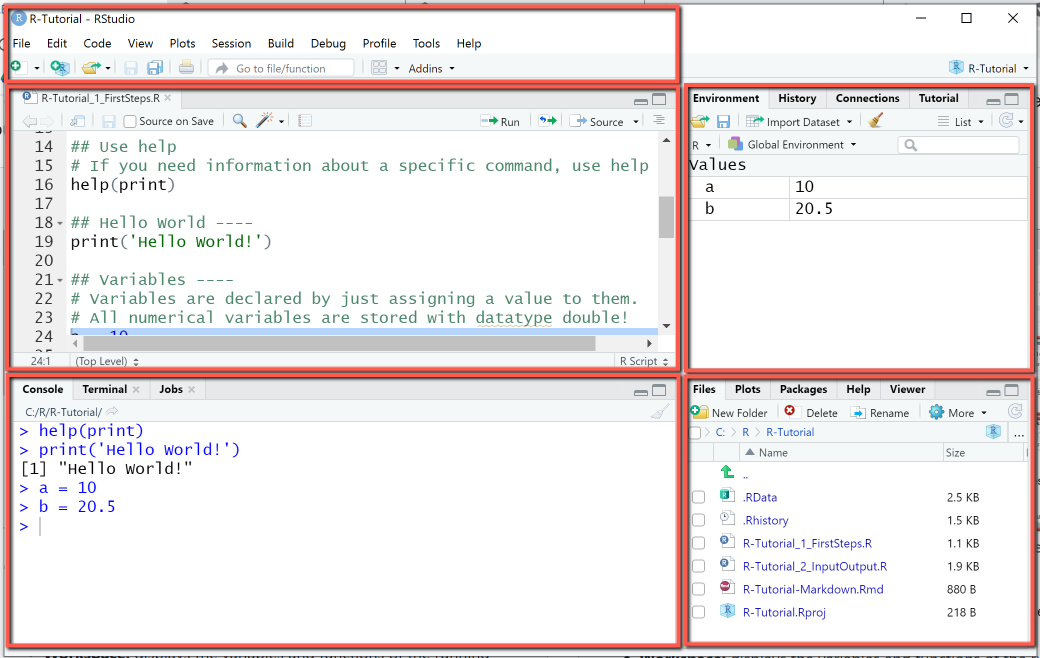
This image of the RStudio interface shows variables 'a' and 'b' and their numeric values appearing in the 'Environment' pane (top-right) after being assigned in the script.
Performing Calculations in R
In the last lesson, you used R for a simple calculation. R can, of course, perform all the standard arithmetic operations. Before we combine this with variables, let's quickly formalize the operators you will use.
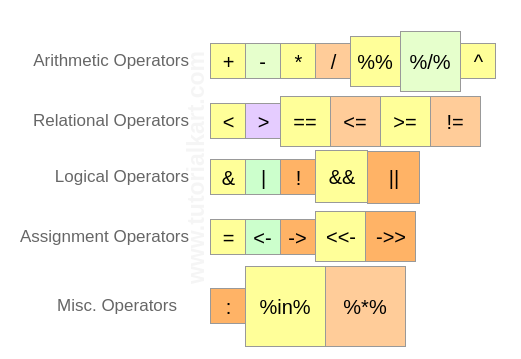
A visual summary of common operators in R. For this lesson, we will focus on the 'Arithmetic Operators' (like +, -, *, /) and the 'Assignment Operators' (<-).
The following reading explains these operators and, crucially, the order in which R performs them.
Chapter 3 Getting started with R | Learning statistics with R
This section from "Learning statistics with R" covers the basics of arithmetic in R and the order of operations.
Read the chapter sections 3.3 through 3.3.3. Pay close attention to the table of operators and the explanation of BEDMAS (Brackets, Exponents, Division/Multiplication, Addition/Subtraction). Understanding this "order of operations" is essential for ensuring your calculations are performed correctly.
Combining Variables and Arithmetic
The real power comes when you combine these two concepts. By performing calculations on variables, you can write code that is not only readable but also adaptable.
Imagine you have extracted the number of participants from the treatment and control groups of a study. You can store these in variables and then calculate the total.
Open a new R script and type the following code. Remember to execute each line with Ctrl+Enter (or Cmd+Enter).
# Data from a hypothetical physical therapy study
n_treatment <- 45
n_control <- 42

# Calculate the total number of participants
total_participants <- n_treatment + n_control

# Print the value of the new variable to the console
total_participants
When you run the final line, the console will display [1] 87. Notice how the total_participants variable has also appeared in your Environment pane.
If you get new information—for instance, if the control group actually had 43 participants—you don't have to redo the entire calculation. You simply change the value of n_control and re-run the script.
# Update the value for the control group
n_control <- 43

# Re-run the calculation
total_participants <- n_treatment + n_control

# View the updated total
total_participants
Now, the console will display [1] 88. This process of assigning data to variables and then writing operations to manipulate them is the essence of programming for data analysis.
The following video provides an excellent summary of everything we have just discussed, including the important convention of using <- for assignment.
This video from the DataDaft channel provides a concise and clear explanation of variables in R.
Watch the entire video. It will reinforce: How to assign values of different types to variables using <span data-type="resource_video_timerange" data-resource-subitem-id="36875cda" data-range-start="40" data-range-end="88">the <- operator</span>. How <span data-type="resource_video_timerange" data-resource-subitem-id="19f484c8" data-range-start="126" data-range-end="145">re-assigning a variable</span> overwrites its old value. How to use variables in <span data-type="resource_video_timerange" data-resource-subitem-id="07c7201a" data-range-start="145" data-range-end="185">mathematical operations</span>. The best-practice distinction between using <- for variable assignment and = for arguments inside functions, which is an important convention to learn early (assignment vs. arguments).
Conclusion
In this lesson, you've learned how to instruct R to store and manipulate information. This is a critical step towards conducting a full meta-analysis. Your script is no longer just a series of commands to be executed and forgotten; it is a dynamic worksheet where you can define, calculate, and update your data.
Here are the main takeaways:
- Variables are names used to store values in R.
- The assignment operator
<-is used to assign a value to a variable. - Created variables appear in the Environment pane in RStudio.
- You can perform arithmetic operations (
+,-,*,/) on variables just as you would with numbers. - R follows the BEDMAS order of operations when evaluating expressions.
So far, we have only worked with numbers. However, the data you extract from studies will include more than just numerical values, such as study authors, intervention types, and outcomes. In the next lesson, we will explore the different data types that R uses to represent this variety of information.