Welcome back to your course on building a high-performance whiteboard. In our last lesson, we established a crucial foundation for optimization by learning how to identify and track "dirty rectangles"—the specific areas of your canvas that have changed from one frame to the next. You now have a conceptual DirtyRectManager that collects and coalesces these rectangles into a minimal list.
However, simply knowing which regions are dirty is only half the battle. Your rendering code still attempts to redraw the entire scene. Today, we bridge that gap. The goal of this lesson is to take your list of dirty rectangles and use it to clip your drawing operations, ensuring that the GPU only performs work within these modified areas. This is the step that translates the theory of dirty rectangles into a tangible performance gain.
The Power of Clipping
You've collected a list of rectangles that need updating. The most direct way to use this information is to tell the graphics API, "For the next set of drawing commands, I want you to completely ignore any pixels that fall outside of these specific areas." This process is called clipping.
Clipping is a fundamental operation in computer graphics, and modern GPUs are highly optimized for it. When you set a clip region, you're not implementing a slow, manual pixel-by-pixel check in your own code. Instead, you're configuring the GPU's rendering pipeline. The hardware itself will then efficiently discard any fragments that are outside the clip boundary, saving fill-rate and memory bandwidth.
For your whiteboard, where a user might be adding a single small stroke, the dirty region could be a tiny fraction of the screen. By clipping to that region, you prevent the GPU from pointlessly re-rasterizing thousands of other static strokes across the entire canvas.
Implementing Clipping in Skia
Skia provides a powerful and easy-to-use clipping system directly on the SkCanvas object. The core pattern involves saving the canvas state, applying a clip, performing your drawing, and then restoring the state to remove the clip.
canvas->save(): Pushes the current state (transformation matrix, clip region, etc.) onto a stack.canvas->clipRect(...)orcanvas->clipRegion(...): Modifies the current clip region. Any subsequent drawing will be constrained by this new boundary.... your drawing code ...: Issue yourdrawPath,drawTextBlob, etc. calls.canvas->restore(): Pops the last saved state from the stack, effectively undoing the clip and any other state changes made sincesave().
This save/restore pattern is essential for isolating the effects of clipping. Without it, a clip applied for one object would incorrectly constrain the drawing of all subsequent objects.
From a List of Rects to a Single Clip Region
You have a std::vector<SkRect> from your DirtyRectManager. How do you turn that into a single clip area for the canvas?
You could iterate through each rectangle, clipping and redrawing the scene for each one, but that would be highly inefficient. The ideal solution is to first compute the union of all your dirty rectangles into a single, possibly complex, shape and then apply that as the clip region just once.
This is precisely what Skia's SkRegion class is designed for. An SkRegion represents an area composed of any number of non-overlapping rectangles. It provides highly optimized methods for performing boolean operations, like kUnion_Op.
The Igalia team, in their work on the Blink rendering engine, uses this exact technique.
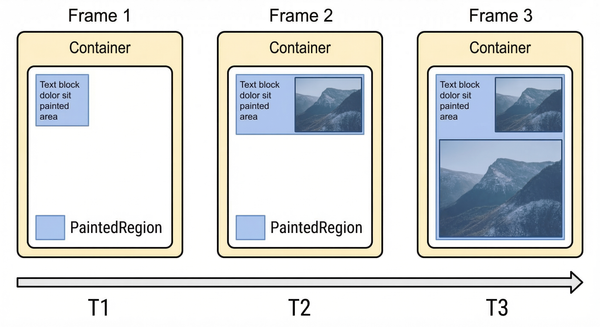
The implementation of Container Timing: aggregating paints in Blink
This technical blog post from Igalia details how they measure and aggregate painted areas in the Blink rendering engine. It provides a real-world example of the concepts we're discussing.
Focus on the section titled Aggregating Regions. Notice how they maintain a PaintedRegion and perform a union operation: CurrentRegion = Union(...). Critically, they mention that they use a class based on Skia's SkRegion to handle these unions efficiently. This validates our approach.
The process in C++ would look like this:
// Assume dirtyRects is your std::vector<SkRect>
SkRegion clipRegion;

for (const SkRect& rect : dirtyRects) {
    // Round the float rect to an integer rect for the region
    SkIRectirect = SkIRect::RoundOut(rect);
    // Union this rect into the total region
    clipRegion.op(irect, SkRegion::kUnion_Op);
}

// Now you have a single SkRegion representing all dirty areas
canvas->save();
canvas->clipRegion(clipRegion);

// ... perform drawing ...

canvas->restore();
The Ultimate Strategy: Culling and Clipping
We can now instruct the GPU to only paint pixels within the dirty region. But what about the CPU? Even with clipping enabled, if we tell Skia to draw 10,000 strokes, the CPU still has to process all 10,000 draw calls, sending them to the driver, even if 9,990 of them are entirely outside the clipped area.
This is where we combine clipping with the culling techniques you've already learned.
- Clipping (GPU-side): Discards pixels outside the dirty region.
- Culling (CPU-side): Skips draw calls for objects that are completely outside the dirty region.
This two-pronged attack is the key to high-performance 2D rendering. Before issuing a draw call, we do a quick check on the CPU: does this object's bounding box even intersect with our dirty region? If not, we don't bother sending the draw call at all.
Let's watch a short video that explains the basic principle of CPU-side culling in a simple game context.
20 - Rendering Efficiency - New Beginner 2D Game Programming
This video from CodeNMore's game programming series tackles the exact problem of wasteful rendering. While the context is a 2D tilemap game, the core logic is universal.
Watch the section from the beginning up to the explanation of the problem. The presenter notes that the engine is trying to render every single tile, even those far off-screen. This is the same inefficiency we're fighting. Then, pay close attention to the logic from the implementation. The key idea is calculating xstart, xend, ystart, and yend variables to limit the for loop. They are no longer looping from 0 to width, but from first_visible_tile to last_visible_tile. This is a simple form of culling.
Apple's developer documentation for its native Cocoa UI framework provides an excellent, more advanced description of this combined culling-and-clipping strategy.
Though written for Objective-C and Cocoa, this document perfectly describes the high-level strategy we need to implement. The principles are universal.
Read the section Constraining Drawing to Improve Performance. The text explains that you can improve performance by drawing only those parts that fall within the dirty rectangle. Pay special attention to the code in Listing 6-1 and Listing 6-2. In Listing 6-1, the code iterates through all drawable objects (thing) and performs two checks. First, a broad check against aRect (the union of all dirty rects), then a finer check against the individual dirty rects. Only if an object intersects does it get drawn ([self drawThing:thing]). Listing 6-2 shows a simplified version using a helper method, needsToDrawRect:, which encapsulates this intersection test. This is precisely the CPU-side culling step we need. We're checking if an object needs to be drawn before actually drawing it.
The Optimized Render Loop
Let's put all these pieces together into a concrete plan for your render loop.
- Start of Frame: Begin your render function.
- Get Dirty Regions: Ask your
DirtyRectManagerfor the list of coalesced dirty rectangles from the last update tick. If the list is empty, there's nothing to do! You can skip drawing entirely for this frame. - Create Clip Region: If there are dirty rects, create a single
SkRegionby taking the union of all of them, as shown in the code snippet above. - Save and Clip: Call
canvas->save()and thencanvas->clipRegion()with the union region you just created. - Clear Background: A crucial step! Since you are no longer clearing the whole screen, you must clear the area inside your clip region. This erases anything that was there before (e.g., an object that was deleted or moved). A simple
canvas->clear(SK_ColorWHITE)will do, and because of the clip, it will only affect the dirty areas. - Cull and Draw: Iterate through the objects you need to draw (e.g., the strokes returned from your Quadtree query). For each object:
- Get its bounding box (
stroke->getBounds()). - Perform a culling check:
if (clipRegion.intersects(SkIRect::RoundOut(stroke->getBounds()))). - If the check passes, issue the draw call:
stroke->draw(canvas).
- Get its bounding box (
- Restore: After the loop, call
canvas->restore()to remove the clip and clean up the canvas state. - Present: Flush the surface to send the updated frame to the screen.
- Reset: Clear the
DirtyRectManager's list to prepare for the next frame.

Summary and Next Steps
You've now moved from simply identifying what changed to actively using that information to command the GPU. This is a significant milestone in building a truly performant renderer.
Key Takeaways:
- Clipping: Use
SkCanvas::save(),clipRegion(), andrestore()to tell the GPU to ignore pixels outside of designated areas. - Union with
SkRegion: Efficiently combine a list of dirty rectangles into a single, complex clip region by usingSkRegion::kUnion_Op. - Culling + Clipping: The optimal strategy combines CPU-side culling with GPU-side clipping. First, check if an object's bounds intersect the dirty region (culling). If they do, issue the draw call and let the GPU handle the precise pixel-level clipping.
- Clear the Dirty Area: When you stop doing full-screen redraws, you become responsible for clearing the background of areas that need to be redrawn.
By implementing this logic, you've drastically reduced redundant work for both the CPU and the GPU. Your application will now feel much more responsive, especially when the canvas is filled with many static elements.
In the next lesson, we will look at another advanced optimization technique. Even with culling and clipping, frequent changes to the SkPaint object (color, stroke width, etc.) can cause performance issues. We will look at how to design an intermediate data structure to represent draw commands, which is the first step towards reordering and batching them to minimize expensive state changes on the GPU.