Welcome back. In our last lesson, you learned how to implement the machinery of move semantics: the move constructor and move assignment operator. We established that these special functions allow for the efficient transfer of resources, but they are typically invoked automatically only for rvalues—temporary objects that are about to expire. This leaves a crucial question unanswered: what if we want to move from an object that has a name, an lvalue, because we know we are finished with its value?
This lesson will provide the answer. We will focus on std::move, the standard library tool that gives you explicit control over the move process. You will learn how to use it to signal your intent to the compiler, enabling you to transfer ownership from any object, not just temporaries. This is a fundamental technique for eliminating unnecessary copies and is central to writing the high-performance C++ code required for your whiteboard application, especially when handling large data objects like image buffers or complex vector paths for user strokes.
The Compiler's Caution: Why Lvalues Are Copied by Default
Before we introduce the solution, it's vital to understand the problem. A C++ compiler is designed to be safe and conservative. When it sees an lvalue—an object with a name and a persistent address—it assumes you might need to use that object again later in its scope.
Consider this simple scenario:
std::vector<MyHeavyObject> objects;

MyHeavyObject obj1;
// ... obj1 is configured and used ...

objects.push_back(obj1); // A copy is made here

// ... some other code that might use obj1 ...
std::cout << "Object 1 size: " << obj1.size() << std::endl;
The compiler chooses to copy obj1 into the vector because, from its perspective, you might still need the original obj1 intact. If it were to move from obj1 (plundering its internal resources), the subsequent use of obj1 would lead to undefined behavior or a crash. To avoid this danger, it makes a safe, but potentially expensive, deep copy.
This is where you, the programmer, have more information than the compiler. You might know that after adding obj1 to the vector, you will never use it again. You need a way to communicate this knowledge to the compiler and override its default safe behavior.
std::move: Giving the Compiler Permission to Move
The tool for this job is std::move, found in the <utility> header. At first glance, its usage seems to do exactly what we want:
// ... same setup as before ...

objects.push_back(std::move(obj1)); // A move is performed here

// ... obj1 is now in a "valid but unspecified" state ...
By wrapping obj1 in std::move, you trigger overload resolution to select the version of push_back that takes an rvalue reference (MyHeavyObject&&), which then invokes your move constructor. The result is a highly efficient transfer of resources.

Now for the most important point, a concept that trips up many developers.
std::move Does Not Move
Despite its name, std::move does not, in itself, move anything. std::move is a cast. It unconditionally casts its argument to an rvalue reference. That's it. It's a message to the compiler's overload resolution system.
You are telling the compiler: "I am giving you permission to treat this lvalue as if it were a temporary rvalue. I promise I am done with its current value, so you are free to call a function that will steal its resources (i.e., a move constructor or move assignment operator)."
The actual movement is still performed by the move constructor or move assignment operator you wrote in the last lesson. std::move is just the key that unlocks the door for them to be called on lvalues.
5 misconceptions about std::move in C++
The first point in this article from PikoTutorial is crucial. It directly confronts the most common misunderstanding about std::move.
Please read the first section, std::move moves an object. This explanation solidifies the idea that std::move is a cast that enables a move, rather than an operation that performs a move.
For a more dynamic explanation, the following video from The Cherno breaks down the concept of std::move as a cast to a temporary.
std::move and the Move Assignment Operator in C++
This clip from "std::move and the Move Assignment Operator in C++" provides an excellent walkthrough of what std::move does at a practical level.
Watch the segment from what it does. The presenter clearly demonstrates how std::move is essentially a more robust and idiomatic way to perform a cast to an rvalue reference, enabling the move constructor.
The Aftermath: The "Valid but Unspecified" State
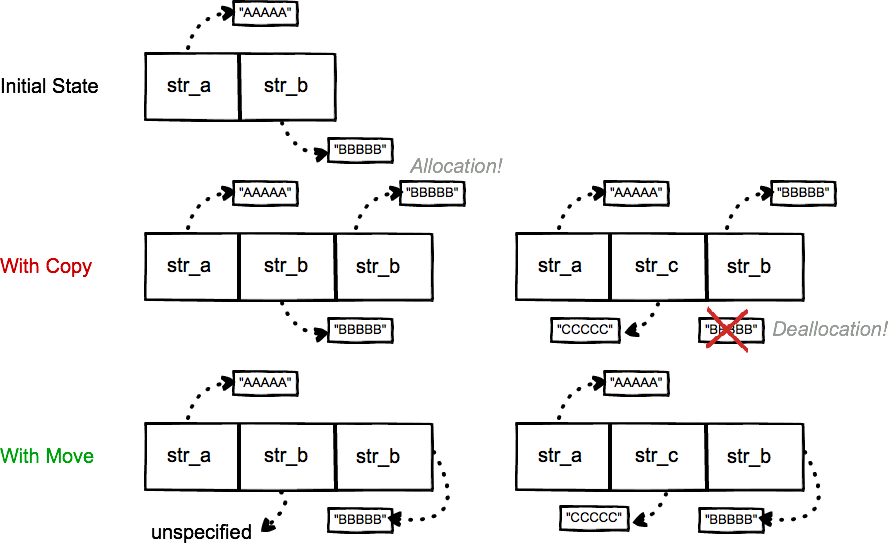
After you have moved from an object, what is its state? The C++ standard guarantees that the moved-from object is left in a valid but unspecified state.
- Valid: The object's internal state is self-consistent. Its class invariants hold. Most importantly, it can be safely destroyed when it goes out of scope. You can also assign a new value to it. This prevents resource leaks and crashes.
- Unspecified: You cannot make any assumptions about the value of the object. A moved-from
std::stringmight be empty, but the standard doesn't require it. A moved-fromstd::vectormight have a size of zero. The only safe operations are destruction and assignment.
This "valid but unspecified" rule is a pragmatic compromise. It allows the implementer of a move operation to do the absolute minimum work required to transfer ownership, maximizing performance. For many standard library types, the minimal work results in an "empty" state.
The following talk by Nicolai Josuttis, a C++ standards committee member, gives the definitive explanation of this state and why it's so important for enabling code patterns like read-modify loops.
Back to Basics: Move Semantics - Nicolai Josuttis - CppCon 2021
In this clip from his "Back to Basics: Move Semantics" talk at CppCon 2021, Nicolai Josuttis explains the state of a moved-from object.
Watch the segment from aftermath of move. Pay close attention to his example of using getline in a loop, which shows a powerful real-world use case for reusing an object after its value has been moved.
Practical Usage and Common Pitfalls
With a clear understanding of what std::move is and what it does, let's look at its application and some critical pitfalls to avoid.
Moving Elements
When a std::vector needs to grow its capacity, it allocates a new, larger block of memory and must transfer all existing elements from the old block to the new one. If the elements are movable, this transfer is incredibly fast. If they are only copyable, it's a slow, element-by-element deep copy.
Pitfall 1: Moving const Objects
What happens if you try to std::move a const object?
const MyHeavyObject const_obj;
objects.push_back(std::move(const_obj)); // What happens here?
You might expect a move, but you will get a copy. Why?
std::move(const_obj)casts it toconst MyHeavyObject&&(aconstrvalue reference).- Your move constructor has the signature
MyHeavyObject(MyHeavyObject&&). It takes a non-constrvalue reference because it needs to modify (pillage) the source object. - The compiler cannot bind a
constobject to a non-constreference. The move constructor is not a viable candidate. - The compiler falls back to the next best option: the copy constructor, which takes a
const MyHeavyObject&. Aconstrvalue reference can bind to aconstlvalue reference.
This is a subtle but critical trap that can silently degrade performance.
5 misconceptions about std::move in C++
The same article from PikoTutorial covers this exact pitfall.
Please read the final section, move semantics always. The code example makes the result perfectly clear.
Pitfall 2: The return std::move(x) Anti-Pattern
When returning an object from a function, you should almost never use std::move.
// ANTI-PATTERN: DO NOT DO THIS
MyHeavyObject create_object() {
    MyHeavyObject local_obj;
    // ... configure local_obj ...
    return std::move(local_obj); // This is counter-productive!
}
Modern compilers perform an optimization called Named Return Value Optimization (NRVO). The compiler can construct the return object directly in the memory of the caller, completely eliding any copy or move. However, by explicitly writing std::move, you are casting local_obj to an rvalue reference. This can, in some cases, prevent the compiler from performing NRVO, forcing it to perform a move when no operation was needed at all. The correct code is simply return local_obj;. Trust the compiler.
Conclusion
You now have the final piece of the move semantics puzzle. While move constructors and assignment operators provide the mechanism, std::move provides the explicit trigger. You've learned that std::move is a cast that signals your intent, allowing the compiler to break its default "copy lvalues" rule in a safe and controlled way. This is not just an academic detail; it is a cornerstone of modern C++ performance.
Key Takeaways:
std::moveis a Cast: It does not move anything. It's a static cast to an rvalue reference, signaling to the compiler that the object can be moved from.- It Enables Moving from Lvalues: It gives you a way to override the compiler's safe-but-slow default of copying named objects.
- Moved-From State: An object that has been moved from is in a valid but unspecified state. It can be safely destroyed or assigned a new value, but its old value is gone.
- Avoid on
constObjects: Attempting to move from aconstobject will silently fall back to a copy. - Avoid in
returnStatements: Do not usestd::moveon local variables in a return statement. Rely on the compiler's (Named) Return Value Optimization (RVO/NRVO).
In our upcoming lessons, we will shift focus slightly. Having mastered how to manage and move data efficiently, we will next explore how to handle logic and behavior with stateful lambda expressions. This will open up new ways to write concise, inline callbacks and custom logic for algorithms, which will be invaluable when handling user input and other events in your whiteboard application.