Welcome to the final lesson of our first module on modern C++ foundations. In our previous session, we explored how auto and range-based for loops simplify code and enhance correctness. We saw that auto allows the compiler to deduce a variable's type from its initializer. This lesson introduces the other side of that coin: C++ templates, which allow you, the programmer, to write functions and classes that are parameterized by type.
Mastering templates is fundamental to writing generic, reusable, and, most importantly for your project, high-performance code. They are the mechanism behind much of the C++ Standard Library and the key to a powerful C++ feature known as "zero-cost abstraction." Today, you will learn how to define your own generic functions and classes using basic template syntax, a skill that will be invaluable for creating flexible and efficient components for your whiteboard application.
The Problem: Code Duplication
Imagine you need a function to find the larger of two values. Without templates, you'd face a familiar problem: code duplication. You would need to write a separate function overload for each data type you want to support.
int max(int a, int b) {
    return (a > b) ? a : b;
}

double max(double a, double b) {
    return (a > b) ? a : b;
}

std::string max(const std::string& a, const std::string& b) {
    return (a > b) ? a : b;
}
The logic is identical in each case; only the type changes. This violates the "Don't Repeat Yourself" (DRY) principle and creates a maintenance burden. If you need to change the logic, you have to change it in every overload.
Function Templates: Writing Code That Writes Code
Templates solve this by allowing you to write a single "blueprint" for a function. The compiler then uses this blueprint to generate the specific versions of the function it needs at compile time.
Here's how we can write a generic myMax function using a template:
#include <iostream>

template <typename T>
T myMax(T a, T b) {
    return (a > b) ? a : b;
}

int main() {
    std::cout << "Max of 5 and 10 is " << myMax(5, 10) << std::endl;
    std::cout << "Max of 3.14 and 2.71 is " << myMax(3.14, 2.71) << std::endl;
}
Let's break down the syntax template <typename T>:
template <...>: This is the template prefix, which tells the compiler we are defining a template.typename T: This declares a template parameter.typenameis a keyword indicating that the following name is a placeholder for a type.Tis the conventional name for this placeholder, but it could be anything. You may also see the keywordclassused instead oftypenamehere; they are equivalent in this context, buttypenameis often preferred because it more clearly states thatTcan be any type, not just a class.
When the compiler sees myMax(5, 10), it deduces that T is int and generates a function int myMax(int, int). When it sees myMax(3.14, 2.71), it deduces T is double and generates double myMax(double, double). This process is called template instantiation.
The following video from The Cherno provides a clear visual explanation of this process.
This video introduces the core motivation for templates and explains the basic syntax for a generic function. It also demonstrates a key concept: template code isn't fully compiled until it's actually used.
Watch the segment from the introduction to the print function example. Pay close attention to how a single template replaces multiple overloads. Then, watch the crucial demonstration from what happens when you don't use the template, which proves that the compiler only generates code for the template instantiations that are actually called in your program.
As The Cherno explains, a template is not real code until it's instantiated. It's a set of instructions for the compiler. This compile-time nature is what makes templates so powerful and performant.
For some hands-on practice with the basic syntax, review the following exercises.
C++ Templates and Generic Programming Exercises
These exercises provide concise, self-contained examples of fundamental function templates.
Review the problem and solution for the following exercises to solidify your understanding of the syntax: Exercise 1: Generic max function Exercise 2: Generic swap function (Note the use of references T& to modify the original variables). Exercise 3: Generic Array Print
A common pitfall with templates arises from their implicit requirements. The myMax template, for example, implicitly requires that type T can be compared using the > operator. If you try to instantiate it with a type that doesn't support this operator, you'll get a compile error. The following article introduces this idea with a divide function, showing how a templated version can lead to unexpected behavior (integer division) if you're not careful.
Templates in C++: Boost your CFD solver performance - cfd.university
This article takes a critical, performance-oriented look at templates. This first section introduces function templates and immediately points out a common bug.
Read the section A first look at templates, and then focus on the subsection A closer look, which explains the subtle bug with integer division in a templated divideT function. This highlights that generic code is not a substitute for understanding type semantics.
Class Templates: Generic Data Structures
Just as we can create generic functions, we can also create generic classes. This is how the C++ Standard Template Library (STL) provides containers like std::vector, std::list, and std::map.
Let's define a simple Pair class that can hold two values of potentially different types.
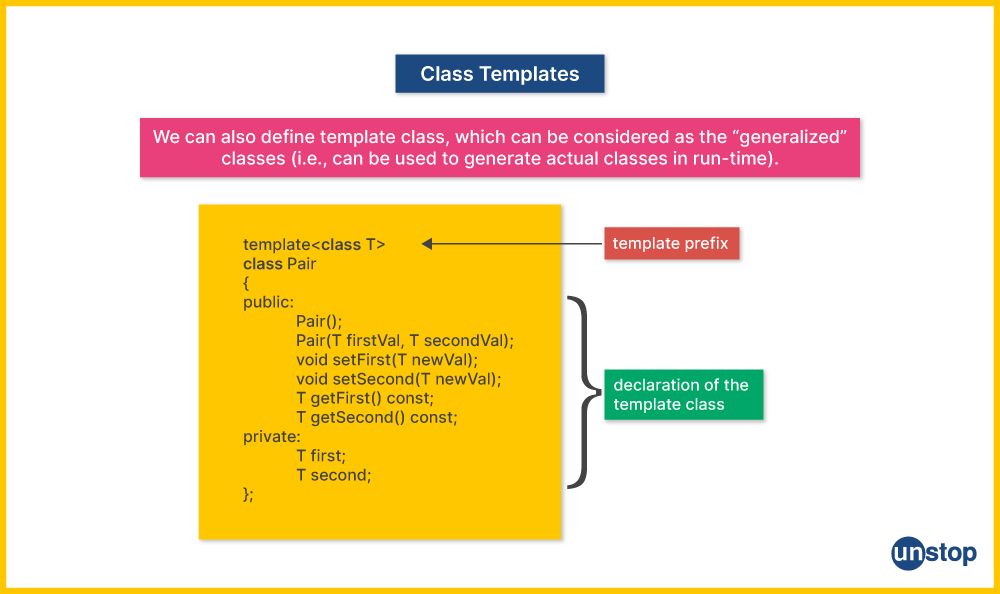
The image shows a Pair that holds two items of the same type T. We can easily extend this to two different types, T1 and T2:
template <typename T1, typename T2>
class Pair {
private:
    T1 first_val;
    T2 second_val;

public:
    Pair(T1 a, T2 b) : first_val(a), second_val(b) {}

    T1 getFirst() const { return first_val; }
    T2 getSecond() const { return second_val; }
};
To use a class template, you must explicitly specify the types you want to use inside angle brackets <...>. The compiler cannot deduce them from constructor arguments the way it often can for functions.
int main() {
    Pair<int, double> p1(10, 5.5);
    std::cout << "First: " << p1.getFirst() << ", Second: " << p1.getSecond() << std::endl;

    Pair<std::string, int> p2("Score", 95);
    std::cout << "First: " << p2.getFirst() << ", Second: " << p2.getSecond() << std::endl;
}
A crucial practical point is that, because of the way the compiler instantiates templates, their full definition (not just the declaration) must typically be placed in a header file.
Back to Basics: Templates in C++ - Nicolai Josuttis - CppCon 2022
This CppCon talk by Nicolai Josuttis covers the fundamentals of templates. These clips explain the header-file rule and show the syntax for class templates.
First, watch the brief explanation of why templates are defined in header files. Then, watch the segment on class templates, which uses a Stack example and points out that you must explicitly specify the template parameters when creating an object.
Non-Type Template Parameters
Templates can also accept non-type parameters, such as constant integers. This allows you to parameterize a class with values known at compile time, like the size of an array. This is the basis for std::array.
The Cherno's video demonstrates this by building a stack-allocated array class that is generic over both its element type and its size.
This part of the video shows how to build a powerful and efficient generic Array class using both a type parameter and a non-type parameter.
Watch the segment from creating a class template. This example combines a typename T with an int n to create a fully compile-time-configurable array.
Templates for High Performance: Static Polymorphism
Now we arrive at the most compelling reason for you to master templates: performance. Templates enable a powerful C++ feature called static polymorphism, which is a compile-time alternative to the dynamic polymorphism provided by virtual functions.
As someone interested in low-level systems and performance, you know that a call to a virtual function has a runtime cost. The program must:
- Look up the object's virtual table (vtable).
- Find the correct function pointer in the table.
- Dereference the pointer and call the function.
This indirection can prevent compiler optimizations like inlining and may lead to instruction cache misses. While this cost is often negligible, in performance-critical code—like the rendering loop of your whiteboard app, which might execute millions of times per second—it can be significant.
Static polymorphism with templates eliminates this runtime overhead entirely. The type resolution happens at compile time. The compiler generates code with direct function calls, which are as fast as non-polymorphic calls and can be inlined. This is a "zero-cost abstraction."
The following article provides an excellent deep dive into this topic, framed in the context of high-performance scientific computing.
Templates in C++: Boost your CFD solver performance - cfd.university
This article contrasts dynamic and static polymorphism, explaining the performance implications in detail.
First, read the section A CFD template example to see how templates can be used to select a RANS turbulence model, which is analogous to selecting different drawing tools or rendering strategies in your application. Then, carefully study the entire section on Static Polymorphism with Templates. It provides a side-by-side comparison of a Reconstructor class implemented with virtual functions versus one implemented with templates. Pay close attention to the discussion of runtime overhead, CPU clock cycles, and instruction pipelines. This is the core reason why templates are indispensable for high-performance C++.
Conclusion
In this lesson, we've moved from the convenience of code reuse to the critical performance advantages of C++ templates. You've seen how they provide a mechanism for generic programming that is resolved entirely at compile time, allowing you to build flexible components without sacrificing speed.
Key Takeaways:
- Generic Programming: Templates allow you to write functions and classes that operate on generic types, reducing code duplication.
- Compile-Time Instantiation: Templates are blueprints, not code. The compiler generates type-specific code only for the instantiations you actually use.
- Syntax: You use
template <typename T>to define a template. Function template types are often deduced, while class template types must be specified explicitly (e.g.,MyClass<int>). - Non-Type Parameters: Templates can also be parameterized by compile-time constants (e.g.,
template <int N>), enabling creations like fixed-size arrays. - Static Polymorphism: This is the killer feature for performance. By using templates for polymorphism, you eliminate the runtime overhead of virtual function calls, resulting in faster, more optimizable code.
This lesson concludes our foundational module. You now have a solid grasp of modern C++ idioms for resource management, writing clean code, and achieving type-safe genericity.
In our next module, "Advanced C++ for Performance," we will begin by exploring the difference between lvalues and rvalues. This is the first step toward understanding move semantics and rvalue references—another cornerstone C++ feature for eliminating unnecessary copies and dramatically improving runtime performance.