In our previous lesson, we successfully integrated the Quadtree into a DocumentLayer, creating a system that automatically partitions every new stroke by its spatial location. This set the stage for a major performance optimization. You now have the data structure in place; it's time to use it to solve the primary challenge of a large-canvas application: rendering speed.
Today's objective is to perform view frustum culling by querying the Quadtree to retrieve only visible strokes. We will implement the core logic that allows your application to ask the Quadtree, "Which strokes are currently inside the user's viewport?" This query is the heart of the culling process and the reason we built the spatial index in the first place. By efficiently retrieving only the visible objects, we can avoid the costly process of checking every single stroke on the canvas for every frame.
The Problem: Rendering Everything
As your whiteboard fills with hundreds or thousands of strokes, a simple, brute-force rendering loop becomes a significant bottleneck.
// The naive approach: iterate through every stroke
void render(SkCanvas* canvas) {
    for (const auto& stroke : m_strokes) {
        // This check happens for every stroke, even those miles off-screen
        if (viewBounds.intersects(stroke.getBounds())) {
             drawStroke(canvas, stroke);
        }
    }
}
This approach has a time complexity of , where is the total number of strokes. For an application designed to handle complex documents, this linear scaling is unacceptable. Your interest in high-performance systems tells you there must be a better way, and that's precisely what spatial partitioning provides.
The following article gives an excellent overview of this problem, comparing the brute-force method to a Quadtree-based solution.
Spatial-Partitioning-Quadtree | Spatial ordering optimization: Quadtree
This article provides context on why spatial partitioning is essential for performance in applications like games and, by extension, our whiteboard.
Start with the section Issue's Point. It explains the performance cost of brute-force searching, where the number of checks scales poorly with the number of objects. Next, read the section QUADTREE and focus on the subsection Quadtree's Approaches. The article specifically mentions Camera Culling as a primary use case, which is exactly what we are implementing. The logic of not needing to render the entire map is directly applicable to our infinite canvas. Finally, review the Quadtree's Goal section. The animated GIF and the performance numbers, showing a reduction from 400 to just 29 iterations, provide a powerful illustration of the optimization we're about to implement. It demonstrates how subdivision drastically reduces the workload.
The Solution: The Recursive Query
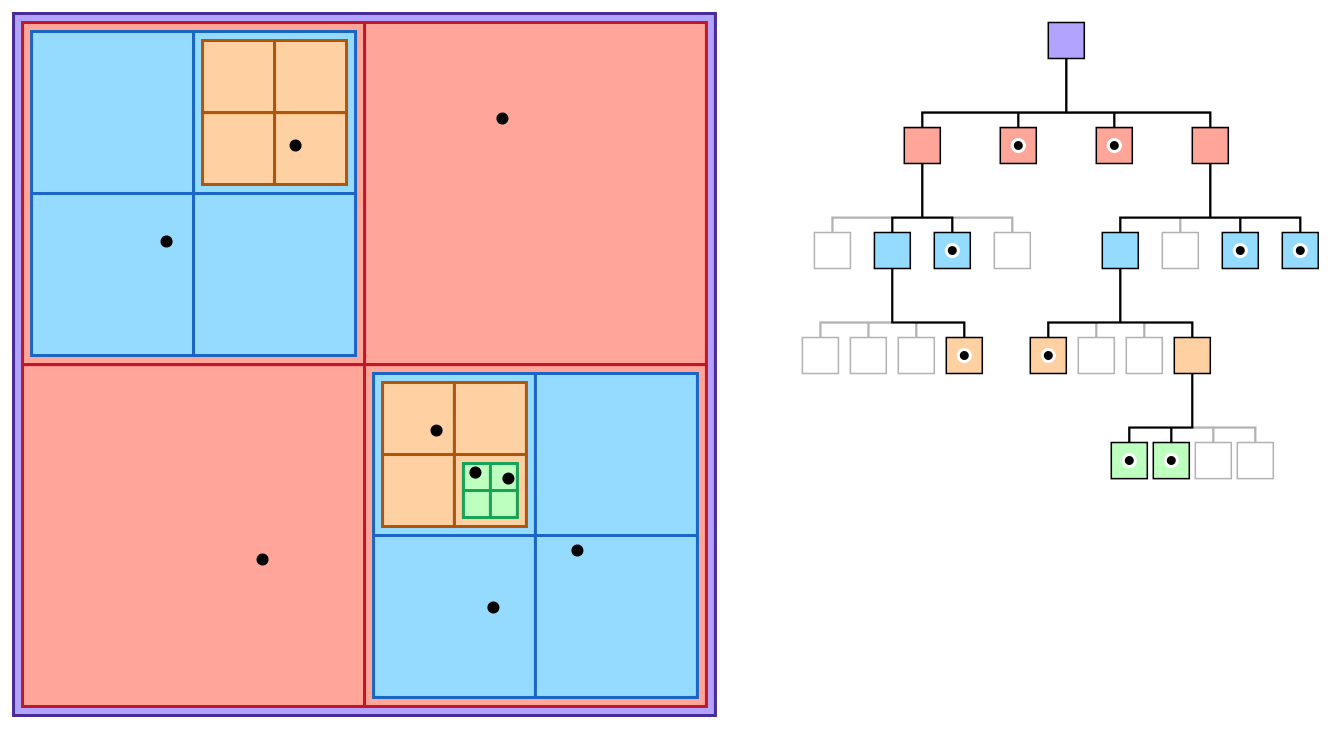
View frustum culling in our 2D context means rendering only the objects that intersect with the camera's visible rectangle. Our Quadtree is designed to answer this question efficiently with a query method. The algorithm is a recursive descent through the tree, pruning entire branches that are outside the query area.
Here's the logic for a query(queryBox) method:
- Start at the Root: Begin with the root node of the Quadtree.
- Check Current Node's Objects: Iterate through all objects stored directly within the current node. For each object, if its bounding box intersects with
queryBox, add it to a list of results. - Descend to Children: If the current node is not a leaf (i.e., it has children), iterate through its four child nodes.
- Prune or Recurse: For each child, check if the child's bounding box intersects with
queryBox.- If it does not intersect, that child and all its descendants are outside the view. We can ignore this entire branch of the tree. This is the culling step and the source of our performance gain.
- If it does intersect, recursively call the
queryfunction on that child node.
The javidx9 video you've seen before gives a great C++-centric explanation of this search mechanism.
Quirky Quad Trees Part1: Static Spatial Acceleration
This video, "Quirky Quad Trees Part1," provides a clear conceptual and implementation overview of the recursive search function.
First, watch the conceptual explanation of how the Quadtree recursively subdivides space and how a query can quickly discount entire regions. Then, pay close attention to the C++ implementation of the search function. The presenter details the recursive logic, including a key optimization: if a child's area is wholly contained within the search area, all of its contents can be added without further checks.
Implementing the Query Method
Now, let's look at a concrete implementation. The following article provides a clean, well-structured C++ example of a Quadtree class, including the query logic. This will serve as a strong reference for adding this capability to your own Quadtree.
Quadtree and Collision Detection | pvigier’s blog
This article presents a robust C++ Quadtree implementation. We'll focus on the section that details the query function.
Navigate to the section Finding Intersections and the subsection Intersection with a Box. The public query method sets up the result vector and calls a private, recursive helper. Study the implementation of the private query helper. You can see the two main steps of the algorithm clearly: A for loop that checks the values stored in the current node. An if block that checks if the node is an interior node, followed by a loop that recursively calls query on children whose boxes intersect the queryBox.
Based on this logic, you will add a query method to your Quadtree class. This method will accept a bounding box (SkRect in our case) and return a std::vector of the items it contains (our std::list<Stroke>::iterator).
Here is what the public-facing method in your DocumentLayer would look like. It acts as a clean interface to the Quadtree's functionality.
// In DocumentLayer.h
class DocumentLayer {
public:
    // ... other methods

    // Queries the document for strokes intersecting the given area.
    std::vector<StrokeIterator> queryVisibleStrokes(const SkRect& viewBounds) const;

private:
    // ... m_strokes, m_quadtree
};


// In DocumentLayer.cpp
std::vector<DocumentLayer::StrokeIterator>
DocumentLayer::queryVisibleStrokes(const SkRect& viewBounds) const {
    // Delegate the call directly to the Quadtree's query method.
    return m_quadtree.query(viewBounds);
}
The heavy lifting is done inside m_quadtree.query(), which you will implement using the recursive logic we've just discussed. The result is a list of iterators pointing only to the strokes that are potentially visible.

The complexity of a brute-force search is . In contrast, a Quadtree query is typically , where is the total number of items and is the number of items found. For a sparse view (where is small), this is a logarithmic-time operation, which is a massive improvement and is essential for building a high-performance system.
Conclusion
In this lesson, you've implemented the core query mechanism that makes view frustum culling possible. By creating a recursive function that traverses the Quadtree and intelligently prunes non-visible branches, you've built a tool to find on-screen objects with logarithmic complexity.
Key Takeaways:
- View Frustum Culling: The strategy of only processing and rendering objects that are within the visible screen area (the "frustum").
- Recursive Query Algorithm: The
querymethod works by checking objects in the current node and only descending into child nodes whose bounding boxes intersect the query area. - Pruning: The key to the Quadtree's efficiency is its ability to discard entire branches of the tree with a single bounding box check, avoiding thousands of individual object comparisons.
- Performance: You've replaced an problem with an solution, a fundamental optimization for your performance-oriented project.
You have now built the query function. The next logical step is to integrate it into your main application loop. In our next lesson, Modify the render loop to draw only the subset of strokes that are inside the current viewport, we will do exactly that. You will connect the camera's view rectangle to the queryVisibleStrokes method and modify your Skia rendering code to iterate over the much smaller, culled list of strokes.