Welcome to the next lesson in our journey to build a high-performance whiteboard application. In our previous session, we established the critical need for a spatial index to manage the potentially vast number of objects on our canvas. We designed the DocumentLayer class, which will own the master list of all strokes and extracted PDF items, and we decided it would use a Quadtree to enable fast spatial queries.
Today, we will dive into the core of that system. Your goal for this lesson is to implement a complete, generic Quadtree data structure in C++. We will move from the high-level design concepts we've discussed to a concrete, reusable class that can store and query objects by their 2D bounding boxes. Given your interest in systems programming and performance, this lesson will focus on creating an implementation that is both efficient and robust, using modern C++ features.
A Quick Recap: Our Architectural Plan
Remember the design from the previous lesson, based on the wrapper approach discussed in the javidx9 video. We have a DocumentLayer that holds two key things:
- A
std::list<WhiteboardObject>which is the "source of truth" for all our objects. We usestd::listbecause its iterators are stable, meaning they don't get invalidated when we add or remove other elements. - A
Quadtree<std::list<WhiteboardObject>::iterator>that does not store the heavyWhiteboardObjects themselves, but rather lightweight, stable iterators pointing to them in the list.
Today, we build that Quadtree class.
The Anatomy of a C++ Quadtree
A Quadtree is a tree structure where each internal node has exactly four children, representing four quadrants of a 2D space. An object is stored in the smallest node that completely encloses it. This structure allows us to quickly discard large areas of space during a query.
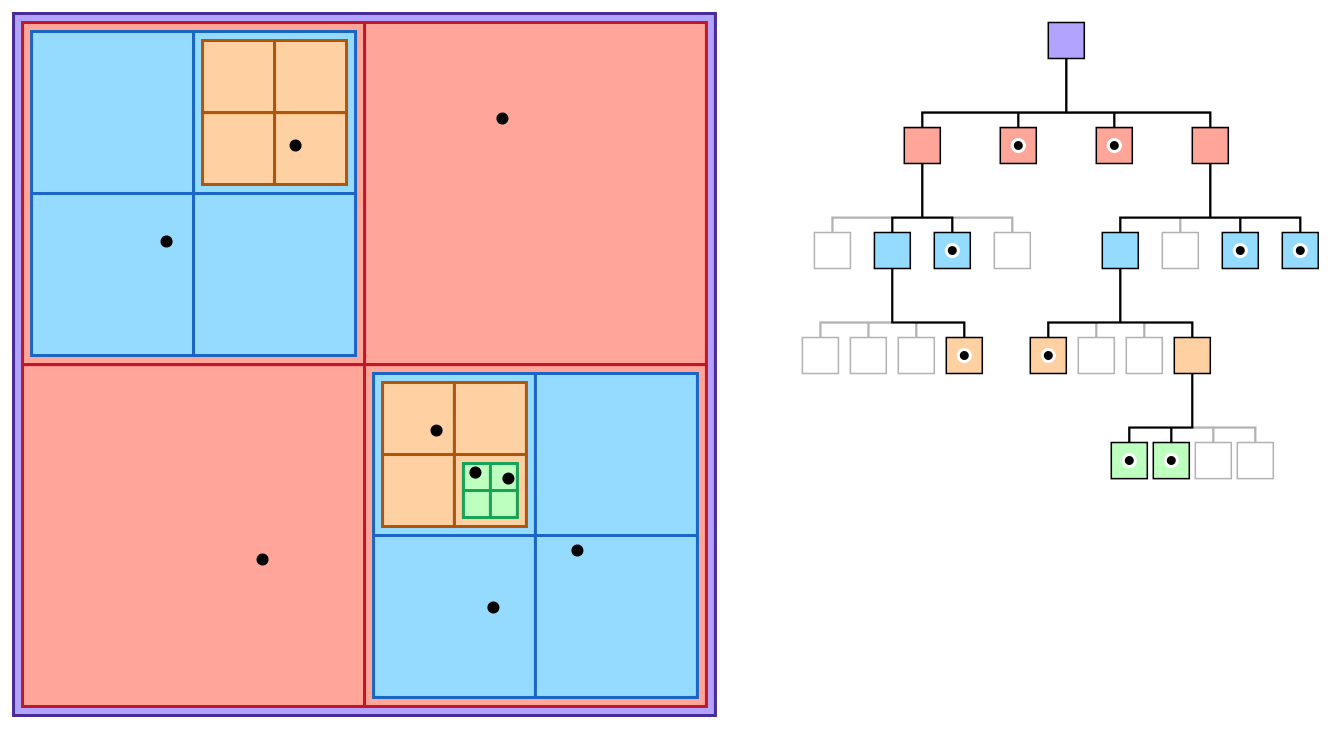
To build our Quadtree, we will follow a clean, modern C++ implementation strategy. A fantastic blog post by P-Vigier, "Quadtree and Collision Detection," provides an excellent blueprint. We will adapt its core ideas to fit our specific needs, particularly using Skia's data types.
Quadtree and Collision Detection | pvigier’s blog
This article provides a superb, template-based C++ implementation of a Quadtree. It's a great example of building a generic and reusable data structure.
First, read the Preliminaries section. The author defines helper classes for a Vector2 and a Box. For our project, we will use Skia's SkPoint and SkRect instead, but the principle is the same. Pay close attention to the contains and intersects methods in the Box class; these are the fundamental geometric tests for our Quadtree logic. Next, study the Quadtree section, which lays out the class structure. Note the elegant use of templates: T: The type of value being stored (for us, an ObjectIterator). GetBox: A callable type (like a lambda) that knows how to get a bounding box from a T. This makes our Quadtree incredibly flexible. Finally, examine the internal Node struct and the main class members. The use of std::unique_ptr for child nodes is a key modern C++ practice for managing the tree's memory automatically.
Building the Quadtree Class
Let's start defining our Quadtree.h file. We will use SkRect for our bounding boxes. A SkRect is defined by its left, top, right, and bottom coordinates. We'll need contains and intersects logic for it.
// Helper functions for SkRect
namespace QuadtreeUtils {
    // Checks if 'outer' fully contains 'inner'
    bool contains(const SkRect& outer, const SkRect& inner) {
        return outer.fLeft <= inner.fLeft &&
               outer.fTop <= inner.fTop &&
               outer.fRight >= inner.fRight &&
               outer.fBottom >= inner.fBottom;
    }

    // Checks if two rects intersect (SkRect::intersects does this)
    bool intersects(const SkRect& a, const SkRect& b) {
        return a.intersects(b);
    }
}

template <typename T, typename GetBox>
class Quadtree {
public:
    // Constructor takes the total area this Quadtree covers.
    Quadtree(const SkRect& box, const GetBox& getBox = GetBox())
        : mBox(box), mRoot(std::make_unique<Node>()), mGetBox(getBox) {}

    void add(const T& value);
    std::vector<T> query(const SkRect& queryBox) const;
    void clear();

private:
    static constexpr size_t THRESHOLD = 16;
    static constexpr size_t MAX_DEPTH = 8;

    struct Node {
        std::array<std::unique_ptr<Node>, 4> children;
        std::vector<T> values;
    };

    SkRect mBox; // The bounding box of this Quadtree node
    std::unique_ptr<Node> mRoot; // The root node
    GetBox mGetBox; // A function/lambda to get the bounding box of a value

    bool isLeaf(const Node* node) const {
        return !static_cast<bool>(node->children[0]);
    }

    // Private helper methods we will define next
    int getQuadrant(const SkRect& nodeBox, const SkRect& valueBox) const;
    SkRect computeBox(const SkRect& box, int i) const;
    void split(Node* node, const SkRect& box);

    void add(Node* node, size_t depth, const SkRect& box, const T& value);
    void query(Node* node, const SkRect& box, const SkRect& queryBox, std::vector<T>& values) const;
};
This skeleton closely follows the structure from the pvigier article, adapted for Skia. The GetBox callable is the bridge between the generic Quadtree and our specific WhiteboardObject data.
The Insertion Algorithm
Inserting an object is the most complex operation. The core principle is to push an object as deep into the tree as possible, placing it in the smallest quadrant that fully contains it. If an object overlaps multiple quadrants at a certain level, it is stored at their parent node.
This strategy is robust because it gracefully handles objects of all sizes without creating duplicate entries or other degenerate cases. The Stack Exchange discussion you saw earlier highlights this as one of the two primary strategies for AABB (Axis-Aligned Bounding Box) trees.
Quadtree and Collision Detection | pvigier’s blog
The pvigier article provides a full implementation of the insertion logic. We will follow this model step-by-step.
First, read the section on Insertion and Removal strategies. The article justifies choosing the second strategy: "store the value in the smallest node that entirely contains its bounding box." This is exactly what we need. Next, examine the two utility functions. The computeBox function calculates the bounds of a child quadrant, and getQuadrant determines which quadrant (0-3) a value's box fits into, returning -1 if it doesn't fit neatly into any single one. Finally, study the Insertion subsection carefully. The public add method calls a private recursive helper. This helper function embodies the core logic: If the node is a leaf, it checks if it has space or is at max depth. If so, it adds the value. If not, it calls split and tries again. If the node is a branch, it uses getQuadrant to decide whether to pass the value down to a child or store it at the current level. The split function itself is also critical, as it re-distributes values from a parent node to its newly created children.
Let's translate that logic into our class methods.
getQuadrant and computeBox
These are direct translations of the geometry logic. computeBox takes a parent rect and an index (0-3) and returns the rect for that quadrant. getQuadrant takes a node's rect and an object's rect and figures out which child quadrant contains the object.
// Inside the Quadtree class...

// Computes the bounding box for a child quadrant.
// 0: NW, 1: NE, 2: SW, 3: SE
SkRect computeBox(const SkRect& box, int i) const {
    SkPoint origin = {box.fLeft, box.fTop};
    SkSize childSize = {box.width() / 2.0f, box.height() / 2.0f};
    switch (i) {
        case 0: // North-West
            return SkRect::MakeXYWH(origin.fX, origin.fY, childSize.fWidth, childSize.fHeight);
        case 1: // North-East
            return SkRect::MakeXYWH(origin.fX + childSize.fWidth, origin.fY, childSize.fWidth, childSize.fHeight);
        case 2: // South-West
            return SkRect::MakeXYWH(origin.fX, origin.fY + childSize.fHeight, childSize.fWidth, childSize.fHeight);
        case 3: // South-East
            return SkRect::MakeXYWH(origin.fX + childSize.fWidth, origin.fY + childSize.fHeight, childSize.fWidth, childSize.fHeight);
        default:
            return SkRect::MakeEmpty();
    }
}

// Determines which quadrant a value's box belongs to.
// Returns -1 if it overlaps multiple quadrants.
int getQuadrant(const SkRect& nodeBox, const SkRect& valueBox) const {
    SkPoint center = {nodeBox.centerX(), nodeBox.centerY()};
    // West
    if (valueBox.fRight < center.fX) {
        if (valueBox.fBottom < center.fY) return 0; // NW
        if (valueBox.fTop >= center.fY) return 2;   // SW
    }
    // East
    else if (valueBox.fLeft >= center.fX) {
        if (valueBox.fBottom < center.fY) return 1; // NE
        if (valueBox.fTop >= center.fY) return 3;   // SE
    }
    return -1; // Overlaps
}
add and split
These private recursive methods form the heart of the insertion logic. add navigates the tree, and split creates new branches when a leaf node becomes too full.
// The public method is a simple entry point.
template <typename T, typename GetBox>
void Quadtree<T, GetBox>::add(const T& value) {
    add(mRoot.get(), 0, mBox, value);
}

// The private recursive helper.
template <typename T, typename GetBox>
void Quadtree<T, GetBox>::add(Node* node, size_t depth, const SkRect& box, const T& value) {
    if (isLeaf(node)) {
        if (depth >= MAX_DEPTH || node->values.size() < THRESHOLD) {
            node->values.push_back(value);
        } else {
            split(node, box);
            add(node, depth, box, value); // Try adding again to the now-split node
        }
    } else {
        int i = getQuadrant(box, mGetBox(value));
        if (i != -1) {
            add(node->children[i].get(), depth + 1, computeBox(box, i), value);
        } else {
            node->values.push_back(value); // Straddles boundary, store here
        }
    }
}

template <typename T, typename GetBox>
void Quadtree<T, GetBox>::split(Node* node, const SkRect& box) {
    // Create children
    for (int i = 0; i < 4; ++i) {
        node->children[i] = std::make_unique<Node>();
    }

    // Re-distribute values to children
    std::vector<T> newValues; // Values that remain in the parent
    for (const auto& value : node->values) {
        int i = getQuadrant(box, mGetBox(value));
        if (i != -1) {
            node->children[i]->values.push_back(value);
        } else {
            newValues.push_back(value);
        }
    }
    node->values = std::move(newValues);
}
The Query Algorithm
With our objects neatly organized in the tree, querying becomes incredibly efficient. To find all objects intersecting a given rectangle (like the screen's viewport), we traverse the tree, but we only visit nodes and their children that actually intersect the query area.

The logic is straightforward and highly effective.
Quadtree and Collision Detection | pvigier’s blog
The final piece of our puzzle is the query method. This section of the article lays out the recursive search logic.
Read the section Intersection with a Box. The public query function sets up a result vector and calls its private recursive helper. The helper function works as follows: It checks all values stored at the current node and adds any that intersect the query box to the results. Then, for each child, it checks if the child's own bounding box intersects the query box. Only if there is an intersection does it recursively call query on that child. This is the step that prunes the search space.
Here is the C++ implementation of the query:
// Public entry point
template <typename T, typename GetBox>
std::vector<T> Quadtree<T, GetBox>::query(const SkRect& queryBox) const {
    std::vector<T> values;
    query(mRoot.get(), mBox, queryBox, values);
    return values;
}

// Private recursive helper
template <typename T, typename GetBox>
void Quadtree<T, GetBox>::query(Node* node, const SkRect& box, const SkRect& queryBox, std::vector<T>& values) const {
    // Add values from the current node that intersect
    for (const auto& value : node->values) {
        if (QuadtreeUtils::intersects(queryBox, mGetBox(value))) {
            values.push_back(value);
        }
    }

    // Recursively check children
    if (!isLeaf(node)) {
        for (int i = 0; i < 4; ++i) {
            SkRect childBox = computeBox(box, i);
            if (QuadtreeUtils::intersects(queryBox, childBox)) {
                query(node->children[i].get(), childBox, queryBox, values);
            }
        }
    }
}
Conclusion
In this lesson, you have constructed a complete, high-performance Quadtree data structure from the ground up using modern C++. This is a significant piece of low-level engineering that will be the performance backbone of your application's renderer.
Key Takeaways:
- Generic Design: By using templates and callables (
GetBox), you've built aQuadtreeclass that isn't tied to one specific data type and can be reused easily. - Insertion Strategy: You implemented the robust strategy of storing objects in the smallest node that fully contains them, handling objects of varying sizes effectively.
- Recursive Logic: You've seen how elegant recursive functions for
addandquerynaturally model the hierarchical nature of the tree. - Query Pruning: The
querymethod is the key to performance, as it intelligently prunes entire branches of the tree that do not overlap with the search area, avoiding a linear scan of all objects. - Modern C++: The implementation correctly uses
std::unique_ptrfor automatic memory management of tree nodes, aligning with RAII principles.
In our next lesson, we will put this new tool to work. You will integrate your Quadtree class into the DocumentLayer and modify the application's render loop to perform view frustum culling. This is where you will see the direct impact of your work, as you'll be able to render only the strokes visible on screen, paving the way for a whiteboard that can handle immense complexity with fluid performance.