Introduction
You have now built the "Create," "Read," and "Update" functionalities for your API. The last core piece of the puzzle is "Delete." In the previous lesson, you implemented a PUT route, learning to use route parameters to identify a resource and handle cases where that resource doesn't exist by returning a 404 error.
This lesson completes your CRUD implementation by focusing on the DELETE operation. You will learn to implement a DELETE route that uses the Mongoose Model.findByIdAndDelete() method. The primary goals are to permanently remove a resource from the database, return a 204 No Content status code on success, and correctly return a 404 Not Found status if the item to be deleted does not exist.
1. The DELETE Method and the 204 No Content Status
The DELETE HTTP method is used to request the removal of a specific resource. When a DELETE operation is successful, the server should let the client know it worked, but it doesn't need to send the deleted data back.
The standard and most appropriate HTTP status code for a successful DELETE request is 204 No Content. This code tells the client: "I have successfully fulfilled your request, and there is no content to send back in the response body."

2. Deleting Documents with Model.findByIdAndDelete()
Mongoose provides a straightforward method for this exact task: findByIdAndDelete(). It's simpler than the update method you used previously.
- Signature:
Model.findByIdAndDelete(id) - Behavior: It finds a single document by its
_id, removes it from the database, and returns the document that was deleted. - Key Point: If no document matches the provided
id, the method returnsnulland does not throw an error. This is the exact same "not found" behavior you handled withfindByIdAndUpdatein the last lesson.
The following video provides a quick demonstration of setting up the DELETE route and using findByIdAndDelete.
#71 Delete document from Express | Using MongoDB with Express| A Complete NODE JS Course
Watch this brief clip from procademy to see how a DELETE route is structured and how Model.findByIdAndDelete() is called.
Watch from 00:00 to 01:49. Focus on how the async function is defined for the DELETE route and how Model.findByIdAndDelete(req.params.id) is used. Note that the video suggests sending a JSON body with a 204 status; we will correct this to send no body, which is the standard practice.
3. The Correct Implementation Pattern
The most critical part of this implementation is handling both the success and "not found" cases correctly. The pattern is simple and robust:
- Call
await Model.findByIdAndDelete(id). - Check if the result is
null. If it is, the item was not found, so return a404. - If the result is not
null, the deletion was successful, so return a204.
This code snippet from the "Build a Secure CRUD API" article demonstrates this pattern perfectly. It is the exact implementation you should aim for.
Build a Secure CRUD API with Node.js, Express & MongoDB ...
This article provides a concise and professional implementation of a DELETE route. This is your target pattern for the exam.
Find the code block under the // Delete comment. Observe the three key lines: the call to findByIdAndDelete, the if (!client) check for the 404 case, and the final res.status(204).send() for the success case.
4. Your Turn: Implement the DELETE Route
Now, it's time to add the final piece of your CRUD API.
Action: Open src/routes/item.routes.js and add the following DELETE route handler. A good place for it is after your PUT route.
// src/routes/item.routes.js

// ... (keep all your existing routes)

// @route   DELETE /api/items/:id
// @desc    Delete an item by ID
// @access  Public
router.delete('/:id', async (req, res) => {
    try {
        const { id } = req.params;

        const deletedItem = await Item.findByIdAndDelete(id);

        // If the item with the given ID was not found, deletedItem will be null
        if (!deletedItem) {
            return res.status(404).json({ message: 'Item not found.' });
        }

        // Successfully deleted, send 204 No Content
        res.status(204).send();

    } catch (error) {
        // This will catch errors like an invalid ObjectId format
        // We will make this error handling more robust in a future lesson
        res.status(500).json({ message: 'Error deleting item', error: error.message });
    }
});

module.exports = router;
Code Breakdown:
- The route is defined as
delete('/:id', ...). - We call
await Item.findByIdAndDelete(), passing theidfromreq.params. - The crucial
if (!deletedItem)check handles the 404 Not Found case. - If an item was found and deleted, we send a
204 No Contentstatus.res.send()is used because we are explicitly sending no body. - The
try...catchblock handles any other potential errors, such as a malformedObjectIdsent in the URL, which would cause aCastErrorfrom Mongoose. For now, we return a generic500error; you'll soon learn to handle these more specifically.
5. Testing Your Endpoint
You must test all possible outcomes to ensure your code is robust. Use Postman to verify your new endpoint.
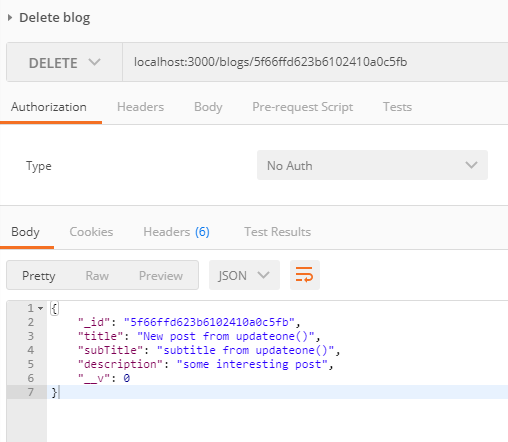
-
First, run a
GETrequest to/api/itemsto get a valid_idof an item you don't mind deleting. Copy the ID. -
Test the Success Case (204 No Content):
- Method:
DELETE - URL:
http://localhost:5001/api/items/<your_copied_id> - Expected Result: A status of
204 No Contentand an empty response body. - Verification: Run the
GET /api/itemsrequest again and confirm the item is no longer in the list.
- Method:
-
Test the Not Found Case (404 Not Found):
- Method:
DELETE - URL: Use a validly formatted but non-existent ID (e.g.,
http://localhost:5001/api/items/60d5f3f7e5b2f2b3e4f3a9e1). - Expected Result: A status of
404 Not Foundand a JSON body like{ "message": "Item not found." }.
- Method:
-
Test the Invalid ID Case (500 Internal Server Error):
- Method:
DELETE - URL: Use a malformed ID that is not a valid MongoDB ObjectId (e.g.,
http://localhost:5001/api/items/123). - Expected Result: A
500 Internal Server Errorstatus (based on our currentcatchblock). This confirms that yourtry...catchis correctly trapping database errors.
- Method:
Conclusion
Congratulations! You have now implemented a full, working CRUD API. You can create, read, update, and delete resources in your database.
Key Takeaways:
- The
DELETEHTTP verb is for removing resources. Model.findByIdAndDelete(id)finds and removes a document in a single step.- The correct response for a successful
DELETEoperation is204 No Content, sent usingres.status(204).send(). - You must check the return value of
findByIdAndDelete(): if it'snull, the item was not found, and you must return a404status.
Next Up:
Your route handlers currently contain individual try...catch blocks. While functional, this approach leads to repetitive code and inconsistent error responses. In the next module, we will refactor this by implementing a centralized, global error-handling system. This is a critical step in building a professional, production-ready API.