Introduction
In our last lesson, you successfully implemented a 404 handler that catches requests for non-existent routes. You saw that when this handler calls next(error), Express's default behavior is to send a basic HTML error page, which isn't suitable for a professional API.
This lesson addresses that problem directly. We are going to build and implement your application's global error-handling middleware. This is a special, centralized piece of code that will catch any error forwarded via next() from anywhere in your application—whether it's the 404 error you just created or a database error we'll handle later. Its single job is to format these errors into clean, consistent JSON responses, a hallmark of a production-ready API.
By the end of this lesson, that ugly HTML error will be gone, replaced by a professional JSON response that you control completely.
1. How Express Identifies an Error Handler
First, it's crucial to understand how Express differentiates regular middleware from error-handling middleware. The distinction is simple but strict: the number of parameters in the function signature.
How to Implement Custom Error Handlers in Express
To understand this core Express concept, let's read a brief but essential explanation from the article 'How to Implement Custom Error Handlers in Express'.
Read the section 'How Express Error Middleware Works'. Pay close attention to the explanation of the function signatures: (req, res, next) for regular middleware versus (err, req, res, next) for error middleware. Also, note the critical rule about order: error handlers must be defined after all your routes.
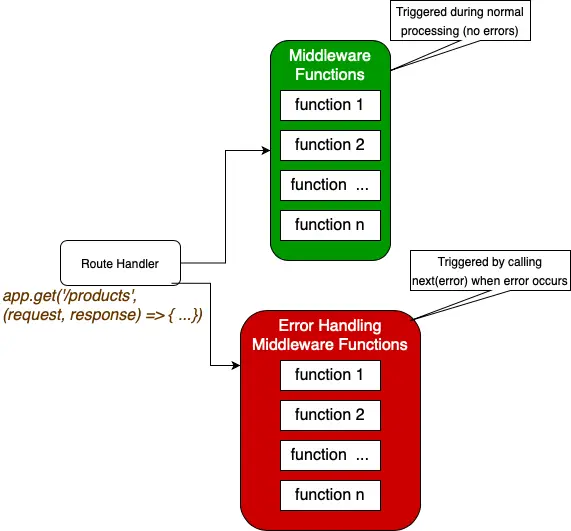
As the article states, the four-parameter signature (err, req, res, next) is a special signal to Express. When next() is called with an argument (e.g., next(error)), Express skips all subsequent regular middleware and jumps directly to the first middleware it finds with this four-parameter signature.
This flow is visualized well in the following diagram:
2. Implementing the Global Error Handler
Now, let's write the code. You will create a new middleware function that catches the error object, extracts the relevant information, and sends a formatted JSON response.
Action: Create the Error Handler File
- Inside your
src/directory, create a new folder namedmiddleware. - Inside
src/middleware/, create a new file namederrorHandler.js. - Add the following code to
src/middleware/errorHandler.js:
// src/middleware/errorHandler.js

const errorHandler = (err, req, res, next) => {
  // Check if a status code is present on the error object, otherwise default to 500
  const statusCode = err.status || 500;

  // Send the response
  res.status(statusCode).json({
    success: false,
    status: statusCode,
    message: err.message || 'Internal Server Error',
  });
};

module.exports = errorHandler;
Let's break down this implementation:
const errorHandler = (err, req, res, next) => { ... }: This defines our function with the required four-parameter signature. Theerrobject is the one we created in our 404 handler (new Error(...)).const statusCode = err.status || 500;: In the previous lesson, we seterror.status = 404. This line retrieves that status. If an error occurs that doesn't have a.statusproperty, it safely defaults to500(Internal Server Error).res.status(statusCode).json(...): This is the core of the handler. It sets the HTTP status code and sends a structured JSON payload. We explicitly include asuccess: falseflag, the status code, and the error message. If the incoming error has no message, we provide a generic one.
3. Registering the Middleware
As you've learned, the order of middleware is critical. The global error handler must be registered last, after all other app.use() calls and route handlers. This ensures it acts as the final safety net for your entire application.
Action: Update Your Main Application File
- Open your main server file (e.g.,
app.jsorserver.js). - First, import your new
errorHandlerat the top of the file. - Then, locate the 404 handler you added in the previous lesson. Immediately after it, add the
app.use(errorHandler);line.
Your file structure should now look like this:
const express = require('express');
const dotenv = require('dotenv');
// ... other imports

// Import the error handler
const errorHandler = require('./src/middleware/errorHandler');

dotenv.config();
const app = express();
app.use(express.json());

// --- ROUTES ---
app.use('/api/items', require('./src/routes/item.routes'));
// ... any other routes

// --- ERROR HANDLING ---

// Handler for routes that don't exist (404)
app.use((req, res, next) => {
  const error = new Error(`Not Found - ${req.originalUrl}`);
  error.status = 404;
  next(error);
});

// Global error handler - MUST BE LAST
app.use(errorHandler);


// --- SERVER STARTUP ---
const PORT = process.env.PORT || 5001;
app.listen(PORT, () => console.log(`Server started on port ${PORT}`));
With this change, any error passed to next() will now be caught and processed by your custom errorHandler function.
4. Testing Your New Handler
It's time for the payoff. Let's repeat the test from the last lesson and see the difference.
- Start your server:
npm run dev - Open Postman and make a request to the same non-existent route:
- Method:
GET - URL:
http://localhost:5001/api/this-route-does-not-exist
- Method:
- Analyze the response.
Instead of the old HTML error page, you should now see a clean, professional JSON response:
{
    "success": false,
    "status": 404,
    "message": "Not Found - /api/this-route-does-not-exist"
}
Also, check the status code of the response in Postman. It should correctly show 404 Not Found. You have successfully replaced Express's default handler with your own.
Conclusion
In this lesson, you've implemented one of the most important components of a robust API: a global error-handling middleware. This centralizes all error responses, ensuring consistency and predictability for any client consuming your API.
Key Takeaways:
- Express identifies error-handling middleware by its unique four-parameter signature:
(err, req, res, next). - The global error handler must be registered as the last middleware in your application stack.
- This handler is responsible for setting the final HTTP status code and sending a structured JSON error response.
- By defaulting to a
500status code, you ensure that even unexpected errors are handled gracefully without crashing the server.
Next Up:
You now have a system to catch errors generated by your 404 handler. However, your API's route handlers that perform database operations are likely async functions. Errors in asynchronous code require special attention to ensure they are properly caught and forwarded to your new global error handler. In the next lesson, we will create a utility to wrap your async route handlers, making your error handling truly comprehensive.