Hello! Welcome to your next lesson.
In our last session, we looked at the very low-level details of how the 1s and 0s of digital data are encoded into physical signals, like pulses of electricity or light. We covered the "how" of data transmission on a single wire or fiber.
Today, we're going to zoom out from the individual cable to the bigger picture. We'll explore how these physical connections are organized to create networks of different sizes and purposes. This lesson directly addresses the learning outcome: Define and distinguish between LAN, WAN, MAN, and PAN. Understanding these classifications is fundamental, as they provide the vocabulary to describe everything from the network connecting your phone to your headphones, to the global internet itself.
Classifying Networks by Scale
The most common way to categorize computer networks is by the geographical area they span. This gives us a hierarchy of network types, each suited for a different scale of communication.
Let's start with a visual overview that shows the relative sizes of the four main network types we'll be discussing today.
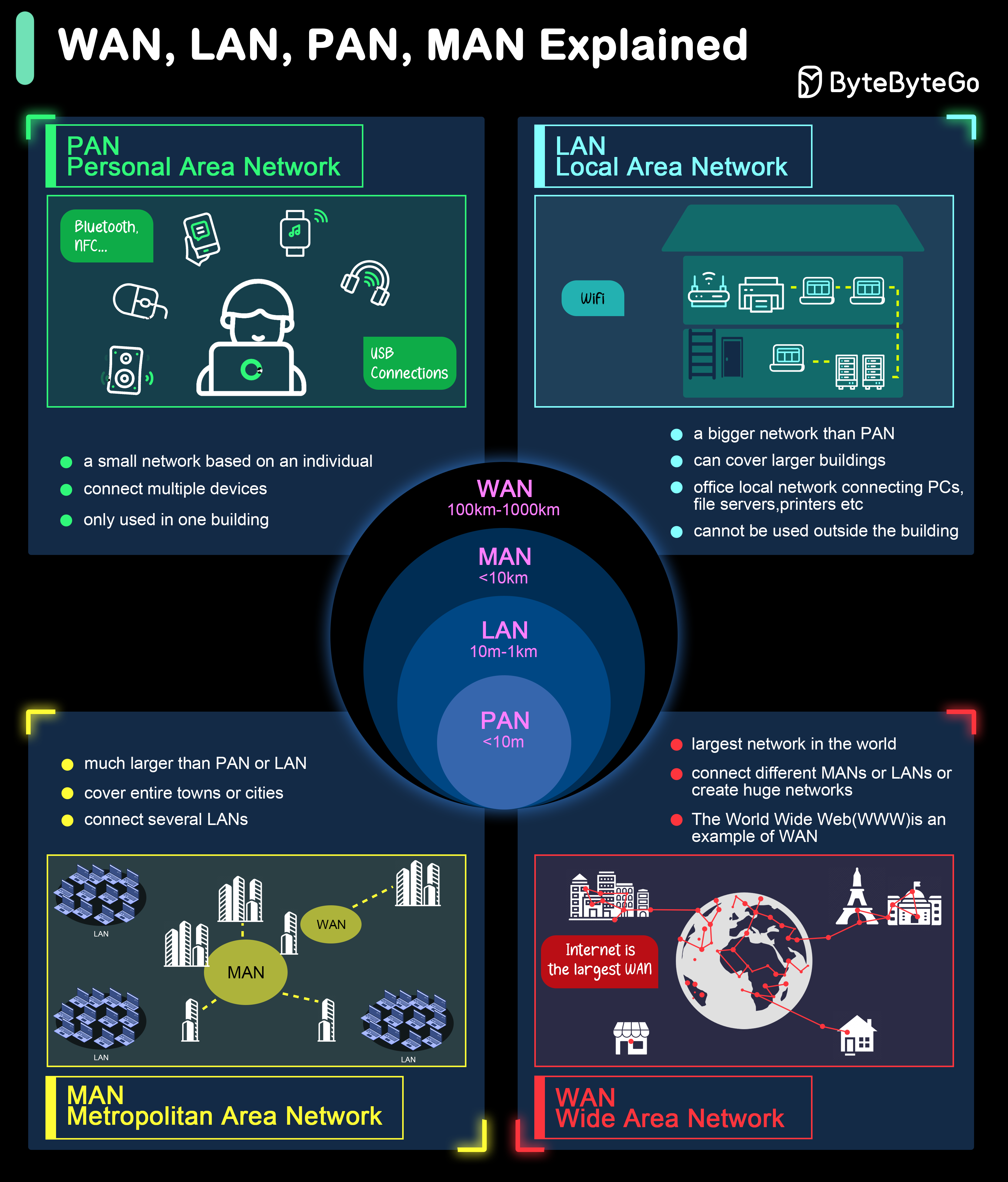
As you can see, the scale ranges from a network that fits in your pocket to one that covers the planet. Let's explore each one.
From Personal to Local: PAN and LAN
We'll begin with the two smallest and most common network types you interact with daily. The following video provides a clear, animated explanation of each.
Network Types: LAN, WAN, PAN, CAN, MAN, SAN, WLAN
This video from PowerCert Animated Videos provides an excellent introduction to the different network types. We'll watch it in segments, starting with PAN and LAN.
Watch the video from the beginning until 02:17. Focus on: The definition and examples of a Personal Area Network (PAN). The definition and examples of a Local Area Network (LAN). The distinction between a wired LAN and a Wireless LAN (WLAN).
As the video explained, these two network types form the foundation of our personal and local connectivity.
1. Personal Area Network (PAN)
- Scope: The smallest network, centered around a single person, typically within a range of a few meters.
- Purpose: To connect personal devices. Think about connecting your wireless earbuds to your smartphone via Bluetooth, tapping your phone for a payment using NFC (Near Field Communication), or transferring photos from your camera to your laptop with a USB cable.
- Ownership: Entirely owned and operated by a single individual.
2. Local Area Network (LAN)
- Scope: A network confined to a small geographical area, such as a single home, office building, or a school campus.
- Purpose: To share resources (like a printer or a file server) and provide network access to devices in close proximity. Your home Wi-Fi network is a perfect example of a LAN (or more specifically, a WLAN - Wireless Local Area Network).
- Key Technologies: The most common technologies are Ethernet (for wired connections) and Wi-Fi (for wireless connections).
- Ownership: Privately owned and managed by the homeowner, business, or institution.
One of the key advantages of a LAN is its high speed and low latency (delay), which is possible because the devices are so close together. This is why competitive gamers often prefer a wired Ethernet connection over Wi-Fi—it minimizes delay.
Expanding to the City and Beyond: MAN and WAN
Now let's scale up to networks that connect entire cities and even the world.
Continue with the PowerCert video to learn about Metropolitan and Wide Area Networks.
Network Types: LAN, WAN, PAN, CAN, MAN, SAN, WLAN
Let's continue with the same video to cover the larger network types.
Watch the video from 03:02 to 03:30 (for MAN) and then from 04:08 to 04:38 (for WAN). Note how each is defined as a collection of smaller networks.
3. Metropolitan Area Network (MAN)
- Scope: Spans a physical area larger than a LAN but smaller than a WAN, such as a city or a large university campus.
- Purpose: A MAN typically interconnects a number of LANs. For example, a company might use a MAN to connect its offices spread across a city. Internet Service Providers (ISPs) also deploy MANs to provide internet connectivity to homes and businesses within a city.
- Key Technologies: Often built using high-speed connections like fiber optic cables.
- Ownership: Can be owned by a single large organization, or it can be a public service offered by a telecommunications company.
4. Wide Area Network (WAN)
- Scope: The largest type of network, spanning a wide geographical area, such as a state, country, or even the entire globe.
- Purpose: To connect disparate LANs and MANs over long distances.
- The Ultimate Example: The Internet is the world's largest public WAN.
- Ownership: A WAN like the internet has no single owner. It's a massive, decentralized collection of interconnected networks owned by thousands of different organizations (ISPs, governments, corporations).
A Side-by-Side Comparison
Now that we've defined each type, let's consolidate the differences. For a more detailed breakdown, the following article provides a concise summary of their key characteristics.
Types of Computer Networks - GeeksforGeeks
The article 'Types of Computer Networks' from GeeksforGeeks gives a very clear, structured overview. Reading this will help solidify the definitions and characteristics.
Please read the section titled 'Classification Based on Geographical Area'. For each network type (PAN, LAN, MAN, WAN), pay close attention to the 'Coverage Range', 'Key Technologies', and 'Real-World Example'.
To see all these distinctions in one place, the table below provides an excellent summary.

Take a moment to review the table. Notice the trade-offs:
- As the scope increases (from PAN to WAN), the typical data rate tends to decrease, and latency increases significantly.
- Security becomes more complex and cost increases as the network gets larger and more distributed.
- Ownership transitions from personal/private for PAN/LAN to public/distributed for MAN/WAN.
Tying It All Together: A Real-World Journey
To fulfill your goal of connecting theory to practice, let's trace a simple, everyday action through these network layers.
Imagine you're at home, working on your laptop.
- You have your wireless mouse connected to your laptop. This connection is a PAN.
- Your laptop is connected to your home Wi-Fi router. Your laptop, your phone, a smart TV, and the router form a LAN (specifically, a WLAN).
- You open a web browser and type
www.google.com. Your request leaves your home LAN and travels through your Internet Service Provider's network infrastructure within your city. This city-wide network is a MAN. - Your ISP's network connects to larger, national and international networks to route your request across the country or the world to one of Google's data centers. This global network of networks is the WAN—the internet.
The response from Google's server follows the same path in reverse: WAN -> MAN -> LAN, finally displaying the webpage on your screen. In a fraction of a second, your request has traversed multiple types of networks, each playing a critical role.
Conclusion
In this lesson, we classified networks based on their geographical size, giving you a framework for understanding the different scales of connectivity that make up the internet.
Key Takeaways:
- PAN (Personal Area Network): Connects devices around a single person (e.g., Bluetooth).
- LAN (Local Area Network): Connects devices in a limited area like a home or office (e.g., Ethernet, Wi-Fi).
- MAN (Metropolitan Area Network): Interconnects LANs across a city or large campus.
- WAN (Wide Area Network): Spans large geographical areas, connecting LANs and MANs. The internet is the largest example.
- These network types form a hierarchy, with smaller networks often connecting to form larger ones.
Preview of the Next Lesson:
We've now categorized networks by their size. Next, we'll zoom back into the LAN and examine how devices within that local network can be physically or logically arranged. We will cover the learning outcome: Describe common network topologies (star, mesh, bus), which are essentially the blueprints for network layouts.