Hello! Welcome to the first lesson of our second module.
In the previous module, we traveled through time, exploring the historical origins of the internet. We finished by drawing a clear line between the internet as a global infrastructure and the World Wide Web as a service running on it. You now have a solid "big picture" view of what the internet is and why it was built.
Now, we shift our focus from "why" to "how." We're going to start at the very bottom, at the most fundamental level of the network. This lesson directly addresses the first learning outcome of this module: Identify the physical media used to transmit data (copper, fiber optic, wireless).
We will explore the tangible materials—the wires, cables, and invisible waves—that form the physical fabric of the internet and carry data from one point to another.
From Bits to Signals: The Role of Physical Media
Before data can travel, the ones and zeros stored in a computer's memory must be converted into a physical signal. The job of the physical medium is to carry that signal. There are three primary ways we do this:
- Copper Cables: Transmit data using electrical signals.
- Fiber-Optic Cables: Transmit data using pulses of light.
- Wireless: Transmit data using electromagnetic waves (like radio waves).
The following video provides a concise introduction to this concept, placing it at "Layer 1," the physical layer of networking.
Networking Fundamentals: OSI 7 - Layer 1 - the physical layer
This short clip introduces the three main categories of physical media and the concept of converting digital bits into physical signals.
Watch from the beginning to 2:56. Pay attention to how it defines the physical layer's role in converting raw bitstreams (1s and 0s) into electrical signals, light, or radio frequencies.
Now, let's examine each of these media types in more detail.
Guided Media 1: Copper Cables
Copper wire is the most common medium for local area networking (LANs), like in your home or office. It's affordable, flexible, and has been the workhorse of telecommunications for over a century. Data is transmitted by varying the voltage on the wire to represent 1s and 0s.
There are two main types of copper cables relevant to modern networking:
- Twisted-Pair Cable: This is the cable used for Ethernet. It consists of pairs of copper wires twisted together. Why twist them? Twisting the wires helps cancel out electromagnetic interference (EMI) from external sources (like power cords) and "crosstalk" from adjacent wires.
- Coaxial Cable: You might recognize this as the cable used for your cable TV or cable internet connection. It has a single central copper conductor, which is heavily shielded, making it more resistant to interference than basic twisted-pair cable.
The video below gives an excellent explanation of twisted-pair cables, focusing on the difference between unshielded (UTP) and shielded (STP) variants.
Physical Layer and Media (Part 3)
This segment from Neso Academy details the construction of Ethernet cables, explaining why the wires are twisted and the difference between UTP and STP.
Watch from 0:26 to 05:40. Focus on understanding the purpose of twisting wires and the trade-offs between using unshielded (cheaper, more common) and shielded (more noise-resistant, expensive) cables.
Guided Media 2: Fiber-Optic Cables
Fiber-optic cable is the backbone of the global internet. These cables carry immense amounts of data across continents and under oceans. Instead of electricity, fiber optics use pulses of light generated by a laser or LED, which travel through a hair-thin strand of pure glass or plastic.
The light is kept inside the fiber core by a principle called Total Internal Reflection, where a surrounding layer of glass called the cladding acts like a perfect mirror, bouncing the light down the cable's path with minimal loss.
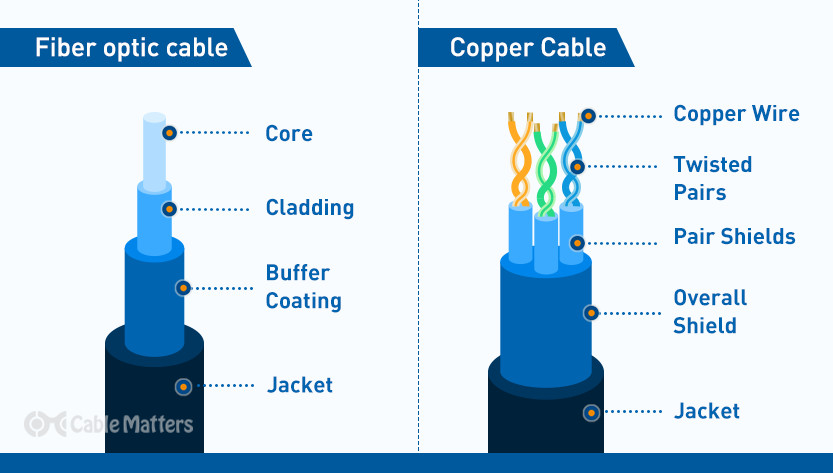
Because fiber transmits light instead of electricity, it has some significant advantages over copper. Let's watch a direct comparison.
Physical Layer and Media (Part 3)
Let's continue with the Neso Academy video, which now provides a clear, point-by-point comparison between copper and fiber-optic media.
Watch from 05:40 to 08:13. Pay close attention to the comparison table, which covers key differences in bandwidth, range, immunity to interference, and cost.
Here's a summary of those key differences:
| Feature | Copper (Twisted-Pair) | Fiber Optic |
|---|---|---|
| Signal Type | Electrical pulses | Light pulses |
| Bandwidth (Speed) | High (up to 10 Gbps) | Extremely High (100+ Gbps and beyond) |
| Distance | Short (up to 100 meters before signal degrades) | Very Long (many kilometers) |
| Immunity to EMI | Low (vulnerable to electrical noise) | Complete (immune to electrical and radio interference) |
| Cost | Lower | Higher, requires specialized installation skills |
| Security | Can be "tapped" with relative ease | Very difficult to tap without disrupting the signal |
The difference in size and capacity is staggering. A single fiber strand can carry significantly more information than a much larger and heavier copper cable.

Unguided Media: Wireless
Wireless communication transmits data through open space using electromagnetic waves. This is "unguided" media because there is no physical cable to direct the signal. Wi-Fi, Bluetooth, 4G/5G cellular networks, and satellite communications all rely on this principle.
While incredibly convenient, wireless media presents unique challenges:
- Coverage Area: The signal has a limited and often unpredictable range.
- Interference: Signals can be disrupted by physical obstacles (walls) or other radio-frequency devices (microwaves, cordless phones).
- Security: Since the signal is broadcast into the air, it's inherently less secure than a signal contained within a wire. Anyone in range can potentially intercept it, making encryption essential.
To get a better sense of these trade-offs and the types of wireless media, please read the following sections.
Transmission Media in Computer Networks
This article from GeeksforGeeks provides a structured overview of the different types of transmission media. We'll focus on their descriptions of wired and wireless types.
First, skim the sections on 'Twisted Pair Cable', 'Coaxial Cable', and 'Optical Fiber Cable' to reinforce what you've learned. Then, read the sections under 'Unguided Media' more carefully, focusing on 'Radio Waves', 'Microwaves', and 'Infrared' to understand the different forms of wireless transmission.
Conclusion: Choosing the Right Medium for the Job
We've identified the three fundamental media for data transmission: copper, fiber, and wireless. Each has a distinct set of characteristics related to speed, cost, distance, and reliability. The choice of medium depends entirely on the application.
Key Takeaways:
- Copper Cables (e.g., Ethernet) use electrical signals. They are cost-effective and ideal for shorter distances, like within a home or office LAN, but are susceptible to electrical interference.
- Fiber-Optic Cables use light pulses. They offer enormous bandwidth and long-distance transmission with high security, making them the foundation of the internet's backbone and long-haul networks.
- Wireless Media (e.g., Wi-Fi) use electromagnetic waves. It offers maximum convenience but is limited by range, interference, and security concerns.
You can see this in your own life: your laptop likely connects to your router via Wi-Fi (wireless), your router connects to the wall jack via an Ethernet cable (copper), and your internet service provider's connection to the wider internet backbone is carried over fiber-optic cables.
Preview of the Next Lesson:
Now that we know what data travels through, our next step is to understand how the ones and zeros are represented as signals on these media. In the next lesson, we will explore the learning outcome: Explain how data is encoded as electrical or light signals on physical media. We'll look at the techniques used to turn a simple bitstream into a robust physical signal.