Hello! In our last lesson, you got hands-on with Wireshark to see how ARP resolves IP addresses to MAC addresses on a local network. We used the ping command simply to create network traffic, but we didn't look at what ping itself does.
Today, we'll dive into the protocol that powers ping and many other network diagnostic tools: the Internet Control Message Protocol (ICMP). Your goal for this lesson is to understand how ICMP serves as the internet's feedback mechanism, providing essential error reports and diagnostic information that help us troubleshoot network problems. This knowledge is crucial for moving from simply knowing that a connection failed to understanding why.
1. What is ICMP?
In the vast world of internet protocols, most traffic you encounter, like web pages or video streams, is handled by TCP or UDP. ICMP is different. It doesn't carry user data. Instead, it carries control and error messages for the IP protocol. Think of it as the network's built-in messaging service for reporting problems.
For a concise introduction to ICMP's role, please start with this article.
How ICMP Works: From Diagnosis to Exploitation
This article from a Medium blog provides a clear, high-level overview of what ICMP is and its core function in the TCP/IP suite.
Read the introductory sections 1, 1.1, and 1.2. Focus on how ICMP is described as a 'network assistant' that operates at the Network Layer to report issues like 'Destination Unreachable' or 'Time Exceeded'.
To summarize, ICMP operates at the Network Layer (Layer 3), right alongside IP. When an IP packet runs into a problem (e.g., a router doesn't know how to reach the destination, or a packet's lifespan expires), the device that discovers the problem uses ICMP to send a notification back to the original source of the packet.
2. The Structure of an ICMP Message
How does an ICMP message convey specific information? The key is in its header structure. An ICMP message is simple but powerful, containing two main fields that define its meaning:
- Type: An 8-bit field that specifies the general category of the message. For example,
Type 3is for "Destination Unreachable". - Code: An 8-bit field that provides more specific information within that type. For a
Type 3message,Code 1means "Host Unreachable," whileCode 3means "Port Unreachable." - Checksum: A 16-bit field used to verify the integrity of the ICMP message header.
The video below explains this structure and lists some common message types.
Understanding Internet Control Message Protocol (ICMP) - Explained
This video from TechClout will walk you through the ICMP packet format and introduce the concept of Types and Codes.
Watch from 03:21 to 05:19 to understand the packet format (Type, Code, Checksum). Then, watch from 05:48 to 08:24 to see a list of common ICMP messages and their associated codes. Don't worry about memorizing them all; just get a feel for the variety of messages.
This image provides a helpful visual summary, categorizing the main ICMP message types.

3. ICMP for Error Reporting
The real power of ICMP in diagnostics comes from interpreting these error messages. When a ping fails, the ICMP message it receives (or doesn't receive) gives you critical clues about the problem.
Let's explore the meaning behind some of the most common error messages.
ICMP, Ping, and Traceroute - What I Wish I Was Taught
This excellent blog post, titled 'What I Wish I Was Taught,' explains the practical diagnostic value of different ICMP messages. It brilliantly connects the theory to what you actually see in your command prompt.
Read the sections 'Know what ICMP messages mean' and 'Pinging on your local network'. Pay close attention to the crucial difference between a 'Destination host unreachable' message and a 'Request timed out' message. The explanation of how ARP failure leads to the 'unreachable' message is a direct link to our previous lesson.
Let's solidify those key distinctions:
-
Destination Unreachable(Type 3): This is an active report of a problem. A router or host is explicitly telling you it can't deliver your packet.- Net Unreachable (Code 0): A router along the path has no route in its routing table to the destination network.
- Host Unreachable (Code 1): The final router can reach the destination network, but it can't find the specific host (often because its ARP request for the host's MAC address failed).
- Port Unreachable (Code 3): The packet reached the destination host, but the OS found no application listening on the specified TCP/UDP port.
- Communication Administratively Prohibited (Code 13): A firewall has explicitly blocked your packet and is configured to send this reply. You know you've reached the firewall.
-
Request Timed Out: This is not an ICMP message! It's an absence of a reply. Your computer sent an ICMP Echo Request and waited for a certain amount of time, but no Echo Reply (or any other ICMP error message) came back. This could mean:- The destination host is down.
- A firewall silently dropped your packet without sending a reply.
- There is heavy network congestion causing the request or reply to be lost.
- As you read, if an ARP reply was received, your PC has a MAC address for the target and will send the ICMP packets. If no ICMP reply comes back, you get this timeout.
Understanding this difference is fundamental to troubleshooting. "Host Unreachable" points to a Layer 2/3 problem on the destination network, while "Request Timed Out" often points to a firewall or the host being offline.
4. ICMP for Diagnostics: ping and traceroute
Beyond simple error reporting, ICMP is the foundation for two essential diagnostic tools.
Ping
The ping utility works by sending an ICMP Echo Request (Type 8, Code 0). If the destination host is reachable and not firewalled, it responds with an ICMP Echo Reply (Type 0, Code 0). This confirms end-to-end connectivity and measures the round-trip time.
Traceroute
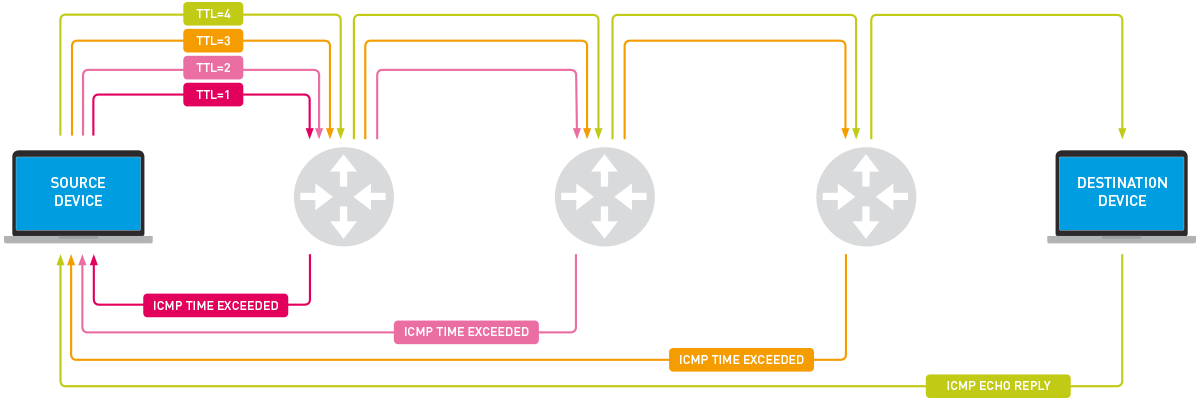
The traceroute (or tracert on Windows) utility is a more advanced diagnostic tool that uses ICMP in a clever way to map the path your packets take to a destination. Here's how it works:
- It sends a packet towards the destination with a Time-To-Live (TTL) value in the IP header set to 1.
- The first router it reaches decrements the TTL to 0. An IP packet with a TTL of 0 cannot be forwarded, so the router discards it.
- The router then sends an ICMP Time Exceeded (Type 11, Code 0) message back to your computer. Your computer records the IP address of that router.
- It then sends a new packet with TTL=2. This packet gets past the first router (which decrements TTL to 1) but is dropped by the second router, which sends back another
Time Exceededmessage. - This process repeats, increasing the TTL by one each time, until the packet finally reaches the destination. The destination, instead of sending a
Time Exceededmessage, sends a reply (e.g., anICMP Echo ReplyorPort Unreachabledepending on the traceroute implementation), signaling that the trace is complete.
This video and diagram perfectly illustrate this process.
Traceroute Explained | Real World Examples
Watch this clip to see a clear explanation of how traceroute uses the TTL field and ICMP 'Time to Live Exceeded' messages to discover the path.
Watch from 01:08 to 02:38. Focus on the interplay between the increasing TTL value and the ICMP messages returned by the routers.
Conclusion
You now understand that ICMP is far more than just "the protocol for ping." It is a fundamental part of the IP suite, providing the feedback necessary for network operators (and you!) to diagnose and understand network behavior. By interpreting the specific Type and Code of an ICMP message, you can pinpoint routing problems, firewall blocks, and other common connectivity issues.
Key Takeaways:
- ICMP is a Network Layer protocol that carries control and error messages for IP.
- ICMP messages are defined by a Type (the general category) and a Code (the specific reason).
- A
Destination Unreachablemessage is an active report of a specific problem (e.g., Host Unreachable, Port Unreachable). - A
Request Timed Outis the absence of a reply, often due to a silent firewall drop or a host being offline. - The
tracerouteutility cleverly uses ICMPTime Exceededmessages to map the routers along a network path.
Preview of the Next Lesson:
In this lesson, we covered the theory of how ICMP is used for diagnostics. In the next lesson, we'll put this theory into practice. You will use the ping command to test connectivity, analyze its output, and see firsthand how different network problems result in the different ICMP-based responses we've discussed today.