Hello! Welcome back to our course.
In the last lesson, we explored MSK Connect, a powerful way to integrate external systems with your MSK cluster using configuration instead of custom code. We saw how to stream data from sources like databases into Kafka topics and sink it to destinations like S3. This raised a crucial question: as data flows through these pipelines, how do we manage its structure, or schema, especially when that structure needs to change over time?
This lesson directly answers that question. Our goal is to learn how to manage schemas for Kafka topics using the AWS Glue Schema Registry. By the end of this lesson, you'll understand how to enforce data formats, prevent breaking changes in your streaming applications, and allow your data schemas to evolve safely.
1. The Challenge of Schema Evolution
In any real-world data system, schemas are not static. Business requirements change, new features are added, and data fields are modified or removed. In a streaming architecture with potentially dozens of producer and consumer applications, an uncoordinated schema change can have a cascading effect, causing data quality issues or outright application failures.
For example, imagine a producer application stops sending a user_id field that several downstream consumer applications rely on. Without a central enforcement mechanism, those consumers would likely start failing.
This is the problem the AWS Glue Schema Registry solves. It acts as a centralized repository for your data schemas, allowing producers and consumers to validate data at runtime and evolve schemas according to predefined compatibility rules.
Let's begin by understanding the core concepts and architecture.
Validate, evolve, and control schemas in Amazon MSK and ...
The AWS Big Data Blog post 'Validate, evolve, and control schemas...' provides an excellent introduction to why a schema registry is necessary and how the AWS Glue Schema Registry works.
Please read the introduction of this article (the first two paragraphs). Focus on the core problem statement: the difficulty of coordinating schema evolution and the data quality issues that can arise. Note how the Glue Schema Registry is positioned as the solution.
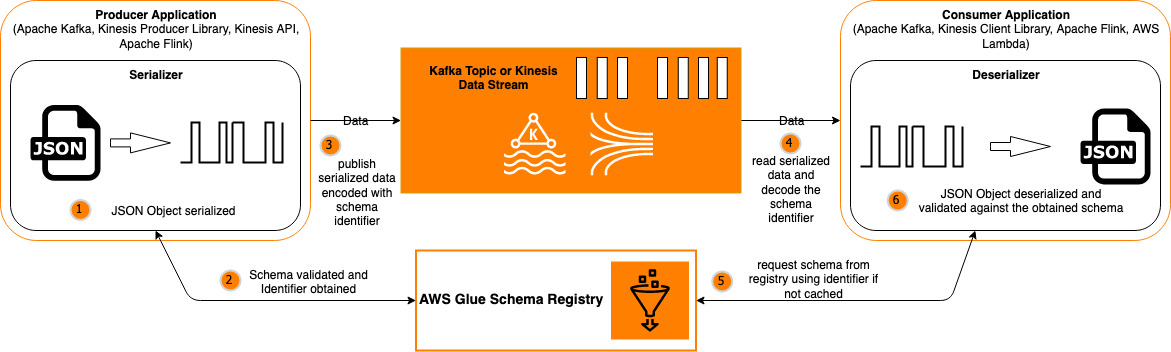
The fundamental workflow, which is a key concept for the exam, is illustrated below.
2. Core Concepts: Avro Schemas and Compatibility Rules
The Glue Schema Registry supports the Apache Avro data format, which is a popular choice for streaming data due to its support for schema evolution and efficient binary serialization. An Avro schema is typically defined in a JSON format.
Here is a simple example of an Avro schema, similar to what you'll find in the resources:
{
  "namespace": "com.example.user",
  "type": "record",
  "name": "User",
  "fields": [
    { "name": "user_id", "type": "long" },
    { "name": "user_name", "type": "string" },
    { "name": "signup_date", "type": "long" }
  ]
}
The most powerful feature of a schema registry is its ability to enforce compatibility rules when a schema changes. These rules determine whether a new version of a schema can be registered.
Let's dive into these rules, as they are a critical topic.
Validate, evolve, and control schemas in Amazon MSK and ...
The 'Validate, evolve, and control schemas...' article also provides a clear explanation of schema evolution and compatibility. This is the heart of schema management.
Read the section titled 'Example of schema evolution'. Pay close attention to the definitions of FORWARD, BACKWARD, and FULL compatibility. This section uses the example of adding a new optional field with a default value.
To summarize and reinforce these crucial concepts:
NONE: No compatibility checks are performed. Any change is allowed.DISABLED: No schema evolution is allowed.BACKWARD(Default): A new schema is compatible if it can be used to read data produced with the previous schema version. This allows you to delete fields or add new optional fields (with default values). For this strategy, you must update your consumer applications to the new schema before your producer applications start using it.FORWARD: A new schema is compatible if data produced with it can be read by applications using the previous schema version. This allows you to add new required fields (if the old consumer can ignore them) or delete optional fields. Here, you update producers before consumers.FULL: The new schema is bothBACKWARDandFORWARDcompatible.
Think of it like API versioning. BACKWARD compatibility ensures that a v2 consumer can handle v1 data. FORWARD compatibility ensures a v1 consumer can handle v2 data.
Test your understanding!
Your team manages a Kafka topic with financial transaction data. The schema compatibility is set to BACKWARD. A new requirement comes in to add the customer's IP address to every transaction record. This new ip_address field must be present in all new records.
Will the Glue Schema Registry allow you to register this new schema version? Why or why not?
Show answer
No, the registry will reject this change. Adding a new required field is not a BACKWARD compatible change. An updated consumer using the new schema would expect the ip_address field to be present, but when it reads older records (produced with the old schema), that field will be missing, causing a deserialization error. To make this change compatible with a BACKWARD setting, the new ip_address field would need to be defined as optional, with a default value (e.g., null).
3. Integrating Schema Registry with MSK Applications
Now, let's connect these concepts to the producer and consumer applications we discussed in previous lessons. Integration is achieved not through complex logic in your code, but by configuring your Kafka clients to use special serializers and deserializers provided by AWS.
- Producer: Uses
AWSKafkaAvroSerializer. This component transparently handles schema registration, compatibility checks, and serializing the record into a binary format prefixed with the schema version ID. - Consumer: Uses
AWSKafkaAvroDeserializer. This component reads the schema version ID, fetches the schema from the registry (using a cache for performance), and deserializes the record.
The following tutorial provides a detailed, practical walkthrough of setting up a Java project with these components. While you don't need to write the code yourself, examining the configuration is essential.
Schema Evolution with Glue Schema Registry and ...
The tutorial 'Schema Evolution with Glue Schema Registry and ...' by LocalStack gives a complete code-level view of integrating with the registry. We will focus on the configuration aspects.
First, read the two code blocks in the 'The Producer' subsection within section 'Implementing a Producer and Consumer'. Focus on the getProducerConfig method. Note the use of GlueSchemaRegistryKafkaSerializer and the AWSSchemaRegistryConstants properties like AWS_REGION, REGISTRY_NAME, and SCHEMA_NAME. Next, read the subsection 'Producer registering a new schema version' within the 'Schema Evolution' section. Pay attention to the property AWSSchemaRegistryConstants.SCHEMA_AUTO_REGISTRATION_SETTING. This is a key feature that enables producers to automatically register new, compatible schema versions.
As you saw, the integration is primarily about setting the right properties for your Kafka client. The schema-registry-serde library from AWS handles the rest of the complexity.
4. Schema Evolution in Action: A Practical Walkthrough
Let's see how these compatibility rules play out in a real scenario. We will follow the narrative from the LocalStack tutorial to understand what happens when a producer attempts both a compatible and an incompatible change.
Scenario 1: A Valid, BACKWARD-Compatible Change
The tutorial first demonstrates removing a field (customer) from the schema.
- Change: The
customerfield is removed from the Avro schema definition. - Compatibility: This is a valid
BACKWARDcompatible change. A v2 consumer (which doesn't expect thecustomerfield) can still process v1 data (it will simply ignore the extra field). - Outcome: The producer, configured with
SCHEMA_AUTO_REGISTRATION_SETTING = true, successfully registers this new schema as version 2 and begins producing records.
Scenario 2: An Invalid, Incompatible Change
Next, the tutorial attempts to add a new required field (unicorn_food) to the schema.
- Change: A new
unicorn_foodfield, which does not have a default value, is added to the schema. - Compatibility: This is not a
BACKWARDcompatible change. A v2 consumer would fail when trying to read v1 data because the requiredunicorn_foodfield would be missing. - Outcome: When the producer starts up, the
AWSKafkaAvroSerializerattempts to register the new schema. The Glue Schema Registry checks it against the previous version, finds it incompatible with theBACKWARDrule, and rejects the registration. The producer application fails with anAWSSchemaRegistryExceptionbefore it can send a single malformed record. This protects all downstream consumers.
This demonstrates the core value proposition: the Schema Registry acts as a gatekeeper, preventing "poison pill" messages from entering your data stream.

Conclusion
In this lesson, we tackled the critical challenge of managing data structure in a streaming environment. You learned how the AWS Glue Schema Registry acts as a central authority for your schemas, enabling safe and controlled evolution.
Key Takeaways:
- Centralized Management: The Glue Schema Registry provides a single place to store, version, and manage your data schemas (e.g., Avro).
- Compatibility Enforcement: It enforces schema evolution rules (
BACKWARD,FORWARD, etc.), preventing producers from introducing breaking changes.BACKWARDis the most common and is the default. - Seamless Integration: Integration with Kafka applications is handled by using the
AWSKafkaAvroSerializerandAWSKafkaAvroDeserializer, which are configured through standard Kafka client properties. - Improved Data Quality: By validating schemas at runtime, the registry prevents malformed data from entering your topics, significantly reducing the risk of downstream application failures.
With MSK Connect for integration and Glue Schema Registry for governance, you now have a robust framework for building reliable and evolvable data pipelines with Amazon MSK.
Next Up: Now that we've covered the core aspects of building and managing data flows with MSK, we will shift our focus to operations. In the next lesson, we will learn how to "Monitor MSK cluster performance and health using CloudWatch metrics," ensuring your streaming infrastructure runs smoothly and efficiently.