Hello! Welcome to the first lesson in your preparation course for the AWS Certified Data Engineer - Associate exam.
Given your hands-on experience with S3, this lesson won't focus on the basics of creating buckets or uploading files. Instead, we'll dive straight into the strategies and services that are critical for building cost-effective data architectures on AWS—a core competency tested in the certification exam.
Today's learning outcome is to configure S3 storage classes and lifecycle policies for cost-optimized data lakes. We will explore how to classify data based on its access patterns and how to automate its management to significantly reduce storage costs over its lifetime. This is a foundational skill for any data engineer working with large-scale data on AWS.
The Lifecycle of Data in a Data Lake
In a typical data lake, data doesn't have the same value or access frequency forever. Its lifecycle often looks like this:
- Hot Tier: Data that has just been ingested. It's raw, recent, and frequently accessed for real-time processing, dashboarding, and analytics. Performance is a priority.
- Warm Tier: As data ages, it's accessed less often. It might be used for occasional ad-hoc queries or monthly reports. Access should still be relatively fast, but cost becomes a more significant factor.
- Cold/Archive Tier: After a few months or years, data is rarely needed but must be retained for compliance, auditing, or long-term historical analysis. Storage cost is the primary concern here, and slower retrieval times are acceptable.
Manually moving terabytes or petabytes of data between these tiers is impractical. This is where S3 Storage Classes and Lifecycle Policies become essential tools.
Part 1: S3 Storage Classes - Your Cost-Optimization Toolkit
Amazon S3 provides a range of storage classes, each designed for a specific access pattern and cost profile. While you're likely familiar with S3 Standard, a deep understanding of the entire spectrum is crucial for the exam.
To get a comprehensive overview, let's start with some foundational material. The following video provides a detailed breakdown of each storage class, their characteristics, and their ideal use cases.
Master AWS S3 | All S3 Concepts | Diagrams & Hands On Demo | AWS SAA |#aws #awscertification
This video, 'Master AWS S3', gives an excellent, detailed walkthrough of the different S3 storage classes. It explains the critical concepts of durability and availability, which are key to understanding the trade-offs between classes.
Please watch the section on 'S3 storage classes' from 54:08 to 1:09:46. Pay close attention to the use cases, availability SLAs, and retrieval characteristics for each class, especially S3 Intelligent-Tiering and the Glacier family.
Now, let's look at the official AWS documentation for a structured summary and specific details, particularly on S3 Intelligent-Tiering.
The official 'S3 Storage Classes' page from AWS provides authoritative details and a fantastic comparison table that's perfect for exam revision.
Please read through this page, focusing on the 'Overview', 'Unknown or changing access' (for S3 Intelligent-Tiering), 'Infrequent access', and 'Archive' sections. Finally, study the 'Performance across the S3 storage classes' comparison table at the end of the page. It's a goldmine of information.
Key Takeaways on Storage Classes
You've now seen that choosing a storage class is a trade-off between storage cost, access cost, and retrieval speed. Here is a visual summary of the main options:
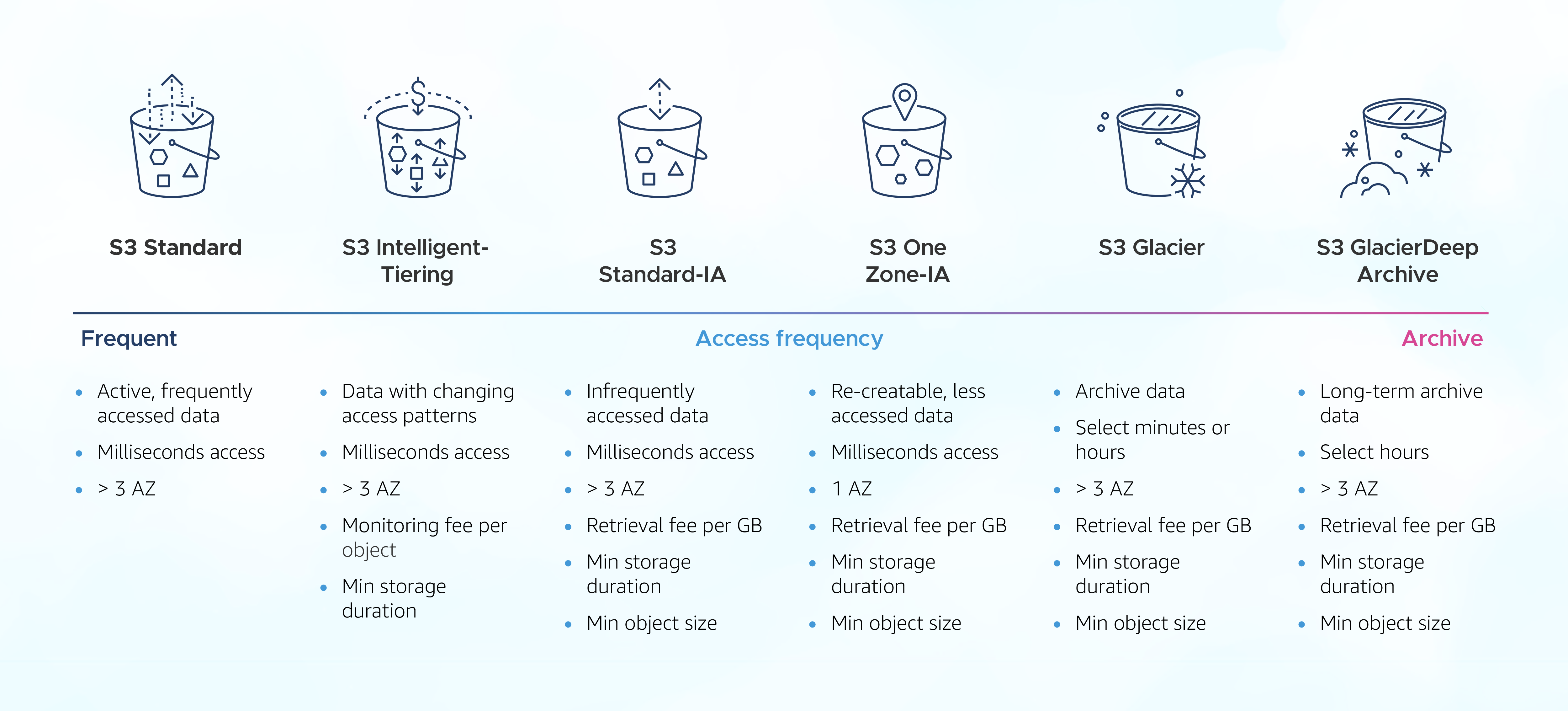
For data engineering workloads, the most important classes to master are:
- S3 Standard: The default choice for the "hot tier." Best for frequently accessed data, such as the landing zone for raw data or tables that power real-time dashboards.
- S3 Intelligent-Tiering: Your best friend for data with unknown or fluctuating access patterns. It automatically moves data between frequent and infrequent access tiers without performance impact or retrieval fees. While there's a small monthly monitoring fee per object, it often results in significant savings with zero operational overhead. The exam frequently presents this as the optimal solution for unpredictable workloads.
- S3 Standard-IA (Infrequent Access): The "warm tier." Ideal for data accessed less than once a month but still requires millisecond access. It has a lower storage price than S3 Standard but includes a per-GB retrieval fee.
- S3 One Zone-IA: A lower-cost version of Standard-IA that stores data in a single Availability Zone (AZ). This reduces its availability and durability guarantees. It's a great choice for data that is not critical or can be easily recreated, like thumbnail images or intermediate ETL outputs.
- S3 Glacier (Instant, Flexible, and Deep Archive): This family represents the "cold/archive tier."
- Glacier Instant Retrieval: For archive data that still needs millisecond access (e.g., medical records, news archives).
- Glacier Flexible Retrieval: For typical backups where retrieval can take minutes to hours. It offers free bulk retrievals.
- Glacier Deep Archive: The cheapest storage in AWS, designed for long-term retention (7-10 years) where a retrieval time of 12+ hours is acceptable. Perfect for compliance and regulatory archives.
Test your understanding!
You are designing the storage for a data lake. Which storage class would be the most cost-effective for each of the following scenarios?
- Raw, unprocessed financial transaction data that must be retained for 7 years for regulatory compliance and is almost never accessed after the first week.
- Aggregated hourly sales reports. These reports are generated and stored in a bucket with the prefix
reports/. Their access patterns are unpredictable; some are queried daily for weeks, others are never touched again. - Log files from a web application that are needed for immediate troubleshooting for 24 hours, then stored for 30 days for trend analysis, after which they can be discarded. You want to automate this process.
Show answer
- S3 Glacier Deep Archive. The primary requirement is long-term, low-cost retention with infrequent access. After the initial processing, the data can be transitioned directly to Deep Archive to maximize cost savings over the 7-year period.
- S3 Intelligent-Tiering. The key phrase is "unpredictable access patterns." Intelligent-Tiering will automatically move the report files between frequent and infrequent access tiers based on actual usage, optimizing costs without manual intervention or retrieval fees.
- This is a trick question that points to our next topic! While S3 Standard is appropriate for the first 24 hours and S3 Standard-IA for the next 30 days, the automation of moving the data and then deleting it requires an S3 Lifecycle Policy.
Part 2: S3 Lifecycle Policies - Automating the Data Flow
As the exercise above hinted, simply knowing the storage classes isn't enough. You need a way to automate the movement of data between them. S3 Lifecycle policies are sets of rules that define actions S3 should take on objects throughout their lifetime.
A lifecycle policy allows you to define two main types of actions:
- Transition Actions: Automatically move objects to a different, usually cheaper, storage class after a certain number of days.
- Expiration Actions: Automatically delete objects after a specified period.
This diagram illustrates a common lifecycle pattern:

To understand the practical application and some important nuances, let's review a couple of resources.
Mastering amazon s3 lifecycle policies: A detailed guide to ...
This article, 'Mastering Amazon S3 Lifecycle Policies', provides a clear explanation of how lifecycle policies work and, crucially, lists common pitfalls to avoid—perfect for exam preparation.
Please read the sections 'What is an s3 lifecycle policy?', 'Why should you use lifecycle policies?', 'How do lifecycle transitions & expirations work?', and 'Pitfalls to avoid'. The pitfalls section contains valuable advice on minimum storage durations and small object considerations.
Now, let's see how this is configured in the AWS console. This short video gives a great hands-on demonstration.
How to set up S3 Lifecycle Rules to save on S3 costs
This video provides a concise, practical demo of setting up lifecycle rules in the S3 console, including a separate rule for non-current versions in a versioned bucket.
Watch the sections from 01:20 to 09:28. Pay attention to how rules are applied (e.g., to the whole bucket or a prefix) and the separate configuration for 'current' vs. 'non-current' object versions.
Lifecycle Policies vs. Intelligent-Tiering
For the exam, you must know when to use a lifecycle policy versus S3 Intelligent-Tiering.
| Feature | S3 Lifecycle Policy | S3 Intelligent-Tiering |
|---|---|---|
| Mechanism | You define explicit rules (e.g., "move to IA after 30 days"). | AWS automatically monitors and moves objects based on access. |
| Data Flow | One-way transitions (e.g., Standard -> IA -> Glacier). You cannot automatically move data back to a hotter tier. | Two-way movement. Objects in an infrequent tier are automatically moved back to the frequent tier if accessed. |
| Cost Model | No extra fees for the policy itself. Standard API costs apply for transitions. | Small monthly monitoring and automation fee per object. No retrieval fees. |
| Best For | Predictable access patterns (e.g., logs, time-series data). | Unpredictable or changing access patterns. |
Tying it all together: A Data Lake Scenario
Let's apply what we've learned to a typical data engineering problem.
Scenario:
Your company's data lake is built on an S3 bucket named my-data-lake-123.
- Raw clickstream data is ingested into the
raw/clickstream/prefix. This data is heavily queried for 60 days. After that, it's rarely accessed but must be retained for 1 year before deletion. - The ETL process creates temporary staging files in the
temp/prefix. These files are large but are only needed for a few hours and should be cleaned up daily to save costs. - Your bucket has versioning enabled to prevent accidental deletions.
Your task:
Design a set of lifecycle rules to automate the management of this data in the most cost-effective way.
Propose your solution before looking at the answer!
Show suggested solution
You would create two separate lifecycle rules:
Rule 1: Clickstream Data Management
- Rule Scope: Limit to prefix
raw/clickstream/. - Actions for Current Versions:
- Transition to
S3 Standard-IAafter 60 days. - Expire (delete) after 365 days.
- Transition to
- Actions for Non-Current Versions:
- To save costs on old versions, you could Transition non-current versions to
S3 Glacier Deep Archiveafter 30 days of becoming non-current. - Permanently delete non-current versions after 90 days. This keeps a short recovery window without incurring long-term storage costs for old versions.
- To save costs on old versions, you could Transition non-current versions to
Rule 2: Temporary File Cleanup
- Rule Scope: Limit to prefix
temp/. - Actions for Current Versions:
- Expire after 1 day.
- Actions for Non-Current Versions:
- Since these are temporary files, old versions are just waste. Permanently delete non-current versions after 1 day.
This approach uses prefix-based rules to apply different policies to different types of data within the same bucket, a common and effective data lake management pattern.
Conclusion
Congratulations on completing your first lesson! We've taken a deep dive into two of the most powerful cost-optimization features of S3, which are fundamental to building and managing efficient data lakes on AWS.
Key Takeaways:
- Match the Class to the Access Pattern: Choosing the right S3 storage class—from Standard for hot data to Glacier Deep Archive for cold data—is the first step to cost optimization.
- Automate with Intelligent-Tiering or Lifecycle Policies: Use S3 Intelligent-Tiering for data with unpredictable access patterns and S3 Lifecycle Policies for data with a predictable lifecycle.
- Master the Trade-offs: The certification exam will test your understanding of the nuances: retrieval fees, minimum storage durations, and availability SLAs. Knowing these details is key to selecting the most optimal solution.
- Think Granularly: Use prefixes and tags to apply different lifecycle rules to different datasets within the same data lake bucket.
In our next lesson, we'll build on this foundation. Now that we know how to store data efficiently, we'll learn how to implement S3 event notifications to trigger data processing workflows, allowing us to automatically kick off ETL jobs or other tasks as soon as new data arrives in our data lake.