Hello! Welcome to the third lesson in our module on Data Governance and Auditing.
In our previous session, we focused on ensuring data integrity by configuring AWS Glue Data Quality rules. We learned how to define and enforce quality standards to prevent bad data from moving through our pipelines. Now that we have a mechanism for controlling data quality, we'll address another fundamental aspect of governance: understanding data provenance. As a Data Quality Engineer, you know that identifying the root cause of an issue is as important as detecting the issue itself. This is where data lineage comes in.
Today’s lesson directly addresses the learning outcome: Describe how AWS Glue automatically captures and visualizes data lineage. We will explore how AWS services track the origin, transformations, and destination of your data, providing a clear map of its journey. This capability is essential for troubleshooting, impact analysis, and building trust in your data assets, making it a key topic for the certification exam.
1. What is Data Lineage?
Data lineage provides a visual and auditable trail of your data's lifecycle. It answers critical questions like:
- Where did this data originate?
- What transformations were applied to it?
- Which other datasets or reports depend on this data?
For a data engineer, the benefits are immediate and practical. Let's explore these benefits by reviewing the official AWS documentation.
Data lineage in Amazon DataZone - AWS Documentation
The official documentation for 'Data lineage in Amazon DataZone' provides a clear definition and outlines the core benefits of implementing data lineage.
Please read the introductory section of this page, starting from the beginning down to just before the 'Types of lineage nodes in Amazon DataZone' heading. As you read, focus on the four key benefits listed:
As the documentation highlights, effective data lineage allows you to:
- Understand Provenance: Build trust by showing a clear data origin.
- Analyze Impact: Foresee the downstream effects of changes to a data pipeline or source schema.
- Identify Root Causes: Trace data quality issues back to their source, a process you are likely very familiar with.
- Improve Governance & Compliance: Demonstrate how data, especially sensitive data, is processed and used.
2. Data Lineage in the AWS Glue Ecosystem
The term "AWS Glue" encompasses a suite of services, and data lineage is handled differently depending on the specific component you're using. For the exam, it's important to distinguish between lineage in AWS Glue DataBrew and the more comprehensive lineage for AWS Glue ETL jobs, which integrates with Amazon DataZone.
2.1. Lineage in AWS Glue DataBrew
AWS Glue DataBrew is a visual data preparation tool designed primarily for data analysts and data scientists who may not have a coding background. It provides a self-contained, project-based environment where lineage is tracked automatically.
The following video provides a concise look at DataBrew and its lineage capabilities.
AWS Glue DataBrew & Data Lineage | Amazon Web Services
This AWS video introduces AWS Glue DataBrew and provides a practical demo, including a clear visualization of data lineage within a project.
Please watch the following segments: Conceptual Overview (02:49 - 03:32): This part explains what data lineage means in the context of DataBrew. Demonstration (03:32 - 10:08): Watch the demo to see how a lineage graph is built up as the user joins datasets and applies transformations. Pay attention to how the final graph (around 09:55) visually connects the S3 source, the Glue table, transformations, and the final S3 destination. Service Comparison (10:08 - 11:25): This final clip is crucial. It clarifies when to use Glue Studio (ETL), SageMaker Data Wrangler (ML), and Glue DataBrew (analyst-led data prep).
DataBrew's lineage is powerful for its intended use case but is scoped to the DataBrew project itself. For enterprise-wide, automated lineage from production ETL pipelines, AWS provides a more centralized solution.
2.2. Automated Lineage with Glue ETL and Amazon DataZone
The primary mechanism for capturing and visualizing lineage from AWS Glue ETL jobs and crawlers is through integration with Amazon DataZone. DataZone is a data management service that allows you to catalog, discover, share, and govern data at scale. A key feature of DataZone is its ability to build a comprehensive, cross-service lineage graph.
This integration is built on the OpenLineage open standard, allowing different systems to report lineage information in a consistent format. In this model:
- AWS Glue jobs (version 5.0 and later) and Glue crawlers act as lineage producers. They are configured to emit events about the data they read and write.
- Amazon DataZone acts as the lineage consumer and visualizer. It collects these events and assembles them into an interactive graph.
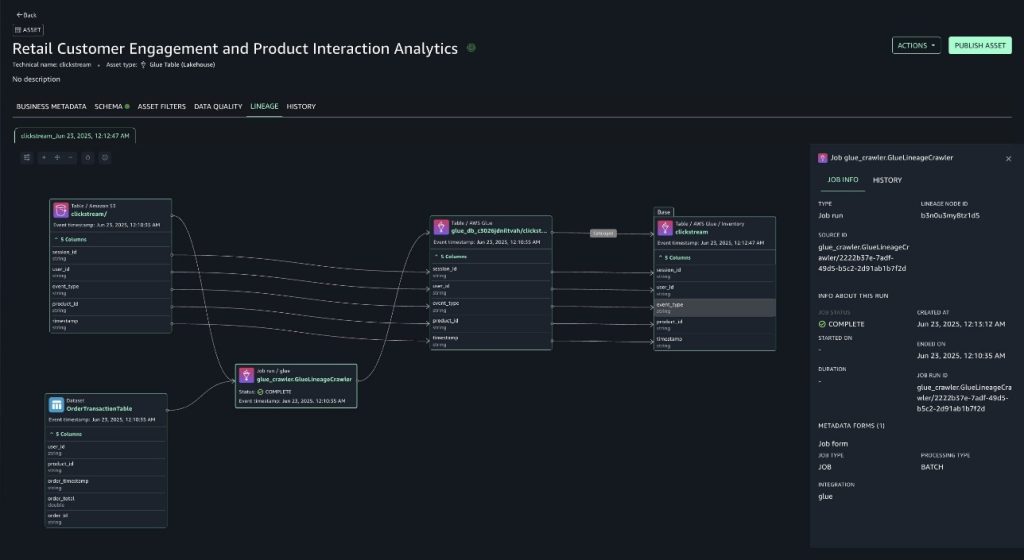
This graph is composed of different elements, or "nodes":
- Dataset node: Represents a data asset, such as an S3 object, a Glue table, or a Redshift table.
- Job (run) node: Represents a process that ran, such as a Glue ETL job run or a crawler run.
Let's look at what these graphs look like in practice.

3. How to Configure Automated Lineage Capture
For the exam, you need to know how to enable this automatic lineage capture for your Glue jobs. With AWS Glue 5.0 and later, this is a straightforward configuration.
Introducing AWS Glue 5.0 for Apache Spark
This AWS Big Data blog post, 'Introducing AWS Glue 5.0 for Apache Spark,' contains a section that gets straight to the point of how to configure lineage generation.
Please read the short section titled 'Data lineage support in Amazon DataZone.' It shows the two methods for enabling lineage capture, which we will summarize next.
As shown in the article, there are two primary ways to configure your Glue ETL job to send lineage events to DataZone:
-
Via the AWS Glue Studio Console: On the Job details tab of your Glue job, you simply enable the "Generate lineage events" checkbox and provide your Amazon DataZone domain ID.
-
Via Job Parameters: For programmatic deployment (e.g., using Infrastructure as Code) or for use in Glue notebooks, you can pass the configuration as Spark parameters. The key parameter is
spark.extraListeners, which registers the OpenLineage agent.--conf spark.extraListeners=io.openlineage.spark.agent.OpenLineageSparkListener --conf spark.openlineage.transport.type=amazon_datazone_api --conf spark.openlineage.transport.domainId=<Your-Domain-ID>
This configuration instructs the Glue Spark job to use the OpenLineage listener to send lineage data to the specified DataZone domain via its API.
Test your understanding!
A business intelligence team reports that a critical daily dashboard has incorrect sales figures. You suspect the issue originates in one of the upstream ETL pipelines. The pipeline consists of several AWS Glue 5.0 jobs that process raw data from S3, join it with data from a Redshift dimension table, and write the output back to S3 for Athena to query.
To facilitate root cause analysis for future issues, what AWS service should you use to visualize the data flow, and what specific configuration must be applied to the Glue jobs to enable this?
Show answer
-
Service: You should use Amazon DataZone to visualize the end-to-end data lineage graph.
-
Configuration: For each of the AWS Glue 5.0 jobs in the pipeline, you need to enable lineage generation. You can do this by either:
- Navigating to the Job details tab in the Glue Studio console, checking "Generate lineage events," and providing the Amazon DataZone domain ID.
- Or, by adding the required
--confjob parameters to the job definition to specify the OpenLineage listener and the DataZone domain ID.
Once configured, subsequent job runs will emit lineage events to DataZone, which will build a graph showing the relationships between the S3 sources, the Glue jobs, the Redshift table, and the final S3 output, making it much easier to trace the data flow.
Conclusion
In this lesson, we've explored how AWS Glue automatically captures and visualizes data lineage, a cornerstone of modern data governance.
Key Takeaways:
- Data lineage provides an end-to-end map of your data's journey, crucial for troubleshooting, impact analysis, and compliance.
- In the AWS ecosystem, Amazon DataZone serves as the central hub for collecting and visualizing data lineage from various sources.
- AWS Glue 5.0+ ETL jobs and crawlers can be configured to automatically emit lineage events to DataZone using the OpenLineage standard.
- Configuration is simple: either a checkbox in the Glue Studio console or a set of Spark job parameters.
- AWS Glue DataBrew also provides lineage visualization, but it is self-contained within its own visual data preparation projects and serves a different user persona than large-scale ETL pipelines.
Next Up:
We have now covered controlling access with tags, ensuring quality with Glue Data Quality, and tracking provenance with Glue and DataZone. In our next lesson, we will tie these concepts together by examining how AWS Lake Formation uses data permissions and lineage for governance. This will show you how these individual features combine to create a holistic data governance framework.