Hello! Welcome back to our course on preparing for the AWS Certified Data Engineer - Associate exam.
In our last lesson, we designed a complete "happy path" ETL workflow using Step Functions to orchestrate AWS Glue and Lambda. We saw how to run tasks synchronously and how to build polling loops for asynchronous jobs like Glue Crawlers. However, real-world data pipelines must be resilient to unexpected failures.
Today, we'll build on that foundation by making our workflows robust. As a Data Quality Engineer, you know that pipelines can fail for countless reasons—transient network issues, invalid data, downstream service throttling, or simple permission errors. This lesson focuses on handling these "unhappy paths" gracefully.
By the end of this lesson, you will be able to implement error handling and retry logic within a Step Functions state machine. You'll learn how to automatically recover from temporary failures and how to define a clear recovery path for permanent ones, a critical skill for building production-grade data pipelines and a key topic on the certification exam.
Why Handle Errors in the State Machine?
Before diving into the "how," let's consider the "why." You could, of course, write try-catch blocks and retry logic inside your Lambda functions. Given your computer science background, this is likely an intuitive approach. However, Step Functions offers a more powerful, declarative way to manage errors.
AWS Step Functions: Handling errors
Let's watch a short segment from the 'AWS Step Functions: Handling errors' video from the Serverless Land channel. It explains the key advantages of handling errors at the workflow level.
Watch from 03:13 to 05:37. Focus on the three main reasons provided: the declarative nature, handling it as a 'solved problem' (like exponential back-off), and the consistent observability it provides.
By defining error handling in the state machine, you centralize your resilience logic, making it independent of the task's implementation language and easier to observe and manage.
The Core Mechanisms: Retry and Catch
Step Functions provides two primary fields within a Task, Parallel, or Map state to handle errors:
Retry: This field lets you re-attempt a failed task automatically. It's ideal for transient errors that are likely to resolve themselves, such as API throttling (TooManyRequestsException) or temporary network glitches.Catch: This field defines a fallback path. If a task fails and either isn't configured for retry or has exhausted all its retry attempts, theCatchblock can redirect the execution to a different state for cleanup, notification, or graceful termination.
When a state fails, Step Functions checks for a Retry block first. If the retry policy doesn't resolve the error, it then looks for a Catch block. If neither can handle the error, the entire execution fails.
Understanding Error Names
To use Retry and Catch, you must specify which errors they apply to. Step Functions identifies errors with case-sensitive strings called error names. AWS defines a set of built-in error names that start with the States. prefix.
Handling errors in Step Functions workflows
To effectively handle errors, you need to know their names. The official AWS documentation provides a comprehensive list. Please review this section to familiarize yourself with the most common ones.
Read the section titled 'Error names'. Pay special attention to States.ALL, States.TaskFailed, States.Timeout, and States.Permissions. These are the ones you will encounter most frequently.
The key takeaways from that reading are:
States.TaskFailed: A wildcard for any error from the task itself (e.g., an unhandled exception in your Lambda function).States.Timeout: Occurs if the task runs longer than its configured timeout.States.Permissions: A very common error caused by missing IAM permissions.States.ALL: A catch-all wildcard for any error. It must be the lastRetryorCatchblock.
Implementing Automatic Retries with Retry
The Retry field is an array of objects called "retriers." Each retrier specifies how to handle one or more types of errors.
Beginner | Learn AWS Step Function in Very Easy way| Retry Logic | Part #3
This video from Soumil Shah provides a very clear and concise explanation of the parameters used to configure a Retry block and shows a live demo.
Watch from 01:22 to 07:36. First, focus on the explanation of the key parameters: ErrorEquals, IntervalSeconds, MaxAttempts, and BackoffRate. Then, observe the demonstration where a Lambda is intentionally throttled to trigger the retry logic. Notice how the state machine waits and re-executes.
Here is an example of a Retry block within a Task state definition:
{
  "Comment": "A Task state that retries on transient errors",
  "StartAt": "ProcessData",
  "States": {
    "ProcessData": {
      "Type": "Task",
      "Resource": "arn:aws:states:::glue:startJobRun.sync",
      "Parameters": {
        "JobName": "my-data-processing-job"
      },
      "Retry": [
        {
          "ErrorEquals": [
            "States.Timeout",
            "Lambda.TooManyRequestsException"
          ],
          "IntervalSeconds": 10,
          "MaxAttempts": 3,
          "BackoffRate": 2.0
        }
      ],
      "End": true
    }
  }
}
In this example:
- If the task times out (
States.Timeout) or gets throttled, the retry logic is triggered. - It waits 10 seconds before the first retry.
- It performs up to 3 retries (
MaxAttempts). Note thatMaxAttempts: 3means one initial attempt plus three retries, for a total of four possible executions. - The wait time doubles (
BackoffRate: 2.0) after each attempt: 10s, then 20s, then 40s. This is exponential backoff.
Implementing Graceful Failure with Catch
When an error is not transient or when retries have failed, you need a plan B. The Catch field provides this by redirecting the workflow to a recovery state.
AWS Step Functions: Handling errors
Let's return to the Serverless Land video. It has an excellent demonstration of using Catch blocks to handle both a States.Timeout and a States.TaskFailed error. It also clearly explains the crucial ResultPath parameter.
Watch from 15:16 to 22:05 to see how to catch a States.Timeout error. Then, watch from 22:05 to 30:05 to see how to catch a States.TaskFailed error. Pay close attention to the use of ResultPath to preserve the original input while adding the error details.
A Catch block redirects the execution and allows you to pass the error details to the next state.
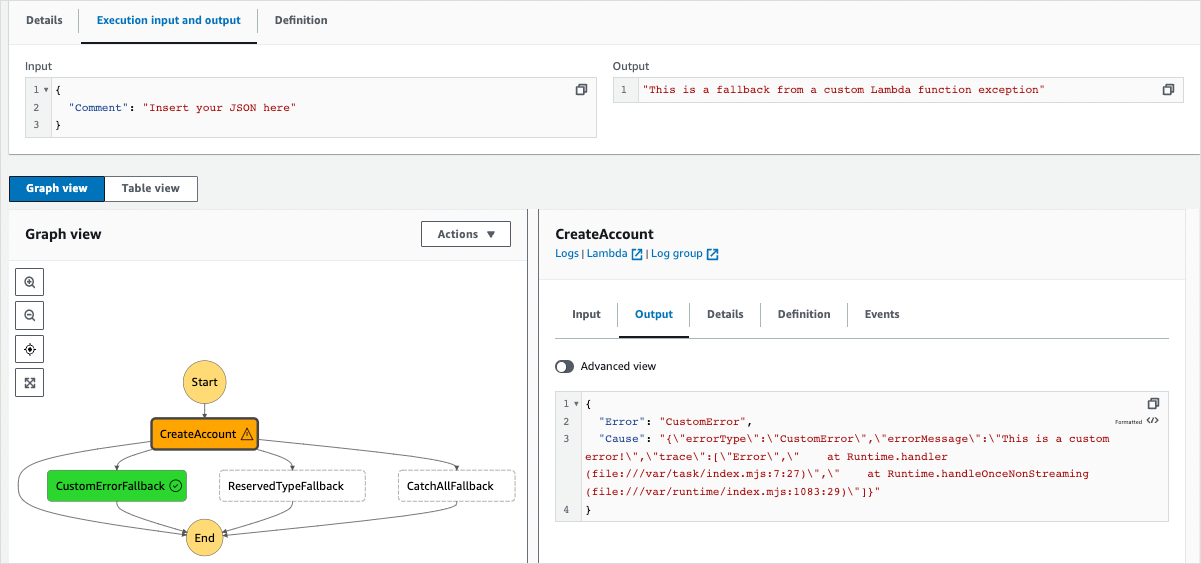
Here's an example of Retry and Catch working together:
"ProcessData": {
  "Type": "Task",
  "Resource": "arn:aws:states:::glue:startJobRun.sync",
  "Parameters": { ... },
  "Retry": [ { ... } ],
  "Catch": [
    {
      "ErrorEquals": [ "States.TaskFailed" ],
      "ResultPath": "$.errorInfo",
      "Next": "NotifyFailure"
    },
    {
      "ErrorEquals": [ "States.ALL" ],
      "ResultPath": "$.errorInfo",
      "Next": "ArchiveAndFail"
    }
  ],
  "End": true
}
ErrorEquals: Specifies the errors to catch. Here we handleStates.TaskFailedseparately from all other errors.Next: The name of the state to transition to (e.g.,NotifyFailure).ResultPath: This JSONPath expression determines where to place the error output in the state's input. Using$.errorInfopreserves the original input and adds the error information under the keyerrorInfo. If you omitResultPath, the error object replaces the entire input, which is often not what you want.
Test your understanding!
A Lambda function fails and produces the following error output:
{
  "Error": "CustomValidationError",
  "Cause": "{\"errorMessage\": \"Input field 'user_id' is missing.\", \"errorType\": \"ValueError\"}"
}
Your current state input is:
{
  "source_bucket": "my-data",
  "source_key": "raw/data.json"
}
You want to catch this error and pass both the original input and the error information to a HandleValidationError state. How would you configure the ResultPath in your Catch block to achieve this?
Show answer
You would set ResultPath to a new key in the root of the JSON object, for example: "ResultPath": "$.error_details".
This would produce the following input for the HandleValidationError state:
{
  "source_bucket": "my-data",
  "source_key": "raw/data.json",
  "error_details": {
    "Error": "CustomValidationError",
    "Cause": "{\"errorMessage\": \"Input field 'user_id' is missing.\", \"errorType\": \"ValueError\"}"
  }
}
This allows the recovery state to know which file failed (source_key) and why (error_details).
Applying Error Handling to Our ETL Workflow
Let's revisit the ETL workflow from the previous lesson and make it resilient. Consider the Task state that runs our first Glue job (TransformRawData).
// From previous lesson - the "happy path"
"TransformRawData": {
  "Type": "Task",
  "Resource": "arn:aws:states:::glue:startJobRun.sync",
  "Parameters": { ... },
  "Next": "StartCleansedCrawler"
}
Now, let's add Retry and Catch blocks to handle failures.
Test your understanding!
Modify the TransformRawData state definition above to include the following resilience logic:
- Retry up to 2 times if the Glue job invocation fails due to a transient service error (e.g.,
Glue.ConcurrentRunsExceededException). Use an initial interval of 30 seconds and a backoff rate of 1.5. - Catch any other failure (
States.TaskFailed) after retries are exhausted. The workflow should transition to a new state namedHandleGlueFailure. The error information should be added to the input under the keyjobError.
Show answer
Here's the updated state definition:
"TransformRawData": {
  "Type": "Task",
  "Resource": "arn:aws:states:::glue:startJobRun.sync",
  "Parameters": { ... },
  "Retry": [
    {
      "ErrorEquals": [ "Glue.ConcurrentRunsExceededException", "States.Timeout" ],
      "IntervalSeconds": 30,
      "MaxAttempts": 2,
      "BackoffRate": 1.5
    }
  ],
  "Catch": [
    {
      "ErrorEquals": [ "States.TaskFailed" ],
      "ResultPath": "$.jobError",
      "Next": "HandleGlueFailure"
    }
  ],
  "Next": "StartCleansedCrawler"
}
Note that the Next field is still present. It defines the "happy path" transition if the state succeeds without being caught. The HandleGlueFailure state would then be defined elsewhere in the state machine, perhaps to trigger an SNS alert and terminate the execution.
Conclusion
You now have the tools to build robust, production-ready data pipelines that don't just work on the "happy path" but can also handle the inevitable failures of a complex system.
Key Takeaways:
- Error handling should be defined declaratively in the state machine for consistency and observability.
- Use the
Retryblock for transient, temporary errors that are likely to succeed on a subsequent attempt. Configure it withMaxAttempts,IntervalSeconds, andBackoffRate. - Use the
Catchblock for terminal errors or after retries fail. It redirects the workflow to a recovery path defined by theNextfield. - The
ResultPathfield in aCatchblock is essential for passing error details to the recovery state without losing the original input. - Always refer to the list of
States.*error names to correctly target yourRetryandCatchlogic.
Next Up:
So far, we've focused on what happens inside a workflow. But how do we start a workflow in the first place? In the next lesson, we will explore how to configure Amazon EventBridge rules to trigger data pipelines based on schedules or events, fully automating our data processing from start to finish.