Hello! Welcome back to our course on preparing for the AWS Certified Data Engineer - Associate exam.
In our last lesson, we configured Amazon EventBridge to automatically trigger our data pipelines, either on a schedule or in response to an event like a file upload to S3. This was a crucial step in automating our workflows.
However, you might know that S3 has its own built-in feature for sending event notifications. This raises a critical architectural question that you're very likely to face on the exam: when should you use direct S3 notifications, and when should you use the more powerful routing capabilities of EventBridge?
This lesson directly addresses that question. Our goal is to compare event-driven patterns: direct S3 event notifications vs. routing through EventBridge. Understanding the trade-offs between these two approaches is key to designing robust, scalable, and maintainable data platforms on AWS.
Two Patterns for S3 Events
Let's start by visualizing the two patterns we'll be comparing today.
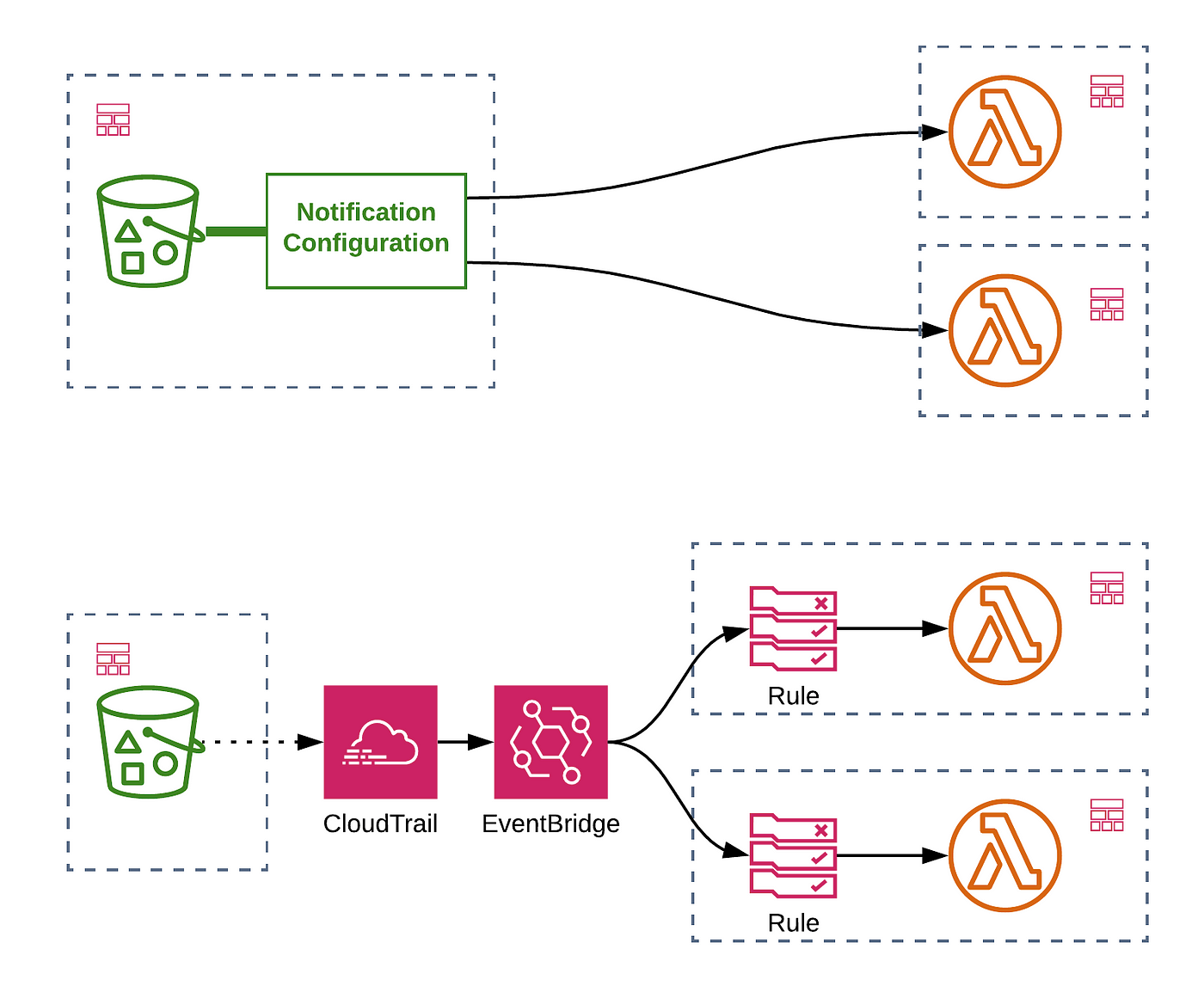
As you can see, the first pattern is a direct link, while the second introduces EventBridge as a central routing hub. Let's break down the characteristics of each.
1. The Direct Approach: S3 Event Notifications
S3 Event Notifications is a feature built directly into S3. It allows you to configure a bucket to send a message to a destination whenever a specific S3 event occurs, such as an object being created or deleted.
This pattern is simple and straightforward, but it comes with significant limitations.
AWS EventBridge vs S3 Notification
The article 'AWS EventBridge vs S3 Notification' provides a clear breakdown of the limitations of the direct notification approach. Reading this will set the stage for understanding why a more advanced pattern is often necessary.
Read the introduction and the sections 'Coupled with S3 bucket'. Pay close attention to the lists of supported event types and, more importantly, the limited target services.
As the article highlights, the key limitations of direct S3 Event Notifications are:
- Limited Targets: You can only send notifications directly to three services: AWS Lambda, Amazon SQS, and Amazon SNS. If your data pipeline is orchestrated by Step Functions or needs to write to a Kinesis stream, you cannot trigger it directly.
- Limited Event Scope: It primarily supports object-level events (e.g.,
s3:ObjectCreated:*,s3:ObjectRemoved:*). It does not support notifications for bucket-level operations like changes to security policies or tags. - Tight Coupling: The notification configuration is part of the S3 bucket's properties. This creates tight coupling, making it harder to manage your event-handling logic independently from your storage. For example, in a CloudFormation template, the notification configuration is defined within the
AWS::S3::Bucketresource. - Simple Filtering: It only supports basic filtering based on the object key's prefix (folder path) and/or suffix (file extension). You cannot have rules with overlapping filters that send events to different targets.
This direct pattern is best suited for very simple, isolated workflows, such as a single Lambda function that needs to resize an image every time one is uploaded.
Test your understanding!
You are designing a data pipeline where a new file uploaded to S3 must trigger an AWS Step Functions state machine. Can you use direct S3 Event Notifications for this task? Why or why not?
Show answer
No, you cannot use direct S3 Event Notifications. The reason is that AWS Step Functions is not a supported target for this feature. The only supported targets are Lambda, SQS, and SNS.
2. The Flexible Approach: Routing through EventBridge
The second pattern uses Amazon EventBridge as a central, decoupled event bus. This approach is more flexible and scalable, making it the standard for most production data architectures.
A crucial detail here is how S3 events get to EventBridge. It's not a direct integration. Instead, you enable AWS CloudTrail data events for your S3 bucket. CloudTrail logs the API activity and sends these events to the default event bus in EventBridge, where you can then create rules to act on them.
Amazon EventBridge - Working with Amazon S3 events
This short video from the Serverless Land channel explains the concept and benefits of using EventBridge for S3 events and walks through the setup process involving CloudTrail.
Please watch from the beginning until 4:22. This will cover: The contrast between simple S3 notifications and the more complex patterns EventBridge enables. The key benefits of using the EventBridge integration. A walkthrough of the necessary setup: creating the bucket, enabling CloudTrail data events, and creating the EventBridge rule.
By using EventBridge, you overcome all the limitations of the direct notification pattern. Let's put them side-by-side.
3. Head-to-Head Comparison
This is the core of our lesson. Understanding these differences is vital for making the right architectural choice on a project or in an exam scenario.
A Complete Guide to Amazon S3 Event Notifications ...
The article 'A Complete Guide to Amazon S3 Event Notifications' has an excellent section comparing S3 notifications to EventBridge. It provides a concise list of benefits that we will expand on.
Scroll down to the section titled 'S3 → EventBridge Integration'. Review the list of events delivered to EventBridge and the summary of 'Why use EventBridge?'.
Let's organize the comparison around several key criteria.
| Feature | Direct S3 Notifications | Amazon EventBridge |
|---|---|---|
| Targets | Limited (Lambda, SQS, SNS only). | Extensive (Over 20 services, including Step Functions, Kinesis, ECS, Batch, and other Event Buses). |
| Event Scope | Object-level only (e.g., ObjectCreated, ObjectRemoved). |
Object-level AND Bucket-level. Captures a rich set of events via CloudTrail, like ACL updates, tag changes, and lifecycle events. |
| Filtering | Basic. Prefix/suffix filtering on the object key. Overlapping filters are not allowed for different targets. | Advanced. Rich, content-based filtering on any part of the event JSON payload. Allows complex routing logic. |
| Routing | Point-to-point. One notification configuration sends to one destination (or fanned-out via SNS). | Many-to-many. A single event can be routed to multiple targets, each with its own rule and filter. Decouples producers from consumers. |
| Reliability | At-least-once delivery. Duplicates and out-of-order events are possible and must be handled by the consumer. | At-least-once delivery. Also supports SQS FIFO queues as targets for ordering and has features like an event archive and replay. |
| Coupling | Tightly coupled. Configuration is part of the S3 bucket resource. | Loosely coupled. Rules are independent resources, separate from the S3 bucket, promoting better architectural separation. |
Why This Matters for Data Engineering
As a Data Quality Engineer, you're concerned with reliability and robustness. The EventBridge pattern gives you the tools to build more resilient systems. For example, S3 guarantees at-least-once delivery, which means your processing logic might receive duplicate events.
The article A Complete Guide to Amazon S3 Event Notifications ... describes an AWS best-practice architecture (under the heading "Handling Event Ordering & Duplicates") that uses EventBridge, Lambda, and DynamoDB to create an idempotent processing system that can safely handle duplicates and out-of-order events. This robust pattern is only practical with the flexibility EventBridge provides.
Conclusion: Making the Right Choice
Today we've compared two fundamental patterns for building event-driven data pipelines with S3. The choice between them is a classic trade-off between simplicity and capability.
Key Takeaways:
- Direct S3 Event Notifications are suitable for simple, single-purpose automations where the target is Lambda, SQS, or SNS and no complex filtering is needed.
- Amazon EventBridge is the recommended and superior choice for virtually all modern data architectures. It provides:
- Flexibility: Route events to any of over 20 AWS services.
- Advanced Filtering: Create precise, content-based rules to trigger specific workflows.
- Decoupling: Manage event routing logic independently of your data storage.
- Richer Event Information: Capture a wider array of events, including bucket-level operations for enhanced monitoring and automation.
- Scalability: Build complex fan-out and event-driven microservice patterns with ease.
For the AWS Data Engineer exam, if a question presents a scenario that involves multiple downstream services, complex filtering logic, or requires triggering services other than Lambda/SQS/SNS, the answer will almost certainly involve Amazon EventBridge.
Next Up:
We've solidified how to trigger our Step Functions workflows. But is Step Functions always the right choice for orchestrating a data pipeline? In our next lesson, we will compare AWS Step Functions with the legacy AWS Data Pipeline service. This will help you understand the landscape of AWS orchestration tools and know when to use each.