Hello! Welcome back to our module on scalable ETL with AWS Glue.
In our previous lesson, we dove into the powerful world of DynamicFrame transformations, learning how to wrangle semi-structured data by flattening nested objects and resolving inconsistent data types. Those transformations were stateless, designed to operate on the entire dataset presented to them.
Today, we address a fundamental challenge in data engineering: efficiency. Most data pipelines don't run just once; they run on a schedule, processing data as it arrives. Rerunning an entire multi-terabyte transformation job every hour just to process a few gigabytes of new data is incredibly inefficient and expensive.
This brings us to our learning outcome: Configure Glue job bookmarks to process incremental data loads. We will learn how to make our Glue jobs stateful, enabling them to remember what they've already processed and only tackle the new or updated data from the last run. This is a cornerstone of building cost-effective, production-grade data pipelines and a critical concept for the Data Engineer certification exam.
1. What Are Glue Job Bookmarks?
At its core, an AWS Glue job bookmark is a mechanism that persists state information about a job run. It "bookmarks" the data that has been successfully processed, so that on subsequent runs, the job can skip this data and only process what's new.
Think of it like reading a book. Instead of starting from page one every time you pick it up, you use a bookmark to remember where you left off. Glue job bookmarks do the same for your data sources.

The main benefits of this approach are:
- Cost Efficiency: You pay only for the compute resources needed to process the new data increment.
- Faster Execution: Jobs finish much more quickly by avoiding redundant work.
- Simplified Pipeline Logic: You don't have to build complex custom logic to track which files or database rows you've already processed.
For a formal definition, let's turn to the official AWS documentation.
Tracking processed data using job bookmarks
This section from the AWS Glue Developer Guide introduces the concept of job bookmarks and lists the S3 source formats that support this feature.
Read the introductory section. Note that bookmarks are supported for common formats like JSON, CSV, Parquet, and ORC, which covers most data lake use cases.
2. How Job Bookmarks Track Data
Glue uses different strategies to track processed data depending on the source type. Understanding this distinction is key.
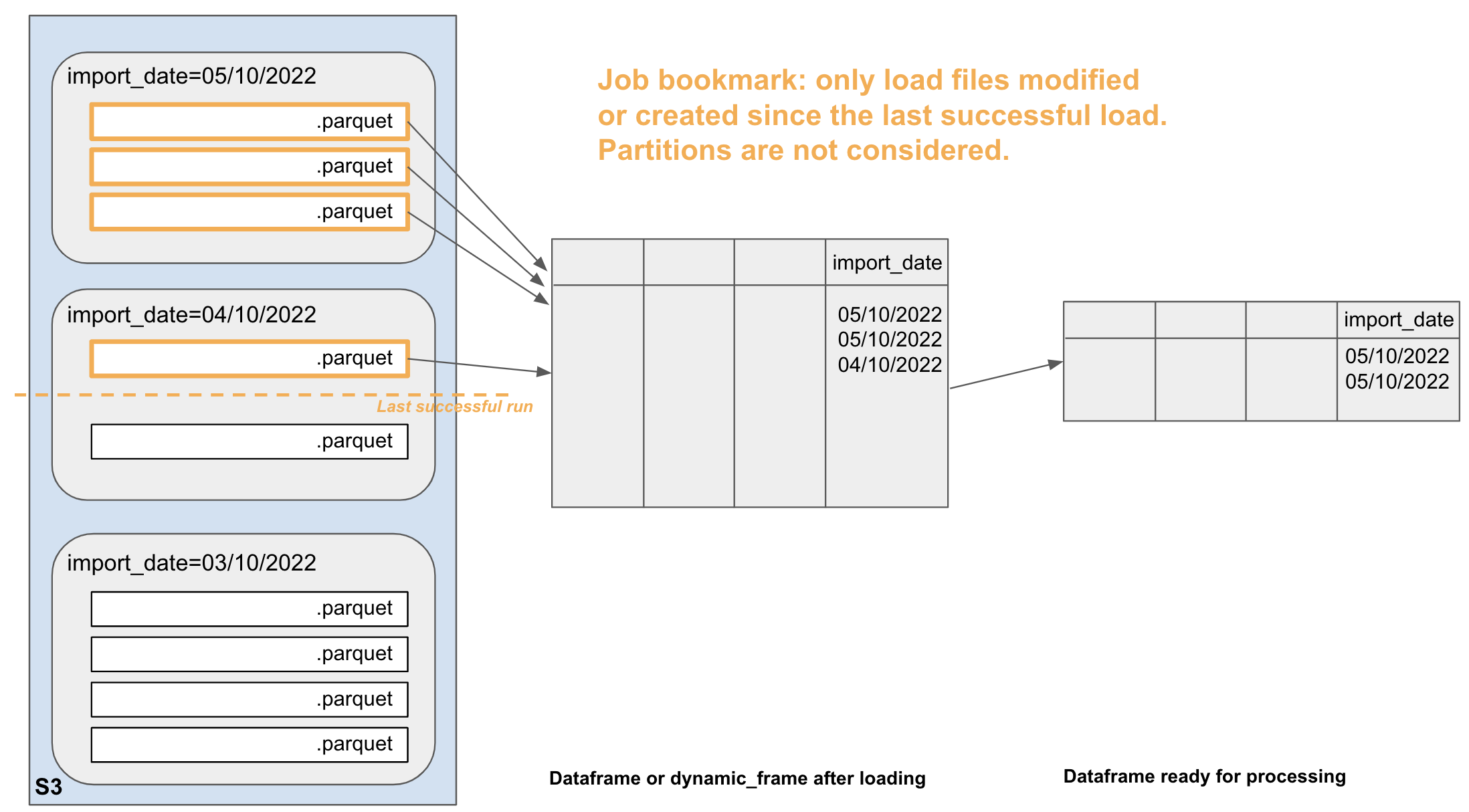
For Amazon S3 Sources (The Default)
By default, job bookmarks track S3 objects based on their last modified timestamp. When a job with an enabled bookmark runs, it records a timestamp. The next time it runs, it will only process files in the source path that have a last_modified timestamp after the one recorded from the previous successful run.
This is simple and effective for many use cases, especially when new files are continuously added to a source directory.
For JDBC Sources
For relational databases, timestamps on files don't exist. Instead, Glue needs a way to identify new rows. Here, job bookmarks rely on bookmark keys, which are one or more columns in the source table.
- By default, Glue tries to use the table's primary key, but this only works if the key's values are strictly and sequentially increasing or decreasing.
- You can explicitly specify one or more columns to act as the bookmark key. These columns must also contain values that consistently increase or decrease between job runs.
Custom Bookmark Keys for S3
The default timestamp method for S3 is not always sufficient. What if your job logic depends on a specific ID field within your files, not the file's modification time? Glue allows you to override the default S3 behavior and specify a custom bookmark key, just like with JDBC sources. This gives you fine-grained control over how new data is identified.
Let's watch a video that explains these tracking mechanisms in more detail.
AWS Tutorials - Using Job Bookmarks in AWS Glue Jobs
To understand the mechanics of how bookmarks track data, let's watch a section of this AWS Tutorials video. It clearly explains the concept of a 'bookmark key' and the default behaviors for S3 and JDBC sources.
Watch from 03:56 to 11:26. Focus on: The definition of a 'bookmark key'. The default tracking method for JDBC sources (primary key) and its requirements (sequentially increasing/decreasing). The default tracking method for S3 sources (last modified timestamp of the object). The ability to provide custom columns as bookmark keys for both source types.
3. Implementing Job Bookmarks
Enabling a job bookmark is a two-part process: you must configure it in the job settings and add specific calls to your PySpark script.
Part 1: Enabling in the AWS Glue Console
When you create or edit a Glue job, under the "Advanced properties" or "Job details" tab, you will find the "Job bookmark" setting. You have three choices:
- Enable: The job will track processed data and update its bookmark state after each successful run. This is what you'll use for standard incremental processing.
- Disable: The job will not use bookmarks and will process the entire source dataset on every run.
- Pause: The job will use the existing bookmark to read only new data, but it will not update the bookmark state upon completion. This is useful for testing or re-running a job for a specific period without advancing the bookmark.
Part 2: Essential Code Modifications
Simply enabling the bookmark in the console is not enough. You must instrument your PySpark script with three key components for the bookmark to function.
Tracking Processed Data Using AWS Glue Job Bookmarks | Incremental ETL In-depth intuition
The 'Knowledge Amplifier' video does an excellent job of breaking down the three essential code changes required to make job bookmarks function correctly in a PySpark script.
Watch the segment from 02:42 to 05:20. Pay close attention to the explanation of: job.init() at the beginning of the script. job.commit() at the end of the script. The transformation_ctx parameter, which acts as a unique identifier for stateful operations.
To recap, your script must include:
job.init(args['JOB_NAME'], args): This must be called at the beginning of your script. It initializes the job and loads the bookmark state from the previous run.transformation_ctx = "...": When you create your sourceDynamicFrame, you must provide this parameter. It's a unique string identifier that Glue uses to associate the bookmark state with this specific data source.job.commit(): This must be called at the very end of your script, after your data has been successfully written to the target. This call tells Glue that the run was successful and it should save the new bookmark state for the next run. If this is missed, the bookmark is never updated.
4. Practical Example: Using a Custom Bookmark Key
Let's see these concepts in action with a complete example. We will follow a scenario where we process customer data from S3, using a customer_id field within the files as a custom bookmark key instead of relying on file timestamps. This is a robust pattern you will encounter in real-world projects.
AWS Tutorials - Using Job Bookmarks in AWS Glue Jobs
Let's walk through a complete example of a job that processes incremental data from S3 using a custom bookmark key. This scenario is more robust than relying on file timestamps and is a common pattern in production pipelines.
Watch the detailed walkthrough from 25:15 to 34:35. Follow the steps mentally as the presenter: Sets up the S3 bucket and uploads the first CSV file (customers1.csv). Creates the Glue job, enables the bookmark in the console, and edits the script. Points out the key lines of code: job.init(), the job_bookmark_keys and transformation_ctx parameters in create_dynamic_frame.from_catalog, and job.commit(). Runs the job for the first time and verifies the output (records 1-50). Uploads the second file (customers2.csv) with records 51-100. Runs the same job again and observes that the new output file only contains the new records (51-100), proving the bookmark worked.
Test your understanding!
In the video example, after the second job run, the S3 source folder contains both customers1.csv (IDs 1-50) and customers2.csv (IDs 51-100). The S3 output folder contains two files: one from the first run with IDs 1-50, and a new one from the second run with IDs 51-100.
What would have happened on the second run if the job bookmark had been set to "Disable" instead of "Enable"?
Show answer
If the bookmark were disabled, the job would have ignored any previous state. On the second run, it would have read both customers1.csv and customers2.csv from the source, processing all records from 1 to 100. The output location would then contain a new file with all 100 records, effectively creating duplicate data (since records 1-50 were already processed and stored from the first run).
5. Managing and Troubleshooting Bookmarks
Bookmarks are powerful, but you also need to know how to manage them and what to do when they don't behave as expected.
Rewinding and Resetting
Sometimes you need to reprocess data. For example, a bug in your transformation logic might require you to fix the code and re-run it on data from the last few days. Glue provides two options for this:
- Rewind: Allows you to roll the bookmark back to the state it was in after a specific previous job run. The next run will then process all data that has arrived since that rewound point. This is ideal for targeted backfills.
- Reset: Completely deletes the bookmark state for the job. The next run will behave as if it's the first time it has ever run, processing the entire dataset from the source.
Crucial Caveat: When you rewind or reset a bookmark, Glue does not clean up any data you've already written to your target location (e.g., your S3 output bucket). It is your responsibility to manually clean the target data to avoid creating duplicates when the job reprocesses the source data.
Common Troubleshooting Issues
If your job is reprocessing data even though the bookmark is enabled, it's almost always due to one of these common configuration errors.
Load data incrementally and optimized Parquet writer with ...
Understanding why a bookmark might not work as expected is crucial for both the exam and real-world troubleshooting. This AWS Big Data Blog post outlines the most common pitfalls.
Read the section titled 'Best practices 1: Development with job bookmarks'. Pay special attention to the four bullet points explaining why a job might reprocess data: Missing job.commit() Missing transformation_ctx How JDBC source requirements differ The reliance on Last modified time for S3
Conclusion
You have now learned one of the most important techniques for building efficient and scalable ETL pipelines in AWS Glue. By processing data incrementally, you save time, reduce costs, and operate your pipelines like a seasoned data engineer.
Key Takeaways:
- Glue Job Bookmarks enable incremental data processing by tracking which data has already been processed.
- Implementation requires both enabling the feature in the job's console settings and adding three key calls to your script:
job.init(),transformation_ctx, andjob.commit(). - Bookmarks track S3 data by last modified timestamp by default, but can be configured to use a custom key from within your data for more control.
- You can reset or rewind a bookmark to reprocess data, but you are responsible for cleaning the target to prevent duplicates.
Next Up:
Now that we know how to avoid reprocessing entire datasets, our next step is to ensure that the processing of each new increment of data is as fast and efficient as possible. In the next lesson, we will focus on "Optimize Glue job performance using worker types, DPU allocation, and other tuning techniques." We'll learn how to right-size our Glue jobs to get the best performance for the lowest cost.