Hello! Welcome to the final lesson in our Exam Preparation and Scenario Analysis module.
In our last lesson, we mastered how to select the right tool for querying our data, comparing services like Athena and Redshift. We've now covered how to ingest, transform, store, and query data. But a real-world data pipeline isn't a series of manual steps; it's an automated, resilient, and observable workflow. This brings us to our final topic in this module: orchestration.
Today's lesson addresses the learning outcome: Select the appropriate orchestration service (e.g., Step Functions, EventBridge) based on workflow complexity and monitoring needs. You've mentioned you have some familiarity with these services, so our goal is to formalize that knowledge into a clear decision-making framework for the exam.
Orchestration vs. Choreography: Two Patterns for Workflow Management
Before diving into specific services, it's crucial to understand the two main patterns for coordinating tasks in a distributed system: orchestration and choreography.

-
Orchestration: A central controller (the orchestrator) explicitly tells each service what to do and when to do it. It manages the end-to-end sequence, handles errors, and directs the flow of logic. Think of a conductor leading an orchestra. In AWS, AWS Step Functions is the primary service for orchestration.
-
Choreography: There is no central controller. Instead, services are decoupled and react to events as they occur. Each service knows what event it's interested in and performs its task without being told directly. Think of a group of dancers improvising based on the music and each other's moves. In AWS, Amazon EventBridge is the key service for enabling choreography.
For the Data Engineer exam, you'll need to know not only which service embodies which pattern, but also how to combine them to build robust data pipelines.
Amazon EventBridge: The Event-Driven Choreographer
Amazon EventBridge is a serverless event bus that acts as a central nervous system for your applications. Its job is not to manage a complex sequence, but to receive events from a source and route them to the correct targets.
To understand its core components, let's watch a short introductory video.
AWS ETL Workflow Orchestration with Glue, Athena, EventBridge, Lambda, and Step Functions – Hands-On
This clip from FutureX Skills provides a clear explanation of EventBridge's fundamental concepts.
Please watch from 00:15:15 to 00:19:53. Focus on the definitions of: Event Bus: The central router that receives events. Rules and Event Patterns: The filters that match incoming events based on their content. Targets: The destinations (e.g., a Lambda function, a Step Function) that receive the event.
When to choose EventBridge:
- Triggering Workflows: It's the ideal way to start a data pipeline based on an event. For example: "When a new CSV file is uploaded to the
raw-dataS3 bucket, trigger our ETL process." - Decoupling Services: It allows the service producing an event (e.g., S3) to be completely unaware of the services consuming it (e.g., Lambda, Step Functions). This makes your architecture more flexible and easier to maintain.
- Fan-out Patterns: A single event can trigger multiple targets simultaneously. For example, a "new customer signed up" event could trigger a Lambda function to send a welcome email AND a Kinesis stream to update an analytics dashboard.
- Scheduled Execution: EventBridge can also generate events on a schedule (similar to cron jobs), which is a common way to kick off nightly batch processing jobs.
EventBridge is powerful for routing and triggering, but it doesn't provide built-in capabilities for managing multi-step logic, error handling across steps, or visualizing an entire workflow's progress. For that, we need an orchestrator.
AWS Step Functions: The Workflow Orchestrator
AWS Step Functions is a serverless orchestration service that lets you design and run workflows composed of services like AWS Lambda, AWS Glue, EMR, and more. You define your workflow as a state machine.
Let's watch a brief introduction to Step Functions.
AWS ETL Workflow Orchestration with Glue, Athena, EventBridge, Lambda, and Step Functions – Hands-On
This next clip from the same FutureX Skills video introduces the core ideas behind Step Functions.
Please watch from 00:23:48 to 00:26:53. Pay attention to how it allows you to coordinate multiple AWS services and visualize the workflow.
The state machine is the heart of Step Functions. It's a series of states, where each state represents a step in your process. This structure is what allows Step Functions to address complex requirements and provide deep visibility.
Addressing Complexity and Monitoring
Step Functions directly addresses the core criteria of our learning outcome:
-
Workflow Complexity:
- Sequencing & Branching: You can run tasks in sequence, in parallel (
Parallelstate), or implement conditional logic (Choicestate) to direct the workflow based on the output of a previous step. - Error Handling: You can define
Retrylogic for transient errors andCatchblocks to execute a specific error-handling path, such as sending a notification or cleaning up resources. This is a massive advantage over writing custom error-handling code in a Lambda function. - Long-Running Tasks: Standard Workflows can run for up to a year, making them suitable for processes that include manual approval steps or long-running batch jobs.
- Sequencing & Branching: You can run tasks in sequence, in parallel (
-
Monitoring Needs:
- Visual Workflow: The console provides a graphical representation of your state machine's execution. You can instantly see which steps succeeded (green), which failed (red), and which are in progress. This is invaluable for debugging.
- Execution History: Step Functions logs a detailed, auditable history of every state transition, including the input and output data for each step. This makes it much easier to diagnose issues compared to piecing together logs from multiple Lambda functions.
Standard vs. Express Workflows
A critical detail for the exam is the difference between the two types of Step Functions workflows.
Building Robust, Scalable, and Event-Driven Orchestration ...
This article, 'Building Robust, Scalable, and Event-Driven Orchestration', clearly explains the distinction between Standard and Express workflows. Understanding this is key to selecting the right type for a given scenario.
Please read the section titled 'What is the difference between the Express and Standard Step Functions?'. Focus on the differences in execution time, pricing model, and ideal use cases.
To summarize:
| Feature | Standard Workflows | Express Workflows |
|---|---|---|
| Use Case | Long-running, durable, auditable workflows (most data pipelines) | High-volume, short-duration event processing (e.g., IoT data, stream processing) |
| Execution Time | Up to 1 year | Up to 5 minutes |
| Execution Model | Exactly-once | At-least-once |
| Pricing | Per state transition | Per execution, duration, and memory |
| Best For | ETL orchestration, business processes with human steps | High-throughput microservice orchestration |
For most data engineering pipelines you'll encounter on the exam, Standard Workflows will be the correct choice due to their durability and long execution time.
The Decision Framework: Combining Choreography and Orchestration
So, is it EventBridge or Step Functions? Most often, the answer is both.
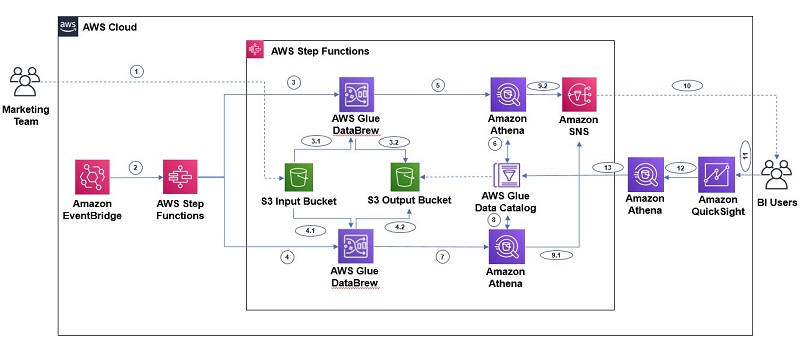
The most common and robust pattern is to use EventBridge for choreography to trigger the pipeline, and Step Functions for orchestration to manage the pipeline's execution.
- Event (Choreography): An event occurs (e.g., a file lands in S3).
- Route (Choreography): An EventBridge rule matches the event pattern.
- Trigger (Orchestration): The target for the rule is a Step Functions state machine, which starts execution.
- Execute (Orchestration): The state machine orchestrates the complex workflow: runs a Glue job, waits for it to complete, runs a data quality check with Lambda, and sends a notification via SNS.
This pattern gives you the best of both worlds: a decoupled, event-driven start to your pipeline and a robust, manageable, and observable execution engine.
AWS ETL Workflow Orchestration with Glue, Athena, EventBridge, Lambda, and Step Functions – Hands-On
Let's see this combined pattern in action. This final clip demonstrates exactly how to automate a data pipeline using an EventBridge rule that triggers a Step Function.
Watch from 00:31:58 to 00:40:34. The video first shows triggering a Glue job from Step Functions directly. The most important part starts around 00:37:30, where the presenter configures an EventBridge rule to trigger the Step Function automatically when a file is uploaded to S3. This demonstrates the full, automated, end-to-end pattern.
What About Glue Workflows?
You might also see AWS Glue Workflows mentioned as an orchestration option. Where does it fit in?
Choosing the Right Orchestration Service for Your Data ...
The AWS Builders' Library article 'Choosing the Right Orchestration Service for Your Data Pipeline' provides an excellent framework for comparing different orchestrators.
Please read two sections from this article: 'What are the Data Orchestration Service Options on AWS?': This section introduces Glue Workflows as a 'purpose-built orchestrator'. 'Conclusion': Read the conclusion and study the 'general rule of thumb' table. It provides a concise summary of when to use Glue Workflows vs. Step Functions vs. MWAA (Apache Airflow).
The key takeaway is that Glue Workflows are a purpose-built orchestrator. They are excellent for simple ETL pipelines that consist only of AWS Glue components (jobs and crawlers). They provide a simple visual editor within the Glue service itself.
However, as soon as your workflow needs to involve other services (Lambda, EMR, SQS, API Gateway, etc.) or requires more sophisticated branching and error handling, Step Functions becomes the superior choice due to its flexibility and vast service integrations.
Test your understanding!
For each scenario, select the most appropriate primary service (EventBridge, Step Functions, or Glue Workflows) and justify your choice based on workflow complexity and monitoring needs.
Scenario A:
You need to build a data pipeline that is triggered whenever a new order.json file is uploaded to an S3 bucket. The pipeline must perform three steps in sequence: 1) run a Glue job to transform the data, 2) invoke a Lambda function to validate the transformed data, and 3) if validation fails, send a message to an SQS queue. The business requires a visual diagram of each execution to quickly troubleshoot failures.
Scenario B:
A development team wants to create a system where multiple, independent microservices can be notified whenever a new user profile is created in a DynamoDB table. One service needs to send a welcome email, another needs to update a marketing database, and a third needs to start a fraud-check process. The services should not be aware of each other.
Scenario C:
You have a straightforward daily ETL process. It consists of two Glue crawlers that catalog new data, followed by a single Glue Spark job that merges the data. The entire pipeline is contained within the AWS Glue service. You want the simplest way to schedule and visualize this sequence.
Show answer
Scenario A: AWS Step Functions
- Justification: The keywords are "three steps in sequence," "conditional logic" (if validation fails), and "visual diagram for troubleshooting." This describes a classic orchestration use case that requires managing a multi-step flow with specific logic and deep monitoring capabilities. Step Functions is designed for exactly this. An EventBridge rule would be used to trigger this Step Function state machine, but Step Functions is the primary service for managing the workflow itself.
Scenario B: Amazon EventBridge
- Justification: The keywords are "multiple, independent microservices," "notified whenever," and "services should not be aware of each other." This is a classic choreography pattern. A DynamoDB Stream would publish an event to an EventBridge event bus. EventBridge would then use rules to route this single event to three different targets (e.g., three Lambda functions), achieving a decoupled "fan-out" architecture. Step Functions would be overkill here as there is no complex sequence to manage.
Scenario C: AWS Glue Workflows
- Justification: The keywords are "straightforward," "two Glue crawlers," "single Glue Spark job," and "simplest way." Since the entire pipeline consists only of AWS Glue components, the purpose-built Glue Workflows is the most direct and simple solution. It avoids the need to configure a more general-purpose orchestrator like Step Functions when all the components are native to Glue.
Conclusion
You have now built a comprehensive mental model for selecting AWS services across the entire data engineering lifecycle. When it comes to orchestration, the choice depends on the job at hand.
Key Takeaways:
- Amazon EventBridge is your go-to for choreography: triggering workflows from events, scheduling jobs, and routing messages between decoupled services.
- AWS Step Functions is your choice for orchestration: managing complex, multi-step workflows that require sophisticated logic, error handling, and deep visual monitoring.
- Glue Workflows are a simpler, purpose-built option for orchestrating pipelines that consist only of Glue jobs and crawlers.
- The most powerful pattern often involves using EventBridge and Step Functions together: EventBridge listens for an event and triggers a Step Functions state machine to manage the subsequent complex workflow.
Next Up:
This lesson concludes the Exam Preparation and Scenario Analysis module. You've learned to select services for ingestion, transformation, querying, and now orchestration. Our next lesson will kick off a new module, Monitoring, Optimization, and Troubleshooting, starting with the topic: "Configure CloudWatch metrics and alarms for monitoring data pipeline health." This is a perfect continuation, as robust monitoring is the foundation of a production-ready data platform.