Hello! Welcome to your next lesson on building and managing data warehouses with Amazon Redshift.
In our last session, we focused on performance, learning how to design materialized views to dramatically accelerate query execution. Now, we shift our focus to an equally critical aspect of any production data system: security. While performance ensures your data is usable, security ensures it's protected.
This lesson directly addresses the learning outcome: Secure a Redshift cluster using encryption, IAM roles, and network controls. We will explore Redshift security as a multi-layered strategy, starting from the network perimeter and moving inwards to identity management and finally, the data itself. For a data engineer, mastering these controls is essential for building robust, compliant, and trustworthy data pipelines.
A Layered Approach to Redshift Security
Effective security isn't about a single solution; it's about building defense in depth. A compromised data warehouse can lead to data breaches, regulatory fines, and loss of customer trust. Amazon Redshift provides a comprehensive set of features to secure your cluster at multiple levels.

We will examine each of these pillars in turn.
1. Network Controls: Building the Fortress
The first layer of defense is isolating your cluster from unintended network traffic. You achieve this by placing your Redshift cluster within an Amazon Virtual Private Cloud (VPC) and using network rules to strictly control who and what can communicate with it.
This architecture diagram illustrates a secure setup:
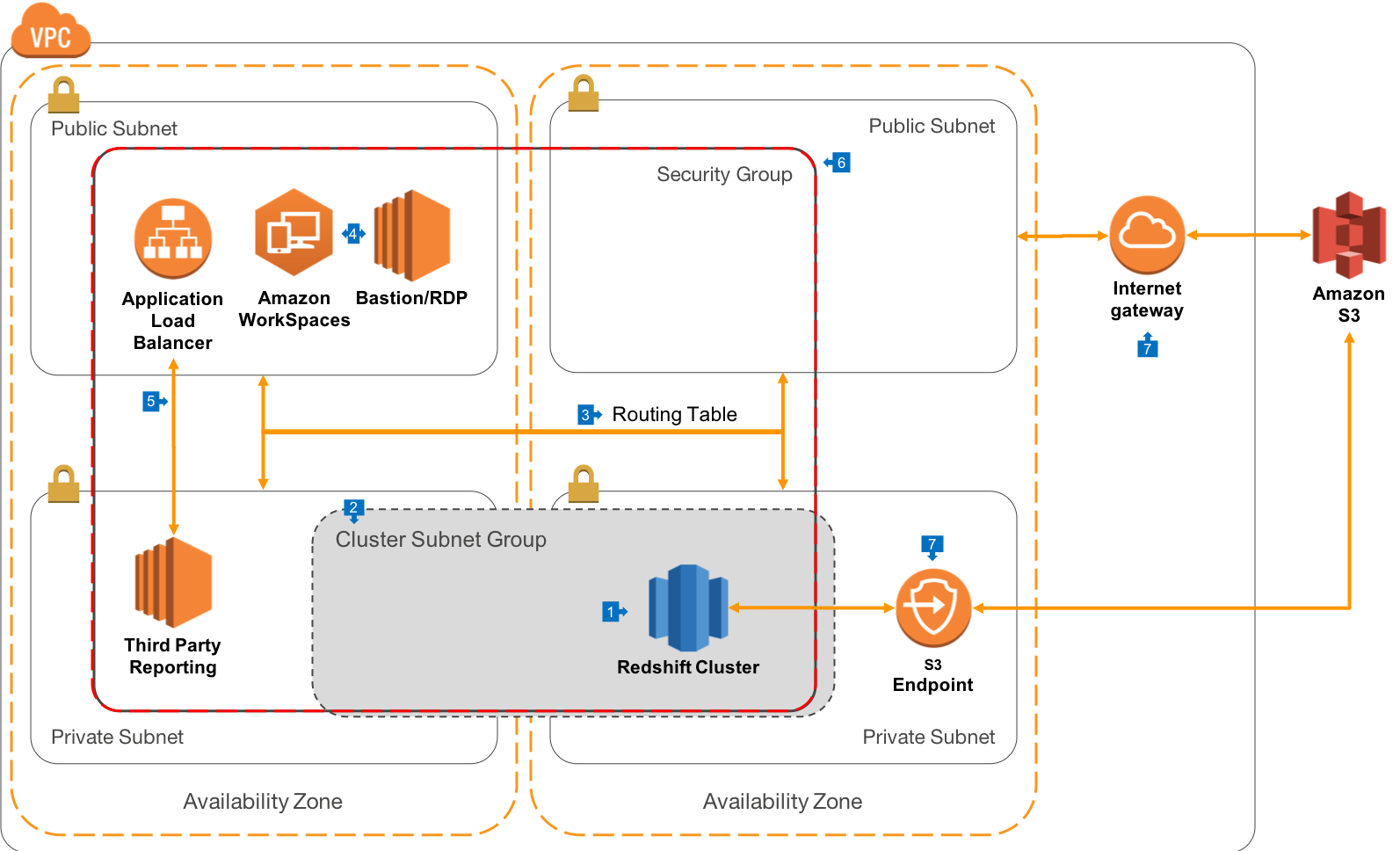
Let's break down the key components of this network architecture.
VPCs and Subnet Groups
As you know from your experience with other AWS services, a VPC provides a logically isolated section of the AWS Cloud. By launching your Redshift cluster into a private subnet, you ensure it does not have a public IP address and cannot be accessed directly from the internet. You specify which subnets your cluster can use by creating a Cluster Subnet Group.
Security Groups: The Cluster's Firewall
A security group acts as a virtual, stateful firewall for your Redshift cluster, controlling inbound and outbound traffic. You configure rules to allow access only from trusted sources.
- Inbound Rules: A common practice is to create an inbound rule that allows traffic on the Redshift port (TCP
5439) only from specific IP addresses (like your corporate office) or from other security groups (like the one attached to your application servers or bastion hosts). - Outbound Rules: Outbound rules are typically less restrictive, but can be used to limit where your cluster can initiate connections.
VPC Endpoints: Private and Secure Data Loading
A critical task for any Redshift data pipeline is loading data from S3 using the COPY command. Without a VPC endpoint, this traffic would have to travel from your private VPC, through a NAT Gateway, out to the public internet, and then to the S3 service endpoint. This is less secure and can incur data transfer costs.
A VPC Endpoint for S3 creates a private connection between your VPC and S3. All traffic between your Redshift cluster and S3 stays within the secure AWS network backbone.
To solidify your understanding of why VPC endpoints are so important, the following video gives an excellent explanation.
Keep Your Network Traffic in AWS with VPC Endpoints | Overview and Tutorial
Watch this video from the 'Be A Better Dev' channel to understand the problem that VPC Endpoints solve and how they enhance security by keeping your network traffic within the AWS cloud.
Please watch from the beginning until 05:10. Focus on: The security and cost drawbacks of using a NAT Gateway for private resources to access AWS services. How a VPC Endpoint provides a simpler, more secure, and more cost-effective solution.
Test your understanding!
You are configuring security for a new Redshift cluster. Data analysts will connect to the cluster from their business intelligence (BI) tool, which runs on a server with the IP address 203.0.113.55.
What is the most appropriate inbound rule you should add to the Redshift cluster's security group to allow this access while following the principle of least privilege?
Show answer
You should add an inbound rule with the following parameters:
- Type:
Redshift - Protocol:
TCP - Port Range:
5439(the default Redshift port) - Source:
Customwith the CIDR block203.0.113.55/32
This rule specifically allows traffic only from the BI server's IP address on the correct port, preventing any other sources from attempting to connect to the cluster. Using a /32 CIDR block ensures the rule applies only to that single IP address.
2. Access Control with IAM: The Gatekeepers
Once network access is established, the next layer of security is identity and access management. AWS Identity and Access Management (IAM) plays two crucial roles in securing Redshift.
IAM Roles for Service-to-Service Access
This is a fundamental concept for data engineers. For your Redshift cluster to perform actions on other AWS resources—like reading data from an S3 bucket for a COPY command or writing data to S3 with UNLOAD—it needs permissions.
You grant these permissions by:
- Creating an IAM role with a policy that allows the necessary actions (e.g.,
s3:GetObject,s3:ListBucket). - Attaching this IAM role to your Redshift cluster.
When you run a COPY command, you reference the role's ARN, and Redshift assumes that role to get temporary security credentials to access S3 on your behalf. This is far more secure than storing AWS access keys directly in your scripts.
IAM Database Authentication
Traditionally, you connect to a database using a username and password. Redshift also offers a more modern and secure method: IAM database authentication.
With this approach, you configure Redshift to map a database user to an IAM user or role. Instead of using a static password, your client application requests temporary database credentials from IAM. This has several advantages:
- You don't need to manage database passwords.
- Credentials are short-lived, reducing the risk if they are compromised.
- You can centrally manage database access through IAM policies.
The article below provides a good overview of Redshift's access control features, including the use of IAM.
Please read the following sections from the article 'AWS Redshift Security' on the Sysdig blog to reinforce your understanding of network and identity controls.
Read the sections titled 'Configuring Security Groups and VPCs' and 'Access Management – AWS IAM Accounts'. These sections summarize the network and IAM concepts we've just discussed.
3. Encryption: The Digital Safe
The final layer of defense protects the data itself, ensuring it remains unreadable even if an unauthorized party gains access to the underlying storage. Redshift encrypts your data both at rest and in transit.
Encryption at Rest
When you create a Redshift cluster, encryption is enabled by default. Redshift automatically handles the encryption and decryption of data as it's written to and read from disk. This process uses a four-tier key hierarchy managed through the AWS Key Management Service (KMS):
- A master key in KMS (either an AWS-managed key or a customer-managed key).
- The master key encrypts a Cluster Encryption Key (CEK).
- The CEK encrypts a Database Encryption Key (DEK).
- The DEK encrypts the individual data blocks on disk.
This hierarchical approach ensures that your data is securely encrypted, and you have granular control over the root key in KMS.
Encryption in Transit
All data moving between your client application (e.g., a SQL client or BI tool) and your Redshift cluster is automatically encrypted using Secure Sockets Layer (SSL). Similarly, traffic between your Redshift cluster and other AWS services (like S3 for COPY/UNLOAD) within the AWS network is also encrypted.
The following resource elaborates on these encryption mechanisms.
To learn more about how Redshift protects your data, read the section on encryption from the same Sysdig article.
Read the sections 'Encryption of Data at Rest' and 'Encryption of Data in Transit' to understand how Redshift protects data on disk and over the network.
Practical Application: Setting Up a Secure Cluster
Theory is important, but seeing these components come together in practice is key. The following video walks through the process of launching a Redshift cluster, incorporating the security controls we've discussed.
AWS Redshift | How to setup a redshift cluster with external connectivity | AWS VPC
This video from 'BI Insights Inc' demonstrates how to configure the necessary IAM and network components before launching a secure Redshift cluster.
Watch the following segments to see these security layers being configured in the AWS console: Creating the IAM Role (00:53 - 02:06): Notice how permissions for S3 and Glue are added to a role that Redshift will use. Configuring the VPC Endpoint (02:06 - 05:59): See how an S3 endpoint is created and associated with the VPC's route table. Configuring the Security Group (05:59 - 07:02): Observe the addition of an inbound rule to allow connections to the Redshift port. Launching the Cluster (07:02 - 08:35): Watch how the IAM role and security group are associated with the new cluster during creation.
Conclusion
In this lesson, you've learned how to secure an Amazon Redshift cluster using a defense-in-depth strategy. By combining network controls, robust identity management, and comprehensive encryption, you can build a data warehouse environment that is both powerful and secure.
Key Takeaways:
- Network Controls: Isolate your cluster in a private VPC, use Security Groups as a firewall, and enable VPC Endpoints for private communication with other AWS services like S3.
- IAM Roles: Use IAM roles to grant your Redshift cluster least-privilege access to other AWS services, which is essential for data loading and unloading. Consider using IAM database authentication for managing user access.
- Encryption: Redshift automatically encrypts data in transit (with SSL) and at rest (using a KMS-managed key hierarchy), protecting your data at all times.
Next Up:
Having covered cluster performance and security, our next lesson will zoom in on optimizing individual queries. We will learn how to analyze query plans to optimize slow-running queries in Redshift, a crucial skill for troubleshooting and fine-tuning your data analytics workloads.