Welcome back to your capstone project. In the last lesson, we undertook a significant architectural refactor, establishing a powerful data-driven foundation for our game world using a unified OBJECT model and a versatile "distance" system. With that in place, you successfully implemented the go command, enabling player movement.
Today, we will leverage that very same architecture to give the player their "senses." This lesson is dedicated to implementing the essential commands that allow a player to perceive their surroundings and take stock of their possessions: look and inventory. You'll see just how elegant and reusable our distance system is, as it will form the core of the logic for these new commands, bringing your text adventure one step closer to the interactive experience shown below.
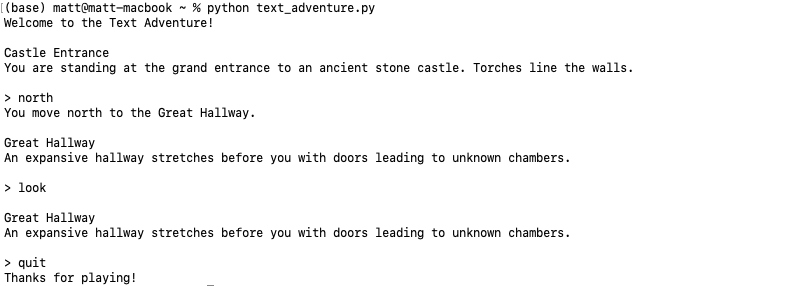
The Theory of Player Perception
Before we write any code, let's consider the design principles behind these commands. A text adventure is a simulation, and the commands we're building are the player's interface to that simulation's state. Richard Bartle, a pioneer of the genre, outlines the core data structures that define the game world.
Compute!'s Guide to Adventure Games - Richard A. Bartle
This classic guide explains the fundamental data structures and routines that power text adventures. We'll use it to frame our implementation.
First, read the section Describing a World. Pay close attention to the descriptions of the internal map, object descriptors, and character descriptor. These are the data sources our new commands will query. Next, read the section on Action Routines. This describes how the game takes parsed tokens (like the verb "look") and uses them to invoke an "action routine" that produces output. This is exactly what we are about to build.
As Bartle explains, our game world is defined by:
- The Internal Map: The collection of locations and their connections. Our
OBJECTarray, specifically the room objects, represents this. - Object Descriptors: The list of all items, their characteristics, and their current locations. Our
OBJECTarray also serves this purpose for non-room objects. - The Character Descriptor: Information about the player, including their location and inventory. Our
playerobject (objs[0]) is our character descriptor.
When a player types look, they are asking for a description of the current "room" and a list of "objects" within it. When they type inventory, they are asking for the list of "objects" associated with their "character." Our task is to write the action routines that query these data structures and present the information to the player.
Implementing the look Command
The look command should provide a comprehensive description of the player's current surroundings. This typically includes:
- The long description of the current room.
- A list of all other objects present in that room.
In our last lesson, you created the getDistance() function, which is the key to implementing this. To find all objects "in the room," we simply need to find all objects whose distance from the player is distHere.
Let's create a new module for our action commands. Create actions.h and actions.c.
In actions.h:
#ifndef ACTIONS_H
#define ACTIONS_H

void executeLook(const char *noun);
void executeInventory(void);


#endif
In actions.c:
Here, we'll implement executeLook. It will print the description of the player's location (player->location->description) and then iterate through all game objects, printing the description of any object it finds to be distHere.
#include <stdio.h>
#include <string.h>
#include "world.h"
#include "misc.h" // For getDistance()
#include "actions.h"

void executeLook(const char *noun)
{
    if (noun != NULL && strcmp(noun, "around") == 0)
    {
        printf("You are in %s.\n", player->location->description);

        // List objects that are 'distHere'
        int count = 0;
        printf("You see:\n");
        for (int i = 0; objs[i].tags != NULL; i++)
        {
            if (getDistance(player, objs + i) == distHere)
            {
                printf(" - %s\n", objs[i].description);
                count++;
            }
        }
        if (count == 0)
        {
            printf(" - Nothing special.\n");
        }
    }
    else
    {
        printf("You can only 'look around'.\n");
    }
}
Self-correction: The loop condition objs[i].tags != NULL is a safe way to iterate through our statically defined OBJECT array, assuming the last entry is a sentinel with NULL tags.
This simple function already provides a powerful way for the player to observe their environment. The beauty of this approach is its reliance on the abstract getDistance function, keeping the action logic clean and readable.
Implementing the inventory Command
The logic for the inventory command is nearly identical to look. The only difference is that instead of searching for objects that are distHere, we search for objects that are being carried by the player, which our system defines as distHeld.
Add the implementation for executeInventory to your actions.c file.
In actions.c (continued):
void executeInventory(void)
{
    int count = 0;
    printf("You are carrying:\n");
    for (int i = 0; objs[i].tags != NULL; i++)
    {
        if (getDistance(player, objs + i) == distHeld)
        {
            printf(" - %s\n", objs[i].description);
            count++;
        }
    }
    if (count == 0)
    {
        printf(" - Nothing.\n");
    }
}
Notice the parallel structure. Both functions iterate through the world's objects and use getDistance to filter them based on their relationship to the player. This is the power of the data-driven architecture we established. To see another example of this pattern, you can review the simple C implementation in the forum post below.
Text adventure design in C - For Beginners - Forums
This forum post contains a full, though basic, C implementation of a text adventure. It provides a good contrast to our more abstract approach.
Focus on the main game loop inside the main function. Notice the if-else if block that handles commands. The logic for the 'search' command is conceptually similar to our executeLook: it iterates through a list of items and prints those associated with the current area.
Your Implementation Task
Now, it's time to integrate these new "senses" into your capstone project.
-
Create
actions.handactions.c:- Create the two new files. Populate
actions.hwith the function declarations forexecuteLookandexecuteInventory. - Populate
actions.cwith the C code for both functions as provided above. Make sure to#includethe necessary headers (stdio.h,string.h,world.h,misc.h,actions.h).
- Create the two new files. Populate
-
Update Your Game Logic (
game.c):- Modify your
parseAndExecutefunction to handle the new verbs. Add cases for "look" and "inventory". - For "look", the command will likely be "look around", so your parser should pass "around" as the noun to
executeLook. - For "inventory", there is no noun, so you will call
executeInventory()directly.
Your
parseAndExecutemight now look something like this:// In game.c #include "location.h" // for executeGo #include "actions.h" // for our new functions // ... void parseAndExecute(char *input) { // ... (verb/noun splitting logic) if (strcmp(verb, "quit") == 0) { // ... } else if (strcmp(verb, "go") == 0) { executeGo(noun); } else if (strcmp(verb, "look") == 0) { executeLook(noun); // Expects "around" as the noun } else if (strcmp(verb, "inventory") == 0) { executeInventory(); } else { printf("I don't know how to '%s'.\n", verb); } } - Modify your
-
Refine the Main Loop (
main.c):- A common feature in text adventures is to show the short room name on every turn, and the full description only when the player types
look around. - Modify your main loop. After a successful
gocommand (or at the start of any new turn), print the name of the player's current location (player->location->descriptionor a separatenamefield if you have one). TheexecuteLookfunction will handle printing the full details when requested.
- A common feature in text adventures is to show the short room name on every turn, and the full description only when the player types
-
Update Your World Data (
world.c):- To test your
inventorycommand, you'll need to add an item and place it in the player's possession. Modify an item'slocationto beplayer. - For example:
// In world.c, inside the OBJECT objs[] array definition: ... /* A shiny brass lamp */ {"a shiny brass lamp", tags_lamp, player, NULL}, ... - Compile and run. Your
inventorycommand should now list "a shiny brass lamp". Thelook aroundcommand should show you the contents of your starting room.
- To test your
Conclusion
You have successfully implemented the player's core sensory commands, look and inventory. In doing so, you've demonstrated the true power and reusability of the distance system you built in the previous lesson. This elegant abstraction allows you to reason about object relationships in a clean, centralized way.
Key Takeaways:
- Action routines (
executeLook,executeInventory) are functions that query the game state and produce descriptive output for the player. - The
distancesystem is not just for movement; it's a universal tool for determining object visibility and accessibility.distHereis the key to finding what's in the current room.distHeldis the key to finding what's in the player's inventory.
- By separating parsing, actions, and world data into different modules (
game.c,actions.c,world.c), you are building a maintainable and scalable project.
In our next lesson, we will move from perception to interaction. You will implement the take and drop commands. These actions will not just query the game state—they will change it by modifying the location pointers of objects, once again using the distance system to determine what can and cannot be manipulated.