Introduction
In our last lesson, we put theory into practice by using pointer arithmetic to traverse and even reverse an array in-place. We established that an array name often acts like a constant pointer to its first element, and expressions like arr[i] are equivalent to *(arr + i).
Today, we'll explore a subtle but critical consequence of this relationship known as array decay. This concept is fundamental to understanding how C handles arrays passed as function arguments. Our goal is to pinpoint exactly why using the sizeof operator to find an array's length works in one context but fails in another. Mastering this will prevent common bugs and solidify your understanding of C's memory model, a crucial step on your path to low-level game programming.
The sizeof Operator: Array vs. Pointer
Before we dive into functions, let's clarify a crucial distinction. Although an array name can be used like a pointer, it is not a pointer variable. The sizeof operator reveals the difference.
- When applied to an array,
sizeofreturns the total number of bytes the entire array occupies in memory. - When applied to a pointer,
sizeofreturns the number of bytes needed to store a memory address on your system (typically 4 bytes on a 32-bit system or 8 bytes on a 64-bit system).
The following video from Dave's Garage offers an excellent high-level explanation of this difference and introduces the concept of array decay.
Master Pointers in C: 10X Your C Coding!
This segment from "Master Pointers in C" clearly distinguishes between how arrays and pointers are treated in memory.
Watch the section from this timestamp. Pay close attention to the final part where the presenter explicitly contrasts sizeof on an array versus sizeof on a pointer. This is the foundational concept for today's lesson.
The C standard formally defines a few situations where an array name is not treated as a pointer to its first element. Using it as an operand to sizeof is one of these key exceptions.
Array Decay: Passing an Array to a Function
The most common place you will encounter array decay is when passing an array to a function. For efficiency, C does not copy the entire array when you call a function. Instead, it "decays" the array into a pointer to its first element and passes that pointer by value.
Inside the function, the parameter that receives the array is treated as a pointer, even if you declare it with array syntax like int arr[]. The function has no information about the original array's size; it only knows the address of where the data begins.
This diagram provides a perfect visual summary of the process.
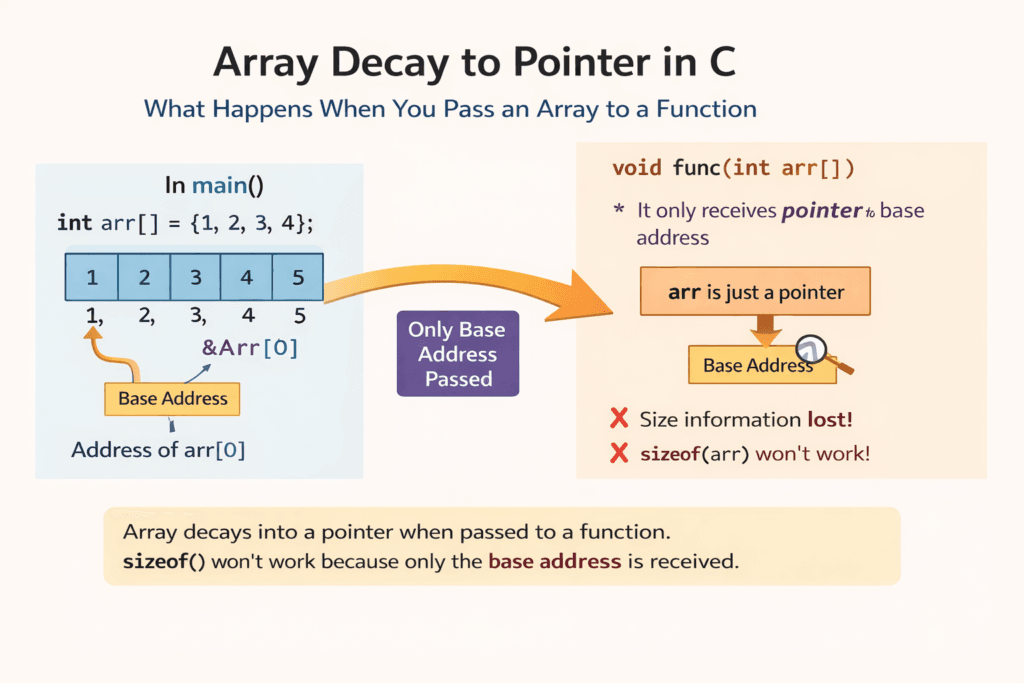
Now, let's see this behavior confirmed with code. The following article from GeeksForGeeks provides a clear definition and a program that demonstrates the problem perfectly.
This article will walk you through the definition of array decay and then provide code that proves the concept.
First, read the introductory paragraphs that define array decay, from the start of the article. Then, carefully study the code example under the heading "C Program to Demonstrate Array Decay" and its output. Note how sizeof(array) gives different values when called from main() versus when called from function1() and function2(). This is array decay in action.
As you saw in the article, both void function1(int array[]) and void function2(int* array) are treated identically by the compiler. Inside both functions, sizeof(array) yields the size of an int* pointer, not the 20 bytes of the original array (5 * sizeof(int)).
The Consequence: Calculating Array Length Fails
This brings us to the core of today's learning outcome. A common C idiom for finding the number of elements in an array is:
size_t num_elements = sizeof(array) / sizeof(array[0]);
This works perfectly as long as array is truly an array within the current scope. However, if you try to use this formula inside a function to which the array has been passed, it will fail.
sizeof(array)will give you the size of a pointer (e.g., 8 bytes).sizeof(array[0])will give you the size of the first element (e.g., 4 bytes for anint).- The result will be something like
8 / 4 = 2, which is incorrect and meaningless.
The lecture notes from UMBC include a fantastic table showing the output of various expressions from within the GNU Debugger (GDB), making the distinction between the caller's context and the function's context crystal clear.
This resource from UMBC provides a detailed, low-level view of what happens when an array is passed to a function.
Focus on the section titled Arrays as function parameters are pointers. Specifically, examine the table comparing GDB command outputs. The row for print sizeof(arr) is the most important part—notice it prints 32 in main but 8 inside the bubble function. This is the "smoking gun" evidence of array decay.
The Solution: Pass the Size Explicitly
Since a function loses an array's size information due to decay, how do we write functions that can safely operate on arrays? The standard and most robust solution in C is to pass the size of the array as a separate argument.
Any function that needs to iterate over an array or know its bounds should be designed to accept both a pointer to the array's first element and an integer or size_t variable that holds the number of elements.
Let's return to the GeeksForGeeks article, which demonstrates this exact solution.
This part of the article provides the standard C solution to the array decay problem.
Read the section titled How to Get Size of Array Inside Function in C?. Study the code example. Notice how the main function calculates the size and passes it as a second argument to func, which can then use it reliably.
This pattern is fundamental in C programming. You'll see it everywhere, from standard library functions to the custom functions you'll write for your game engine.
Conclusion
In this lesson, we've untangled the often-confusing behavior of arrays and pointers when they interact with functions. You now understand that the apparent failure of the sizeof operator is not a bug, but a direct consequence of C's efficient design choice to pass arrays by reference using a decayed pointer.
Key Takeaways:
- Array Decay: When an array is passed to a function, it decays into a pointer to its first element. The function loses all information about the original array's size.
sizeofBehavior:sizeof(array)returns the total byte size of the array, whilesizeof(pointer)returns the size of a memory address. This distinction is the root of the issue.- The Problem: Because of decay, the
sizeof(array) / sizeof(array[0])idiom for calculating array length fails inside functions that receive that array as a parameter. - The Solution: To write functions that can safely process arrays, you must explicitly pass the array's size or element count as a separate function argument.
With this solid understanding of array decay, you are now prepared to tackle C strings. In the next lesson, we will see that strings are simply null-terminated character arrays, and this principle of decay will be central to how we distinguish between different ways of representing and manipulating them.