Introduction
In our last lesson, we established the critical difference between storing strings in a character array versus using a pointer to a string literal. We now know that char arr[] creates a mutable copy, while const char *ptr points to an immutable literal in read-only memory. This foundational knowledge is the key to avoiding a common class of C programming errors.
Today, we'll build directly on that foundation. Knowing how strings are stored is one thing; knowing how to work with them is another. This lesson will teach you to process strings manually, traversing them character-by-character using pointers. This is a fundamental skill in C, essential for everything from simple text manipulation to complex data parsing. For your goal of building a game, this technique is the bedrock of features like command parsers, which interpret player input like "go north" or "get key".
By the end of this lesson, you will be able to process strings manually by implementing character-by-character pointer traversal, a core competency for low-level programming.
Traversing a String with a Pointer
Let's begin by recalling the memory layout of a C string. A string is a contiguous block of characters in memory, ending with a null terminator (\0). A pointer to a string simply holds the memory address of the very first character.
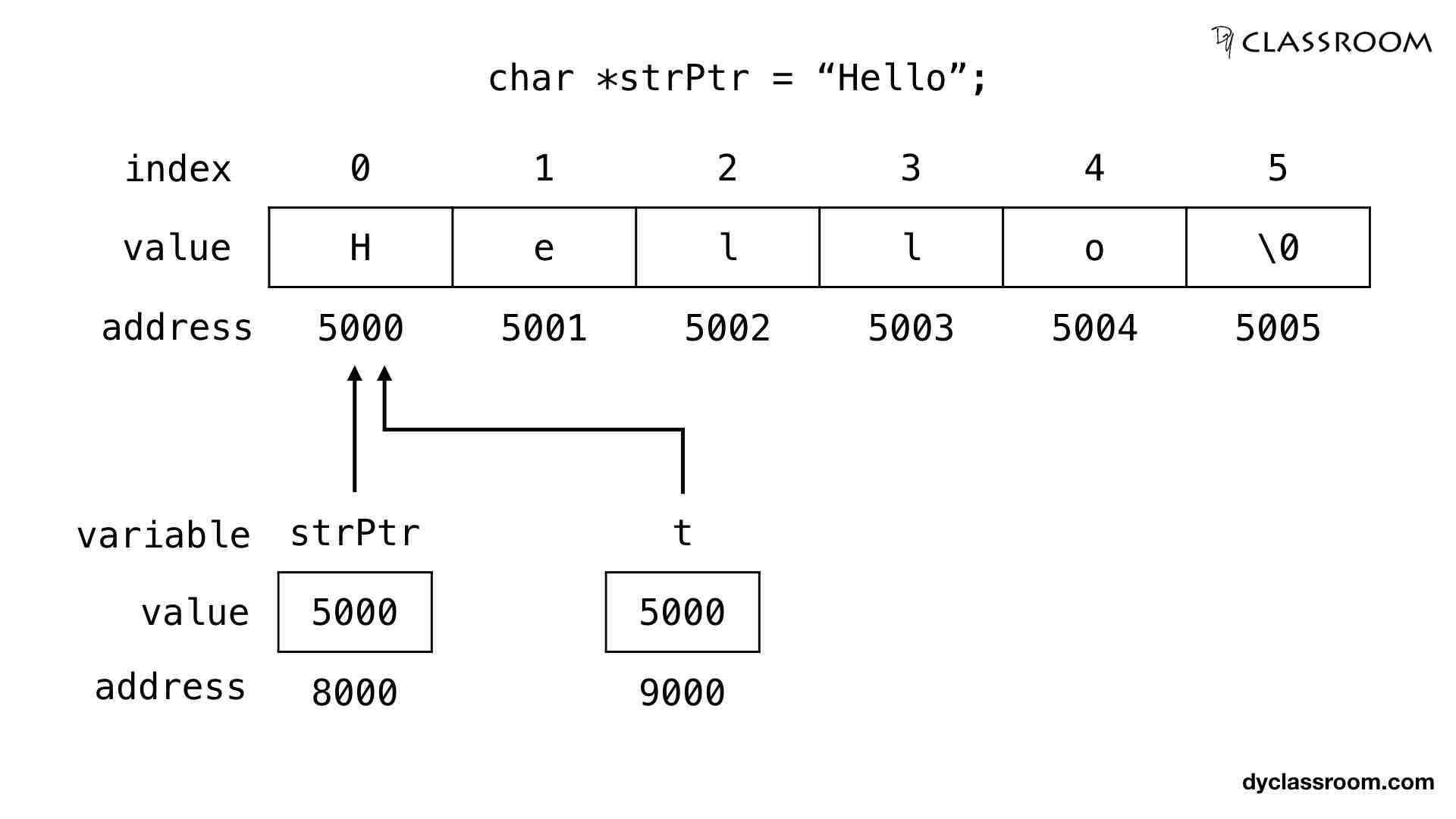
To process this string, we need three basic pointer operations:
- Initialization: A
charpointer is initialized to point to the first character of the string.const char *p = "Hello"; - Dereferencing: The
*operator retrieves the character at the address the pointer is currently pointing to. Initially,*pwould give us'H'. - Incrementing: The
++operator advances the pointer to the next character's memory address. Afterp++,pwill point to the address of'e'. Sincecharis guaranteed to be 1 byte,p++simply increments the memory address by one.
By combining these operations in a loop, we can visit every character in the string until we reach the null terminator. The following video provides a clear, step-by-step demonstration of this exact process.
Iterate Through A String Using A Pointer | C Programming Example
The video "Iterate Through A String Using A Pointer" from Portfolio Courses explains the core mechanics of string traversal.
First, watch the segment from this timestamp to understand how a pointer is initialized to the start of a string and how characters are stored sequentially in memory. Next, see how these concepts are combined into a while loop to process the string from this section. Pay close attention to the use of dereferencing (*p) to get the character and incrementing (p++) to move to the next one. Finally, watch the short explanation from this timestamp which introduces a more concise and idiomatic way to write the loop condition. We will discuss this next.
The Idiomatic C String Loop: while (*p)
As you saw in the last part of the video, the explicit comparison while (*p != '\0') can be shortened to while (*p). This is a very common idiom in C programming, and understanding why it works is crucial for reading professional C code.
The logic is simple and elegant:
- The null terminator character,
'\0', has an integer value of 0. - All other valid (and printable) characters have non-zero integer values.
- In C's boolean logic, the integer
0is treated asfalse, and any non-zero integer is treated astrue.
Therefore, the condition while (*p) effectively means "while the character we are pointing at is not the null terminator." When the pointer p finally reaches the '\0', *p evaluates to 0, the condition becomes false, and the loop terminates.
Here is the complete, idiomatic pattern for traversing a string to print its characters:
void print_string(const char *p) {
    while (*p) { // Condition is true for any character except '\0'
        putchar(*p); // Process the character
        p++;         // Move to the next character
    }
}
This compact and efficient structure is the preferred way to manually loop over a string in C.
Application: Writing Your Own String Functions
Now that you understand the traversal mechanism, you can create your own versions of standard string functions. This is not just an academic exercise; it solidifies your understanding of how these functions work under the hood.
Let's look at another example that implements this logic. The following video resource demonstrates writing a custom print function.
Character arrays and pointers - part 1
The video "Character arrays and pointers - part 1" from mycodeschool shows a practical example of wrapping the traversal logic into a function.
Please watch the section from this timestamp. The instructor writes a print function that accepts a character pointer. Notice the evolution of the implementation, from using an index i to finally using direct pointer increment (C++) within the loop. This last version, while (*C != '\0') { ... C++; }, is exactly the pattern we are focusing on.
Case Study: A Real-World Game Parser
This skill of pointer traversal is not just for simple printing functions. It's the core engine for more complex tasks, like the command parser for your text adventure game. A parser needs to read the player's input string (e.g., "get silver key") and match it against known command patterns (e.g., "get A", where 'A' is a noun).

The resource below is taken from the tutorial series on building a text adventure game. You don't need to understand every detail of the logic, but focus on how it uses pointer traversal to achieve its goal.
This file, match.c, contains the pattern-matching logic for the text adventure's parser. It's a fantastic real-world example of pointer traversal in action.
Your goal here is not to become an expert on this specific code, but to see our lesson's concept in a practical setting. Focus your attention on the code for the matchCommand function, found by scrolling down to the section titled match.c. Look at the main loop within matchCommand: The main loop Notice how it iterates as long as both the input src and the pattern pointers are not at the end of their respective strings (*pattern != '\0'). Inside the loop, helper functions like matchTerminal are called, which in turn use *src and src + 1 to consume characters one by one. This is character-by-character pointer traversal being used to solve a complex problem.
This example should make it clear that the simple while (*p) loop is a powerful building block that scales up to solve real-world programming challenges in game development.
Practice
To solidify your understanding, try implementing a common string function yourself. Write your own version of strlen, which calculates the length of a string (not counting the null terminator).
Your Task:
Create a function with the following signature:size_t my_strlen(const char *s);
Hints:
- Create a local counter variable, initialized to 0.
- Create a pointer to traverse the string
s. - Loop until your pointer finds the null terminator. In each iteration, increment your counter.
- Return the final count.
This exercise is a classic test of pointer and string handling in C.
Conclusion
In this lesson, you have mastered the fundamental technique of processing C strings through manual pointer traversal. This is a crucial skill that separates C from many higher-level languages and is essential for writing efficient, low-level code.
Key Takeaways:
- The Traversal Loop: The core pattern involves initializing a pointer to a string, dereferencing it (
*p) to access a character, and incrementing it (p++) to move to the next. - The Idiomatic Condition: The loop
while (*p)is a concise and efficient way to iterate until the null terminator is found, leveraging C's treatment of zero asfalse. - Practical Application: This technique is not just theoretical; it is the basis for parsing text, manipulating data, and implementing many of the standard library's own string functions. You've seen it applied directly in the context of a game's command parser.
Now that you understand how to perform these operations manually, you will appreciate the convenience and safety of using pre-built functions. In our next lesson, we will explore the standard string-handling library, <string.h>, which provides optimized functions like strlen, strcpy, and strcmp that perform these very tasks for you.