Introduction
In our last lesson, we mapped out a plan to refactor your game's single-file source code into a modular structure, separating interfaces (.h files) from implementations (.c files). This is a crucial step for managing complexity. However, it introduces a practical challenge: compiling the project is no longer a simple gcc main.c -o game command. You would now need to manually list every single .c file:
gcc -Wall -Wextra -Werror -o game main.c player.c inventory.c
Typing this repeatedly is tedious, error-prone, and inefficient. If you change only one line in inventory.c, this command recompiles everything, wasting time. For your eventual goal of building a game engine, this manual approach is simply unsustainable.
Today, we will solve this problem by learning how to write a basic Makefile. A Makefile is essentially a recipe book for your project, telling the make utility how to build your executable from its source files efficiently. We will focus on the fundamental building blocks: rules, targets, and dependencies, creating an automated and intelligent build process for the multi-file project we designed.
The Problem: Inefficient Compilation
Before diving into the solution, it's important to fully appreciate the problem we're solving. Imagine creating a simple shell script to automate the build command. While this saves you from retyping, it doesn't solve the efficiency issue. The script would still recompile every file, every time.
The following video demonstrates this exact scenario. The presenter first uses a shell script to build a small project, highlighting its lack of intelligence, before introducing make as the solution.
Makefiles: 95% of what you need to know
In this clip from "Makefiles: 95% of what you need to know" by Gabriel Parmer, you'll see why a simple build script is not enough.
Watch the section from the build script demonstration. Pay attention to the core issue: when he modifies just one .c file, the script still recompiles everything unnecessarily. This is the central problem make is designed to fix.
The Anatomy of a Makefile
The make utility works by reading a file named Makefile. This file contains a set of rules that describe how to create files (called targets) from other files (called prerequisites or dependencies).
A rule has a simple structure:
target: prerequisite1 prerequisite2 ...
    <tab>command1
    <tab>command2
- Target: The file you want to build (e.g., an executable or an object file).
- Prerequisites: A list of files the target depends on.
- Command: A shell command to execute to create the target. Crucially, this line must start with a tab character, not spaces.
The power of make lies in how it decides whether to run a rule's command. It checks the modification timestamps of the files. The command is executed only if:
- The target file does not exist.
- OR, at least one of the prerequisites has been modified more recently than the target file.
This simple timestamp logic is the "essence of make." It's what allows make to avoid redundant work. The following reading explains this fundamental concept clearly.
This tutorial provides a concise and clear definition of Makefile syntax and its core operating principle.
First, read the brief section on Makefile Syntax to solidify the structure of a rule. Then, carefully study the section titled The essence of Make. This is the most important concept to internalize.
Creating a Basic Makefile for Your Project
Let's apply this to the multi-file inventory project we designed. The files are main.c, player.c, player.h, inventory.c, inventory.h, and item.h. Our goal is to create an executable named game.
The build process has two stages, which we will mirror in our Makefile:
- Compilation: Compile each
.cfile into an intermediate object file (.o). - Linking: Link all the object files together to create the final executable.
Here is the complete, basic Makefile. We will break it down rule by rule.
# Makefile for the inventory game


# Rule to link the final executable
game: main.o player.o inventory.o
	gcc main.o player.o inventory.o -o game


# Rule to compile main.c into main.o
main.o: main.c player.h inventory.h
	gcc -Wall -Wextra -Werror -c main.c -o main.o


# Rule to compile player.c into player.o
player.o: player.c player.h item.h
	gcc -Wall -Wextra -Werror -c player.c -o player.o


# Rule to compile inventory.c into inventory.o
inventory.o: inventory.c inventory.h item.h
	gcc -Wall -Wextra -Werror -c inventory.c -o inventory.o
Let's analyze this:
-
The Linking Rule (
game: ...)- This is the first rule, so it's the default goal. When you just type
make, this is the targetmakewill try to build. - It states that the
gameexecutable depends on three object files:main.o,player.o, andinventory.o. - If any of those
.ofiles are newer than thegamefile (or ifgamedoesn't exist), the linker commandgcc main.o ... -o gamewill run.
- This is the first rule, so it's the default goal. When you just type
-
The Compilation Rules (
.o: ...)- These rules tell
makehow to create the object files. - The
-cflag in thegcccommand is critical. It tells the compiler to "compile only, do not link," which produces the.ofile. - Notice the prerequisites. For
main.o, the prerequisites are not justmain.c, but also the header files it includes (player.h,inventory.h). This is essential! If you change a function declaration inplayer.h,makenow knows thatmain.cmust be recompiled to create a newmain.o.
- These rules tell
When you type make, the tool builds a dependency tree and works backward:
makewants to buildgame.- It sees
gameneedsmain.o,player.o, andinventory.o. - To build
main.o, it checks its prerequisites (main.c, etc.). If needed, it runs thegcc -ccommand. - It does the same for
player.oandinventory.o. - Once all the
.ofiles are present and up-to-date, it finally runs the command for thegametarget, linking them together.
The result is pure efficiency. If you only change inventory.c and run make, only inventory.o will be rebuilt, and then the final game executable will be re-linked. main.o and player.o will be untouched. This video clip perfectly demonstrates this intelligent behavior.
Makefiles: 95% of what you need to know
Now let's see the payoff. This part of the "95% of what you need to know" video demonstrates Make's intelligence.
Watch from the demonstration. Notice how after the initial build, running make again does nothing. When the binary is removed but the object files remain, make is smart enough to only run the linking command. This is the efficiency we've been after.
Useful Makefile Conventions: all and clean
Our Makefile works, but we can improve it by adopting two widespread conventions: the all and clean targets.
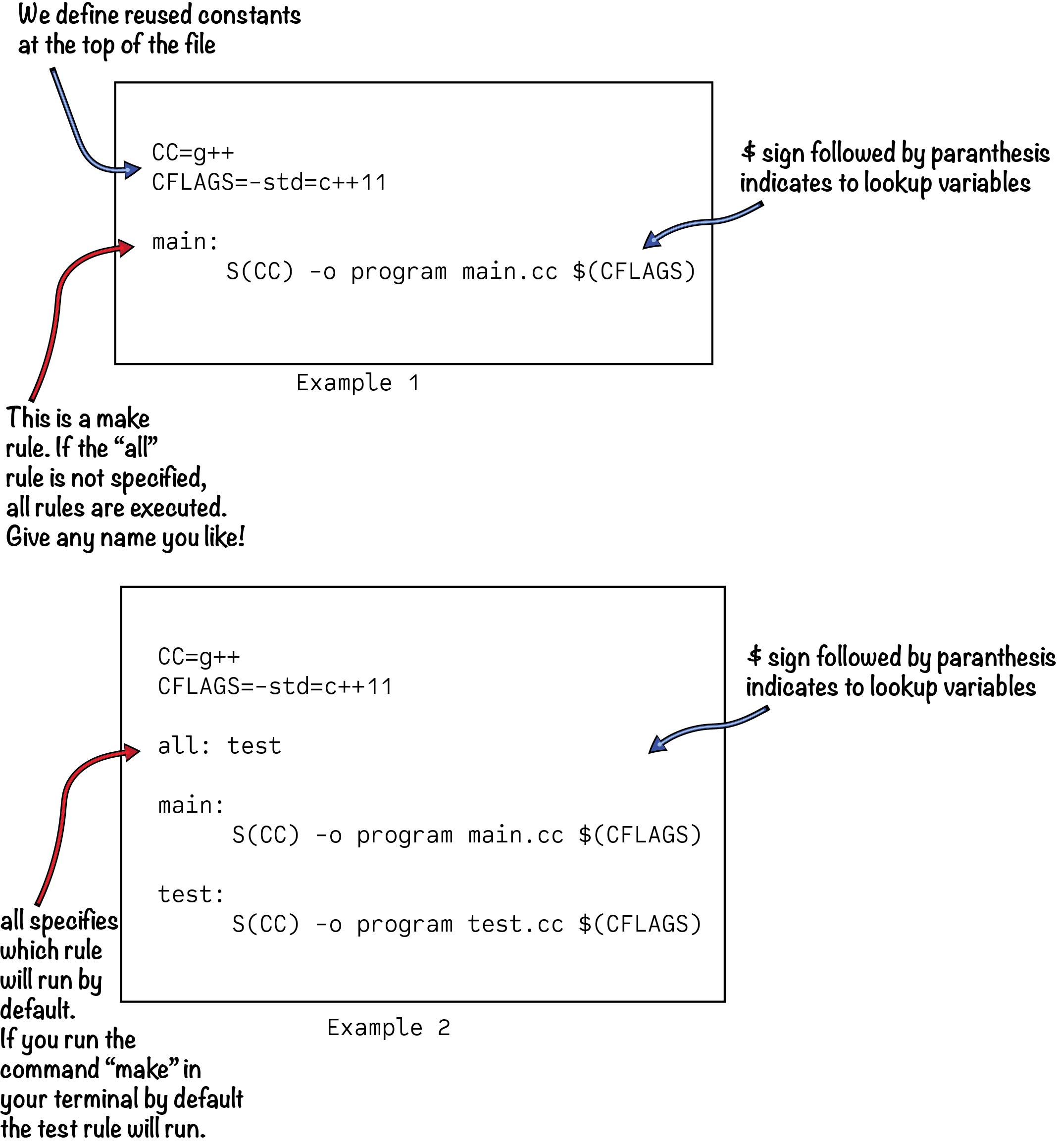
The all Target
The default behavior of make is to build the first target in the file. It's good practice to make the first target a "phony" target named all, whose prerequisite is the main executable you want to build. This makes the Makefile's intention more explicit.
The clean Target
It's also standard to provide a clean target that removes all generated files (object files and the final executable). This is useful for forcing a complete rebuild from scratch.
Here is our improved Makefile with these conventions:
# Makefile for the inventory game

.PHONY: all clean

all: game


# Rule to link the final executable
game: main.o player.o inventory.o
	gcc main.o player.o inventory.o -o game


# ... (compilation rules are the same as before) ...


# Rule to clean up the directory
clean:
	rm -f game main.o player.o inventory.o
The .PHONY: all clean line tells make that all and clean are not actual files to be built. This prevents issues if you ever happen to have a file named "clean" in your directory. Now you can run make (which defaults to make all) to build the project, and make clean to tidy up.
Conclusion
You have now bridged the gap between writing modular code and building it efficiently. By automating the compilation and linking process, you've removed a significant point of friction in the development cycle. This is a foundational skill for any serious C programmer.
Key Takeaways:
- A
Makefileautomates builds using a set of rules. - A rule consists of a target, prerequisites, and commands (which must be indented with a tab).
makeuses file timestamps to determine if a target needs to be rebuilt, ensuring maximum efficiency.- Building a multi-file project involves compiling
.cfiles to.oobject files (gcc -c) and then linking the.ofiles into a final executable. - Header files (
.h) must be listed as prerequisites for any object file that depends on them. allandcleanare conventional "phony" targets for building the project and cleaning up generated files.
Our current Makefile is functional, but you may have noticed it's quite repetitive. We list the object files multiple times, and the compilation rules are nearly identical. In our next lesson, we will refactor this Makefile using variables and pattern rules to make it dramatically more concise, flexible, and scalable—ready for a much larger project.