Introduction
In our last lesson, we explored how to automate repetitive tasks using for loops, allowing you to process every item in a list without rewriting your code. This was a major step toward writing more powerful scripts.
Today, we will address the final learning outcome of this module: to define a Python function that accepts arguments and returns a value. Functions are the single most important tool for organizing your code. While loops help you avoid repeating a single action, functions allow you to package entire blocks of logic—including loops, conditionals, and other operations—into reusable, named components. For your goal of building projects for data journalism, mastering functions is what will allow you to transform a simple script into a well-structured and maintainable analysis tool.
Why Use Functions? The DRY Principle
As your programs grow, you'll often find yourself writing the same or very similar blocks of code in multiple places. Consider this image:

If you wanted to change the greeting message, you would have to find and edit it in all three locations. This is inefficient and prone to errors. Programmers follow a principle called DRY: Don't Repeat Yourself.
Functions are Python's primary tool for adhering to the DRY principle. A function is a named, reusable block of code that performs a specific task. You can "call" the function by its name whenever you need to perform that task, rather than copying and pasting the code.
For the example above, we could write a single function:
def greet(name):
    print(f"Hi {name}")
    print("Nice to see you again!")
    print("Enjoy our video!")


# Now we can call the function as many times as we need
greet("Peter")
greet("Sarah")
greet("Dominique")
This code is shorter, easier to read, and much easier to maintain.
Defining and Using a Function
Let's break down how to create your own functions. The process involves defining the function and then calling it. The "Programming with Mosh" YouTube channel offers a very clear and concise introduction to this.
Python Functions | Python Tutorial for Absolute Beginners #1
This video explains the fundamental syntax for creating and calling functions, and then clarifies the important distinction between parameters and arguments.
First, watch the section on defining a basic function. Pay attention to the def keyword, the naming convention, and the role of indentation. Next, watch the segment that explains how to pass information to your function using parameters and arguments. This is a critical concept for making your functions flexible and powerful.
As Mosh explained, the key terms to remember are:
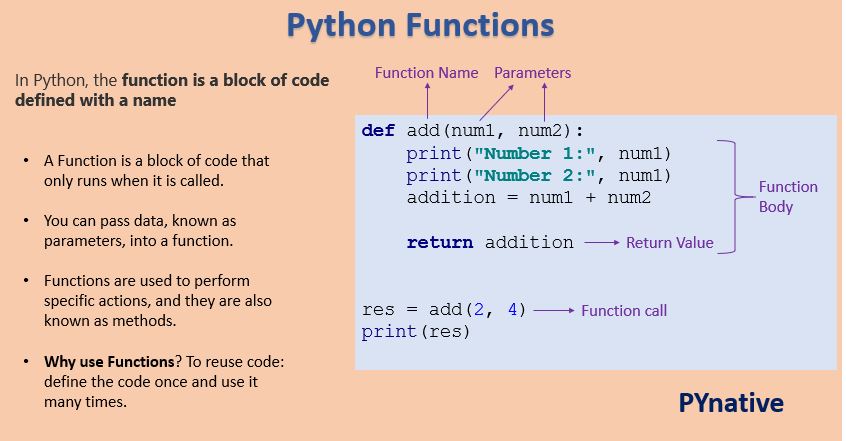
- Parameters: The variables listed inside the parentheses in the function definition. They are placeholders for the inputs the function expects.
- Arguments: The actual values you provide for the parameters when you call the function.
The image below provides a great visual summary of a function's structure.
Functions That Return Values
In programming, we can think of two main types of functions:
- Functions that perform a task: These functions "do" something, like printing text to the screen (e.g., our
greetfunction). - Functions that calculate and return a value: These functions process their inputs and send a result back, which can then be stored in a variable or used in other parts of your code.
For building complex projects, the second type is often more useful. A function that returns a value is a self-contained unit of logic that you can plug into other parts of your program. The Programming with Mosh video has an excellent segment explaining this distinction.
Python Functions | Python Tutorial for Absolute Beginners #1
This clip highlights the difference between functions that just perform an action and those that are designed to return a useful value.
Watch the section on functions that return a value. Notice how returning a value makes the function more reusable, as its output can be saved to a file, sent over a network, or simply printed, giving you more flexibility.
The return keyword is what allows a function to send a value back to the code that called it. A function stops executing as soon as it hits a return statement. If a function doesn't have an explicit return statement, it automatically returns a special value called None, which represents the absence of a value.
A Deeper Look at Writing Functions
The process of building a function often involves writing the logic first, then wrapping it in a def block, and finally parameterizing it to make it reusable. The following guide provides a more detailed, step-by-step walkthrough of this process.
Writing Functions in Python— A Beginner's Guide
This article from Jessica Miles on Medium breaks down the process of writing a function into clear, manageable steps. While the main example is more advanced, the principles are universal.
Focus on these three key sections: Step 2: Create the empty function. Read the part that describes the basic structure using def, a docstring placeholder, and a return None placeholder. Step 4: Add parameters. This is the most important section. Read the explanation of parameters versus arguments, and the discussion of required versus optional (default) parameters. Step 5: Code your return value. Read the part explaining how to replace the None placeholder with the actual value your function should output.
Practical Application: A Text Analysis Function
Let's apply these concepts to build a function relevant to your interest in writing and journalism. Imagine you have a piece of text and want to count how many times a specific keyword appears. We can write a function for that.
This function will:
- Accept two arguments: the text to search and the keyword to find.
- Process the text to make the search case-insensitive.
- Loop through the words and count the occurrences of the keyword.
- Return the final count.
Here is the code:
def count_keyword(text, keyword):
    """
    Counts the number of times a keyword appears in a string of text.
    The search is case-insensitive.
    """


    # Normalize both the text and keyword to lowercase for a fair comparison
    normalized_text = text.lower()
    normalized_keyword = keyword.lower()


    # Split the text into a list of words
    words = normalized_text.split()


    # Initialize a counter to store the result
    count = 0


    # Loop through each word in the list
    for word in words:


        # We'll strip common punctuation for a cleaner match
        cleaned_word = word.strip('.,!?"\'')
        if cleaned_word == normalized_keyword:


            # If a word matches the keyword, increment the counter
            count = count + 1


    # Return the final count
    return count


# --- Let's test our function ---
article_snippet = "The stock market saw a major market correction today. Analysts are watching the market closely."
keyword_to_find = "market"


# Call the function and store its return value in a variable
market_mentions = count_keyword(article_snippet, keyword_to_find)

print(f"The word '{keyword_to_find}' appeared {market_mentions} times.")


# Test it again with a different keyword
analyst_mentions = count_keyword(article_snippet, "Analysts")
print(f"The word 'Analysts' appeared {analyst_mentions} times.")
Try it yourself:
- Copy and run the code. Observe how we call the function and use its returned value.
- Change the
article_snippetandkeyword_to_findto see how the output changes. - This function encapsulates logic we've learned in previous lessons: string methods (
.lower(),.split(),.strip()) andforloops. It packages them into a single, reusable tool.
Conclusion
You have now learned the final core concept of basic Python programming: functions. By packaging code into functions, you can create organized, reusable, and readable programs—the foundation for any significant project.
Key takeaways from this lesson:
- Functions are defined with the
defkeyword and help you follow the DRY (Don't Repeat Yourself) principle. - Parameters are the named placeholders for inputs in a function's definition.
- Arguments are the actual values you pass to a function when you call it.
- The
returnstatement allows a function to send a value back to the caller, making it a powerful building block for more complex logic.
This lesson concludes our first module on Python's core concepts. You are now equipped with the essential tools for manipulating text and controlling program flow. In the next module, we will begin our journey into practical data handling by learning how to read content from and write content to text files. This will open the door to working with real-world data sets, moving you one step closer to your goal of building data journalism projects.