Hello! Welcome to the first lesson in our new module on Parallel and Distributed Databases.
In the previous modules, we've done a deep dive into the internals of a single database node, exploring everything from storage layouts and buffer management to indexing and write-optimized structures like LSM-Trees. We've been focused on how to make a single machine as efficient as possible—a concept known as vertical scaling or "scaling up."
Now, we shift our focus to a different challenge: how do we build a database system that can scale beyond the limits of a single machine? This is the world of horizontal scaling or "scaling out," where we combine the power of multiple machines to handle massive datasets and high query loads.
This lesson addresses the most fundamental design choice in this domain: comparing shared-memory, shared-disk, and shared-nothing architectures for parallel databases. Understanding the trade-offs between these three models is the starting point for designing virtually any large-scale data system.
1. The Landscape: Parallel vs. Distributed Systems
Before we dive into the architectures, it's useful to clarify some terminology. While often used interchangeably, "parallel" and "distributed" database systems have a subtle but important distinction.
- A parallel database primarily focuses on using multiple processors and disks on a single machine (or a tightly coupled cluster) to speed up query execution.
- A distributed database involves multiple independent machines, connected by a network, that work together. This introduces new challenges like network latency and the possibility of partial system failures.
In practice, most modern large-scale systems are both parallel and distributed. They use parallel techniques within each machine and distributed principles to coordinate across machines.
22 - Introduction to Distributed Databases (CMU Databases Systems / Fall 2019)
To start, let's watch a segment from a lecture by Prof. Andy Pavlo at Carnegie Mellon University. He provides an excellent introduction to distributed databases and frames the architectural discussion we're about to have.
Watch from 05:07 to 08:27. Pay attention to how the challenges of a single-node system (concurrency, logging, etc.) become even harder in a distributed environment due to the network.
As you just saw, the core decision in designing such a system is how the fundamental resources—CPU, memory, and disk—are arranged and shared across the different processing units. This brings us to our three main architectural models.
2. The Three Architectural Models
Let's examine the three canonical architectures. For each one, we'll look at its definition, pros, cons, and when it's typically used.
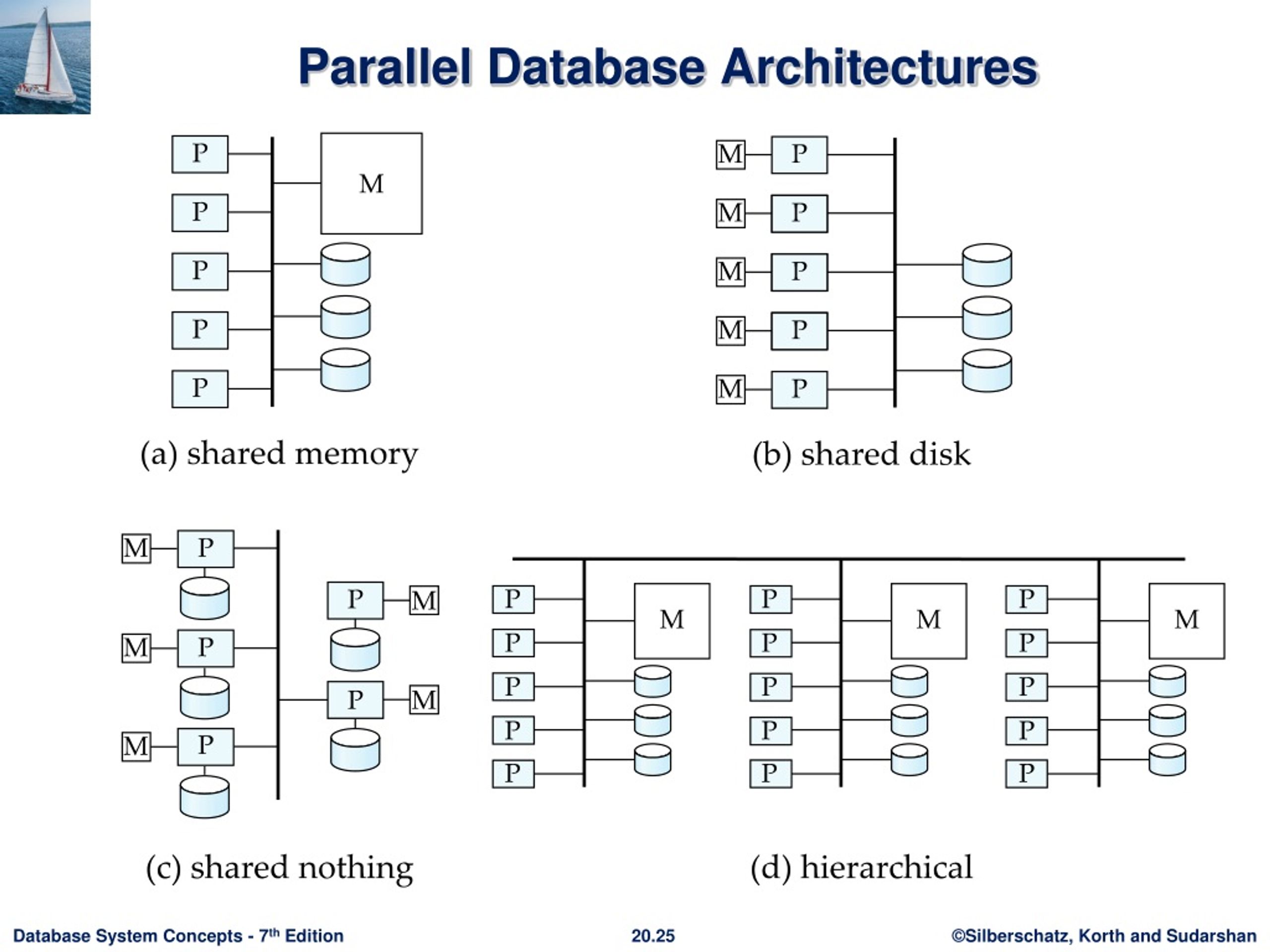
2.1. Shared-Memory Architecture
A shared-memory system is the most tightly-coupled architecture. Think of a powerful, high-end server with multiple CPU cores or processors.
- Definition: All processors in the system have access to a single, shared main memory and a shared disk. Communication between processors is extremely fast as they can read from and write to the same memory locations.
- Pros:
- Simplicity: The programming model is straightforward, as data can be easily shared through global memory.
- High Performance for Communication: Inter-process communication is very fast, managed by the operating system and hardware.
- Cons:
- Contention and Bottlenecks: The shared memory bus and interconnect can become a bottleneck as you add more processors.
- Limited Scalability: There is a hard physical limit to how many processors you can add to a single motherboard.
- High Cost: Scaling vertically by buying larger, more powerful servers is significantly more expensive than scaling horizontally with commodity hardware.
22 - Introduction to Distributed Databases (CMU Databases Systems / Fall 2019)
Let's hear Prof. Pavlo's take on the Shared-Memory architecture. He also clarifies why this model isn't the dominant choice for large-scale distributed databases today.
Watch the segment from 09:39 to 10:15 and 11:32 to 13:21 (you can skip the brief discussion of 'shared everything'). Notice the emphasis on this model being more common in High-Performance Computing (HPC) than in commercial databases.
The key takeaway is that while nearly all modern databases use shared-memory parallelism within a single node (to leverage multi-core CPUs), it is not a viable architecture for building a large-scale distributed database that spans many machines.
2.2. Shared-Disk Architecture
The shared-disk model is a middle ground. It decouples the processing from a central storage system.
- Definition: Each node consists of its own processor and private memory, but all nodes share a common set of disks. This is often implemented using a Storage Area Network (SAN).
- Pros:
- Independent Scaling: You can scale the compute layer (add more nodes) and the storage layer independently.
- High Availability: If a compute node fails, other nodes can take over its work because they all have access to the entire database on the shared disk. Compute nodes are essentially stateless.
- Simplified Administration: There's no need for complex data partitioning across nodes, which can simplify database administration.
- Cons:
- Storage Bottleneck: The shared disk system can become a performance bottleneck, as all I/O from all nodes funnels through it.
- Complexity of Coordination: Since nodes have their own memory (and thus their own buffer pools), the system needs a complex distributed lock manager and cache coherency protocol to ensure that a page modified in one node's memory is seen correctly by others. This can be a major source of contention and overhead.
22 - Introduction to Distributed Databases (CMU Databases Systems / Fall 2019)
The Shared-Disk model is extremely relevant in the cloud era. Watch this next segment where the lecture discusses its modern incarnation and the challenges it presents.
Watch from 13:21 to 19:40. Pay close attention to the example of how a shared-disk system works in a cloud environment (like Amazon S3/EBS) and the cache coherency problem he describes when one node updates a page that other nodes have in their local buffer pools.
As noted in the video, this architecture is very popular for modern "cloud-native" databases (e.g., Snowflake, Amazon Aurora, Oracle RAC). They leverage scalable cloud storage services and provide customers the flexibility to scale their compute resources up and down on demand.
2.3. Shared-Nothing Architecture
This is the most common architecture for massive-scale distributed databases, often referred to as Massively Parallel Processing (MPP) systems.
- Definition: Each node is an independent, self-contained server with its own processor, memory, and disk. Nodes are connected via a high-speed network and coordinate by passing messages. There are no shared resources.
- Pros:
- Massive Scalability: This architecture offers the highest potential for scalability. You can add hundreds or thousands of commodity servers to the cluster, with performance often scaling linearly.
- No Central Bottleneck: By eliminating shared resources, the architecture avoids the bottlenecks inherent in shared-memory and shared-disk systems.
- Cost-Effective: It scales horizontally using inexpensive, off-the-shelf commodity hardware.
- Cons:
- Management Complexity: The data must be partitioned (or "sharded") across the nodes. Managing this partitioning, especially when adding or removing nodes (rebalancing), is complex.
- Network Overhead: Performance is highly dependent on the network. Queries that need to access data from multiple nodes (distributed joins) can incur significant network communication costs.
- Fault Tolerance Complexity: While a single node failure doesn't bring down the system, the data on that node becomes unavailable unless it has been replicated elsewhere.
Shared-nothing vs. other architecture models
The Aerospike engineering blog provides an excellent article that directly compares these models from an engineering perspective. Reading this will solidify your understanding of the trade-offs.
Read the section titled 'Shared-nothing vs. other architecture models'. It provides a concise, direct comparison of shared-nothing against shared-everything, shared-disk, and shared-memory, highlighting the key differences in contention, scalability, and fault tolerance.
Test your understanding!
You are designing a data system for a fast-growing social media app. The workload is characterized by a massive volume of writes (new posts, likes) and requires the ability to scale out quickly and cost-effectively as the user base grows. High availability is critical.
Which architecture—shared-memory, shared-disk, or shared-nothing—would be the most appropriate choice, and why? What is the primary technical challenge you'll face with your chosen architecture?
Show answer
Shared-nothing is the most appropriate architecture.
-
Why: It offers the best horizontal scalability to handle a rapidly growing volume of data and users. Its use of commodity hardware makes it cost-effective to scale. The inherent fault isolation (failure of one node doesn't crash the system) is crucial for high availability. Shared-memory can't scale to this level, and a shared-disk system would likely become a bottleneck under such a heavy write load.
-
Primary Challenge: The main challenge will be data partitioning (sharding). You need an effective strategy to distribute user data and posts evenly across the nodes to avoid "hotspots." You also need a robust mechanism for rebalancing data when new nodes are added to the cluster, without causing significant downtime or performance degradation.
3. Summary and Comparison
Let's put it all together. The choice of architecture involves a fundamental trade-off between performance, scalability, and ease of management.
| Feature | Shared-Memory | Shared-Disk | Shared-Nothing |
|---|---|---|---|
| Scalability | Low (limited to a single machine) | Medium (bottlenecked by storage) | High (scales near-linearly) |
| Primary Bottleneck | Memory bus / interconnect | Storage I/O and Lock Manager | Network bandwidth |
| Fault Tolerance | Low (single point of failure) | High (stateless compute nodes) | Medium (node failure causes data loss without replication) |
| Cost | High (expensive high-end servers) | Medium (SANs can be expensive) | Low (commodity hardware) |
| Management | Simple | Medium (cache coherency is complex) | Complex (data partitioning and rebalancing) |
| Commercial Examples | (Used within nodes of other systems) | Oracle RAC, Snowflake, Amazon Aurora | Teradata, Greenplum, Cassandra, BigQuery |
As the image we saw earlier suggests, a common modern setup is a hierarchical or hybrid model: a shared-nothing cluster where each individual node is a powerful shared-memory multi-core machine. This approach gets the best of both worlds.
Conclusion
In this lesson, we have compared the three foundational architectures for parallel and distributed databases.
Key Takeaways:
- Shared-Memory: Confined to a single machine, it offers simple and fast communication but has severe scalability limits and high costs.
- Shared-Disk: Decouples compute and storage, offering flexibility and high availability, but introduces contention at the storage layer and requires complex cache-coherency protocols. It is popular in cloud environments.
- Shared-Nothing: Provides the highest level of scalability and cost-effectiveness by eliminating shared resources, but introduces the complexity of data partitioning and reliance on the network. This is the dominant architecture for web-scale systems.
The choice of architecture is the most critical decision in designing a scalable data system, as it dictates the system's performance characteristics, failure modes, and operational complexity.
Preview of the Next Lesson
We've established that for massive scalability, the shared-nothing architecture is king. However, we also highlighted its biggest challenge: how do you divide the data across all the independent nodes? In the next lesson, we will tackle this head-on by learning how to implement hash-based and range-based data partitioning (sharding) strategies.