Hello! Welcome to the next lesson in our exploration of database system internals.
In our last session, we built the HeapFile, an unordered collection of pages on disk. We analyzed the I/O cost of reading and writing those pages, but we treated the movement of data between disk and memory as a given. Today, we're going to pull back the curtain on that "magic."
This lesson focuses on a cornerstone of any disk-oriented database: the buffer pool. Our learning outcome is to explain the role of the buffer pool in managing data pages in memory. We'll see how this component acts as a sophisticated cache, trying to give the rest of the database system the illusion that the entire database fits in fast, volatile memory, even when it's terabytes in size on slow, persistent disk.
Let's get started.
1. The Role of the Buffer Pool Manager
At its heart, a database's performance is dominated by the speed at which it can access data. As we know, reading from disk (even a fast SSD) is many orders of magnitude slower than reading from main memory (DRAM). The central mission of the buffer pool is to minimize the number of times the database has to perform a slow disk read.
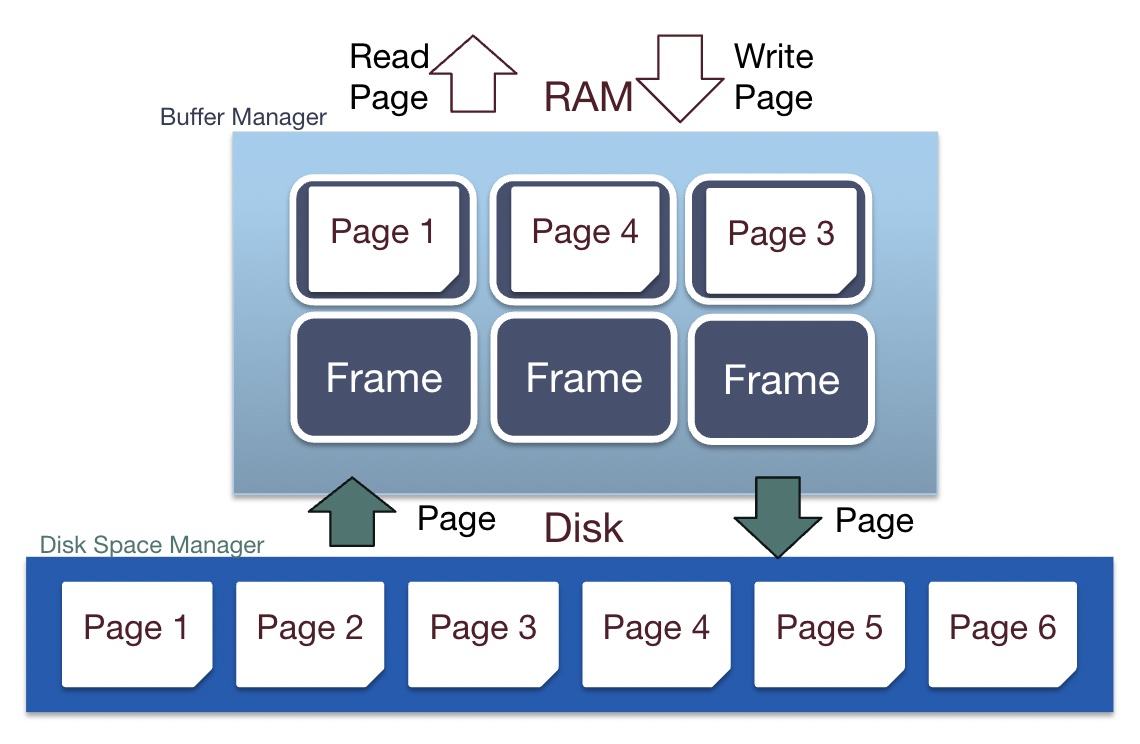
The buffer pool is a large region of main memory that the DBMS allocates for itself on startup. It acts as a cache for pages read from disk. The software component that manages this memory is the Buffer Pool Manager.
To understand the core idea, let's watch the introductory segment of a CMU database lecture that frames the problem.
#04 - Memory Management & Buffer Pools (CMU Intro to Database Systems)
This video by Professor Andy Pavlo from Carnegie Mellon University introduces the fundamental concepts of memory management in a DBMS, highlighting the need for both spatial control (where data is on disk) and temporal control (what data is in memory and when).
Watch from 4:54 to 9:07. Focus on how the buffer pool fits into the overall database architecture and its goal of maximizing the work done on pages once they are brought into memory.
As the video explained, the buffer pool manager aims to provide temporal control: once we pay the high price of a disk I/O to fetch a page, we want to keep it in memory as long as it's useful.
2. Architecture of the Buffer Pool
To manage the pages in memory efficiently, the buffer pool manager relies on a few key data structures. Your background in C++ and data structures will make these concepts very familiar. The buffer pool itself is essentially a large array of fixed-size memory chunks called frames.

Let's break down the metadata shown in the diagram:
-
Page Table: This is an in-memory hash table. Its job is to map a
page_id(which is persistent and identifies a page on disk) to theframe_idwhere that page is currently located in the buffer pool. When the database needs a page, it first queries the page table to see if it's already in memory (a cache hit). This is much faster than going to disk. -
Pin/Reference Counter: This is an integer counter for each frame. Before any part of the database can read or write to a page, it must "pin" it. This increments the pin count. When it's finished, it "unpins" the page, decrementing the count. The buffer pool manager is forbidden from evicting a page from a frame if its pin count is greater than zero. This is a crucial internal concurrency mechanism that guarantees a page won't disappear from memory while a task is using it.
-
Dirty Flag: This is a single bit for each frame. If a page is modified in memory, its dirty flag is set to
true. This tells the buffer pool manager that the in-memory copy is newer than the on-disk copy. Before this frame can be reused for another page, the manager must write the dirty page back to disk to ensure the changes are persisted.
The following video segment explains this architecture and also makes two critical distinctions that are essential for database engineers:
- Page Table vs. Page Directory: Continuing from our last lesson, this clarifies the role of the in-memory page table versus the on-disk page directory.
- Locks vs. Latches: An important terminology distinction. Latches (like mutexes) protect the internal data structures of the DBMS itself (e.g., the page table), while Locks are a higher-level, transactional concept for protecting logical data (e.g., rows or tables).
#04 - Memory Management & Buffer Pools (CMU Intro to Database Systems)
This segment details the internal architecture of the buffer pool, including frames, the page table, and the crucial metadata like pin counters and dirty flags.
Watch from 9:07 to 22:53. Pay close attention to the roles of the pin counter and the distinction between locks and latches. This is core knowledge for a systems programmer.
3. A Fundamental Design Choice: DBMS vs. The OS
A natural question arises: why build all this complex machinery? The operating system already provides sophisticated memory management, including a file system cache and the ability to memory-map files (using mmap on POSIX systems). Why not just let the OS handle caching?
This is one of the most fundamental design philosophies in database systems. The consensus among database engineers is emphatic: the database must manage its own memory.
The OS is a general-purpose tool. It lacks the specific semantic knowledge that the DBMS has about its workload. The DBMS knows about transactions, query plans, data access patterns, and logging requirements. This knowledge allows it to make far more intelligent decisions about memory management than the OS ever could.
Professor Pavlo is famously passionate about this topic. The next video segment is an excellent, engineering-focused breakdown of why relying on the OS is a bad idea.
#04 - Memory Management & Buffer Pools (CMU Intro to Database Systems)
This part of the lecture is a detailed argument against using the operating system's virtual memory (mmap) for database memory management.
Watch from 22:53 to 36:19. This is highly relevant to your goal of understanding systems internals. Note the specific problems cited: lack of control over writes (which breaks transaction logging protocols), unpredictable stalls, and complex error handling.
To reinforce these points, here is a concise summary from the lecture notes.
15-445/645 Database Systems (Fall 2024) - 06 Buffer Pools
These notes summarize the key reasons why a DBMS implements its own buffer pool rather than relying on the OS.
Read the section titled 'Why not use the OS?' on page 3. It's a quick read that crystallizes the arguments made in the video.
The core takeaway is that giving up control to the OS means giving up predictability and correctness guarantees that are non-negotiable for a database system.
4. The Lifecycle of a Page Request
Now let's synthesize this into a concrete algorithm. When a component like the query executor needs a page, it interacts with the buffer pool manager through a simple API, often conceptualized as Pin() and Unpin().
Pin(page_id): Requests a page and pins it in memory.Unpin(page_id, is_dirty): Informs the manager that the task is done with the page.
Here’s the logic flow for a Pin(page_id) request:
- Acquire a latch on the page table to ensure thread safety.
- Check the page table for
page_id. - If it's a cache hit (page is in the pool):
- Increment the page's pin count.
- Release the latch.
- Return a memory pointer to the frame containing the page.
- If it's a cache miss (page is not in the pool):
- Find an available frame.
- If there's a free frame, select it.
- If there are no free frames, a replacement policy must be invoked to choose a victim page to evict. The victim must have a pin count of zero. (We'll dive deep into these policies in our next lesson).
- If the chosen victim page is dirty, write its contents to disk.
- Remove the victim's entry from the page table.
- Read the requested
page_idfrom disk into the now-available frame. - Insert the new
page_id->frame_idmapping into the page table. - Initialize the new page's metadata (pin count = 1, dirty flag = false).
- Release the latch.
- Return a memory pointer to the frame.
- Find an available frame.
Test your understanding!
A thread requests Page A and the buffer manager finds it in Frame 3. The thread pins Page A. While it's working, another thread requests Page B, which is not in the buffer pool. The buffer pool is full, and the replacement policy chooses Page A as the victim to evict.
What happens next?
Show answer
The buffer manager cannot evict Page A. The replacement policy must scan for another victim because Page A's pin count is greater than zero. The guarantee that a pinned page will not be evicted is fundamental to the correctness of the database system. The second thread will have to wait until the manager can find an unpinned page to evict. If all pages are pinned, the request for Page B might fail with an out-of-memory error.
5. Real-World Optimizations
The basic model we've discussed is powerful, but real-world systems employ further optimizations for performance.
- Background Writing: Instead of waiting to write a dirty page to disk at the moment of eviction (which would stall the requesting query), many systems have a dedicated background thread. This "cleaner" thread periodically scans the buffer pool for dirty, unpinned pages and writes them to disk, flipping their dirty flag back to
false. This increases the probability that a victim chosen for eviction will be clean, making the eviction process much faster. - Bypassing the OS Cache: To avoid the "double caching" problem (where a page exists in both the OS file cache and the DBMS buffer pool), database systems use a flag like
O_DIRECTwhen opening files. This tells the OS to bypass its own cache and move data directly between the disk and the application's memory (our buffer pool).
The final video segment discusses these practical techniques and ends with a fascinating real-world example of how OS behavior can silently corrupt data, reinforcing why DBMS engineers are so insistent on controlling their own environment.
#04 - Memory Management & Buffer Pools (CMU Intro to Database Systems)
This final clip covers advanced buffer pool optimizations, including background writing and the use of Direct I/O to bypass the OS page cache.
Watch from 1:02:27 to 1:19:28. The discussion on Direct I/O and the 'fsyncgate' scandal is a perfect example of the complex, low-level issues that database system developers face.
Conclusion
Today, we've moved a critical piece of the database architecture into place. The buffer pool is not just a simple cache; it's a sophisticated manager that sits between the query execution engine and the disk, working tirelessly to minimize the most significant bottleneck in the system: I/O.
Key Takeaways:
- The buffer pool is an in-memory cache for disk pages, managed by the buffer pool manager.
- Its primary goal is to minimize disk I/O by intelligently keeping frequently used pages in memory.
- The manager uses a page table to track resident pages and maintains metadata like a pin count (to prevent eviction of in-use pages) and a dirty flag (to track modifications).
- Database systems insist on managing their own memory because they have semantic knowledge about the workload (transactions, query patterns) that allows for better performance and correctness than relying on the general-purpose OS.
- Techniques like background writing and direct I/O are used in practice to further optimize performance and avoid redundant work.
Preview of the Next Lesson:
We've established that when the buffer pool is full and a new page needs to be loaded, the manager must choose a page to evict. But how does it choose? Picking a page that will be needed again immediately would be terrible for performance. This decision is governed by a buffer replacement policy. In our next lesson, we will dive into the algorithms behind these policies, starting with a classic and efficient approach: the CLOCK algorithm.