Hello! Welcome back to our journey into the internals of database systems.
In the last lesson, we designed the complete architecture for a buffer pool manager using the CLOCK replacement policy. We now have a solid blueprint for how a DBMS manages pages in memory. But building the component is only half the battle; understanding how to make it perform well is what separates a textbook exercise from a production-ready system.
Today, we shift our focus from implementation to analysis. We will explore the real-world performance implications of the buffer pool. Specifically, our learning outcome is to analyze the impact of buffer pool size and page pinning on query performance. This is a critical skill for any systems engineer, as it involves tuning the system's most important resource—memory—to match the demands of the workload.
1. The Impact of Buffer Pool Size on Performance
The primary goal of the buffer pool is to minimize expensive disk I/O by caching frequently used pages in memory. The effectiveness of this cache is measured by the hit ratio.
DBMS-Implementation, Chapter 5: The Buffer Cache
Let's start with a formal definition of the buffer cache and the hit ratio. This brief text from a DBMS implementation course at the University of Halle provides a clear and concise foundation.
Read the subsections titled 'Buffering/Caching (1)' through '(8)'. This will formally define key terms like cache hit, cache miss, and hit ratio. Pay special attention to the '80-20 rule' and why a high hit ratio is achievable and necessary for good performance.
A higher hit ratio means fewer disk reads, which directly translates to faster query execution. The most straightforward way to increase the hit ratio is to increase the size of the buffer pool. However, the relationship isn't always linear, and simply allocating more memory is not a silver bullet.
A Practical Demonstration in PostgreSQL
There is no better way to understand this relationship than to see it in action. The following video demonstrates how buffer pool size is configured in a real-world database system (PostgreSQL) and the dramatic effect it has on performance.
06 - Memory Management + Buffer Cache (CMU Intro to Database Systems / Fall 2022)
This segment from a CMU lecture provides an excellent practical demonstration. You will see how an undersized buffer pool leads to poor performance (low hit ratio, high disk I/O) and how correctly sizing it for the workload resolves the issue.
Watch the segment from 38:35 to 54:31. The lecturer, Andy Pavlo, starts by discussing the interaction between the DBMS buffer pool and the OS page cache. He then runs a query on PostgreSQL and uses the EXPLAIN (ANALYZE, BUFFERS) command to diagnose a low cache hit rate. The core of the demo involves: Identifying that the table size exceeds the buffer pool size. Changing the shared_buffers parameter in the postgresql.conf file. Restarting the database and re-running the query to see a 100% cache hit rate.
Analysis and Key Concepts
The video demonstrates several crucial concepts for performance tuning:
- Working Set: For a given workload, the "working set" is the subset of data and index pages that are accessed frequently. The primary goal of buffer pool tuning is to make the pool large enough to hold the working set. In the demo, the working set was the entire table being scanned.
- Thrashing: When the buffer pool is too small to hold the working set, the system may enter a state of "thrashing." It continuously evicts a page only to read it back from disk moments later, leading to a disastrously low hit ratio and high I/O.
- Diminishing Returns: Once the buffer pool is large enough to hold the working set, making it even larger yields diminishing returns. If your queries primarily access 10 GB of data, increasing the buffer from 12 GB to 20 GB will likely have minimal impact.
- Double Paging/Buffering: There's a danger to making the buffer pool too large. If the total memory allocated to the DBMS (and other processes) exceeds the physical RAM available, the operating system will start paging out parts of the DBMS process itself to disk. This means a request that should have been a fast memory access might trigger a page fault, forcing a disk read to bring the DBMS's own memory back from the OS's swap space before it can even serve the page from its buffer pool. This is a performance catastrophe.
2. The Impact of Page Pinning on Performance
In our previous lesson, we saw that pages are "pinned" (by incrementing a pin counter) to prevent the buffer manager from evicting them while they are being used by a query thread.
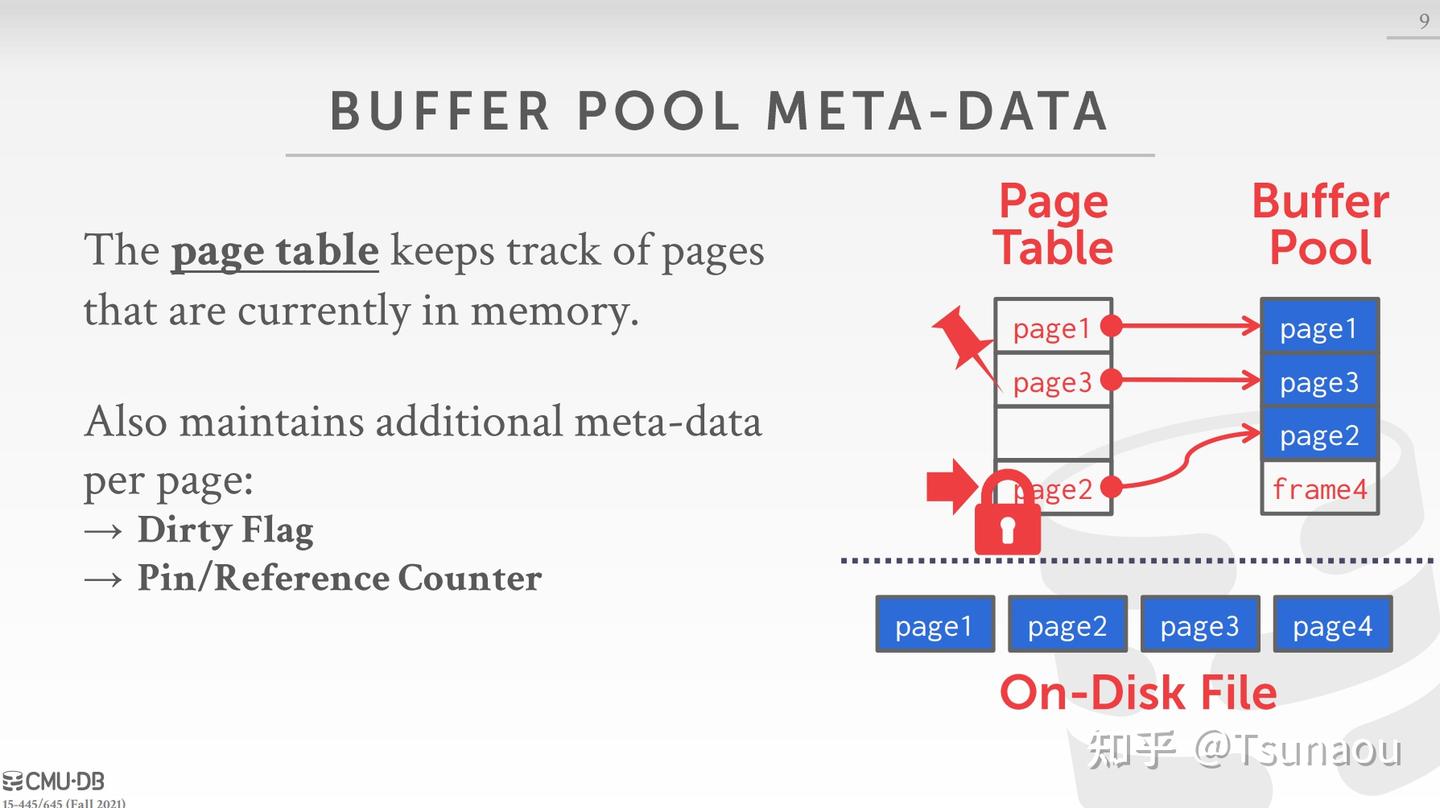
Pinning is a correctness mechanism. It ensures that a pointer to a page remains valid and prevents memory corruption. However, it has significant performance implications.
The Risk of Stalls
The fundamental rule of a replacement policy like CLOCK is that it cannot evict a pinned page. Consider this scenario:
- A database has a buffer pool with
Nframes. Mconcurrent queries are running.- Together, these queries have pinned all
Nframes in the buffer pool. For example, they might be performing calculations that require holding references to several pages at once. - A new query (
M+1) starts and requests a page that is not in the buffer pool. - The buffer pool manager needs to find a free frame. It calls the replacer's
Victim()method. - The replacer scans all
Nframes but finds that every single one has a pin count greater than zero. - Result: The replacer cannot choose a victim. The buffer pool manager cannot load the requested page. Query
M+1is stalled, unable to proceed until another query unpins a page. If this situation persists, the entire system can grind to a halt.
This highlights a classic trade-off: pinning ensures the stability of individual threads but can harm the overall liveness and throughput of the system if not managed carefully.
Test your understanding!
A query is executing a hash join between two tables, R and S. The query plan is to scan the smaller table, R, and build an in-memory hash table on its join key. To do this, it must fetch and pin all pages of R while building the hash table.
The buffer pool has 1000 frames. Table R occupies 1200 pages. What is the immediate performance consequence when the query executor tries to execute this plan?
Show answer
The plan will fail or stall indefinitely. The executor will fetch and pin the first 1000 pages of R, filling the entire buffer pool. When it tries to fetch page 1001, the buffer manager will find that all 1000 frames are pinned. It cannot find a victim to evict, so it cannot load page 1001. The query cannot proceed, and it is holding all available buffer pool frames, potentially blocking all other queries in the system.
A smart query optimizer would recognize this and choose a different algorithm (like a block nested loop or sort-merge join) that doesn't require pinning the entire table in memory at once.
3. Advanced Optimizations: Getting More from Your Memory
Sizing the buffer pool is just one part of the story. Modern database systems employ several other techniques to maximize the performance they get from their memory. You were introduced to some of these in the video, and they are worth highlighting as they directly influence performance.
06 - Memory Management + Buffer Cache (CMU Intro to Database Systems / Fall 2022)
Let's revisit the CMU lecture to quickly review some of these advanced strategies. The goal here is not to learn their implementation details, but to appreciate how they help mitigate the performance bottlenecks we've discussed.
Watch the segment from 22:29 to 38:35. This covers: Multiple Buffer Pools: Reducing contention and allowing for specialized eviction policies. Prefetching: Anticipating which pages a query will need next and fetching them from disk in the background to avoid stalls. Scan Sharing: Allowing multiple queries that are scanning the same table to share a single data-reading cursor, improving efficiency.
These optimizations show that effective buffer management is a dynamic process. The DBMS actively uses knowledge from the query plan to pre-fetch data, shares work between queries, and can even partition its buffer pool to isolate different access patterns (e.g., separating random OLTP access from large OLAP scans) to prevent one from harming the other.
Conclusion
You now have a robust analytical framework for thinking about buffer pool performance. It's not just about an eviction algorithm; it's a dynamic interplay between configuration, workload, and the internal logic of the DBMS.
Key Takeaways:
- Buffer pool size is the most critical tuning parameter for database performance. Its size should be configured to hold the workload's "working set" to maximize the cache hit ratio.
- Sizing is a trade-off: too small leads to disk thrashing, while too large can cause double paging at the OS level. Both are detrimental to performance.
- Page pinning is essential for correctness but introduces a performance risk. If all frames in the buffer pool become pinned, the system can stall.
- Efficient database systems go beyond simple sizing and use advanced techniques like prefetching, multiple buffer pools, and scan sharing to optimize memory usage based on query semantics.
Preview of the Next Lesson:
This lesson concludes our module on database architecture and storage. We've gone from the on-disk format of pages to the complex mechanisms for managing them in memory. We now have the foundation to ask the next logical question: given this storage infrastructure, how does a database find a specific piece of data quickly without scanning every page?
In our next module, we will begin to answer that by exploring indexing. Our first topic will be B+ Trees, the single most important data structure for disk-based database systems.