Hello! Welcome to our next lesson.
In our last session, we built the MarketDataHandler, a crucial component that parses raw ib_insync.Ticker objects into our own standardized TickData dataclass. This was a fantastic step in creating a clean abstraction layer. However, at the moment, our handler simply prints this structured data. For our trading system to function, this data needs to be delivered to the components that will act on it—our trading strategies.
Today, we will tackle the learning outcome: Design an event-driven system to publish market data updates to the relevant strategy instances. We are going to build the central nervous system of our framework. Instead of the DataHandler directly calling a strategy, which would create a rigid and tightly-coupled system, we will implement an event-driven mechanism. The DataHandler will "publish" an event containing the market data, and any interested strategy can "subscribe" to receive it, all without knowing about each other.
Why an Event-Driven Architecture?
In a complex system like a trading framework, components need to communicate. The simplest way is through direct function calls. For example, the DataHandler could have a list of strategy objects and call an update method on each one. This approach, known as Request/Response, is simple but brittle. What happens when you add a new strategy? You have to modify the DataHandler. What if a strategy only cares about data for 'SPY' and not 'QQQ'? The DataHandler's logic becomes complicated.
An Event-Driven Architecture (EDA) solves this by decoupling the components.
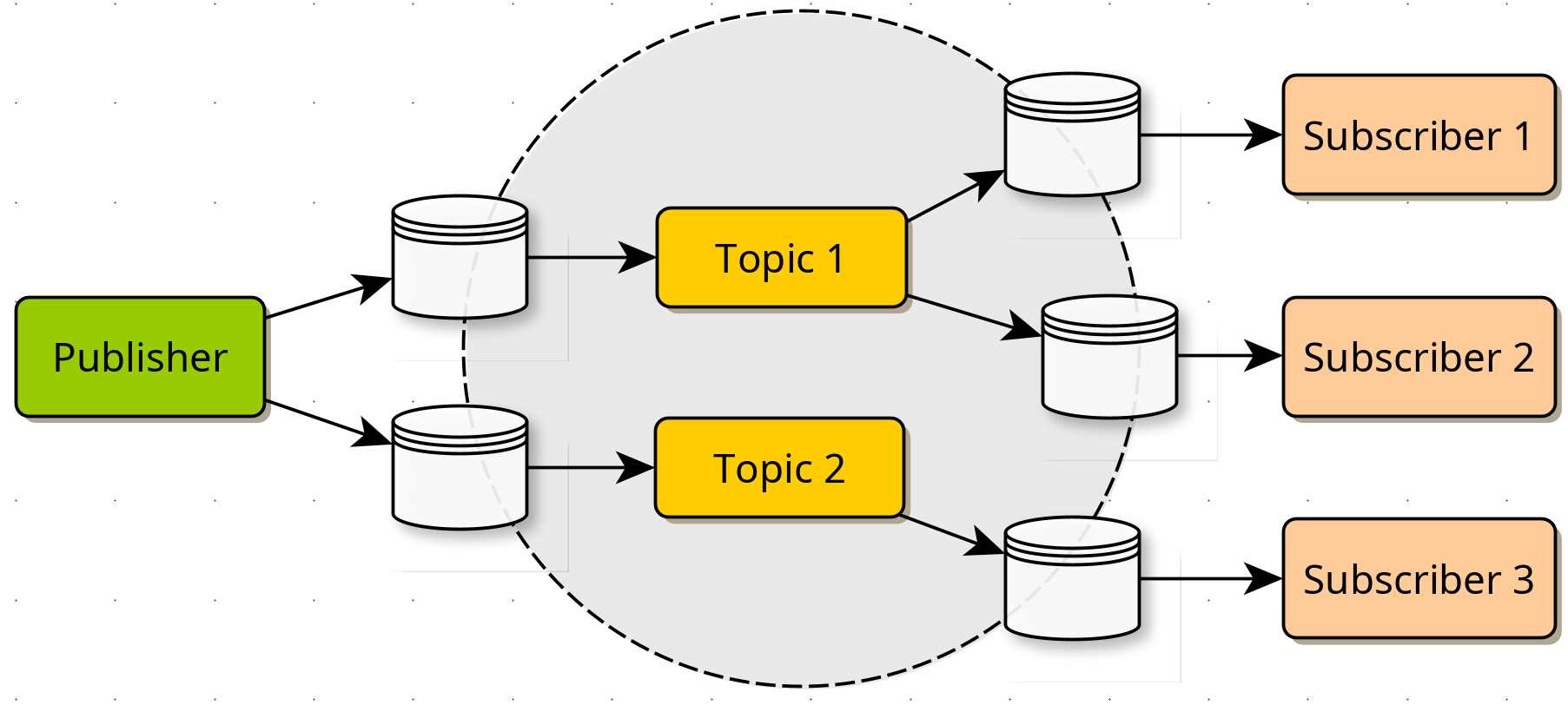
The key benefits of this approach for our trading system are:
- Decoupling: The
DataHandler's only job is to publish data. It doesn't need to know which strategies exist or what they do. - Flexibility & Scalability: We can add, remove, or modify strategies without ever touching the
DataHandler. A new strategy simply subscribes to the events it needs. - Asynchronous Processing: Events are placed into a queue and processed as they arrive, which is essential for handling a high-frequency stream of market data without blocking.
To get a better sense of these advantages, the following short video provides a high-level comparison between event-driven and request-response architectures.
Event-Driven Architecture (EDA) vs Request/Response (RR)
This video from Confluent explains the core principles of Event-Driven Architecture (EDA). Focus on how it promotes decoupling and asynchronous communication, which are the main reasons we're adopting this pattern.
Watch the sections on reactivity and coupling (0:49-1:35 and 2:02-2:54) to understand the fundamental difference from direct communication. Also, watch the summary (10:50-11:21) which recaps the benefits.
The Observer Pattern: A Simple Event System in Python
At the heart of many event-driven systems is a design pattern called the Observer Pattern. It provides a simple yet powerful way to implement the publish-subscribe logic we need.
Instead of integrating a heavy-duty messaging system like Kafka (which you may have seen in some resources), we can build a lightweight, in-process event engine ourselves. The following video tutorial is an excellent guide to building just that.
Observer Pattern Tutorial: I NEVER Knew Events Were THIS Powerful 🚀
ArjanCodes provides a practical, step-by-step tutorial on implementing the Observer pattern in Python to create an event system. Pay close attention to how he refactors tightly coupled code into a flexible, event-driven design.
Watch the full video. The first part (0:00-4:24) sets up the problem of tight coupling. The core implementation is from 4:24 to 7:17, where he builds the simple event system with subscribe and post functions. The rest of the video shows how this new system makes the code much cleaner and more maintainable.
Implementing Our EventEngine
Inspired by the video, let's create our own EventEngine. This will be the central hub for all events in our framework.
First, let's define what an "event" is. We'll create a base class for all events and a specific MarketDataEvent. This approach is extensible; in the future, we could have SignalEvent, OrderEvent, etc.
Create a new file: framework/event_system.py.
# In framework/event_system.py
from typing import Callable, Dict, List, Any

# 1. Define Event Types
class Event:
    """Base class for all events."""
    pass

class MarketDataEvent(Event):
    """Event triggered when new market data is received."""
    def __init__(self, tick_data):
        self.type = 'MARKET_DATA'
        self.tick_data = tick_data

# We can also use simple strings for event types/topics
TICK_EVENT_TOPIC_PREFIX = "tick"

class EventEngine:
    """
    The central event bus of the trading system.
    """
    def __init__(self):
        # A dictionary mapping event types (topics) to a list of listeners
        self._handlers: Dict[str, List[Callable[[Event], None]]] = {}

    def subscribe(self, topic: str, handler: Callable[[Event], None]):
        """
        Subscribe a handler function to a specific event topic.

        :param topic: The event topic to subscribe to (e.g., 'tick.SPY.458702845').
        :param handler: The function to be called when the event is posted.
        """
        if topic not in self._handlers:
            self._handlers[topic] = []
        self._handlers[topic].append(handler)
        print(f"Handler {handler.__name__} subscribed to topic '{topic}'.")

    def post(self, event: Event, topic: str):
        """
        Post an event to a specific topic, triggering all subscribed handlers.

        :param event: The event object to post.
        :param topic: The topic to post the event to.
        """
        if topic in self._handlers:
            for handler in self._handlers[topic]:
                handler(event)
Key Design Choices:
_handlersdictionary: This is our central registry, mapping a topic string (e.g.,"tick.472098412") to a list of functions that want to be notified.subscribe(topic, handler): This method allows a component (like a strategy) to register its interest in a specific topic. Thehandleris the function that will be executed when an event for that topic is posted.post(event, topic): This method is called by a publisher (like ourDataHandler) to broadcast an event. The engine looks up the topic and calls all registered handlers.- Topic-based Routing: We use a string
topicfor subscriptions. This is crucial for routing data to the relevant strategy instances. A strategy for a SPY spread can subscribe to the topic for SPY options, ignoring all other market data. We'll use the contract ID (conId) to create unique topics.
Integrating the EventEngine
Now, let's plug this engine into our existing components.
1. Update the MarketDataHandler to be a Publisher
The MarketDataHandler will no longer print data. It will now create a MarketDataEvent and post it to the EventEngine.
# In framework/market_data.py
# Add these imports at the top
from .data_types import TickData
from .event_system import EventEngine, MarketDataEvent, TICK_EVENT_TOPIC_PREFIX
from datetime import datetime
from ib_insync import Ticker

# ... (MarketDataSubscriber class remains the same) ...

class MarketDataHandler:
    """
    Parses incoming Ticker objects and publishes them as MarketDataEvents.
    """
    def __init__(self, event_engine: EventEngine):
        self.event_engine = event_engine

    def process_incoming_ticker(self, ticker: Ticker):
        """
        Parses an ib_insync Ticker object and posts a MarketDataEvent.
        """
        ts = datetime.utcnow()

        bid_price = ticker.bid if ticker.bid == ticker.bid else -1.0
        # ... (all other NaN handling and parsing logic from last lesson) ...
        volume = ticker.volume if ticker.volume == ticker.volume else 0

        tick_event = TickData(
            timestamp=ts,
            contract_id=ticker.contract.conId,
            # ... all other fields ...
            volume=volume
        )

        # Create a market data event
        market_data_event = MarketDataEvent(tick_data=tick_event)

        # Define the specific topic for this contract
        topic = f"{TICK_EVENT_TOPIC_PREFIX}.{tick_event.contract_id}"

        # Post the event to the engine
        self.event_engine.post(market_data_event, topic)
Notice the MarketDataHandler now requires an EventEngine instance at initialization and uses it to post events.
2. Create a Mock Strategy as a Subscriber
We haven't built our BullPutSpread or BearCallSpread classes yet (that's for Module 5). For now, let's create a simple mock strategy to demonstrate how a subscriber works.
# In a main.py or testing file
from framework.event_system import MarketDataEvent

class MockStrategy:
    """
    A simple mock strategy that subscribes to and processes market data events.
    """
    def __init__(self, contract_id_to_monitor: int):
        self.contract_id = contract_id_to_monitor
        print(f"MockStrategy initialized to monitor contract ID: {self.contract_id}")

    def on_market_data(self, event: MarketDataEvent):
        """
        This is the handler function that gets called by the EventEngine.
        """
        if event.tick_data.contract_id == self.contract_id:
            print(f"Strategy received tick for its contract ({self.contract_id}): "
                  f"Last Price: {event.tick_data.last_price}")
3. Tying It All Together
Finally, let's update our main application logic to initialize and connect all these pieces.
# In a main.py or testing file
# ... (all necessary imports for IB, Option, our new classes, etc.) ...
from ib_insync import IB, Option
from framework.market_data import MarketDataSubscriber, MarketDataHandler
from framework.event_system import EventEngine, TICK_EVENT_TOPIC_PREFIX
# Assuming MockStrategy is in this file

if __name__ == '__main__':
    # 1. Initialize all components
    event_engine = EventEngine()
    ib = IB()
    ib.connect('127.0.0.1', 7497, clientId=4) # Use a new client ID

    # The DataHandler now needs the event engine
    data_handler = MarketDataHandler(event_engine)
    subscriber = MarketDataSubscriber(ib)

    # Connect the handler to the subscriber
    subscriber.set_data_handler(data_handler.process_incoming_ticker)

    # 2. Define contracts and create strategy instance(s)
    spy_call = Option('SPY', '20241220', 550, 'C', 'SMART')
    ib.qualifyContracts(spy_call)

    # We need the conId to subscribe to the correct topic
    spy_call_conid = spy_call.conId

    # Create a strategy instance for this specific contract
    spy_strategy = MockStrategy(contract_id_to_monitor=spy_call_conid)

    # 3. Subscribe the strategy to the relevant topic
    topic = f"{TICK_EVENT_TOPIC_PREFIX}.{spy_call_conid}"
    event_engine.subscribe(topic, spy_strategy.on_market_data)

    # 4. Start the data flow
    subscriber.subscribe_contracts([spy_call])

    print("System is live. Waiting for events...")
    try:
        ib.run()
    except (KeyboardInterrupt, SystemExit):
        print("\nSystem shutdown requested.")
        ib.disconnect()
When you run this code, you will no longer see the "Parsed Tick..." message from the last lesson. Instead, you'll see the "Strategy received tick..." message, confirming that the data has traveled from the MarketDataSubscriber, through the MarketDataHandler, across the EventEngine, and finally arrived at the MockStrategy.
Test your understanding!
Imagine your framework is running two strategies simultaneously: strategy_A for a SPY call option and strategy_B for a QQQ call option.
How would you modify the setup code (steps 2 and 3 in "Tying It All Together") to ensure strategy_A only receives SPY data and strategy_B only receives QQQ data?
Show answer
You would create two separate strategy instances and subscribe each one to its own unique topic based on the contract ID.
# 2. Define contracts and create strategy instances
# For SPY
spy_call = Option('SPY', '20241220', 550, 'C', 'SMART')
ib.qualifyContracts(spy_call)
spy_call_conid = spy_call.conId
strategy_A = MockStrategy(contract_id_to_monitor=spy_call_conid)

# For QQQ
qqq_call = Option('QQQ', '20241220', 480, 'C', 'SMART')
ib.qualifyContracts(qqq_call)
qqq_call_conid = qqq_call.conId
strategy_B = MockStrategy(contract_id_to_monitor=qqq_call_conid)

# 3. Subscribe each strategy to its specific topic
topic_A = f"{TICK_EVENT_TOPIC_PREFIX}.{spy_call_conid}"
event_engine.subscribe(topic_A, strategy_A.on_market_data)

topic_B = f"{TICK_EVENT_TOPIC_PREFIX}.{qqq_call_conid}"
event_engine.subscribe(topic_B, strategy_B.on_market_data)

# 4. Start the data flow for both contracts
subscriber.subscribe_contracts([spy_call, qqq_call])
This demonstrates the power of topic-based routing. The DataHandler will publish events for both SPY and QQQ, but the EventEngine ensures that each strategy only receives the data it explicitly subscribed to.
Conclusion
Congratulations! You have now designed and implemented the message bus for your trading framework. This event-driven system is a cornerstone of a robust and scalable architecture.
Key Takeaways:
- Event-Driven Architecture (EDA) decouples components by allowing them to communicate through events rather than direct calls.
- The Publish-Subscribe (Pub/Sub) pattern is a common way to implement EDA, with publishers, subscribers, and topics.
- We built a lightweight, in-process
EventEngineusing a simple dictionary to manage subscriptions to different topics. - Using topics (like
"tick.12345") allows for precise routing of data, ensuring components only receive the information relevant to them. - Our
DataHandleris now a publisher, and our (mock) strategies are subscribers, completing the end-to-end data flow.
Preview of the Next Lesson:
Our data pipeline is now functional, but is the data reliable? Real-world data streams can sometimes contain errors, outliers, or missing values that we didn't catch during basic parsing. In our next lesson, "Implement data validation checks for incoming real-time data to ensure integrity," we will enhance our DataHandler to perform checks on the data before it gets published, preventing bad data from ever reaching our strategies.