Introduction
In our last lesson, we examined the modular, service-oriented architecture of OpenStack, a leading open-source platform for building private clouds. We identified its core components like Nova (compute) and Cinder (storage) and saw how they interact.
Now, we pivot from the private cloud ecosystem to the world of public cloud, starting with the undisputed market leader: Amazon Web Services (AWS). This lesson directly addresses your syllabus objective to understand the offerings of major cloud vendors. Your goal is to describe the key services offered by AWS, focusing on the foundational trio: EC2, S3, and RDS. For your exams, a clear understanding of what each service does, its primary use cases, and its key features is crucial. We will structure this knowledge using definitions, diagrams, and tables to aid in your revision.
1. An Overview of AWS Core Services
AWS offers over 200 services, which can be overwhelming. A common way to understand them is to see how they fit into a standard application architecture. Most web applications can be broken down into three tiers: a compute layer (to run the application logic), a storage layer (to store files), and a database layer (to store structured data).
To get a clear picture of this framework and the main AWS services that map to it, let's start with a video.
Intro to AWS - The Most Important Services To Learn
This video from Be A Better Dev provides an excellent overview of the most important AWS services by mapping them to a standard three-tier application architecture. This will give you a mental model for how the services relate to one another.
Watch the following segments to understand the core components: Introduction to the 3-Tier Architecture (00:00 - 01:51): Understand the conceptual model of web, application, and database layers. Compute Services (EC2) (03:18 - 04:28): Focus on the explanation of Amazon EC2 as virtual machines. Database Services (RDS & others) (09:07 - 12:23): Pay attention to the descriptions of Amazon RDS and Amazon Aurora. Storage Service (S3) (43:38 - 44:46): Listen for the introduction to Amazon S3 for object storage.
As the video illustrates, AWS provides building blocks for each layer. We will now dive deeper into the three specific services required by your syllabus: EC2, S3, and RDS.
2. Amazon EC2 (Elastic Compute Cloud) – Virtual Servers
Amazon EC2 is the core compute service in AWS. It is classified as Infrastructure as a Service (IaaS).
Definition: Amazon Elastic Compute Cloud (EC2) is a web service that provides secure, resizable compute capacity—essentially virtual servers—in the cloud. It is designed to make web-scale cloud computing easier for developers.
Think of an EC2 instance as your own virtual computer running in an AWS data center. You have full control over the operating system (Linux or Windows) and can install any software you need.
To get precise, exam-friendly definitions of EC2's purpose and key features, the following reading is helpful.
Day 2 – AWS Services Overview_ EC2, S3, RDS, Lambda Explained
This article from Curiosity Tech provides concise explanations and use cases for core AWS services. We will use it to solidify our understanding of EC2.
Read the section titled 'EC2 – The Backbone of Cloud Computing'. Focus on the descriptions of Instance Types, Elasticity, and Security & Access.
Key Features of EC2
For your exams, being able to list and briefly explain key features is vital.
- Instance Types: EC2 offers a wide variety of instance types optimized for different workloads (e.g., general-purpose, compute-optimized, memory-optimized, GPU-intensive). This allows you to select the right hardware configuration for your application's needs.
- Elasticity (Auto Scaling): This is a critical feature. EC2 allows you to automatically increase or decrease the number of instances running in response to application demand. This ensures performance during traffic spikes and saves money during quiet periods.
- Elastic Block Store (EBS): EC2 instances use EBS volumes for persistent block storage. Think of an EBS volume as a virtual hard drive that you attach to your instance. It persists independently of the instance's lifecycle, meaning your data is safe even if the instance is terminated.
- Security: Security is managed through Security Groups, which act as a virtual firewall for your instance to control inbound and outbound traffic, and IAM (Identity and Access Management) roles, which securely grant permissions to your EC2 instances to access other AWS services.
3. Amazon S3 (Simple Storage Service) – Object Storage
While EC2 provides compute, S3 provides highly durable and scalable storage. It is fundamentally different from the block storage (EBS) used by EC2.
Definition: Amazon Simple Storage Service (S3) is an object storage service that offers industry-leading scalability, data availability, security, and performance. It stores data as "objects" within containers called "buckets."
Unlike a traditional file system, S3 is a flat storage system. You cannot install an operating system on it. Instead, you store files (like images, videos, backups, application assets, or data for analytics) and retrieve them via a web API.
Let's watch a short, official video from AWS that covers the core concepts of S3.
Introduction to Amazon Simple Storage Service (S3) - Cloud Storage on AWS
This official AWS video provides a clear and concise introduction to S3, covering its core value proposition, key features like durability and storage classes, and security mechanisms.
Watch the video from 00:54 to 03:03. Focus on understanding: The concepts of buckets and objects. The meaning of '11 nines' of durability. The different storage classes (Standard, Glacier). Security features like IAM policies and encryption.
Key Features of S3
- High Durability and Availability: AWS designs S3 for 99.999999999% (11 nines) of durability by automatically creating and storing copies of your objects across multiple physical locations (Availability Zones).
- Scalability: S3 offers virtually unlimited storage. You can store as much data as you want, and you only pay for what you use.
- Storage Classes: S3 provides a range of storage classes to optimize cost based on how frequently you access your data. Key classes include:
- S3 Standard: For frequently accessed data.
- S3 Standard-Infrequent Access (S3-IA): For long-lived, but less frequently accessed data.
- Amazon S3 Glacier: For long-term archival and data backup, with retrieval times from minutes to hours.
- Static Website Hosting: You can host a static website (HTML, CSS, JavaScript) directly from an S3 bucket.
- Data Management: Features like Versioning (to preserve every version of an object) and Lifecycle Policies (to automatically move objects between storage classes) help manage data efficiently.
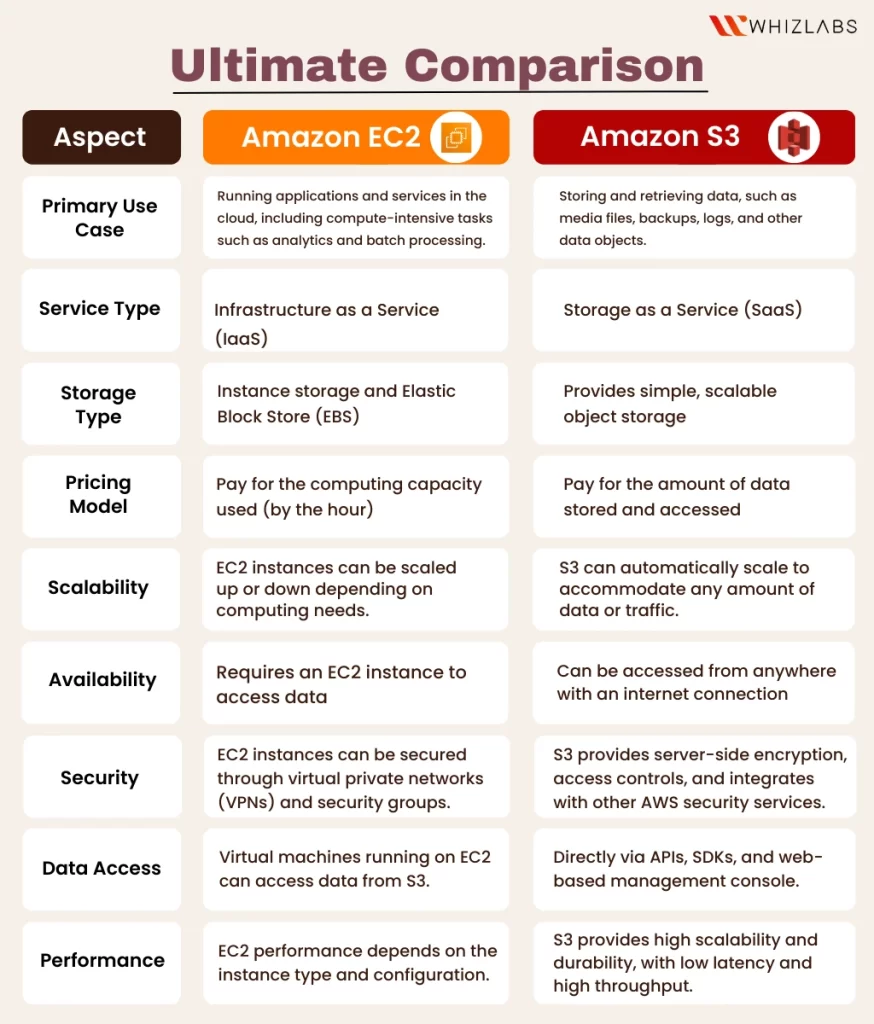
The following table provides a clear, exam-ready comparison between EC2 and S3.
4. Amazon RDS (Relational Database Service) – Managed Databases
RDS falls under the category of Platform as a Service (PaaS). It solves the problem of running a relational database in the cloud.
Definition: Amazon Relational Database Service (RDS) is a managed service that makes it easy to set up, operate, and scale a relational database in the cloud. It automates time-consuming administration tasks such as hardware provisioning, database setup, patching, and backups.
Instead of installing a database like MySQL on an EC2 instance yourself, you use RDS. AWS manages the underlying infrastructure, the operating system, and the database software, allowing you to focus on your application.
Key Features of RDS
- Supported Database Engines: RDS supports several popular relational database engines:
- MySQL
- PostgreSQL
- MariaDB
- Oracle Database
- Microsoft SQL Server
- Amazon Aurora: A MySQL and PostgreSQL-compatible relational database built for the cloud, which offers higher performance and availability.
- Automated Management: RDS handles routine database tasks such as patching, backups, and failure detection. It can perform point-in-time recovery for your database.
- Scalability: You can scale the compute and storage resources powering your database up or down with a few clicks. RDS also supports Read Replicas to offload read traffic from your primary database, improving performance for read-heavy applications.
- High Availability (Multi-AZ): For production workloads, you can run your database in a Multi-AZ (Multiple Availability Zones) deployment. RDS automatically provisions and maintains a synchronous standby replica in a different Availability Zone. If your primary database fails, RDS automatically fails over to the standby replica without manual intervention.
To consolidate these points, let's refer back to our text resource.
Day 2 – AWS Services Overview_ EC2, S3, RDS, Lambda Explained
Let's use the Curiosity Tech article again to get a structured summary of RDS, which is ideal for exam preparation.
Read the section titled 'RDS – Managed Relational Databases'. Focus on the 'Supported Engines', 'Automatic Management', and 'High Availability' points.
5. Architectural View: How EC2, S3, and RDS Work Together
Understanding these services individually is important, but seeing how they connect is crucial. A common and secure architecture involves placing your web servers in a public-facing network and your database in a private network, inaccessible from the public internet.
The following diagram illustrates this typical two-tier architecture.

In this setup:
- EC2 runs the application code in a Public Subnet, making it accessible to users over the internet.
- RDS hosts the database in a Private Subnet. Only the EC2 instance is allowed to connect to it, protecting sensitive data from direct external access.
- S3 is used to store and serve static assets like images, videos, and CSS files, which can be referenced by the web application running on EC2.
Conclusion
In this lesson, we moved from the private cloud world of OpenStack to the public cloud giant, AWS. We focused on three foundational services that are essential for your exams and for building most applications on AWS.
Key Takeaways:
- Amazon EC2 (Elastic Compute Cloud) provides scalable virtual servers (IaaS) for running applications. Its key features are Instance Types, Elasticity (Auto Scaling), and EBS for persistent storage.
- Amazon S3 (Simple Storage Service) offers highly durable and scalable object storage for files, backups, and static assets. Its defining features are 11 nines of durability, Storage Classes for cost optimization, and its role in static website hosting.
- Amazon RDS (Relational Database Service) is a managed database service (PaaS) that simplifies the operation of relational databases. Its main advantages are support for multiple engines, automated management (backups, patching), and High Availability through Multi-AZ deployments.
- These services often work together in a tiered architecture, with EC2 providing compute, RDS managing the database, and S3 storing object data.
Preview of the Next Lesson:
Having covered the key services of AWS, we will continue our tour of major public cloud providers. In the next lesson, we will explore Microsoft Azure, describing its core services like Azure Virtual Machines, App Service, and Azure SQL, and drawing parallels to the AWS services we've just learned about.