Introduction
Welcome to your next lesson on Cloud Resource Management and Scaling. In our previous session, we established the difference between static and dynamic resource provisioning. You learned that dynamic provisioning, combined with horizontal scaling (adding more servers), is what gives the cloud its signature elasticity.
This leads us to a critical operational challenge: if you have a group of servers running your application, and you're adding or removing them based on demand, how do you direct incoming user traffic to the right server at the right time? Simply adding more servers isn't enough; you need a system to manage and distribute the workload among them.
This is where the load balancer comes in. It is a fundamental component of any scalable and resilient cloud architecture. Today's learning outcome is to explain the role of a load balancer in distributing traffic to enable horizontal scaling and high availability. We will break down its function, explore how it works, and see why it's indispensable for modern applications.
What is a Load Balancer?
At its core, a load balancer is a device or software that acts as a "traffic cop" for your servers. It sits in front of your server farm and routes client requests across all servers capable of fulfilling those requests in a manner that maximizes speed and capacity utilization and ensures that no one server is overworked, which could degrade performance.
Let's watch a short video that introduces this concept visually.
The video 'What is a Load Balancer?' from IBM Technology clearly explains the problem of a single server being overwhelmed and introduces the load balancer as the solution that enables horizontal scaling.
Watch the segment from the beginning until 02:31. Focus on how the narrator transitions from the problem of a single application server to a multi-server solution, and note the definition given for a load balancer's role.
From the video and standard industry definitions, we can formulate a precise definition suitable for your exams:
Definition: A load balancer is a dedicated hardware device or a software-based service that distributes incoming network or application traffic across a group of backend servers (often called a server farm or server pool). Its primary purpose is to "balance" the load to improve application responsiveness, prevent any single server from becoming a bottleneck, and increase overall system availability and reliability.
Now, let's explore the two primary roles mentioned in our learning outcome.
Role 1: Enabling Horizontal Scaling
As we've discussed, horizontal scaling (or scaling out) involves adding more server instances to handle increased load. The load balancer is the key enabler of this strategy.
Without a load balancer, your application's domain name (e.g., www.my-app.com) would point to the IP address of a single server. If you add nine more servers, users would have no way of reaching them. The load balancer solves this by becoming the single point of contact for all incoming traffic.
The process works as follows:
- Your application's domain name points to the IP address of the load balancer.
- When a user sends a request, it arrives at the load balancer first.
- The load balancer then selects a server from its pool of registered backend servers and forwards the request to it.
- This distribution allows a large number of user requests to be shared across the entire group of servers, making the scaling effective.
The following diagram illustrates this relationship perfectly.

Role 2: Ensuring High Availability
High availability is the quality of a system to operate continuously without failure for a designated period. In simple terms, it means your application stays online even if something goes wrong. Load balancers are crucial for achieving high availability through two main functions: redundancy and health checks.
Redundancy and Failover
By distributing traffic across multiple servers, a load balancer inherently creates redundancy. There is no longer a single point of failure. If one server crashes, becomes unresponsive, or is taken down for maintenance, the load balancer can simply stop sending traffic to it and redirect requests to the remaining healthy servers. This process is known as failover, and it happens automatically without any user-facing downtime.
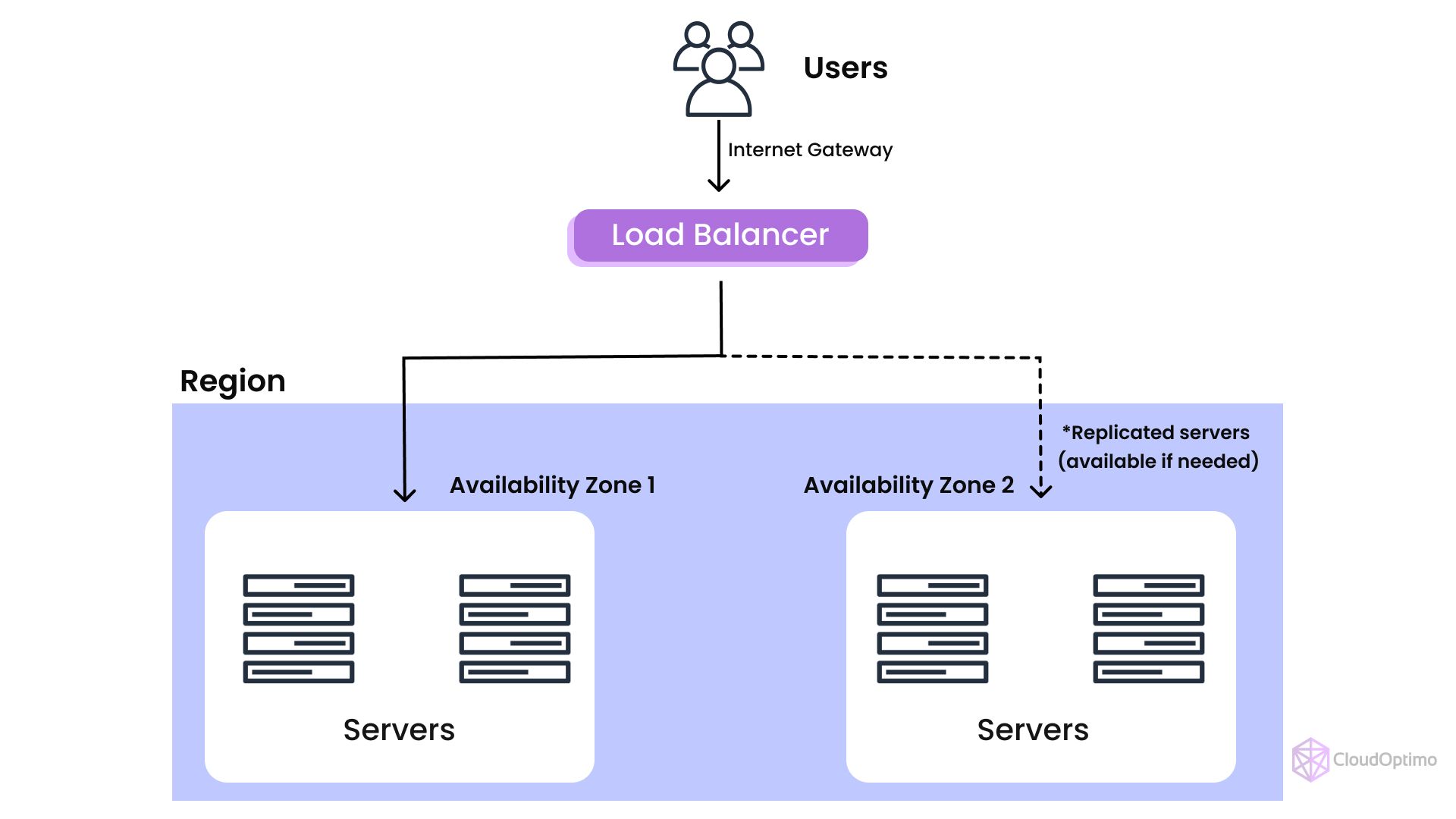
The architecture below shows how a load balancer can distribute traffic across servers in different physical locations (Availability Zones), further enhancing availability. If an entire data center in Zone 1 were to have an issue, the load balancer would route all traffic to the servers in Zone 2.
Health Checks
To perform failover effectively, the load balancer must know the status of each backend server. It does this by performing regular health checks.
- A health check is a simple, periodic request sent by the load balancer to each server in its pool to verify that the server is operating correctly.
- This can be as simple as a 'ping' or a request to a specific page (e.g.,
/health) that is expected to return a "200 OK" status code. - If a server fails a configured number of consecutive health checks, the load balancer marks it as "unhealthy" and temporarily removes it from the pool of available servers.
- It will continue to check the unhealthy server, and if it becomes healthy again, the load balancer will automatically add it back into rotation.
This combination of traffic distribution and health-based failover is how load balancers turn a collection of individual servers into a single, fault-tolerant system.
How Do Load Balancers Distribute Traffic?
A load balancer needs a strategy to decide which server gets the next request. This is determined by a configured load balancing algorithm. For your exam, knowing the main algorithms is key.
Let's watch a video that quickly covers the most common ones.
What is a LOAD BALANCER really about?
The video 'What is a LOAD BALANCER really about?' by ByteByteGo provides an excellent, fast-paced overview of various load balancing algorithms.
Watch the segment from 04:20 to 05:52. Pay attention to the name of each algorithm and its basic logic (e.g., Round Robin, Least Connections, IP Hashing).
Based on the video and other standard resources, here is a summary of the most important algorithms for your exam:
| Algorithm | Description | Use Case & Considerations |
|---|---|---|
| Round Robin | Requests are distributed sequentially across the group of servers. The first request goes to server 1, the second to server 2, and so on. When it reaches the end, it starts over from server 1. | Simple and predictable. Works well when all servers are identical in power and requests require similar processing time. It can become unbalanced if one request creates a long-running session. |
| Least Connections | The load balancer sends the next request to the server that currently has the fewest active connections. | More dynamic than Round Robin. It's a "smarter" algorithm that adapts to the current server load, making it ideal for situations where session durations vary significantly. |
| IP Hash | A hash of the client's IP address is used to determine which server receives the request. As long as the server pool doesn't change, a user with the same IP will always be sent to the same server. | Ensures session persistence (or "stickiness"). This is crucial for stateful applications where user session data is stored on a specific server (e.g., items in a shopping cart). |
| Weighted Round Robin | An administrator assigns a "weight" to each server, usually based on its processing power. Servers with a higher weight receive a proportionally larger number of requests. | Optimizes for heterogeneous environments. Use this when your servers have different capacities (e.g., some new, powerful servers and some older, weaker ones). |
Types of Load Balancers
For comprehensive exam answers, it's useful to know that load balancers can be classified in a few ways. The most common distinctions are Hardware vs. Software and Layer 4 vs. Layer 7.
| Type | Description | Key Characteristics |
|---|---|---|
| Hardware-Based | A dedicated physical appliance with specialized processors (ASICs) designed for high-speed network traffic routing. | High Performance: Extremely fast due to specialized hardware. Cost: Very expensive and less flexible. Example: F5 BIG-IP, Citrix ADC. |
| Software-Based | Software that runs on standard commodity hardware (like a regular server or VM). | Flexibility: Highly configurable and can run in any environment (on-premise, cloud). Cost: Much more cost-effective. Example: NGINX, HAProxy. Cloud provider load balancers (AWS ELB, Azure Load Balancer) are managed software-based services. |
| Layer 4 (L4) | Operates at the transport layer of the OSI model. It makes routing decisions based on IP addresses and port numbers from the first few packets in the TCP stream. | Fast & Simple: It doesn't inspect the content of the traffic, making it very fast. It just forwards packets. Use Case: Simple traffic distribution where content-based routing is not needed. |
| Layer 7 (L7) | Operates at the application layer of the OSI model. It can inspect the content of the traffic, such as HTTP headers, URLs, and cookies. | Content-Aware & "Smarter": Can make complex routing decisions, like sending all requests for /video to a specific set of servers and requests for /images to another. Use Case: Advanced routing, session persistence, SSL termination. Also known as an Application Load Balancer (ALB). |
Conclusion
In this lesson, we dissected the critical role of the load balancer in a cloud environment. It is the linchpin that connects a scalable server fleet to its users, ensuring both performance and resilience.
Key Takeaways:
- A Load Balancer acts as a traffic director, distributing incoming requests across a pool of backend servers.
- It is the primary enabler for horizontal scaling, allowing traffic to be shared among many servers.
- It ensures high availability by providing redundancy and performing health checks to automatically route traffic away from failed servers (failover).
- Load balancers use various algorithms (like Round Robin, Least Connections, and IP Hash) to determine how to distribute traffic.
- They can be classified by implementation (hardware/software) or by the network layer they operate on (Layer 4/Layer 7), with L7 balancers offering more advanced, content-aware routing capabilities.
Preview of the Next Lesson:
Now that we understand how user traffic is distributed to a pool of resources, our next lesson will address a related concept from your syllabus: resource scheduling. We will explore the purpose of resource scheduling in a cloud environment, which deals with how the cloud provider efficiently assigns computational tasks onto the available physical resources.