Introduction
In our previous lesson, we dissected the task_struct, the kernel's master data structure for every process and thread. You learned that to the kernel, everything schedulable is a "task," and this structure holds all the information needed to manage it.
Now that we understand the "what," we'll explore the "how." Today's lesson focuses on the dynamic lifecycle of a process. Our goal is to explain the lifecycle of a process in Linux, including creation via fork/clone, execution, and termination. We will trace the journey of a task from the moment it's created, through its transformation to run a new program, to its final cleanup. Understanding this fork()-exec()-exit() cycle is fundamental to all Linux and Unix-like systems and is a core topic in advanced kernel interviews.
1. Process Creation: The fork() and clone() System Calls
In Linux, creating a new process is a two-step dance: first, you create a copy of the running process, and second, you optionally replace the copy with a new program. We begin with the first step, fork().
Conceptually, fork() creates a child process that is a near-perfect clone of its parent. They have separate PIDs but initially share almost everything else. The primary way for the code to know whether it's running in the parent or the child is by the return value of fork():
- In the parent,
fork()returns the PID of the newly created child. - In the child,
fork()returns0.
Linux Kernel Internals: Process
To start, let's get a high-level overview of process creation and termination. This video from Maple Circuit provides a concise explanation of the core concepts.
Watch the segments from 23:39 to 25:47. Focus on how fork() creates a clone and how exec() is used to load a new program into the newly created process context.
Kernel Implementation of fork()
Now, let's peel back the layers and see what happens inside the kernel.
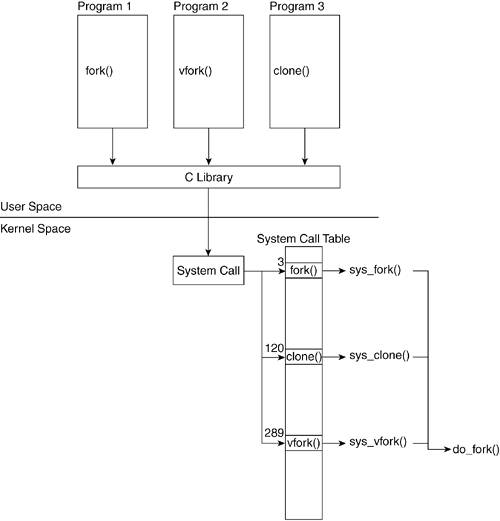
As the diagram illustrates, user-space calls funnel into a common kernel mechanism. The clone() system call is the fundamental primitive for creating tasks in Linux. Simpler calls like fork() are implemented as wrappers around clone() with specific flags.
The heart of process creation is a function called copy_process().
[PDF] (Advanced) Linux Kernel Programming - Lecture 06: Processes in ...
These presentation slides from a Virginia Tech course provide an excellent, concise summary of the kernel's implementation of fork(). We'll focus on the call chain and the role of copy_process.
Please read slides 16 through 21 (you can find these by looking for the slide titles "The fork/exec Model", "Copy-on-Write (CoW)", "fork() Implementation: Call Chain", "copy_process: Step by Step", and "copy_thread and ret_from_fork"). Pay close attention to: Copy-on-Write (CoW): This is the key optimization that makes fork() efficient. Instead of duplicating the entire memory space, the kernel lets the parent and child share the memory pages and only copies a page when one of them tries to write to it. copy_process() steps: Notice how it duplicates or shares each resource (files, fs, mm, thread) based on the clone flags. copy_thread(): This is the magic that makes the child return 0. It sets up the child's kernel stack to make it look like the fork() call is returning with a value of 0 in the rax register (on x86-64).
To summarize the kernel's work during a fork():
sys_clone()/sys_fork()is entered.- This calls
kernel_clone()(previouslydo_fork), which allocates a new PID. copy_process()is called to do the heavy lifting:dup_task_struct()allocates a newtask_structand kernel stack.- It then copies or shares all the parent's resources. A key step here is
copy_mm(), which duplicates the page tables for the new process's address space, marking them as read-only to enable CoW. copy_thread()prepares the new task's CPU state (pt_regs) so that when it runs for the first time, it will return to user-space with0in its return value register.
wake_up_new_task()is called, which makes the new child processTASK_RUNNINGand places it on a scheduler run queue, making it eligible to be picked by the scheduler.
2. Process Execution: The execve() System Call
After a fork(), the child process is running the same code as the parent. To run a different program, it must call one of the exec family of functions, with execve() being the underlying system call.
execve() replaces the current process image with a new one. This is a destructive operation: the memory space (code, data, stack, heap) of the old program is completely discarded and replaced by the new program. The PID does not change. There is no return on success; the new program simply starts executing.
Kernel Implementation of execve()
Given your preference for hands-on, deep-level exploration, we're going to trace the execve() call path using a GDB-guided walkthrough. This will demonstrate exactly how the kernel tears down the old process image and sets up the new one.
How Linux Kernel Runs Executables
This video by Nir Lichtman is an outstanding step-by-step walkthrough of the execve system call inside the kernel using GDB. It's the perfect resource for seeing these concepts in action.
Watch the core of the video from 06:34 to 16:44. This is a dense section, so feel free to pause and rewind. Follow the GDB session as it traces the kernel's execution path. Focus on these key stages: do_execve & bprm (07:25): The kernel creates a linux_binprm struct to hold the parameters for the new program (arguments, environment variables). search_binary_handler (08:24): The kernel reads the first few bytes of the file to identify its type (e.g., an ELF binary, or a script starting with #!). It then finds the appropriate handler. load_elf_binary (10:45): This is the main function for loading ELF executables. It parses the ELF header and maps the program's segments into a new address space. start_thread (11:54): This is the critical step. The kernel modifies the saved registers (pt_regs) on the kernel stack. It sets the instruction pointer (regs->ip) to the entry point of the new program. It also sets up the new stack pointer. Return to User-space & Demand Paging (14:06): When the IRET instruction returns control to user-space, it jumps to the new program's entry point. You'll see an initial page fault, which is handled by the kernel's demand paging mechanism to load the first page of code from disk into memory just before it's executed.
This walkthrough vividly illustrates the "point of no return" in execve(). Once the kernel starts tearing down the old address space (in load_elf_binary), there's no going back. The start_thread function effectively hijacks the return path of the system call, redirecting it to the entry point of the new executable.
3. Process Termination: exit() and wait()
A process's life ends when it either calls exit() or is terminated by an unhandled signal. This initiates an orderly shutdown sequence within the kernel, orchestrated by the do_exit() function.
Kernel Implementation of exit()
The do_exit() function is responsible for untangling the process from the rest of the system.
Anatomy of Linux process management - IBM Developer
Let's return to the IBM Developer article for a look at the process destruction path.
Read the section 'Process destruction'. It provides a high-level view of the do_exit() function and the resources it releases.
The key steps in do_exit() are:
- Set the
PF_EXITINGflag in thetask_structto prevent other subsystems from interacting with a dying process. - Call a series of
exit_*functions (exit_mm,exit_files, etc.) to release the process's resources. - Call
exit_notify(), which handles two critical tasks:- It looks for any child processes and reparents them to another process (typically
init/PID 1). These are now orphan processes. - It sends a
SIGCHLDsignal to the process's parent to notify it that a child has terminated.
- It looks for any child processes and reparents them to another process (typically
- Change the process's state to
EXIT_ZOMBIE. - Call
schedule()to switch to a new process. The dying process will never run again.
Zombie and Orphan Processes
The EXIT_ZOMBIE state is a crucial and often misunderstood part of the lifecycle.
Linux Kernel Internals: Process
The Maple Circuit video we saw earlier provides a very clear explanation of zombie processes, the role of the parent's wait() call, and what happens to orphan processes.
Please watch from 25:47 to 29:23. This section covers the entire termination and cleanup sequence.
- Zombie Process: A process in the
EXIT_ZOMBIEstate. It has terminated and released all its resources (memory, files), but itstask_structstill remains in the kernel's process list. Why? To hold the process's exit code and resource usage statistics for the parent to collect. - Reaping: The parent process collects this information (and allows the kernel to finally free the
task_struct) by calling one of thewait()family of system calls. This act is called "reaping" the child. - Orphan Process: If a parent dies before its child, the child becomes an orphan. The kernel automatically reparents the orphan to the
initprocess (PID 1) or a designated subreaper.init's main loop periodically callswait(), ensuring that all orphans are eventually reaped and don't remain as zombies forever.
4. The Complete Picture
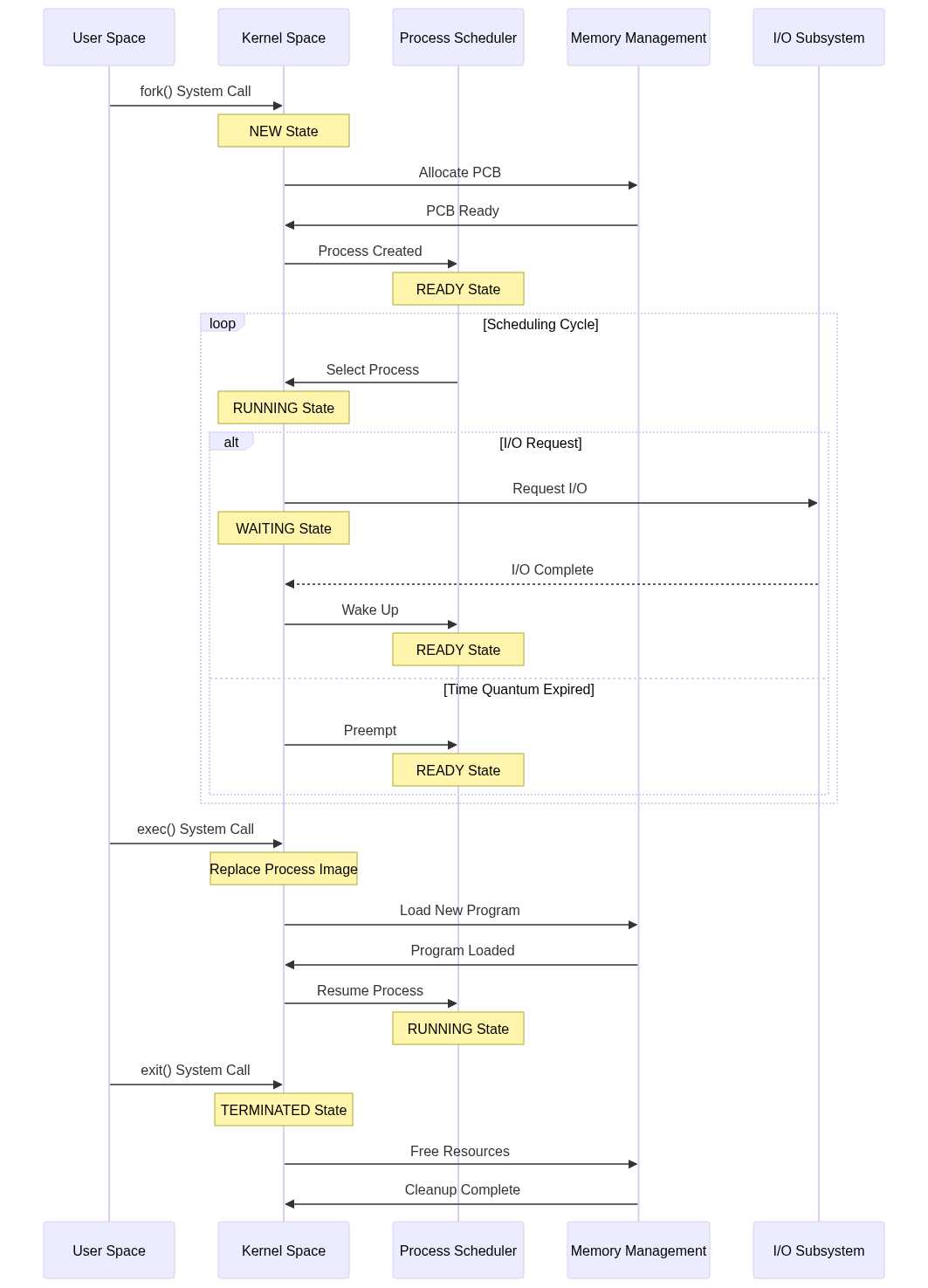
Let's visualize the entire journey. The process transitions between several states, managed by the kernel.
5. Interview Scenario
Your deep understanding of this lifecycle is prime material for a senior-level interview.
Question: "Walk me through what happens at the kernel level when a shell runs a command like ls -l. Then, explain what a zombie process is and why it's a necessary state."
Your Thought Process:
- Shell runs a command: This is the classic
fork()followed byexec(). - The shell process calls
fork(). The kernel executescopy_process(), creating a new childtask_struct, duplicating the shell's state (with CoW for memory), and making the child runnable. - The child process, now running shell code, immediately calls
execve("ls", ["ls", "-l"], ...). - The kernel's
execvepath is triggered. It finds the/bin/lsexecutable, verifies it's an ELF binary, and callsload_elf_binary. load_elf_binarytears down the child's current memory map (the copy of the shell's) and maps the segments of thelsexecutable into memory.start_threadmodifies the child'spt_regsto set the instruction pointer to the entry point ofls.- The system call returns to user-space, but now executes
lscode. Thelsprocess runs, prints the directory listing, and callsexit(). - The
lsprocess's call toexit()triggersdo_exit()in the kernel. It releases resources and changes its state toEXIT_ZOMBIE. It also sendsSIGCHLDto its parent (the shell). - The shell, which was likely waiting via a
wait()call, is woken up. Thewait()call reaps the zombielsprocess, gets its exit status, and allows the kernel to finally free thelstask_struct. The shell then prints a new prompt. - Zombie Explanation: A zombie is a terminated process whose
task_structis kept by the kernel solely to provide an exit status to its parent. It consumes no memory or CPU, only a slot in the process table. It's necessary for parent processes to get feedback on how their children terminated. They are cleaned up when the parent callswait().
Conclusion
Today you've traced the entire life of a Linux process, from creation to execution to termination. This is one of the most fundamental mechanisms in the kernel.
Key Takeaways:
- Process creation is separated into
fork()(cloning) andexecve()(replacing). fork()is implemented viacopy_process(), which efficiently duplicates a task using Copy-on-Write (CoW).execve()is a destructive operation that replaces the current process's memory image with a new program, orchestrated by functions likeload_elf_binary().exit()triggersdo_exit(), which releases all of a process's resources and transitions it to theEXIT_ZOMBIEstate.- Zombie processes exist so parents can retrieve their exit status via
wait(). Orphan processes are adopted byinitto ensure they are eventually reaped.
In our next lesson, we will address a critical question: with many processes in the TASK_RUNNING state, how does the kernel decide which one gets to use the CPU? We will dive into the Linux scheduler and describe how the Completely Fair Scheduler (CFS) allocates CPU time using virtual runtime.