Introduction
Hello! In our last lesson, we explored techniques for avoiding locks altogether in performance-critical code using atomic operations and per-CPU variables. These are powerful tools for building scalable subsystems. However, locks remain an indispensable part of kernel development for protecting more complex data structures. When used incorrectly, they can lead to one of the most difficult classes of bugs: deadlocks.
This lesson directly addresses the learning outcome: Diagnose a deadlock scenario in kernel code using the lockdep tool to analyze lock dependencies. We will move from writing correct synchronization code to debugging incorrect implementations.
You will learn:
- What deadlocks are and the common patterns that cause them.
- How to enable and use the kernel's powerful lock validator,
lockdep. - How to read and interpret a
lockdepreport to pinpoint the exact cause of a deadlock. - How
lockdep's proactive analysis can detect potential deadlocks before they even hang the system.
This skill is crucial for any serious kernel developer and is a common topic in advanced technical interviews.
1. Understanding Deadlocks and the lockdep Validator
A deadlock is a state where two or more tasks are stuck waiting for each other to release a resource, creating a circular dependency that prevents any of them from proceeding. In the kernel, these resources are typically locks.
There are two primary deadlock patterns you'll encounter:
- Recursive Locking (Self-Deadlock): A task acquires a non-recursive lock (like a
mutexorspinlock_t) and then, without releasing it, attempts to acquire the same lock again. The task will wait forever for itself to release the lock. - Lock Inversion (AB-BA Deadlock): Two tasks attempt to acquire the same set of locks but in a different order.
- Task A locks
lock_X. - Task B locks
lock_Y. - Task A now tries to lock
lock_Y, but it's held by Task B, so Task A waits. - Task B now tries to lock
lock_X, but it's held by Task A, so Task B waits. - Both tasks are now deadlocked.
- Task A locks
Debugging a system that has already hung is difficult. A better approach is to detect unsafe locking patterns before they cause a catastrophic hang. This is precisely what lockdep is for.
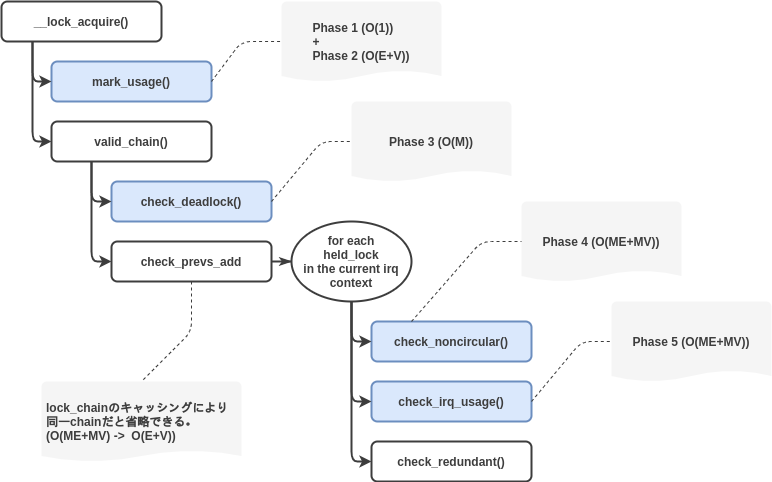
lockdep is a runtime validator that observes all lock and unlock operations in the kernel. It doesn't just check for existing deadlocks; it builds a dependency graph of all locking sequences. If it detects a sequence that could lead to a deadlock (like a lock inversion), it prints a detailed warning, even if the deadlock hasn't actually occurred yet.
To understand how lockdep works, let's look at the official kernel documentation.
Runtime locking correctness validator
The kernel's design documentation for lockdep explains its fundamental concepts. We'll focus on the high-level purpose and the idea of a 'lock-class'.
Read the introductory section 'Lock-class' to understand that lockdep operates on lock classes (e.g., all inode locks are one class) rather than individual instances. Then, read the first two paragraphs of 'Multi-lock dependency rules' to see how it detects both recursive locking and lock inversion deadlocks.
Enabling lockdep
To use lockdep, you must compile your kernel with specific debugging options enabled. These are found under the "Kernel hacking" -> "Locking NMI, testing and debugging" menu in menuconfig.
Linux Kernel Debugging | dev-guides
This guide lists the essential kernel config options for enabling lock debugging.
Review the 'Lock Debugging Configurations' section. The key options for our purpose are CONFIG_PROVE_LOCKING and CONFIG_DEBUG_LOCKDEP.
Enabling these options instruments the kernel's locking primitives to call into the lockdep validator on every lock/unlock operation. This adds some overhead, so it's typically only used in development and debugging builds.
2. Diagnosing a Simple Recursive Deadlock
Let's start with the most straightforward case: a task trying to acquire a lock it already holds.
Imagine a simple kernel module with the following initialization function:
// Code that will trigger a lockdep warning


#include <linux/module.h>
#include <linux/spinlock.h>

static DEFINE_SPINLOCK(my_lock);

static int __init deadlock_init(void)
{
    pr_info("Acquiring lock...\n");
    spin_lock(&my_lock);
    pr_info("Lock acquired. Acquiring again...\n");

    // Bug: Trying to acquire the same lock again
    spin_lock(&my_lock);

    pr_info("This will never print.\n");
    spin_unlock(&my_lock);
    spin_unlock(&my_lock);
    return 0;
}
When you load this module into a kernel with lockdep enabled, the system won't necessarily hang immediately, but lockdep will instantly detect the unsafe pattern and print a detailed warning to the kernel log (dmesg).
Let's analyze a real lockdep report for this exact scenario.
Linux Kernel Debugging | dev-guides
The dev-guides page provides an excellent, annotated example of a lockdep report for a recursive deadlock.
Read the section 'Example - Deadlock Report'. Carefully study the provided lockdep output and how it maps back to the simple buggy code snippet (sad.c). Pay close attention to the key lines that lockdep prints.
Deconstructing the Report
Let's break down the key parts of the report you just read:
WARNING: possible recursive locking detected: This islockdep's summary of the problem.insmod/2139 is trying to acquire lock: ... at: init_module+0x35/0x54 [sad]: This tells you which process (insmod, PID 2139) and which function (init_modulein thesadmodule) tried to acquire the lock that caused the warning. The address helps you pinpoint the exact line of code.but task is already holding lock: ... at: init_module+0x1d/0x54 [sad]: This tells you where the lock was first acquired.*** DEADLOCK ***:lockdepvisualizes the unsafe scenario: a CPU trying tolock(slay)and thenlock(slay)again.stack backtrace:: This is a full call stack at the time of the second lock attempt. It's invaluable for understanding the code path that led to the bug.
This same pattern can occur in more subtle ways.

3. Interpreting Advanced lockdep Reports
lockdep reports contain even more information, especially about the context in which locks are taken. This is crucial for diagnosing complex deadlocks involving interrupts.
Notice the {+.+.} notation in the lock names from the report:ffffffffc0830018 (slay){+.+.}-{2:2}
This tells you about the lock's usage history with respect to interrupt contexts.
Runtime locking correctness validator
The official lockdep documentation explains how to decode this state information.
Read the section 'State' to understand the meaning of the characters ., -, +, and ?. Then read 'Single-lock state rules' to understand why mixing usage (e.g., taking the same lock in both a process context with IRQs enabled and an IRQ handler context) is dangerous and can lead to a deadlock.
To summarize the state bits:
- The first pair of bits relates to hardirq context.
- The second pair relates to softirq context.
- For each pair, the first bit is for write locks, the second for read locks.
.: Acquired outside IRQ context, with IRQs disabled.-: Acquired inside IRQ context.+: Acquired outside IRQ context, with IRQs enabled (unsafe for locks used in IRQs).?: Acquired inside IRQ context, with IRQs enabled (a definite bug).
Understanding these states is key to diagnosing the more subtle bugs that lockdep can find.
4. Interview Scenario: The Intermittent Hang
Let's tackle a scenario-based question that reflects your goal of interview preparation.
Scenario: You are working on a network driver that uses a timer to perform periodic cleanup. The system works fine under light load, but it hangs intermittently when processing heavy traffic. You suspect a locking issue, so you enable lockdep and reboot. Soon after, you get a lockdep warning in dmesg with the message: WARNING: inconsistent lock state. The report points to a spinlock used in both your module's init function and the timer's callback function.
Question: What kind of deadlock scenario does this "inconsistent lock state" suggest, and why can lockdep detect it even if the system hasn't hung yet?
Analysis and Answer
This scenario points to a classic deadlock involving different execution contexts.
-
The Problem: The warning
inconsistent lock statemeanslockdephas seen the same lock class being used in ways that are mutually unsafe. In this case:- It was acquired in a process context (the module's
initfunction), where it's legal to acquire a lock that might sleep or be interrupted (softirq-on). - It was also acquired in a timer callback, which runs in a softirq context (
in-softirq).
- It was acquired in a process context (the module's
-
The Deadlock Scenario: Consider this sequence of events:
- CPU 0 enters your
initfunction and acquires the spinlock. - Before it can release the lock, a hardware interrupt occurs. After the hardirq handler finishes, the kernel begins to process softirqs.
- The timer you set fires, and its callback function is scheduled to run on CPU 0.
- The timer callback now tries to acquire the same spinlock that is already held by the interrupted
initfunction. - This is a recursive deadlock. The timer callback will spin forever, waiting for the
initfunction to release the lock, but theinitfunction cannot resume until the timer callback (a softirq) completes. The system hangs.
- CPU 0 enters your
-
Why
lockdepCatches It: This is the magic oflockdep. It doesn't need the exact unlucky timing of the deadlock to occur. It tracks the properties of each lock class.- When it first saw the lock taken in
init(a process context where softirqs are enabled), it marked the lock class with the statesoftirq-on. - Later, when it saw the same lock class taken in the timer callback (a softirq context), it checked its rules. One fundamental rule is that a lock taken inside a softirq cannot also be taken in a context where softirqs are enabled, because that context could be interrupted by the softirq, leading to the deadlock we just described.
- Upon detecting this rule violation, it immediately printed the warning, proactively identifying the bug without needing the system to hang.
- When it first saw the lock taken in
This example is illustrated perfectly in the dev-guides resource.
Linux Kernel Debugging | dev-guides
This section of the dev-guides page provides the code and lockdep report for the exact scenario we just discussed, involving a timer and an inconsistent lock state.
Read the section 'Example - Deadlock Warning'. Analyze the jail.ko code and see how it sets up this exact conflict. Then, examine the report to see how lockdep identifies the inconsistent usage and flags the potential deadlock.
Conclusion
In this lesson, you've gained a powerful new tool for your kernel debugging arsenal. Deadlocks are notoriously hard to reproduce and debug, but lockdep transforms the problem from post-mortem forensics on a hung machine to proactive, static analysis at runtime.
Key Takeaways:
- Deadlocks commonly occur from recursive locking or lock inversions (AB-BA).
lockdepis a runtime validator that tracks locking sequences to detect potential deadlocks before they happen.- To use
lockdep, you must enableCONFIG_PROVE_LOCKINGandCONFIG_DEBUG_LOCKDEPin your kernel configuration. - A
lockdepreport provides the process, function, and call stack for both the conflicting lock acquisition and the one it conflicts with. lockdepalso validates IRQ safety, reporting "inconsistent lock state" warnings when a lock is used in mutually unsafe contexts (e.g., process vs. softirq), which can predict subtle deadlocks.
In our next lesson, we will complete our journey through kernel synchronization by focusing on the solution. Now that you can diagnose a deadlock with lockdep, you will learn how to resolve a diagnosed deadlock by applying a consistent lock ordering scheme to the kernel code.