Welcome to your first lesson in our journey to master Rust! Your goal is to become proficient in Rust, especially for embedded systems, and this is our starting point. Given your background in C, C++, and Python, you'll find some concepts familiar, but you'll also discover Rust's unique approach to programming, which prioritizes safety and performance.
Today, we'll cover the absolute fundamentals. By the end of this lesson, you will be able to write basic Rust programs using variables, data types, functions, and control flow. These are the essential building blocks we'll need before we dive into Rust's most powerful feature—the ownership system—in our next lesson.
Let's begin by writing our first lines of Rust code.
Your First Rust Program: The main Function
Just like in C, C++, and Python (when run as a script), a Rust program needs a designated starting point. In Rust, this is a function named main. The structure is simple:
fn main() {
    // Program code goes here
}
The fn keyword declares a new function. The parentheses () indicate it takes no arguments, and the curly braces {} define the function's body.
To print text to the console, Rust provides the println! macro. For now, you can think of a macro as a special kind of function. The ! signifies that you're calling a macro instead of a regular function.
fn main() {
    println!("Hello, Embedded World!");
}
This code will print the string "Hello, Embedded World!" to the console, followed by a new line.
Variables, Constants, and Mutability
Now let's talk about how to store and manage data. Your experience with other languages will be helpful here, but Rust has a very important default behavior that is key to its design.
To get a clear overview of the core concepts of variables, mutability, constants, and shadowing, please watch the first part of the following video.
Common Programming Concepts in Rust
Watch this segment from the video "Common Programming Concepts in Rust" by Let's Get Rusty.
This part covers the fundamentals of declaring and using variables. Pay close attention to the concepts of default immutability, the mut keyword, constants, and shadowing. Watch from the beginning until the end of the section on shadowing.
Let's break down those key ideas.
Immutability by Default: This is a cornerstone of Rust. Unlike variables in Python or C/C++, variables declared with let are immutable by default.
let x = 5;
// x = 6; // This would cause a compile-time error!
This design choice encourages a safer programming style by making you be explicit about which parts of your state can change. This helps prevent a whole class of bugs common in concurrent or large-scale systems. To make a variable mutable, you must use the let mut keywords.
let mut y = 5;
y = 6; // This is allowed.
Constants: While an immutable let variable's value is fixed at runtime, a const is a value that is known at compile time. They are always immutable and require an explicit type annotation. The convention is to name them in UPPER_SNAKE_CASE.
const MAX_POINTS: u32 = 100_000;
This distinction is similar to the one between const and readonly in C#, or const variables and #define macros in C/C++. The following image provides a great summary.

Shadowing: Rust allows you to declare a new variable with the same name as a previous one, effectively "shadowing" it. This is different from making a variable mut. You are creating a completely new variable. This is useful because it allows you to reuse a name after performing a transformation on the value, and you can even change the type.
let spaces = "   ";       // spaces is a string slice
let spaces = spaces.len(); // spaces is now a number (3)
Common Data Types in Rust
Rust is a statically-typed language, meaning it must know the types of all variables at compile time. However, the compiler is smart and can usually infer the type based on the value and how it's used, so you don't always have to write the types out. This provides the safety of static typing (like C++) with some of the ergonomic feel of dynamic typing (like Python).
Let's continue with the same video to explore Rust's primitive and compound data types.
Common Programming Concepts in Rust
Continue watching "Common Programming Concepts in Rust".
This segment introduces Rust's scalar types (integers, floats, booleans, characters) and compound types (tuples, arrays). Watch from this section. Pay attention to the discussion of integer sizes and array bounds checking.
To solidify this, let's look at a textual explanation that draws some useful comparisons to C.
Introducing the Rust Programming Language
This document provides a detailed walkthrough of Rust's basics. It reinforces what you saw in the video and connects the concepts to what you already know from C.
In the PDF, read section 2.1 Variables (the section on variables) and section 2.2 Basic Types (the section on basic types). As you read, note the following: The discussion on integer types like i32 and u64. Their explicit size is crucial for embedded programming, where you need precise control over memory layout. The comparison of Rust's arrays (which have a known length and bounds checking) to arrays in C. This is a perfect example of how Rust prevents common memory errors like buffer overflows.
The main data type categories are:
-
Scalar Types: Represent a single value.
- Integers: Signed (
i8toi128) and unsigned (u8tou128). The number indicates the bits they occupy.isizeandusizedepend on the architecture of the computer (32-bit or 64-bit).i32is the default. - Floating-Point Numbers:
f32(single-precision) andf64(double-precision).f64is the default. - Booleans:
boolwith valuestrueorfalse. - Characters:
charrepresents a single Unicode Scalar Value, denoted with single quotes (e.g.,'a').
- Integers: Signed (
-
Compound Types: Group multiple values.
- Tuples: A fixed-length collection of values of different types.
let tup: (i32, f64, u8) = (500, 6.4, 1); let (x, y, z) = tup; // Destructuring the tuple println!("The value of y is: {}", y); // Access via destructuring println!("The first value is: {}", tup.0); // Access via index - Arrays: A fixed-length collection where every element must have the same type.
let a = [1, 2, 3, 4, 5];
let first = a[0];
- Tuples: A fixed-length collection of values of different types.
Functions and Expressions
You've already seen the main function. Now let's see how to define our own. Rust function and expression syntax has some powerful features.
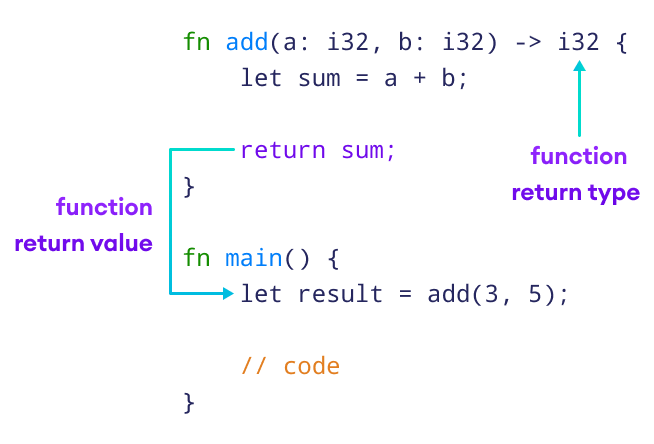
Watch the next part of the video to see how functions are defined and how they handle return values.
Common Programming Concepts in Rust
Continue with "Common Programming Concepts in Rust".
Watch the segment on functions, from the beginning of the section. Focus on the distinction between statements and expressions, and how it enables implicit returns.
The most significant concept here is that Rust is an expression-based language.
- Statements are instructions that perform an action but do not return a value. They end with a semicolon. For example,
let x = 5;is a statement. - Expressions evaluate to a resulting value. For example,
5 + 6is an expression that evaluates to11.
In Rust, blocks of code ({...}) are also expressions, and they evaluate to the last expression within them. This is why you can return a value from a function without using the return keyword: the last expression in the function body becomes the function's return value.
fn add_five(x: i32) -> i32 {
    x + 5 // No semicolon means this is an expression, and its value is returned.
}

fn main() {
    let result = add_five(10);
    println!("The result is {}", result); // Prints "The result is 15"
}
If we had added a semicolon (x + 5;), it would have become a statement that evaluates to a "unit type" (), essentially void. This would cause a type mismatch error because the function promises to return an i32. This feature might feel unusual at first, but it allows for very concise and readable code.
Control Flow
Finally, let's look at how to control the flow of execution in your program using loops and conditionals.
Common Programming Concepts in Rust
Watch the final segment of "Common Programming Concepts in Rust" for this lesson.
This part covers if expressions and the three loop types: loop, while, and for. Watch from this section on control flow to the end of the video.
Let's recap the main structures:
if Expressions:
Like functions, if is an expression in Rust. This means you can use it on the right side of a let statement. The blocks for each arm (if, else if, else) must evaluate to the same type.
let condition = true;
let number = if condition { 5 } else { 6 }; // number will be 5
Unlike in C or Python, the condition for an if statement must be a bool. Rust will not automatically convert non-boolean types.
Loops:
Rust has three kinds of loops:
loop: An infinite loop that you exit usingbreak. You can also return a value from the loop when you break.let mut counter = 0; let result = loop { counter += 1; if counter == 10 { break counter * 2; // Returns 20 from the loop } }; // result is now 20while: The standard conditional loop, which runs as long as a condition is true. It's identical in concept towhileloops in C and Python.let mut number = 3; while number != 0 { println!("{}!", number); number -= 1; }for: The most common and safest loop in Rust. It iterates over a collection. This will feel very similar to Python'sfor...inloop.let a = [10, 20, 30, 40, 50]; for element in a.iter() { println!("the value is: {}", element); }
Practice Exercise
To put these concepts into practice, try to write a simple function. Create a new project with cargo new basics and add this to your src/main.rs file.
Task: Write a function called factorial that takes an unsigned 32-bit integer (u32) as a parameter and returns its factorial value. Use a loop to calculate the result. Then, call this function from main and print the result for a few different numbers (e.g., 5, 7, 10).
Click for a possible solution
fn factorial(n: u32) -> u32 {
    let mut result = 1;
    for i in 1..=n { // 1..=n is a range that includes n
        result *= i;
    }
    result // Implicit return
}

fn main() {
    let num1 = 5;
    let num2 = 7;
    println!("Factorial of {} is {}", num1, factorial(num1));
    println!("Factorial of {} is {}", num2, factorial(num2));
}
Conclusion
Congratulations on completing your first step into Rust! In this lesson, we have covered the foundational syntax for writing simple programs.
Here are the key takeaways:
- Rust programs start in
fn main(). - Variables are immutable by default (
let) and can be made mutable (let mut). Constants (const) are for compile-time values. - Rust is statically typed, with powerful type inference. It has familiar scalar types (integers, floats, etc.) and compound types like tuples and arrays.
- Functions and
ifblocks are expressions, meaning they evaluate to a value. This enables concise, implicit returns. - Rust provides three loop constructs:
loopfor infinite loops that can return values,whilefor conditional looping, andforfor safe iteration over collections.
You now have the basic vocabulary of Rust. In the next lesson, we will explore the feature that truly sets Rust apart: the ownership and borrowing system. The principles of immutability and explicit mutability that you learned today are the first steps toward understanding how Rust achieves its guarantees of memory safety without a garbage collector.