Welcome to the seventh module of your journey to becoming a backend engineer. In the previous module, you honed your skills in optimizing database queries, learning how to use select_related and prefetch_related to make your application's data access layer fast and efficient. While database optimization is critical, it's only one piece of the performance puzzle. What happens when a task within your application is inherently slow, not because of the database, but because it involves heavy processing or waiting on an external service?
This lesson introduces the fundamental concept that addresses this challenge: asynchronous processing. You will learn to distinguish between synchronous (the default, blocking way of doing things) and asynchronous (non-blocking) execution, specifically within the context of a web application like the ones you're building. Understanding this distinction is the first and most crucial step toward building scalable, responsive backend systems, a core requirement listed in the Infilect job description under "handle automation, asynchronous processing, scaling backend."
By the end of this 60-minute lesson, you will be able to:
- Define synchronous and asynchronous execution.
- Explain why traditional web request handling is synchronous and its limitations.
- Describe how asynchronous execution can improve application performance and user experience.
- Differentiate between CPU-bound and I/O-bound tasks, and explain why this matters for web applications.
- Identify use cases in a web application that are well-suited for asynchronous processing.
1. The Synchronous World: One Thing at a Time
By default, most web frameworks, including Django, handle requests synchronously. This means when a user sends an HTTP request to your server, a worker process picks it up and executes your view function from top to bottom. It will not do anything else until it has finished every single line of code in that view and returned a response.
Think of it like a phone call. When you call someone, you wait for them to pick up, have the conversation, and then hang up. During the call, you are "blocked"—you can't simultaneously have another phone conversation.
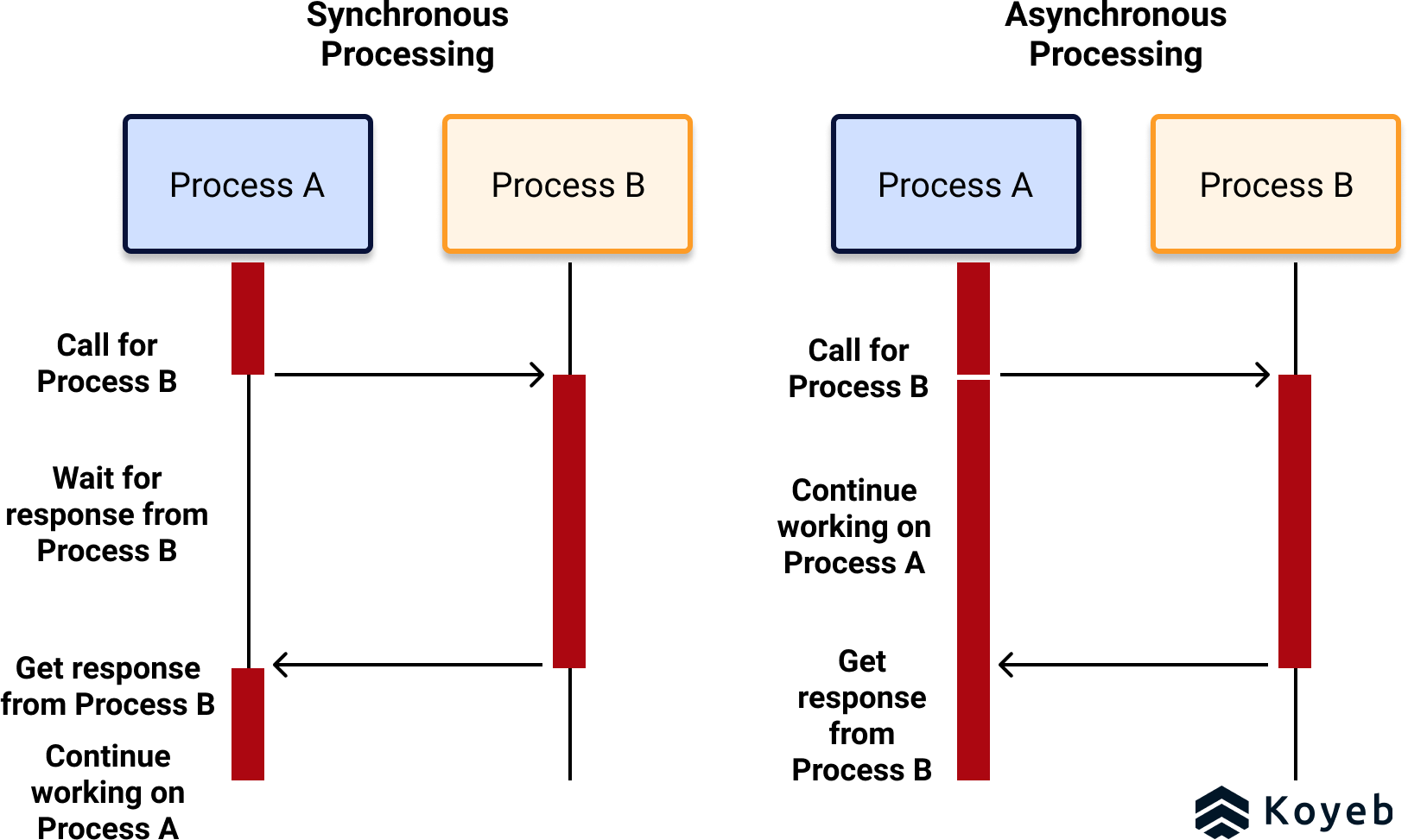
This sequential, blocking model is simple and predictable, which is great for many tasks. However, it has a significant drawback in web development. What if one of the steps in your view is slow?
- Sending a welcome email after user registration.
- Processing an uploaded image to create thumbnails.
- Generating a complex report.
- Calling a slow third-party API.
In a synchronous world, the user's browser will simply hang, showing a loading spinner, until the entire process is complete. If the task takes 30 seconds, the user is stuck waiting for 30 seconds. This leads to a terrible user experience.
The following video illustrates this problem perfectly using a simple web application example.
Secrets to Microservices Communication | How Microservices Talk to Each Other | Sync VS Async
The channel Lazy Programmer explains the practical difference in user experience between a synchronous and an asynchronous system.
Watch the segment from discussing a simple example. Notice how in the synchronous case, the user is stuck on the page, whereas in the asynchronous case, they receive an immediate acknowledgment and are free to continue using the application.
2. A Better Way: The Asynchronous Approach
Asynchronous execution provides a solution to the blocking problem. It allows a program to initiate a long-running task and then move on to other work without waiting for the first task to complete.
Think of this like sending a text message or an email. you send the message and then immediately put your phone away and continue with your day. You don't stare at the screen waiting for a reply. When the reply eventually arrives, you get a notification and can handle it then.
As shown in the diagram above on the right, Process A calls Process B but doesn't wait. It continues its own work and gets a response from B later. This is non-blocking.
In a web context, this means our Django view can hand off a slow task (like image processing) to a background process. The view can then immediately return an HTTP response to the user, saying something like, "Your image has been uploaded and is being processed." The user can continue browsing the site, and the heavy lifting happens behind the scenes.
This approach dramatically improves responsiveness and perceived performance.
3. The Core Reason: CPU-bound vs. I/O-bound Tasks
To truly grasp why asynchronous processing is so effective in web applications, you must understand the difference between two types of work a computer does:
- CPU-bound work: This involves active computation. The CPU is busy "thinking" and performing calculations, like crunching numbers for a machine learning model, resizing an image, or finding prime numbers.
- I/O-bound work (Input/Output): This involves waiting for something. The CPU is mostly idle, waiting for data to come from a network, a database, or the file system. Examples include making a database query, calling an external API, or reading a large file from disk.
Most performance bottlenecks in web applications are I/O-bound. Your powerful CPU often spends most of its time just waiting. Synchronous execution wastes this waiting time. Asynchronous execution allows the system to use that waiting time to do other useful work, like handling another user's request.
This video provides an exceptionally clear explanation of this concept using a restaurant analogy. While it uses Node.js as an example, the principles are universal to all backend development.
Non-blocking I/O and how Node uses it, in friendly terms: blocking vs async IO, CPU vs IO
This video from Studying With Alex masterfully explains the concepts of blocking vs. non-blocking I/O and CPU vs. I/O-bound work.
First, watch the restaurant analogy, which illustrates how a single waiter (a single thread) can serve multiple tables by working on other tables during their downtime. Next, focus on the clear definitions of CPU vs. I/O work. This is the most critical concept in this lesson. Finally, see how this all comes together in the explanation of non-blocking I/O, which allows a thread to switch to another task during the "waiting" time of an I/O operation.
4. Choosing the Right Approach
Now that you understand the "what" and "why," let's solidify the "when." When should you use synchronous versus asynchronous communication?
What is Synchronous and Asynchronous Programming - Kissflow
This article from Kissflow provides a great written summary of the concepts we've discussed, with a focus on their application in a business and web context.
Please read the following sections: Start with the definitions of Synchronous Programming and Asynchronous Programming. Review the comparison table under Core Differences. Pay close attention to the sections When to use and Web Development, as they directly apply to the systems you'll be building. Finally, the FAQ on API communication is an excellent, concise summary.
The key takeaway is this:
- Use Synchronous when the client needs an immediate answer to proceed. Examples: User login, checking if a username is available, fetching product details for display.
- Use Asynchronous for tasks that can be deferred, are long-running, or don't require an immediate response to the user. Examples: Sending notification emails, generating reports, processing large file uploads, or kicking off a machine learning inference job.
This distinction is crucial for system design, as we'll explore in future modules.
5. Hands-On Task: Analyze Your Project for Asynchronous Opportunities
You won't be writing any code in this lesson. Instead, your task is a "thought experiment" to apply these concepts to the project you've been building.
- Review the features of your "Retail Inventory API" project.
- Identify three distinct operations that are currently handled synchronously but would be much better candidates for asynchronous processing.
- For each operation, write a short explanation covering:
- What the operation is (e.g., "Generating a monthly sales report CSV").
- Why it's a good candidate for async (e.g., "This is I/O-bound as it queries many sales records and writes to a file. It could take a long time for stores with lots of data.").
- The improved user experience (e.g., "Instead of the user waiting on a loading screen, the API could immediately return a
202 Acceptedstatus with a message: 'Your report is being generated and will be emailed to you shortly.'").
Think about tasks related to reporting, notifications, and potential interactions with external systems. This exercise will build the foundation for our upcoming practical work with Celery and Redis.
Conclusion
In this lesson, you've taken a significant conceptual leap. You now understand the fundamental difference between blocking (synchronous) and non-blocking (asynchronous) execution in a web context. This knowledge is not just academic; it is the bedrock of building scalable, modern backend applications that can handle complex, time-consuming tasks without sacrificing user experience.
Key Takeaways:
- Synchronous execution is sequential and blocking. It's simple but can lead to poor performance and user experience if tasks are slow.
- Asynchronous execution is concurrent and non-blocking. It's ideal for improving responsiveness by offloading long-running tasks to the background.
- The benefit of async in web applications comes from efficiently handling I/O-bound tasks (waiting on networks, databases, files), which are the most common bottlenecks.
- Choosing between sync and async is a key system design decision based on whether an immediate response is required.
You've learned the what and the why. In our next lesson, we will dive into the how. You'll be introduced to the producer-consumer pattern and the essential tools that bring asynchronous processing to life in Django: message queues and task runners.