Welcome back! In our previous lesson, we established the groundwork for writing Python code by learning how to store data in variables, understand different data types, and perform calculations using operators. These are the nouns and verbs of our programming language.
Now, we'll give our programs intelligence and purpose. This lesson focuses on control flow, which is the ability to direct the order in which your code executes. You will learn how to make your programs make decisions using if/else statements and repeat actions with for and while loops. Mastering control flow is the difference between writing a simple calculator and building a dynamic backend system that can react to user input, process large datasets, and automate complex tasks—all skills central to the Infilect role you're aiming for.
1. Making Decisions with if, elif, and else
So far, our scripts have run linearly from top to bottom. But what if we want to execute code only if a certain condition is met? This is the job of the if statement. Its structure is based on a condition that evaluates to a boolean value: True or False.
The basic structure is:
if some_condition:


    # Code to run only if some_condition is True
Notice the colon : at the end of the if line and the indentation of the code block below it. Python uses indentation (typically four spaces) to group statements together. This is not just for style; it is a strict syntactic rule.
Let's watch a video that walks through the core concepts of conditional logic in Python.
Python Tutorial for Beginners 6: Conditionals and Booleans - If, Else, and Elif Statements
This video from Corey Schafer provides a clear, step-by-step introduction to conditional statements.
Please watch the following segments: if statements: the basic structure, including how comparison operators like == create the conditions. else statements: the else block, which runs when the if condition is false. elif for multiple conditions: using elif to check for multiple possibilities in a structured way.
As you saw, we can build a chain of logic:
if: Checks the first condition. IfTrue, its block runs, and the chain is exited.elif: If theif(or a precedingelif) wasFalse, this next condition is checked. You can have as manyelifstatements as you need.else: If all precedingifandelifconditions wereFalse, this block runs. It's a catch-all.
Combining Conditions with Logical Operators
Often, a decision depends on more than one factor. Python provides three logical operators to combine boolean expressions:
and: Both sides must beTruefor the whole expression to beTrue.or: At least one side must beTruefor the whole expression to beTrue.not: Inverts a boolean value (TruebecomesFalse, andFalsebecomesTrue).
For example, to grant access to a secure admin page, you might check:
if user_role == 'admin' and is_logged_in:
    print("Welcome, Admin!")
else:
    print("Access Denied.")
Let's see these logical operators in action.
Python Tutorial for Beginners 6: Conditionals and Booleans - If, Else, and Elif Statements
This part of the same video explains the and, or, and not operators with a practical example.
Watch the segment from the start of the logical operators section.
What is "Falsy"?
An important feature of Python is that it's not just the boolean False that is treated as false in an if statement. Several other values are considered "falsy":
- The number
0(and0.0) - An empty string
"" - An empty list
[], tuple(), or dictionary{} - The special value
None
Everything else is "truthy". This allows for concise code, like checking if a list has items:
shopping_cart = []


# ... some code that may or may not add items to the cart
if shopping_cart:  # This is the same as 'if len(shopping_cart) > 0:'
    print("Proceeding to checkout.")
else:
    print("Your cart is empty.")
For a comprehensive written guide on if/else statements, you can refer to the following article. It covers the syntax, logical operators, and even nested conditionals.
How to Use If/Else Statements in Python: A Beginner's Guide
This DigitalOcean tutorial is a great reference for everything related to Python's conditional statements.
Focus on these parts: The introduction and basic syntax under What is an If/Else Statement?. The explanation of if-elif-else for multiple conditions in the section Using if-elif-else. How to build more complex checks under Handling Multiple Conditions. The concept of nested if statements, which is shown in the example under the Nested If Statements section. Finally, the FAQ section provides a clear, tabular comparison between if and elif under What is the difference.
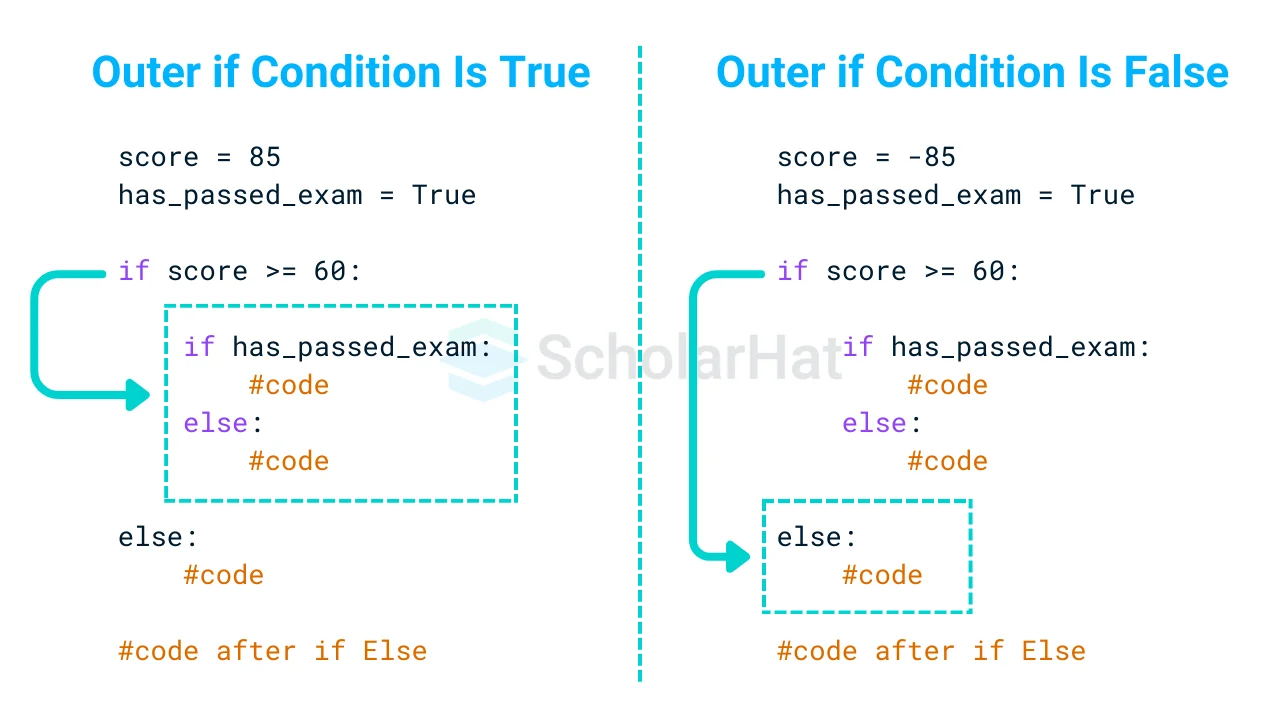
Visually, when you nest if statements, you create a decision tree. The inner condition is only evaluated if the outer one is true.
2. Repeating Actions: for and while Loops
Loops are control structures that repeat a block of code multiple times. Python has two main types of loops: for and while.
The for Loop: Iterating Over a Sequence
A for loop is used to iterate over a sequence of items, like a list, a string, or a range of numbers. For each item in the sequence, it executes the loop's body.
products = ["InfiViz", "InfiAssure", "InfiArt"]
for product in products:
    print(f"Processing product: {product}")
This is much more efficient than writing a print statement for every single product, especially if the list had thousands of items.
The following video introduces the for loop and its key features.
Python Tutorial for Beginners 7: Loops and Iterations - For/While Loops
Corey Schafer's video on loops is another excellent resource that breaks down the concepts clearly.
Watch these segments to understand the fundamentals of for loops: Basic for loop: Iterating through a list. Controlling the loop: Using break and continue to exit a loop or skip an iteration. Nested loops: Placing a loop inside another to handle more complex iteration patterns. The range() function: Looping a specific number of times.
To summarize the loop control statements:
break: Immediately terminates the loop.continue: Immediately stops the current iteration and jumps to the next one.
The Real Python article below is a more in-depth read. It details how for loops work with all of Python's main data collections and points out common mistakes to avoid.
Python for Loops: The Pythonic Way
This article from Real Python is a comprehensive guide to for loops. It's a bit longer, but it contains valuable information for writing clean and correct loops.
Please read the following sections: Start with the introduction to get the basic syntax: Getting Started. Skim through the "Traversing Built-in Collections" section. Pay attention to how to iterate through sequences and dictionaries (.keys(), .values(), .items()). Read about advanced syntax: The break, continue, and else clauses, and nested loops. Read about repeating actions a specific number of times using range: Repeating Actions. Finally, it's very important to understand common pitfalls. Read the section on Common Pitfalls. The part about modifying a collection while iterating over it is a frequent source of bugs for new developers.
The while Loop: Repeating as Long as a Condition is True
While a for loop is great for iterating over a known sequence, a while loop is used when you want to repeat a block of code an unknown number of times, as long as a certain condition remains True.
The syntax is:
while condition:


    # Do something
    # IMPORTANT: Something here should eventually make the condition False!
A classic example is a countdown:
count = 5
while count > 0:
    print(count)
    count = count - 1  # or count -= 1
print("Blast off!")
If you forget to include count = count - 1, count will always be 5, the condition count > 0 will always be True, and you will have an infinite loop.
Let's watch the final segment of the video on loops, which covers while.
Python Tutorial for Beginners 7: Loops and Iterations - For/While Loops
This part of the video covers the while loop, including the potential for infinite loops and how to handle them.
Watch from the start of the while loops section. Pay close attention to how an infinite loop (while True:) can be intentionally and safely used with a break statement.
The pattern of while True: with an internal break is very common in backend systems for tasks that need to run continuously, like listening for incoming network requests or monitoring a directory for new files.

3. Hands-On Practice
Let's put these concepts together. Open a Python file (e.g., control_flow_practice.py) and work through these tasks.
Task 1: User Input Validation
Write a script that asks the user to enter a password. The script should keep asking until the user enters the correct password, which is "InfiViz2024".
- Hint: Use a
while True:loop and anifstatement with abreak. - Give the user feedback if they enter the wrong password.
# --- Solution for Task 1 ---

correct_password = "InfiViz2024"

while True:
    user_input = input("Enter the password: ")
    if user_input == correct_password:
        print("Access granted. Welcome!")
        break  # Exit the loop if the password is correct
    else:
        print("Incorrect password. Please try again.")
Task 2: Data Processing with Loops and Conditionals
Imagine you have a list of tasks for a backend worker. Each task is a dictionary.
tasks = [
    {'id': 1, 'type': 'image_processing', 'priority': 'high', 'file': 'img_001.jpg'},
    {'id': 2, 'type': 'send_email', 'priority': 'low', 'recipient': 'user@example.com'},
    {'id': 3, 'type': 'data_cleanup', 'priority': 'medium'},
    {'id': 4, 'type': 'image_processing', 'priority': 'high', 'file': 'img_002.png'},
    {'id': 5, 'type': 'generate_report', 'priority': 'critical'}, # This task will cause us to stop
    {'id': 6, 'type': 'image_processing', 'priority': 'low', 'file': 'img_003.gif'},
]
Write a script that loops through this list of tasks and does the following:
- Print the ID and type of each task it is about to process.
- If a task has a
priorityof 'low',continueto the next task without processing it further (but still print the initial message). - If a task has a
typeof 'image_processing', print a special message:-> Found an image to process: [filename]. - If a task has a
typeof 'generate_report',breakthe loop immediately because it's a critical stop signal.
# --- Solution for Task 2 ---

tasks = [
    {'id': 1, 'type': 'image_processing', 'priority': 'high', 'file': 'img_001.jpg'},
    {'id': 2, 'type': 'send_email', 'priority': 'low', 'recipient': 'user@example.com'},
    {'id': 3, 'type': 'data_cleanup', 'priority': 'medium'},
    {'id': 4, 'type': 'image_processing', 'priority': 'high', 'file': 'img_002.png'},
    {'id': 5, 'type': 'generate_report', 'priority': 'critical'},
    {'id': 6, 'type': 'image_processing', 'priority': 'low', 'file': 'img_003.gif'},
]

for task in tasks:
    print(f"Processing task ID: {task['id']}, Type: {task['type']}")

    if task['type'] == 'generate_report':
        print("Critical report task encountered. Stopping worker.")
        break

    if task['priority'] == 'low':
        print("--> Low priority, skipping further processing.")
        continue

    if task['type'] == 'image_processing':
        print(f"-> Found an image to process: {task['file']}")


    # You could add other processing logic here for medium/high priority tasks
    print("...Task processing complete.\n")

print("Worker loop finished.")
Conclusion
In this lesson, you've moved beyond simple sequential scripts and learned how to control the flow of your programs. This is a massive step forward.
Key Takeaways:
if/elif/elsestatements allow your program to execute different code blocks based on conditions, making your code responsive and intelligent.forloops are your tool for iterating over sequences like lists and dictionaries, allowing you to perform an action on each item.whileloops repeat a block of code as long as a condition is true, perfect for situations where the number of repetitions is not known beforehand.breakandcontinuegive you fine-grained control to exit a loop or skip an iteration, making your loops more efficient.
These control flow structures are the fundamental logic gates of programming. Every complex backend feature, whether it's authenticating a user, processing a queue of jobs, or serving data from a database, is built upon these simple but powerful concepts.
In our next lesson, we will dive deeper into Python's primary collection types: lists, dictionaries, sets, and tuples. You've already seen how to loop through them; next, you'll learn how to manipulate them with built-in methods, which will further expand your ability to manage and process data.