Hello! Welcome to your next lesson.
In our previous session, you learned how to craft a persuasive, well-formatted book description. By combining the AIDA framework with strategic HTML formatting, you've created a powerful sales tool for your book's Amazon page. This was the final piece of optimizing your book's content.
Now, we'll focus on making sure your book can be found. Imagine a physical bookstore: even the most beautiful book won't sell if it's hidden in the stockroom. Amazon's categories are the digital equivalent of aisles and shelves, guiding customers to what they're looking for.
This lesson addresses the learning outcome: Select the two most relevant and commercially viable browse categories for your book. We'll explore why categories are a critical driver of visibility and sales, and I'll walk you through a research process to find the perfect "shelves" for your coloring book on Amazon.
1. Why Categories Are Your Secret Weapon
When you publish on KDP, Amazon asks you to place your book into categories. This does more than just classify your book; it directly impacts who sees it and how likely it is to become a bestseller.
Think of it this way:
- Discoverability: Customers often browse categories directly, like walking down the "Crafts & Hobbies" aisle. Being in the right category puts your book directly in the path of motivated buyers.
- Bestseller Status: Amazon awards a "#1 Best Seller" orange tag to books that rank first in any of their thousands of categories. Achieving this in a huge, competitive category like "Books" is nearly impossible. However, in a smaller niche category (e.g., "Coloring Books for Grown-Ups > Mandalas & Patterns"), it might only take a few sales per day. This tag provides powerful social proof and can significantly boost your sales.
The video below gives a great introduction to the importance of categories and how customers use them.
AMAZON KDP BOOK CATEGORIES for Low Content and Medium Content Books | Free and Easy
In the video 'AMAZON KDP BOOK CATEGORIES,' Latoya Nicole explains the fundamental role categories play in helping customers find your book.
Watch the first part of this video, from 00:00 to 01:42. Pay attention to the analogy of categories being like 'bookshelves in a library' and how they can help you reach bestseller status.
2. The Goal: Relevance and Viability
Your goal is to choose categories that are both relevant (an accurate description of your book) and commercially viable (offering a real chance to rank and make sales).
Choosing irrelevant categories just to chase an easy bestseller tag is a bad strategy. It creates a poor customer experience, and Amazon may penalize you by removing or re-categorizing your book.
The key is to understand the competition level of a category. This is determined by the Best Sellers Rank (BSR) of the books currently at the top.
To learn more about this crucial relationship between categories, BSR, and sales, the following article is the best resource available. It's a detailed read, but it contains the core theory you need to succeed.
Amazon Book Categories: My Secret Method to Choose Clear Winners
The article 'Amazon Book Categories: My Secret Method to Choose Clear Winners' from Kindlepreneur is an essential guide. It explains how BSR determines bestseller status and how choosing the right category dramatically changes the number of sales you need.
Read the first section of the article, from the beginning down to 'How to Find the Amazon Book Categories.' Focus on the example comparing a category that requires 90 books per day to rank #1 versus one that only requires 3. This illustrates the concept of 'commercial viability.'
3. A Practical Strategy for Category Research
While KDP allows you to choose up to three categories, our focus will be on finding the two most effective ones:
- A Primary, Relevant Category: This should be the most accurate, logical home for your book, even if it's competitive. This is for long-term relevance.
- A Niche, Viable Category: This should be a more specific subcategory that is still relevant but has less competition, giving you a strategic opportunity to rank and earn a bestseller tag.
Here is a step-by-step process to find these categories.
Step 1: Analyze Your Competitors
The best way to find relevant categories is to see where similar, successful books are placed.
- Go to Amazon.com.
- Search for a keyword that describes your book (e.g., "animal coloring book for adults").
- Click on one of the top-selling books from the search results.
- Scroll down to the "Product details" section. You will see a list of categories where the book is ranking. These are your initial research leads.
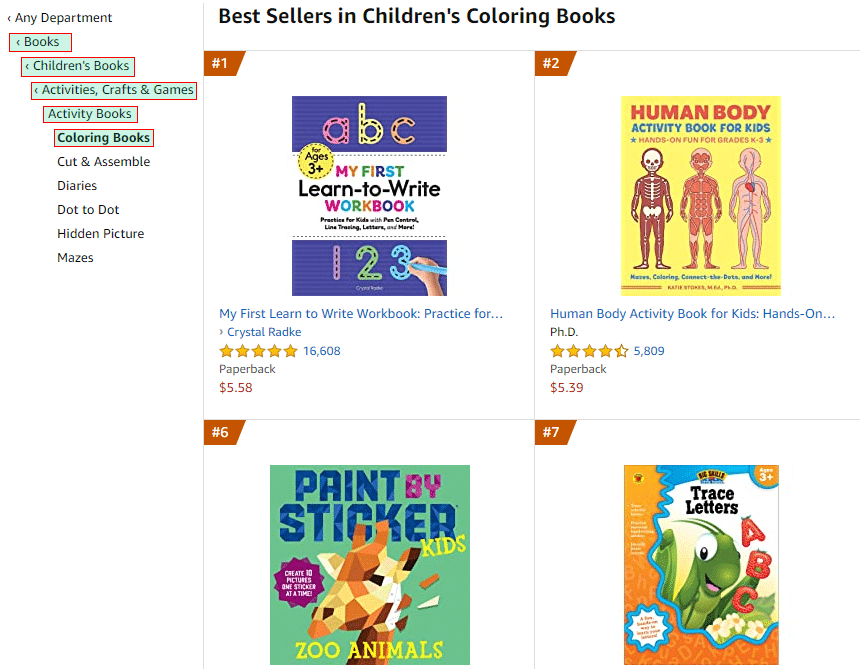
Step 2: Assess Category Competitiveness
Once you have a category path from a competitor, click on the final, most specific category link. This will take you to the bestseller list for that category.
- Click on the book ranked #1.
- On its product page, scroll down to "Product details" and find its Amazon Best Sellers Rank (BSR).
- Use a free online tool like the Kindlepreneur Book Sales Calculator (mentioned in the resources). Enter the BSR to estimate how many sales per day are needed to reach that rank.
A category where the #1 book has a BSR of 500 (requiring ~150 sales/day) is highly competitive. A category where the #1 book has a BSR of 20,000 (requiring ~12 sales/day) is much more viable for a new book.
This video provides an excellent walkthrough of this manual research process.
How to Pick the Right Amazon KDP Categories (& the Hack No One Talks About)
In 'How to Pick the Right Amazon KDP Categories,' Rachel Harrison-Sund demonstrates how to find competitor categories and assess their viability.
Watch the segments from 03:39 to 05:04 and 06:24 to 07:38. She shows you exactly how to find competitor categories, use the Kindlepreneur calculator, and offers key tips on choosing relevant, niche categories.
Step 3: Watch Out for Ghost and Duplicate Categories
As you do your research, there are two important pitfalls to be aware of. The Kindlepreneur article you looked at earlier explains these in detail.
Amazon Book Categories: My Secret Method to Choose Clear Winners
Let's return to the Kindlepreneur article to understand two advanced but critical concepts: Duplicate and Ghost categories.
Read the section titled 'WARNING: Choose Your Categories Wisely.' Pay close attention to the explanations and examples under 'Secret #1: 54% of Categories Are Duplicates' and 'Secret #2: 27% of Categories are Ghost Categories.' Understanding these will prevent you from wasting one of your valuable category slots.
- In short: A Ghost Category is a category that doesn't appear on the live Amazon store, meaning you can't get a bestseller tag in it. It's a wasted slot. A Duplicate Category means multiple paths lead to the same page. This isn't necessarily bad, but you shouldn't use two of your three slots on categories that are duplicates of each other.
4. Your Action Plan: Find Your Book's Categories
Now, it's time to apply this research process to your own coloring book.
- List Competitors: Go to Amazon and find 3-5 successful coloring books that are similar to yours.
- Gather Category Data: For each competitor, scroll to their "Product details" and copy the full category paths they are listed in. Create a list of these potential categories.
- Analyze Viability: For each category on your list, visit its bestseller page, find the BSR of the #1 book, and use the sales calculator to estimate the daily sales needed.
- Select Your Top Two: Based on your analysis, choose two final categories for your book:
- Category 1 (Relevance): The most accurate, logical category for your book, even if it's competitive.
- Category 2 (Viability): A relevant but less competitive subcategory where you have a realistic chance of ranking high with a modest number of sales.
- Record the Full Paths: Write down the exact, full path for your two chosen categories. You will need this for the next module when we update your book. For example:
Books > Crafts, Hobbies & Home > Crafts & Hobbies > Coloring Books for Grown-Ups > Mandalas & Patterns.
Here is an example of what the selection process looks like inside the KDP dashboard.

Conclusion
Congratulations! You've now unlocked one of the most powerful strategies for getting your book noticed on Amazon. By moving beyond simple classification and thinking strategically about categories, you are setting your book up for success. You've learned how to find categories where your book is not just listed, but where it can genuinely compete and thrive.
Key Takeaways:
- Categories are crucial for discoverability and achieving the coveted "#1 Best Seller" tag.
- Your goal is to find a balance between relevance (accuracy) and commercial viability (winnability).
- Research starts with analyzing successful competitors to see which categories work.
- Use the Best Sellers Rank (BSR) of the #1 book in a category to gauge its competitiveness.
- Always aim to select niche subcategories over broad, general ones.
- Be aware of "ghost" and "duplicate" categories to ensure you use your limited slots effectively.
Preview of the Next Lesson:
With this lesson, you have now optimized all the key components of your book's listing: the interior file, the description, and the categories. You are ready to put it all together. In the first lesson of our next module, "Re-launching Your Optimized Book," we will walk through the process of updating your book's cover, title, keywords, and description in the KDP dashboard to officially begin your book's turnaround.