Hello! Welcome to the next step in your KDP journey.
In our last lesson, you created a comprehensive re-launch checklist and, in theory, hit "Publish" on your newly optimized coloring book. That was a huge step! You've transformed your book's foundation by improving its niche positioning, keywords, cover, and description. But publishing is just the start of a new phase: observation and analysis.
This lesson directly addresses that need. Your goal is to learn how to track your book's Best Sellers Rank and keyword rankings post-launch using free tools. We'll cover the two most important metrics that tell you if your changes are working, how to find them, and how to monitor them over time without spending any money. This data will be the foundation for all your future decisions.
Part 1: Tracking Your Best Sellers Rank (BSR)
The first and most direct piece of feedback you'll get from Amazon is your Best Sellers Rank, or BSR.
What is BSR?
The BSR is a number Amazon assigns to your book after it gets its first sale. It reflects how well your book is selling compared to millions of other books on the platform.
- A lower BSR is better. A BSR of #1 means it's the current best-selling book on Amazon. A BSR of #1,000,000 means it's selling, but much less frequently.
- BSR is a lagging indicator of sales. It's updated hourly and reflects recent sales history. Consistent sales are needed to maintain a good BSR.
- Your book has multiple BSRs: one for the entire "Books" store, and others for each category it's listed in (e.g., "Children's Coloring Books").
How to Find and Track Your BSR
You can find the BSR on your book's product page, in the "Product details" section. It will only appear after you've made at least one sale.

To track it, you don't need fancy software. A simple spreadsheet is the perfect tool. Create a sheet with the following columns:
| Date | BSR (Overall Books) | BSR (Category 1) | Notes |
|---|---|---|---|
| 2023-10-26 | No Rank | No Rank | Book is live. |
| 2023-10-27 | 150,234 | 850 | First sale! |
| 2023-10-28 | 125,100 | 620 | BSR improved after another sale. |
For the first few weeks after your re-launch, check your BSR once a day. This will give you a clear picture of your sales momentum. A falling BSR (getting lower) is great news!
Part 2: Tracking Your Keyword Rankings
While BSR tells you if you're selling, keyword rankings tell you how customers are finding your book. Tracking this reveals whether your keyword optimization from Module 3 was successful.
Why is this so important? Just looking at sales reports doesn't give you the full picture. You might be making sales, but you won't know which search terms are driving them.
Increase KDP Low Content Sales with Cool Keyword Tracking Software
To understand the strategic value of keyword tracking, watch this segment from a video by Paul Marles. He explains why relying only on sales data is limiting and how tracking keywords allows you to actively optimize your book's visibility.
Watch from the beginning until 04:55. Focus on the core idea: tracking keyword performance helps you understand what's working so you can optimize your cover, description, and marketing efforts based on real data, rather than just guessing.
As the video explains, knowing your rank for specific keywords is powerful. Now, let's learn how to find this data for free.
Method 1: The Manual Spreadsheet
The most straightforward way to track keywords is to manually search for them on Amazon and record your book's position. This is the method we'll start with, as it requires no special tools.
The 7 KDP Keywords, Why They Matter and How To Pick Winners
The article 'The 7 KDP Keywords' by Brandon Rohrbaugh offers a simple, effective way to approach keyword tracking. We'll focus on the section that outlines this process.
Please read the section titled 'Tracking, Testing, and Iteration'. Pay close attention to the suggestions for using a 'Simple spreadsheet for tests' and the advice on 'When to update and how to measure'.
Based on this reading, here is your step-by-step process:
- Open a Private Browser Window: Open an "Incognito" window in Chrome or a "Private" window in your browser. This ensures your personal search history doesn't influence the results.
- Go to Amazon.com: Make sure you are in the correct marketplace and have the "Books" department selected.
- Search Your Keyword: Type one of your 7 backend keywords into the search bar and press Enter.
- Find Your Book: Carefully scroll through the search result pages until you find your book. Note the page number and its position on the page. If you don't find it within the first 10-15 pages, it's considered "not ranking" for now.
- Record Your Findings: Add this data to your tracking spreadsheet.
Expand your spreadsheet to look like this:
| Date | BSR (Overall) | Keyword 1 ("dinosaur coloring book for toddlers") | Keyword 2 ("easy dino coloring pages") | ... |
|---|---|---|---|---|
| 2023-11-01 | 125,100 | Page 8, Position 5 | Not found | ... |
| 2023-11-08 | 98,500 | Page 5, Position 12 | Page 12, Position 3 | ... |
This process is tedious, but it gives you the raw data you need. Do this once a week for each of your 7 keywords.
Method 2: Using a Free Chrome Extension
To make the manual search process a little easier, you can use a free browser extension. These tools often overlay data directly onto the Amazon search results page, so you don't have to count positions manually.
A popular free tool is the "KDP / Amazon BSR & Keyword Research SEO Tool" from Self Publishing Titans.
KDP Niche Research Chrome Extension | Self Publishing Titans
This resource provides simple, step-by-step instructions for installing the free Self Publishing Titans Chrome extension. We will use this tool to speed up our keyword rank checking.
Follow the four steps in the article to install and pin the Chrome extension. The link to the Chrome Store is provided directly in the article.
Once installed, when you search for a keyword on Amazon, this extension will show you data about the results on the page, including their ranks. This can help you spot your book more quickly and understand its position relative to competitors.
While this free extension helps, dedicated keyword trackers automate this entire process. They check your rank daily and present it in a graph.
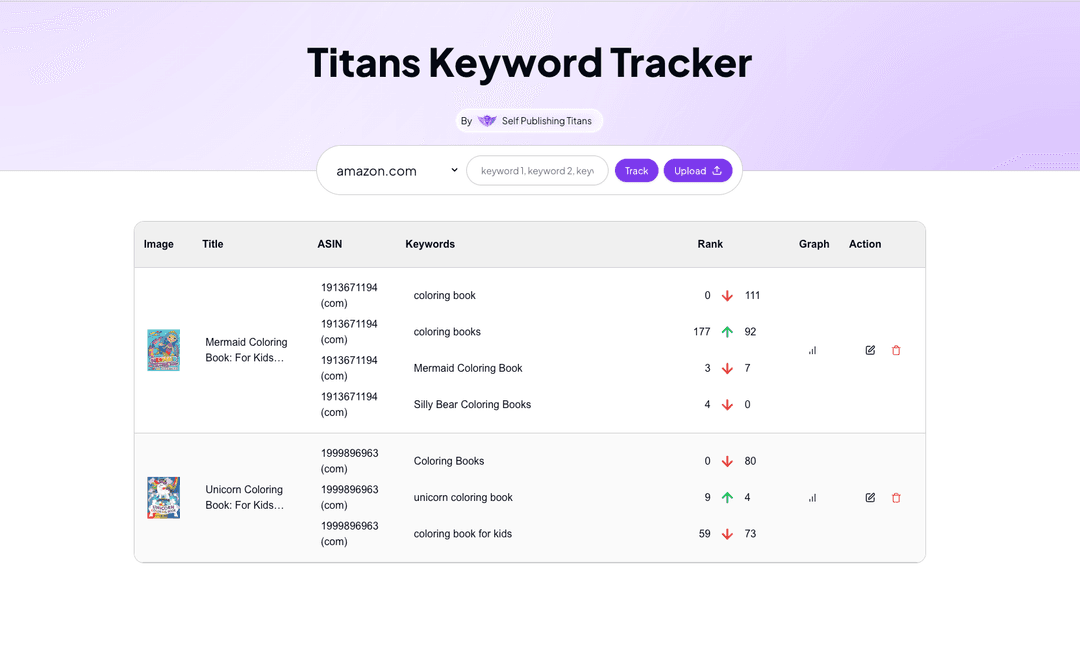
For now, your manual spreadsheet method is more than enough. The goal is to get into the habit of tracking your data so you can see which keywords are gaining traction.
Conclusion
You now have a complete, free system for monitoring your book's performance after its re-launch. By tracking these two key metrics, you're no longer guessing—you're making data-driven decisions.
Key Takeaways:
- Best Sellers Rank (BSR) is your primary indicator of sales. Track it daily in a spreadsheet to monitor sales momentum. A lower number is better.
- Keyword Ranking tells you how visible your book is for specific customer searches. It's the key to understanding if your SEO strategy is working.
- You can track your keyword ranks for free by manually searching in a private browser window and recording the results in a spreadsheet.
- Free browser extensions can help speed up the manual process.
- Consistency is crucial. Check your BSR daily and your keyword ranks weekly for the first month to gather meaningful data.
Preview of the Next Lesson:
Tracking data is a passive activity. In the next module, we'll move into active promotion. Your next lesson will introduce you to free marketing channels suitable for coloring books, such as Pinterest and targeted social media groups. Driving your own traffic is the best way to generate those first crucial sales, which will, in turn, improve the BSR and keyword ranks you are now so skillfully tracking.