Hello! Welcome to the first lesson in our course, "React.js: Basic to Advanced." I'm excited to start this journey with you.
Given your background in computer science and software engineering, we'll be able to dive deep into not just how to use React, but also why it works the way it does. We'll start from the ground up, but we won't shy away from the underlying theory, like how React's rendering mechanism operates.
Today, we'll tackle our first learning outcome: explaining what React is and how it differs from vanilla JavaScript DOM manipulation. This lesson lays the conceptual groundwork for everything that follows. We'll explore the core paradigm shift React introduced—moving from imperative to declarative UI development—and understand the key innovation that makes it all possible: the Virtual DOM.
Let's begin.
The Old Way: Imperative DOM Manipulation
Before libraries like React became popular, UIs were typically built by directly manipulating the Document Object Model (DOM). The DOM is a tree-like structure that the browser creates to represent a webpage, and JavaScript provides an API to interact with it.
With your JavaScript experience, you're likely familiar with methods like document.getElementById(), document.createElement(), and element.appendChild(). This approach is imperative.
To understand what "imperative" means in this context, let's start with a clear definition.
Imperative vs Declarative Programming
This article provides excellent real-world analogies and code examples to clarify the difference between imperative and declarative programming. It's a great starting point for understanding React's core philosophy.
Please read the first part of the article, from the beginning down to the section with the two metaphors ('Red Lobster' and 'giving directions'). Read the introductory analogies, and focus on how the 'how' vs. 'what' distinction applies in these non-code scenarios.
As the article illustrates, the imperative approach is about specifying how to achieve a result through a sequence of explicit steps. In the context of UI development, this means you write code that tells the browser exactly how to change the DOM.
For example, to add a "completed" class to a to-do item, your imperative code would be:
- Find the specific list item element in the DOM (e.g., by its ID).
- Access its
classListproperty. - Call the
add()method with the 'completed' class name.
This seems simple for one item, but as an application grows, this imperative style can lead to significant problems.
To see this in action, please watch the following video. It demonstrates how a simple to-do list built with vanilla JavaScript quickly becomes complex, and then shows a real-world example from Facebook that highlights the fundamental issues with imperative UI management.
This video, 'Why React is Declarative?', brilliantly illustrates the challenges of imperative DOM manipulation and introduces React's declarative solution.
About five and a half minutes in, please watch the UI examples. Pay close attention to how managing the application's state becomes increasingly difficult as new features are added in both the to-do list and the Facebook chat examples.
As you saw, the main problems with the imperative approach are:
- Complexity: The code becomes a tangled web of event listeners and direct DOM manipulations. The logic to update the UI is spread out, making it hard to follow and maintain.
- State Management: The "source of truth" for your application's state gets scattered. Some state might be in JavaScript variables, while other state is stored directly in the DOM (e.g., in an element's class or data attribute). This can easily lead to synchronization bugs, like the infamous unread message count at Facebook.
The New Way: React and Declarative UI
React offers a different paradigm: it is declarative. Instead of telling React how to update the UI, you tell React what the UI should look like for a given application state.

With React, your UI is a function of your state: UI = f(state).
You define a component that says, "If the state is X, render this HTML. If the state is Y, render that HTML instead." When the state changes from X to Y, React takes on the responsibility of figuring out the most efficient way to update the DOM to match the new desired UI.
Let's return to the video from earlier to see how the same to-do list is built declaratively with React.
Let's see the declarative approach in action.
Around 8 minutes and 48 seconds in, please watch the React example. Notice how the event handler no longer contains any direct DOM manipulation code. It simply updates a state variable (the array of to-dos), and the UI updates automatically.
The difference is profound. The code is simpler, more predictable, and easier to reason about because the state is centralized, and the rendering logic is self-contained. You're no longer managing the complex, step-by-step transitions.
Test your understanding!
Imagine you are building a simple traffic light UI with three colored circles (red, yellow, green). The state can be one of 'red', 'yellow', or 'green'. Only the active light should have an "active" CSS class that makes it glow.
How would you describe the imperative approach versus the declarative approach to change the light from green to yellow?
Show answer
-
Imperative Approach: You would write a function that executes specific steps:
- Get the DOM element for the green light (e.g.,
document.querySelector('.light.green')). - Remove the "active" class from it.
- Get the DOM element for the yellow light (e.g.,
document.querySelector('.light.yellow')). - Add the "active" class to it.
- Get the DOM element for the green light (e.g.,
-
Declarative Approach (the React way): You would have a state variable, let's say
activeLight, which holds the current color string (e.g.,'green').- To change the light, you would simply update this state variable:
setActiveLight('yellow'). - Your component's rendering logic would be written to describe the UI based on this state: "For the green light element, add the 'active' class only if
activeLight === 'green'. For the yellow light element, add the 'active' class only ifactiveLight === 'yellow', and so on." React would then handle the DOM manipulations automatically.
- To change the light, you would simply update this state variable:
How React is Both Declarative and Efficient: The Virtual DOM
This declarative approach raises a crucial question: If we just re-describe the entire UI on every state change, isn't that incredibly inefficient? Re-rendering the entire actual DOM is one of the most computationally expensive operations in a web browser.
This is where React's core innovation comes in: the Virtual DOM (VDOM).
How React Works: Virtual DOM & Performance Guide
This article, 'How React Works', provides a clear, high-level explanation of the Virtual DOM and its role in React's performance.
Please read the sections 'How React Works Behind the Scenes with Virtual DOM' (reviewing the VDOM system), 'What Is the Virtual DOM and Why It Matters for Performance' (focusing on performance optimization), 'Why Virtual DOM Updates Are Faster Than Real DOM Operations' (explaining VDOM speed), and the first FAQ question 'What is the Virtual DOM in React...' (summarizing the VDOM concept). These sections explain what the VDOM is and why it's a performance powerhouse.
To summarize and expand on the reading:
-
The VDOM is a JavaScript Object: The Virtual DOM is a lightweight, in-memory representation of the real DOM. It's just a tree of JavaScript objects that describes what the UI should look like. Creating and comparing these objects is extremely fast compared to interacting with the real browser DOM.
-
Reconciliation: When your component's state changes, React doesn't immediately touch the real DOM. Instead, it performs a process called reconciliation.
- It creates a new VDOM tree that represents the new UI.
- It then compares this new VDOM tree with the previous VDOM tree. This comparison process is often called "diffing."
- React's diffing algorithm efficiently determines the exact, minimal changes that need to be made to the real DOM to bring it in line with the new VDOM.
- Finally, React applies these minimal changes to the real DOM in a batched update.
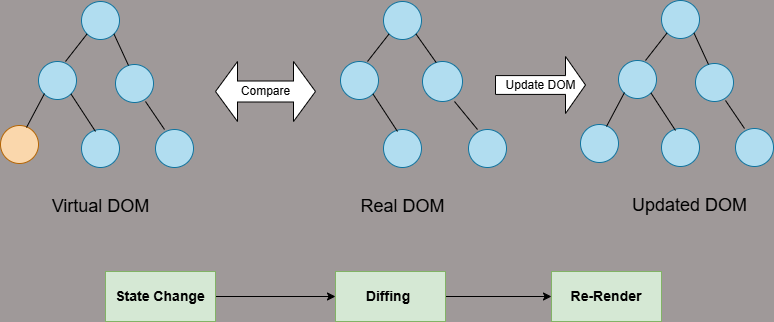
The following video provides a more detailed, step-by-step walkthrough of this entire rendering pipeline, from components to the final render.
Understanding React's UI Rendering Process
This video, 'Understanding React's UI Rendering Process', dives deeper into the technical details of how elements, the Virtual DOM, and reconciliation work together.
Watch the following segments: Around 4 minutes in, watch the Virtual DOM: This part explains how React components return 'elements' (plain JS objects) and how this tree of elements forms the Virtual DOM. At the 12-minute mark, watch the reconciliation process: This explains the 'reconciliation' and 'diffing' process, showing how React decides what to update. Near the end of the video, catch the final recap: A concise final recap of the entire process from start to finish.
By abstracting away direct DOM manipulation, React not only gives us a simpler, declarative programming model but also uses the Virtual DOM and reconciliation to optimize performance under the hood. It turns out that letting React manage the DOM is often faster than hand-optimized imperative code, especially in large, complex applications.
Conclusion
Let's summarize the key takeaways from our first lesson:
- Imperative vs. Declarative: Traditional DOM manipulation is imperative—you write step-by-step instructions on how to change the UI. React is declarative—you describe what the UI should look like for a given state, and React handles the "how."
- Benefits of Declarative UI: This approach leads to code that is simpler, more predictable, and less prone to bugs related to state synchronization.
- The Virtual DOM: React achieves efficiency through an in-memory representation of the UI called the Virtual DOM.
- Reconciliation: When state changes, React creates a new VDOM, compares it to the old one ("diffing"), and calculates the minimal set of changes needed for the real DOM. This process, called reconciliation, makes updates fast and efficient.
You now understand the fundamental problem that React solves and the core concepts behind its solution. This "why" is the foundation upon which all your practical React skills will be built.
In our next lesson, we'll move from theory to practice. We will set up a React development environment with TypeScript using Vite, which will prepare us to write our very first component.