Hello! Welcome to the final lesson in our module on performance optimization.
In our last session, you mastered applying TypeScript to useRef, useMemo, and useCallback. We're now going to use those skills to tackle one of the most common performance bottlenecks in React applications: the Context API. While Context is excellent for avoiding prop drilling, it comes with a significant performance "gotcha" that can cause widespread, unnecessary re-renders.
Today, you will learn how to optimize Context consumers to prevent these re-renders. We will cover two primary strategies: memoizing the values you pass to your context providers and splitting large contexts into smaller, more focused units.
The Root of the Problem: Reference Equality
Before we dive into solutions, we must understand why Context can be a performance trap.
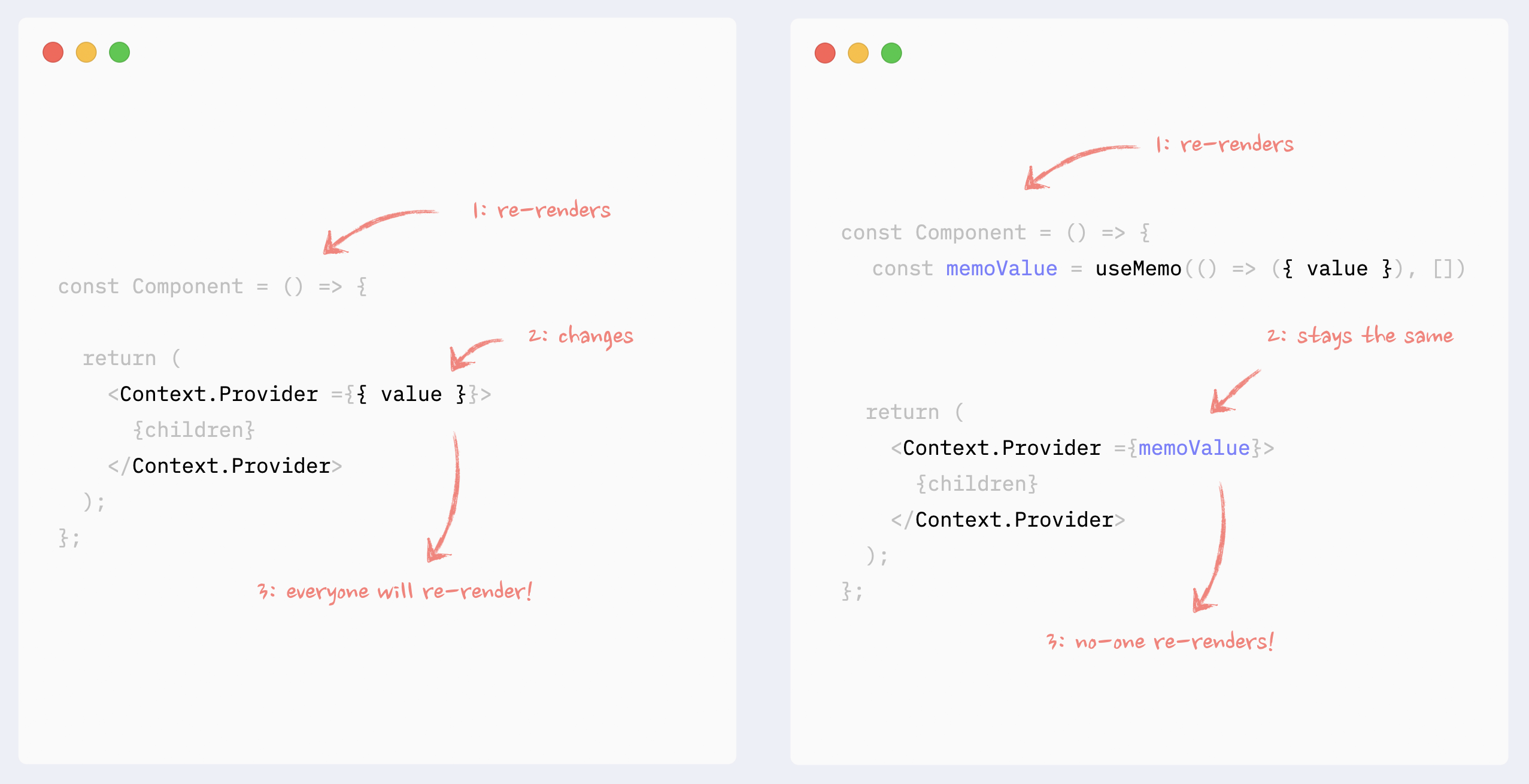
Whenever a component that hosts a Context.Provider re-renders, any objects or functions defined within its render scope are recreated. This means even if the data inside the object is the same, the object itself has a new reference in memory.
For example, in <MyContext.Provider value={{ theme: 'dark' }}>, the value prop is a brand new object on every single render of the parent component.
React's Context API determines whether to re-render consumers by comparing the old and new value props using Object.is() (which is similar to === reference equality). Since the new object has a different reference, React concludes the value has changed and re-renders all components that consume that context, even if they are memoized with React.memo.
This image perfectly illustrates the problem and hints at the solution we'll explore first.
Solution 1: Memoize Your Provider's Value
The most direct way to solve this is to ensure the value prop you pass to the provider maintains a stable reference across renders unless its underlying data actually changes. As you learned in previous lessons, useMemo and useCallback are the perfect tools for this.
useMemofor thevalueobject: Wrap the creation of your context's value object inuseMemo. This ensures that the object reference only changes when one of its dependencies changes.useCallbackfor functions: If your context value includes functions (like anupdateThemefunction), wrap them inuseCallback. Otherwise, a new function reference on each render would force youruseMemo'd value object to be recreated anyway.
Let's study an article that walks through this exact refactoring process.
Optimizing React Context with TypeScript
The article 'Optimizing React Context with TypeScript' provides a clear, practical walkthrough of this exact problem and its solution. We'll focus on the part that refactors an unoptimized ThemeProvider to use useMemo and useCallback.
Read the section titled 'Using the ThemeContext in Components With useMemo'. Compare the ThemeProvider code in this section to the un-memoized version provided earlier in the article. Note how useMemo is used to wrap the value object and useCallback is used for the toggleTheme and changeFontSize functions. Pay close attention to the dependency arrays for each hook.
Now, let's reinforce this concept by watching it being implemented.
Advanced React Context Typescript | useContext and createContext
The video 'Advanced React Context Typescript' by Weibenfalk has an excellent segment that demonstrates memoizing the context value in a live coding example.
Watch from 21:42 to 26:05. The presenter explains why a new object reference in the value prop causes re-renders and then implements the useMemo hook to memoize the context value, demonstrating the performance improvement in the process.
This leads to a foundational rule for performant React code, as highlighted in the article "How to write performant React code" (LINK): When using context, make sure that the value property is always memoized if it’s not a primitive (like a number, string, or boolean).
Test your understanding!
Below is a UserProvider component that provides user data and a login function to its children. It suffers from the performance issue we just discussed. How would you refactor it using useMemo and useCallback to prevent unnecessary re-renders?
import React, { useState, createContext, ReactNode } from 'react';

type User = { name: string } | null;

interface UserContextType {
  user: User;
  login: (name: string) => void;
}

export const UserContext = createContext<UserContextType | undefined>(undefined);

export const UserProvider = ({ children }: { children: ReactNode }) => {
  const [user, setUser] = useState<User>(null);

  const login = (name: string) => {
    setUser({ name });
  };

  const value = { user, login };

  return <UserContext.Provider value={value}>{children}</UserContext.Provider>;
};
Show answer
You should wrap the login function in useCallback and the value object in useMemo.
import React, { useState, createContext, ReactNode, useCallback, useMemo } from 'react';

type User = { name: string } | null;

interface UserContextType {
  user: User;
  login: (name: string) => void;
}

export const UserContext = createContext<UserContextType | undefined>(undefined);

export const UserProvider = ({ children }: { children: ReactNode }) => {
  const [user, setUser] = useState<User>(null);

  // Memoize the login function
  const login = useCallback((name: string) => {
    setUser({ name });
  }, []); // setUser is stable, so the dependency array is empty

  // Memoize the value object
  const value = useMemo(() => ({ user, login }), [user, login]);

  return <UserContext.Provider value={value}>{children}</UserContext.Provider>;
};
Solution 2: Split Your Contexts
Memoizing the provider value is essential, but it doesn't solve every problem. Consider a single, large context that holds both theme information and user authentication status:
value = { theme, toggleTheme, user, logout }
Even with useMemo, if you call toggleTheme, the value object is recreated. This will cause a Header component that only consumes user and logout to re-render unnecessarily.
When a component only needs a subset of the context's data, but re-renders when an unrelated part changes, you have two main optimization strategies.
Strategy A: Split into Multiple Providers
The most straightforward approach is to break your large context into smaller, more granular ones. Instead of one AppContext, you would create ThemeContext and UserContext.
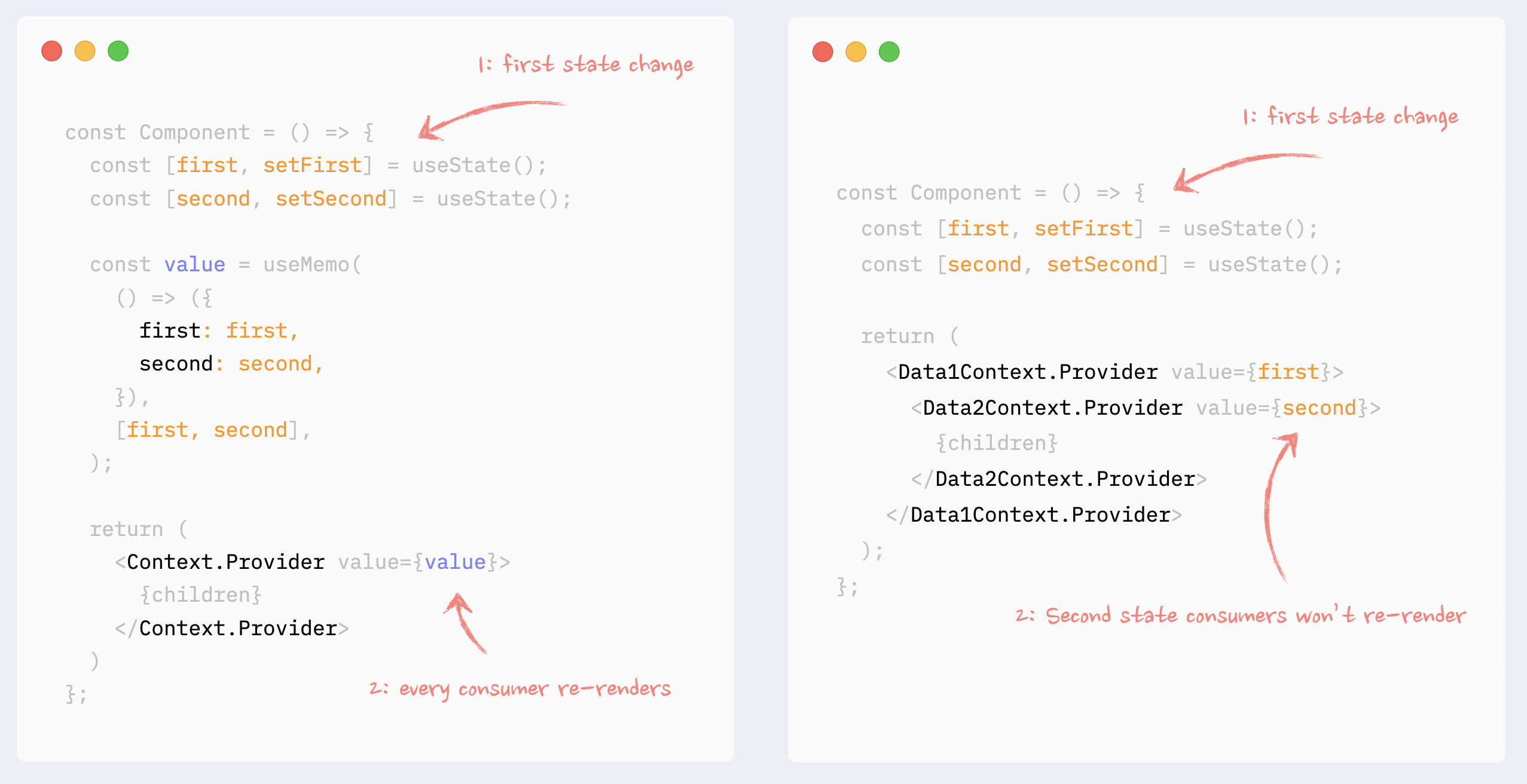
A component that needs theme data would consume ThemeContext, and a component that needs user data would consume UserContext. Now, updating the theme will only re-render components that consume ThemeContext.
The tradeoff is that you might end up with nested providers in your application's root, sometimes called "provider hell," but this is often a small price to pay for the performance gain.
<UserProvider>
  <ThemeProvider>
    <App />
  </ThemeProvider>
</UserProvider>
Strategy B: Split Consumption with Selector Hooks
An alternative, more advanced pattern is to keep a single context but create custom hooks that act as "selectors," allowing components to subscribe to only the slices of state they need. This pattern is inspired by state management libraries like Redux.
This approach avoids provider nesting and keeps related state logically grouped. The key is that the custom hook is responsible for returning only the necessary data, and your component will only re-render if that specific data changes.
Let's watch a video that demonstrates this elegant pattern.
Context API React + Typescript | useContext & useReducer Examples
While splitting providers is a great strategy, another powerful technique is to split the consumption of a single context. The video 'Context API React + Typescript' by Dave Gray demonstrates this pattern brilliantly by creating selector-like custom hooks.
Watch from 20:04 to 24:28. The presenter has a single context that manages both a count and text. Notice how they create two separate custom hooks, useCounter and useCounterText, each returning only a specific slice of the context's state. A component using useCounter won't re-render when just the text state changes.
This selector pattern requires a more complex implementation inside the custom hook (often involving useMemo itself) to be fully effective, but it's a powerful tool for managing complex, related state within a single context provider.
Conclusion
You have now learned the critical techniques for ensuring the Context API doesn't degrade your application's performance. By applying these patterns, you can build scalable applications where components only re-render when the specific data they care about actually changes.
Key Takeaways:
- The Problem: React Context re-renders all consumers when the provider's
valueprop gets a new object reference, which happens on every render of the parent by default. - Solution 1: Memoize: Always wrap non-primitive context
valueprops inuseMemoand any functions within that value inuseCallback. This stabilizes thevalue's reference. - Solution 2: Split: To prevent re-renders from unrelated state changes within a large context, you can either:
- Split Providers: Break the context into multiple, smaller, more focused contexts.
- Split Consumption: Create custom selector hooks that allow components to subscribe to only the slices of state they need.
Preview of the Next Lesson:
Our exploration of selector hooks provides a perfect segue into our next module. In the first lesson of Module 8, "Explain the purpose and benefits of creating custom hooks," we will generalize this concept. You'll learn how to extract any reusable stateful logic from your components into clean, composable, and testable custom hooks, dramatically improving your code's organization and reusability.