Hello! Welcome to the first lesson of Module 7: Performance Optimization Techniques.
In our previous module, we concluded by exploring how useRef can be used to store values across renders without triggering a re-render. This is, in itself, a form of performance optimization—a way to consciously avoid unnecessary work. Now, we're going to zoom out and look at the fundamental architecture that makes React performant by default.
Today's learning outcome is to describe the concept of the Virtual DOM and its role in React's performance. Understanding this is crucial because it's the core mechanism that allows you to write declarative code (describing what the UI should look like) while React handles the performance-critical details of how to update the UI efficiently.
Given your background in computer science, you'll find that this concept is an elegant engineering solution to a common bottleneck in web applications. We'll be looking at the data structures and processes that make it all work.
The Problem: Direct DOM Manipulation is Expensive
Before we can appreciate React's solution, we must first understand the problem it solves. Every web browser represents an HTML document as a tree-like structure called the Document Object Model (DOM). JavaScript can interact with this DOM to change the content, structure, and style of a page, making it dynamic.
However, these interactions, often called DOM manipulations, are computationally expensive.
Understanding React's UI Rendering Process
To start, let's watch a segment from the video "Understanding React's UI Rendering Process" that explains why frequent DOM manipulation can be a performance bottleneck.
Please watch from 01:50 to 03:54. Focus on the core message: writing to the DOM is the most expensive thing you can do in a web browser, and understand the distinction between the HTML document and the DOM API used to edit it.
As the video highlighted, every time you change the DOM, the browser may have to do a lot of work:
- Re-calculating the layout of elements on the page (Reflow).
- Re-painting the pixels on the screen (Repaint).
If an application has many frequent updates (like a stock ticker, a timer, or user interactions), performing direct DOM manipulations for every small change can lead to a slow and janky user experience.
React's Solution: An In-Memory Representation
So, if manipulating the real DOM is slow, what's the alternative? The core idea behind React is: what if we could figure out the result of all our changes in memory first, and then update the real DOM only with the final, minimal set of changes?
This is where the Virtual DOM (VDOM) comes in.
The Virtual DOM is a lightweight, in-memory representation of the real DOM. It's just a JavaScript object that describes the UI. Because it's a plain JavaScript object, reading from it and writing to it is incredibly fast.
A Deep Dive into React Reconciliation Algorithm
This article, "A Deep Dive into React Reconciliation Algorithm", provides a concise explanation of what the Virtual DOM is and its benefits. It clearly outlines how React uses it.
Please read the section titled 'Understanding the Virtual DOM and Its Benefits'. This will give you a solid definition and overview of its purpose.
From JSX to "Element Trees"
To be more precise, what we often call the "Virtual DOM" is actually a tree of React Elements. When you write JSX, it isn't compiled directly into HTML. Instead, it's syntactic sugar for calling React.createElement(), which produces these JavaScript objects.
For example, this JSX:
<div>
  <h1>Hello</h1>
</div>
Is transformed into an object structure like this:
{
  type: 'div',
  props: {
    children: {
      type: 'h1',
      props: {
        children: 'Hello'
      }
    }
  }
}
This tree of objects is the Virtual DOM. It's a blueprint for what the real DOM should look like.
React Reconciliation: The Hidden Engine Behind Your ...
The article "React Reconciliation: The Hidden Engine Behind Your ..." makes a great point about using the term 'Element Trees' for better precision. This is a useful distinction for understanding the internals.
Read the section 'Element Trees, Not Virtual DOM'. It clarifies how JSX is transformed into a tree of plain JavaScript objects, which is the actual internal representation React works with.
The Role of the Virtual DOM in an Update
Now we can put the pieces together. The Virtual DOM's true power shines during updates, such as when a component's state changes. The entire process is called Reconciliation.
Here's how it works, step-by-step:
- Initial Render: React creates a Virtual DOM tree for your entire app and uses it to generate the real DOM that the user sees.
- State Change: When a component's state or props update, React doesn't immediately touch the real DOM. Instead, it creates a new Virtual DOM tree in memory that reflects the new UI.
- Diffing: React now has two Virtual DOM trees in memory: the previous one and the new one. It runs a highly optimized "diffing" algorithm to compare them and identify exactly what has changed.
- Batch Update: React takes the list of differences (the "diff") and applies only those specific changes to the real DOM in a single, efficient operation.
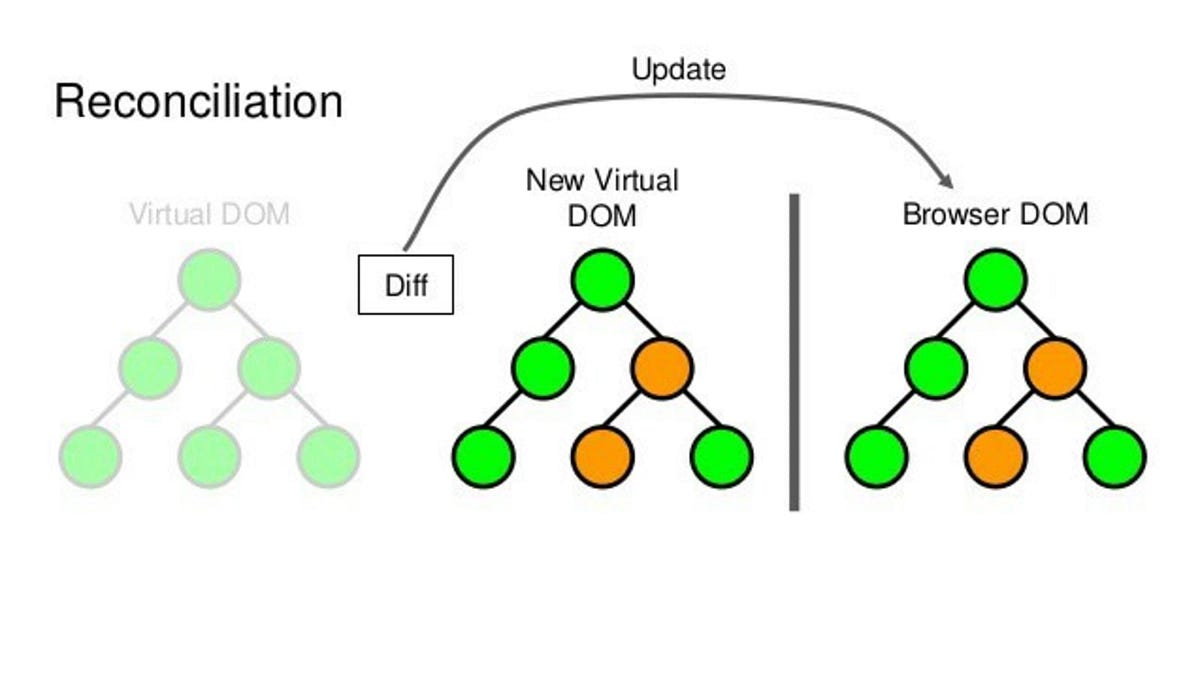
12 - ReactJS Virtual DOM - What are Virtual DOM, Reconciliation, Diffing, and Batch Update in React?
This next video provides a fantastic animated walkthrough of this entire process. Seeing it in motion really helps solidify the concept.
Please watch from 07:12 to 12:45. Pay close attention to how a state change triggers the creation of a new VDOM, the 'diff' that happens between the old and new VDOMs, and how this results in a targeted, 'batched' update to the original DOM.
By using this approach, React abstracts away the slow, imperative DOM manipulation. We can simply declare what our UI should look like for a given state, and React takes on the responsibility of updating the real DOM in the most performant way possible.
Test your understanding!
Imagine a React component that renders a list of 100 to-do items. You click a button to mark the 50th item as "complete". This updates the component's state.
Based on your understanding of the Virtual DOM and reconciliation, which of the following best describes what happens next?
- React finds the 50th
<li>element in the real DOM and directly adds aclass="completed"attribute to it. - React regenerates the HTML for all 100 list items and replaces the entire list in the real DOM.
- React creates a new Virtual DOM tree. It compares this new tree with the old one, finds that only the
classNameprop of the 50th list item has changed, and then performs a single, targeted update on that specific element in the real DOM. - React deletes the entire old Virtual DOM and builds a new one from scratch, then uses it to repaint the entire page.
Show answer
The correct answer is 3. React's strength lies in creating a new VDOM, comparing it to the previous version to find the minimal set of changes (the "diff"), and then applying only those specific changes to the real DOM. It avoids both overly broad updates (like replacing the whole list) and direct, imperative manipulation without a diffing process.
Conclusion
In this lesson, we established the foundational performance concept in React. You now understand not just what the Virtual DOM is, but why it exists and the critical role it plays.
Key Takeaways:
- Directly manipulating the browser's DOM is a slow operation that can lead to poor application performance.
- React avoids this bottleneck by using a Virtual DOM, which is a lightweight JavaScript object representation (an "element tree") of the UI.
- When a component's state changes, React creates a new Virtual DOM tree and compares it to the previous one in a process called Reconciliation.
- The comparison, or "diffing", identifies the minimal set of changes required.
- React then applies these changes to the real DOM in a single batched update, ensuring high performance.
Preview of the Next Lesson:
We've covered the "what" and "why" of the Virtual DOM and reconciliation. But how does React perform the "diffing" step so quickly? Comparing two trees is a complex problem in computer science. In our next lesson, we will explain the key principles of React's reconciliation (diffing) algorithm. You'll learn about the clever heuristics React uses to make this comparison incredibly fast, which has important implications for how we write our components.