Hello! Let's continue our journey into React performance optimization.
In the last lesson, we saw how React.memo can prevent a component from re-rendering. However, we also discovered its Achilles' heel: it's easily defeated by props that are objects, arrays, or functions. Because a new reference for these is created on every render, React.memo's shallow comparison always fails, triggering a re-render.
Today, we'll learn the tool that solves this problem and more. We will explore the useMemo hook, which allows us to memoize expensive computations. You'll see that "expensive" can mean two things: a calculation that is computationally intensive (slow to run) or a value that is "expensive" to re-create because it breaks optimizations in child components (like React.memo).
This lesson will directly build on what we've learned, showing you how to make React.memo truly effective and how to avoid costly calculations in your components.
Memoization: A Familiar Concept
Given your computer science background, the term "memoization" is likely familiar. It's a caching technique where the result of a function call is stored, so the next time the same inputs are provided, the cached result is returned instead of re-computing it. A classic example is optimizing a naive recursive Fibonacci function.
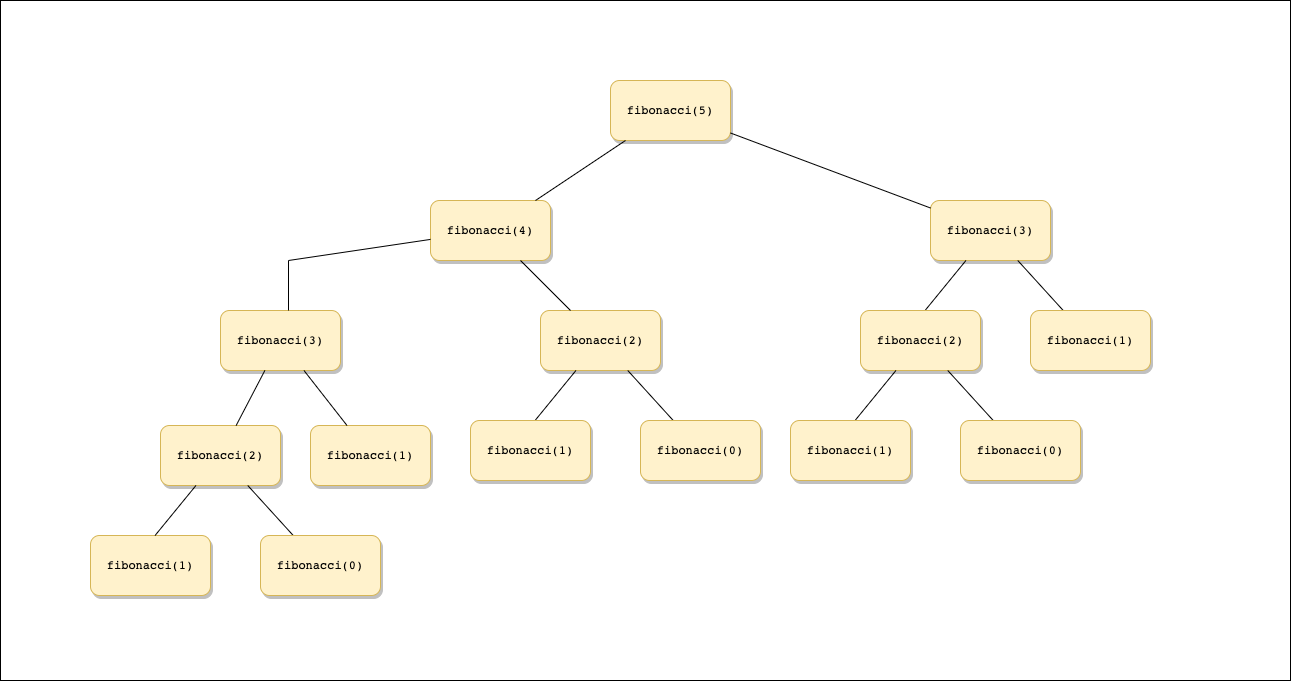
The useMemo hook brings this exact principle into the world of React components. It allows us to "remember" a value between re-renders, preventing it from being recalculated unnecessarily.
Use Case 1: Skipping Computationally Expensive Calculations
The most direct use of useMemo is to avoid re-running slow functions on every render. A component might re-render for many reasons—a parent's state changed, a theme toggled, etc. If a calculation within that component is slow and its inputs haven't changed, re-running it is wasted effort that can make your UI feel sluggish.
Let's see a practical demonstration of this problem.
The video 'Learn useMemo In 10 Minutes' from Web Dev Simplified provides an excellent, clear example of this exact problem. It shows an artificially slow function that blocks the UI even when unrelated state is updated.
Watch from 01:03 to 03:15. Notice how changing the theme, which is completely unrelated to the number calculation, still suffers from the same delay.
This is where useMemo comes in. You wrap the expensive calculation in it and provide a list of its dependencies. React will only re-run the calculation if one of those dependencies has changed since the last render.
The syntax is:const memoizedValue = useMemo(() => computeExpensiveValue(dep1, dep2), [dep1, dep2]);
- Calculation Function: The first argument is a function that computes and returns the value you want to cache.
- Dependency Array: The second argument is an array of all the reactive values (props, state) that the calculation depends on.
Now, let's see how useMemo solves the problem from the video.
Let's continue with the same video to see the solution in action.
Watch from 03:15 to 05:16. The key is to see how wrapping the slowFunction call in useMemo with [number] as the dependency array makes the theme change instantaneous, because the slow calculation is now skipped.
To solidify this concept, let's look at another example. This one deals with filtering a very large array, a common scenario in data-driven applications.
Learn React Hooks: useMemo - Simply Explained!
The video 'Learn React Hooks: useMemo - Simply Explained!' by Cosden Solutions offers another great perspective on the same problem.
Watch from 00:39 to 10:10. The video clearly demonstrates a performance lag when incrementing a counter because of a slow find operation on a huge array. Then, it shows how useMemo with the correct dependency (items) completely resolves the lag.
The Importance of the Dependency Array
As you've seen, the dependency array is the key to making useMemo work correctly. If you forget a dependency, your component can show stale data because the value won't be re-computed when it should be. If you include a value that changes unnecessarily, you defeat the purpose of memoization.
Thankfully, the official React ESLint plugin (eslint-plugin-react-hooks) is excellent at detecting missing dependencies and will warn you if you forget one. It's a standard part of projects set up with tools like Vite.
Test your understanding!
Consider the following component:
import React, { useState, useMemo } from 'react';

const PrimeCalculator: React.FC = () => {
  const [selectedNum, setSelectedNum] = useState(100);
  const [theme, setTheme] = useState('light');

  // isPrime is an expensive function
  const allPrimes = findPrimes(selectedNum);

  return (
    <div>
      <button onClick={() => setTheme(theme === 'light' ? 'dark' : 'light')}>
        Toggle Theme
      </button>
      <input
        type="number"
        value={selectedNum}
        onChange={(e) => setSelectedNum(Number(e.target.value))}
      />
      <p>Primes up to {selectedNum}: {allPrimes.join(', ')}</p>
    </div>
  );
};
How would you modify the allPrimes calculation using useMemo to prevent it from re-running every time the theme is toggled?
Show answer
You would wrap the findPrimes call in useMemo and provide selectedNum in the dependency array.
const allPrimes = useMemo(() => {
  return findPrimes(selectedNum);
}, [selectedNum]);
This tells React to only re-calculate allPrimes when selectedNum changes. Changes to theme will no longer trigger the expensive findPrimes function.
Use Case 2: Preserving Referential Equality
This brings us back to the problem from our last lesson. When you pass an object or array as a prop to a memoized child component (React.memo), the optimization fails because you are creating a new object/array on every render.
// Parent.tsx
function Parent() {
  const [user, setUser] = useState('Alice');

  // This `style` object is a NEW object on every render
  const style = { color: 'blue', fontSize: '16px' };

  return <MemoizedChild style={style} />;
}
Here, useMemo is the solution. By wrapping the object creation in useMemo, you can ensure that you get the exact same object reference on subsequent renders, as long as its dependencies haven't changed.
Understanding useMemo and useCallback
The article 'Understanding useMemo and useCallback' by Josh W. Comeau has a fantastic explanation of this concept. It clearly illustrates the difference between value and reference equality.
Read the section titled 'Use case 2: Preserved references'. Pay close attention to the JavaScript analogy of the 'identical twins' and how it relates to React creating new arrays/objects on each render. This is the core concept.
The article's visual representation of how useMemo works across renders (or "snapshots") is particularly helpful.
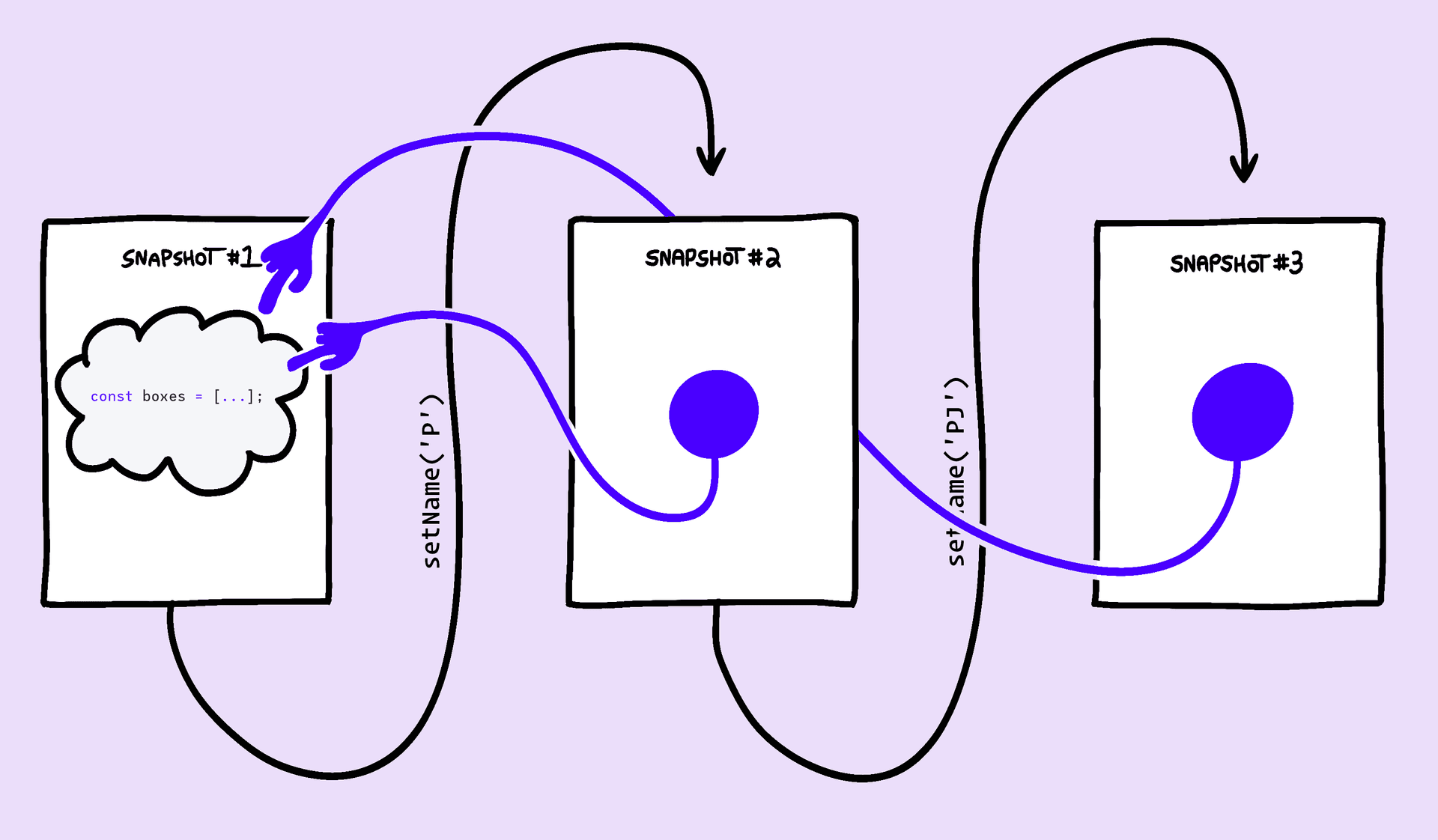
Let's apply this to a concrete example. Imagine we have a Chart component wrapped in React.memo. We pass it a config object.
// In Chart.tsx
interface ChartProps {
  data: number[];
  config: {
    color: string;
    type: 'line' | 'bar';
  };
}

const Chart: React.FC<ChartProps> = ({ data, config }) => {
  console.log('Rendering Chart...');
  // ... expensive chart rendering logic
  return <div>...</div>;
};

export const MemoizedChart = React.memo(Chart);

// In App.tsx
import React, { useState, useMemo } from 'react';
import { MemoizedChart } from './Chart';

function App() {
  const [chartData, setChartData] = useState([10, 20, 30]);
  const [theme, setTheme] = useState('light');

  const chartColor = theme === 'light' ? 'black' : 'white';

  // FIX: Memoize the config object
  const chartConfig = useMemo(() => ({
    color: chartColor,
    type: 'line' as const, // using 'as const' for a more specific type
  }), [chartColor]); // Dependency is the value that actually changes the object

  return (
    <div>
      <button onClick={() => setChartData([...chartData, 40])}>
        Add Data
      </button>
      <button onClick={() => setTheme(theme === 'light' ? 'dark' : 'light')}>
        Toggle Theme
      </button>
      <MemoizedChart data={chartData} config={chartConfig} />
    </div>
  );
}
Without useMemo on chartConfig, toggling the theme would work, but clicking "Add Data" would also cause the chartConfig object to be re-created. This new reference would cause MemoizedChart to re-render unnecessarily.
With useMemo, when we add data, chartColor doesn't change, so React returns the exact same chartConfig object from the previous render. Now React.memo's shallow comparison on the config prop passes, and the chart doesn't re-render needlessly. The optimization works as intended.
This same principle applies to dependencies of other hooks, like useEffect, which also rely on referential equality in their dependency arrays.
The Trade-offs: When to Use useMemo
useMemo is an optimization, not a magic bullet. It comes with a cost:
- Memory: React has to store the memoized value.
- CPU: On every render, React must call the
useMemohook and compare its dependencies, which is work it wouldn't otherwise do.
Therefore, applying useMemo everywhere is an anti-pattern called premature optimization. The code becomes harder to read, and you might even make performance worse if the cost of memoization outweighs the cost of simply re-calculating the value.
The official React documentation gives excellent, nuanced advice on this topic. It's crucial to understand that useMemo is a tool to be used surgically, not a hammer for every nail.
Please read the section 'Skipping expensive recalculations'. Focus on the two 'Deep Dive' callouts: 'How to tell if a calculation is expensive?' and especially 'Should you add useMemo everywhere?'. The five principles listed in the second callout are a fantastic guide to writing performant React code without over-relying on manual memoization.
In summary, you should use useMemo when:
- You have profiled your app with the React DevTools Profiler and identified a component whose re-renders are slow due to a demonstrably expensive calculation.
- You need to pass an object or array to a child component that is wrapped in
React.memo. - You are passing an object or array as a dependency to another hook (like
useEffect) and need to prevent the hook from running on every render.
Conclusion
You've now added useMemo, a powerful and versatile hook, to your performance optimization toolkit. It allows you to tackle performance issues from two different angles: raw computational speed and the subtleties of React's render cycle.
Key Takeaways:
useMemocaches the result of a calculation between re-renders.- It takes two arguments: a function that returns the value, and a dependency array.
- Use Case 1: It prevents expensive, slow-running calculations from being re-executed on every render.
- Use Case 2: It preserves the referential identity of objects and arrays, making them stable dependencies for other hooks and for props passed to components wrapped in
React.memo. useMemois an optimization with a cost. Always profile first and use it strategically, not everywhere.
Preview of the Next Lesson:
We've solved the problem for objects and arrays. But what about functions? Passing a function like onClick={handleClick} to a memoized component also breaks memoization, because a new function is created on every render.
In the next lesson, we will cover useCallback, a hook specifically designed to memoize functions. You will see that it's just a small syntactic variation of useMemo, and it's the final piece of the puzzle for mastering React.memo.