Hello! Welcome to our next lesson on advanced state management.
In the last two lessons, we explored tools for managing client state—the data that lives synchronously within your application's memory. We saw how Zustand provides a lightweight and powerful way to manage global client state.
Today, we shift our focus to the other, often more complex, category of state: server state. This is the data that lives on a remote server and is fetched asynchronously. Our goal for this lesson is to introduce the core principles of a server state library like TanStack Query (formerly React Query). We will explore why managing server state requires a specialized tool and understand the fundamental concepts that make TanStack Query the industry standard for this task.
1. The Shortcomings of useEffect for Data Fetching
Before we dive into TanStack Query, it's crucial to understand the problem it solves. In React, the common approach for fetching data without a dedicated library is to use the useEffect and useState hooks.
You've likely seen or written code like this:
import { useState, useEffect } from 'react';
import axios from 'axios';

function UserProfile({ userId }) {
  const [user, setUser] = useState(null);
  const [isLoading, setIsLoading] = useState(true);
  const [error, setError] = useState(null);

  useEffect(() => {
    setIsLoading(true);
    axios.get(`/api/users/${userId}`)
      .then(response => {
        setUser(response.data);
      })
      .catch(err => {
        setError(err);
      })
      .finally(() => {
        setIsLoading(false);
      });
  }, [userId]); // Refetch when userId changes

  if (isLoading) return <div>Loading...</div>;
  if (error) return <div>An error occurred: {error.message}</div>;

  return <div>Welcome, {user.name}</div>;
}
While this works for simple cases, it quickly becomes unwieldy and error-prone in a real application. This pattern forces you to manually handle many complex scenarios for every single data fetch.
This video, "The Story of React Query," perfectly illustrates the challenges of relying solely on useEffect for server state.
Watch from 02:04 to 05:16. The narrator walks through the evolution of a simple data-fetching component, highlighting critical issues like: Manually managing loading and error states. The subtle but critical bug of race conditions when requests are fired in quick succession. The problem of data duplication when multiple components need the same data.
The key takeaway is that useEffect is a general-purpose tool for synchronizing with external systems, not a specialized tool for managing the complex lifecycle of server state. The boilerplate and potential bugs accumulate rapidly.
2. Client State vs. Server State
The root of the problem is that we often treat server state and client state as if they were the same. They are fundamentally different.
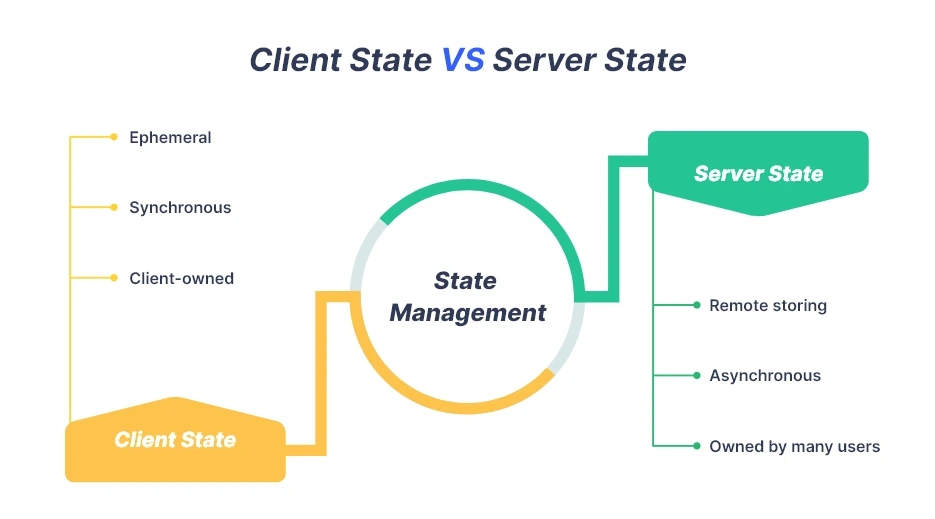
Let's formalize this distinction.
The same video provides a concise definition of these two state types.
Watch from 06:57 to 07:49. Pay close attention to the key characteristics used to describe each state type.
To summarize:
-
Client State:
- Synchronous: Instantly available.
- Owned by the client: Your app has full control. It's predictable.
- Ephemeral: Usually reset on a page refresh.
- Examples: UI theme (
'dark'), form input values, whether a modal is open. - Tools:
useState,useReducer, Zustand.
-
Server State:
- Asynchronous: Must be fetched over a network, introducing latency.
- Owned by the server: The "source of truth" is remote. The data can be changed by other users or processes without your app knowing.
- Shared and persistent: It's persisted in a database and can be accessed by multiple clients.
- Examples: A user's profile, a list of products, search results.
- Tools: TanStack Query.
Treating asynchronous server state with tools designed for synchronous client state leads to the problems we saw with useEffect.
3. Introducing TanStack Query: The Missing Piece
This is where TanStack Query comes in. It is not a data-fetching library like Axios. Instead, it is a server state management library. You provide it with a promise (from fetch, axios, etc.), and it handles everything else.
Let's hear how TanStack Query positions itself as the solution.
Watch from 07:49 to 08:43. The key insight here is that TanStack Query is an async state manager that handles the "dirty work" of managing server data over time.
By taking ownership of server state, TanStack Query provides a declarative API that automatically handles:
- Caching: Storing fetched data in memory to avoid redundant network requests.
- Request Deduping: If multiple components request the same data at the same time, it only makes one request.
- Background Updates: Automatically refetching "stale" data to keep your UI in sync with the server.
- Performance Optimizations: Strategies like "stale-while-revalidate" show cached data instantly while fetching updates in the background.
- Error Handling and Retries: Automatically retrying failed requests.
This article, "React Query is all you need," provides a fantastic summary of these core principles and compares the useEffect approach with the simplicity of TanStack Query.
Read the first three sections: "Introduction to React Query", "Comparison: Without React Query vs. With React Query", and "Core React Query Features". This will solidify your understanding of what the library is, why it's useful, and the key features it offers.
4. Core Concepts and Hooks
TanStack Query's architecture revolves around a few key concepts.
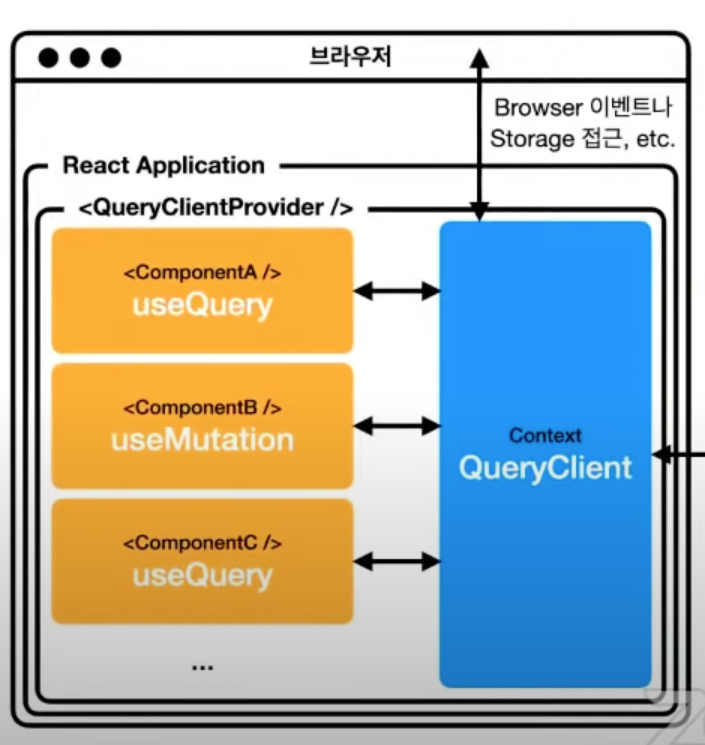
a. QueryClient and QueryClientProvider
The QueryClient is the heart of TanStack Query. It's the engine that manages the cache. You create one instance of it and provide it to your application tree using the QueryClientProvider.
This is typically done in your main.tsx file:
// src/main.tsx
import React from 'react';
import ReactDOM from 'react-dom/client';
import App from './App';
import { QueryClient, QueryClientProvider } from '@tanstack/react-query';

// Create a client
const queryClient = new QueryClient();

ReactDOM.createRoot(document.getElementById('root')!).render(
  <React.StrictMode>
    <QueryClientProvider client={queryClient}>
      <App />
    </QueryClientProvider>
  </React.StrictMode>
);
b. Queries with useQuery
For reading data, you use the useQuery hook. It requires two primary options:
queryKey: An array that uniquely identifies this query. It acts as the dependency list and caching key.queryFn: An async function that resolves with your data or throws an error.
import { useQuery } from '@tanstack/react-query';
import axios from 'axios';

// The async function to fetch data
const fetchTodos = async () => {
  const { data } = await axios.get('https://api.example.com/todos');
  return data;
};

function TodoList() {
  // Use the hook in your component
  const { data, isLoading, isError, error } = useQuery({
    queryKey: ['todos'],
    queryFn: fetchTodos,
  });

  if (isLoading) { /* ... */ }
  if (isError) { /* ... */ }

  // ... render the data
}
Notice how the isLoading and isError states are provided for you, eliminating the manual useState boilerplate.
c. Mutations with useMutation
For creating, updating, or deleting data, you use the useMutation hook.
mutationFn: An async function that performs the C/U/D operation.mutate: The function returned by the hook that you call to trigger the mutation.
The most powerful part is how mutations integrate with queries. After a successful mutation, you often want to refetch related data. You do this by invalidating the relevant query keys.
import { useMutation, useQueryClient } from '@tanstack/react-query';
import axios from 'axios';

function AddTodoForm() {
  const queryClient = useQueryClient();

  const { mutate, isPending } = useMutation({
    mutationFn: (newTodo) => axios.post('https://api.example.com/todos', newTodo),
    onSuccess: () => {
      // Invalidate the 'todos' query to refetch the list
      queryClient.invalidateQueries({ queryKey: ['todos'] });
    },
  });

  const handleSubmit = (e) => {
    e.preventDefault();
    const title = e.target.elements.title.value;
    mutate({ title, completed: false });
  };

  // ... form JSX
}
When invalidateQueries({ queryKey: ['todos'] }) is called, TanStack Query marks any query with that key as stale and automatically refetches it in the background, keeping your UI up-to-date.
The "React Query is all you need" article also has a great section explaining these two fundamental hooks.
Read the section "Key Hooks and Concepts" for a clear explanation and code examples of useQuery and useMutation.
5. Type Safety with TypeScript
Given your expertise in TypeScript, you'll appreciate TanStack Query's excellent type safety. The library makes heavy use of generics, but the best practice is to let TypeScript infer types from a well-typed queryFn.
TkDodo, a core maintainer of TanStack Query, wrote the definitive blog post on this topic. It explains why type inference is the preferred approach.
Read the section titled "Type Inference". The key takeaway is that if your data-fetching function (the queryFn) has a clear return type, TanStack Query will automatically infer the type of data returned by useQuery.
By defining the return type of your queryFn, you avoid manually passing generics to useQuery and get a cleaner, more maintainable codebase.
Example with Type Inference:
interface Todo {
  id: number;
  title: string;
  completed: boolean;
}

// Ensure your queryFn has a clear return type
const fetchTodos = async (): Promise<Todo[]> => {
  const { data } = await axios.get('https://api.example.com/todos');
  return data;
};

function TodoList() {
  // `data` is automatically inferred as `Todo[] | undefined`
  // `error` is inferred as `Error | null` (or `unknown` depending on config)
  const { data, error } = useQuery({
    queryKey: ['todos'],
    queryFn: fetchTodos
  });
}
Test your understanding!
A coworker shows you this code:
const { data } = useQuery<User[], Error>({
  queryKey: ['users'],
  queryFn: () => axios.get('/api/users').then(res => res.data),
});
Based on the principle of type inference, what feedback would you give to improve this code?
Show answer
The better approach is to remove the explicit generics from useQuery and instead ensure the queryFn is correctly typed. You would suggest creating a typed function for the API call:
// In an api.ts file
interface User { id: number; name: string; }

export const fetchUsers = async (): Promise<User[]> => {
  const { data } = await axios.get('/api/users');
  return data;
};

// In the component
import { fetchUsers } from './api';

const { data } = useQuery({
  queryKey: ['users'],
  queryFn: fetchUsers,
});
This way, the type of data is inferred automatically from fetchUsers. This is more maintainable because the type definition is centralized with the API logic, and it prevents potential mistakes if more complex useQuery options (like select) are added later.
Conclusion
In this lesson, we established the fundamental principles of TanStack Query. We differentiated between client and server state, identified the limitations of useEffect for data fetching, and positioned TanStack Query as a specialized server state manager.
Key Takeaways:
- Server state is asynchronous, remote, and not owned by your app, making it fundamentally different from client state.
- TanStack Query is an async state management library that automates the difficult parts of working with server state: caching, synchronization, and background updates.
- The core primitives are
useQueryfor reading data anduseMutationfor writing data. queryKeys are the cornerstone of the caching system, uniquely identifying data.- You can keep your UI synchronized with server changes by using
queryClient.invalidateQueriesafter a successful mutation. - For optimal TypeScript integration, type your
queryFnand let TanStack Query infer the rest.
Preview of the Next Lesson:
Now that we've covered the "what" and "why," the next step is the "how." In our next lesson, we will get hands-on and use TanStack Query to manage data fetching, caching, and invalidation in our application. We'll build components that fetch data, display loading/error states, and update the server, putting all these principles into practice.